The Real Battle for Cross-Border Sellers Isn’t Ads Anymore — It’s Where Your Team’s Context Lives
Every cross-border operator I know is running the same broken stack: a dozen ChatGPT tabs, a Notion wiki nobody updates, a Slack channel where the real decisions happen, and a Google Sheet that’s somehow the source of truth for three markets. The product research lives in one place, the supplier negotiation in another, the ad copy in a third. When someone leaves, the context leaves with them. So when a launch like ChatGPT Space crosses my feed — a shared workspace where people and AI maintain living documents together, hunted by Rohan Chaubey — I don’t read it as a productivity toy. I read it as a signal about where the operating layer for distributed commerce teams is heading. That matters more to a seller running Amazon US, TikTok Shop UK, and a Shopify DTC store than any new ad format.
What Problem Space Actually Claims to Solve
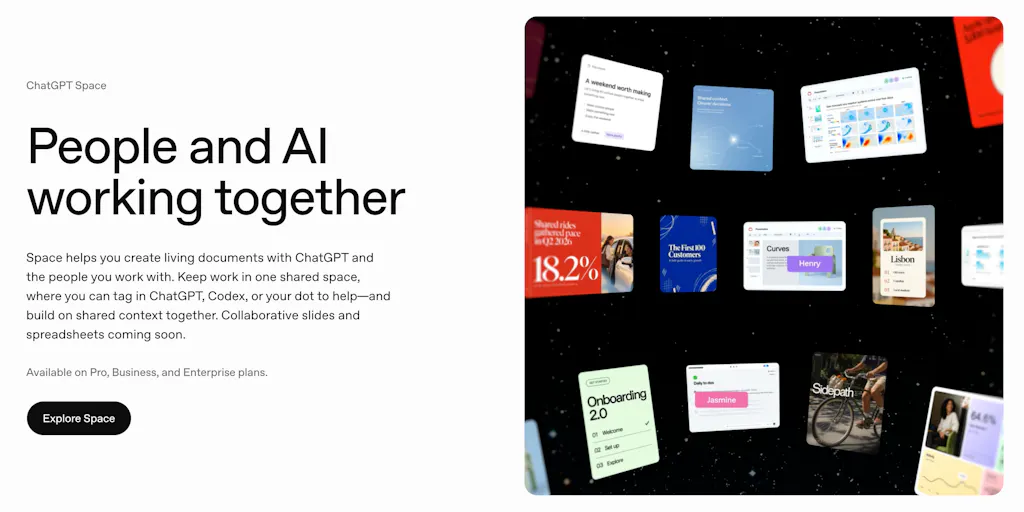
Strip away the launch-page polish and the pitch is narrow and specific: work gets scattered across chats, docs, files, and updates, and Space wants to keep context, collaboration, and AI assistance in one place. The mechanism is the interesting part. Instead of treating AI as a separate chat tool you alt-tab to, Space lets you tag ChatGPT, Codex, or your dot directly inside a shared page to edit, research, code, or take next steps. The advertised feature set is a self-updating pages system for writing, visualizing, research, and coding; real-time team editing, comments, and AI tagging in the same document; a shared knowledge hub for files, pages, slides, spreadsheets, and team context; a dots integration that keeps pages updated across ChatGPT, Slack, and Microsoft Teams; and templates for to-do lists, project dashboards, and onboarding-style workflows.
If you’ve ever onboarded a new marketplace account manager, you already feel the pain this is aimed at. The “onboarding-style workflows” line is doing quiet work — it’s the same problem as getting a new VA productive on your Amazon catalog without a six-week shadowing period.
The stated audience is teams and professionals on Pro, Business, and Enterprise plans, and the named use cases are project dashboards, onboarding prototypes, campaign plans, visual research pages, and self-updating to-do lists. Notably, pricing isn’t disclosed on the launch page, and there’s no migration story for existing docs. That’s a gap I’ll come back to.
Why Amazon sellers should care more than Shopify ones
Here’s my read: this category of tool maps almost perfectly onto how Amazon FBA brand owners actually work, and only loosely onto how Shopify DTC operators work.
A Shopify-first DTC brand tends to have a tighter loop — one storefront, one brand voice, a marketing team that lives in Klaviyo and Meta Ads Manager. Their context is already centralized in the tools themselves. A living document is nice-to-have.
An Amazon seller is the opposite. Your reality is fragmented across Amazon Seller Central, a supplier WeChat thread, a freight forwarder’s email chain, a Helium 10 keyword project, a listing-change log, and a returns spreadsheet. The “living document” concept is genuinely valuable here because the artifact you need — a single page tracking a SKU from sourcing to PPC to returns — doesn’t exist in any single incumbent. If Space can ingest a Slack update and self-update that page, that’s a real workflow, not a demo.
How It Stacks Up Against the Incumbents
Let’s be honest about the competitive frame, because “AI workspace” is a crowded graveyard.
The obvious comparison is Notion, which added AI and has owned the “team wiki” position for years. Notion’s weakness is that its AI is a bolt-on you invoke, not a participant that lives in the page. Space’s “tag ChatGPT, Codex, or your dot directly inside a shared page” is a genuine architectural difference — the AI is addressable like a teammate. Whether that’s better or just different depends entirely on conflict handling, which I’ll get to.
The second comparison is Coda, which has pushed hard on “docs that act like apps” and has real formulas and automations. Coda is stronger for structured data; Space appears stronger for unstructured collaboration with AI woven in. For a seller, that’s the difference between a returns dashboard (Coda territory) and a supplier-negotiation log that summarizes itself (Space territory).
The third is the raw ChatGPT/Claude chat interface itself. The launch page’s own framing — “instead of treating AI as a separate chat tool” — is an explicit attack on that habit. Fair. But the incumbency advantage of a plain chat window is that it’s stateless and private. Space’s value is statefulness, and statefulness is exactly where things go wrong.
Where the math breaks
The most useful comment on the entire launch came from Gal Dayan, who asked the question every operator should be asking: if you’re mid-edit on a section and a teammate’s dot tag triggers the AI to rewrite that same section based on a Slack update, whose version wins — does it merge, does it flag a conflict, or does one edit quietly overwrite the other? His closing line is the one I’d frame on the wall: “living documents are exactly where silent overwrites do the most damage, since nobody’s diffing a doc the way they’d diff code.”
This is not a nitpick. For a cross-border seller, a silent overwrite isn’t a lost paragraph — it’s a listing change log that loses the record of why you changed a title, or an ad-campaign plan where the AI’s “helpful” rewrite of your Q4 budget got merged over your actual spend assumptions. Audit trails aren’t a nice feature in commerce; they’re the difference between a fixable mistake and a compliance problem.
Marina Gomel raised the adjacent ask: a version history that shows which edits came from a person and which came from the AI, so you can undo without hunting. That’s the same problem from the other direction — attribution. Neither of these is confirmed as shipped on the launch page. If Space doesn’t solve attribution and conflict resolution, the “self-updating” feature is a liability dressed as a feature.
What Cross-Border Sellers Can Borrow From This
Even if you never touch Space, the launch is a useful mirror. Three things worth stealing for your own stack.
Treat your SOPs as living documents, not PDFs
Most sellers write an SOP once, drop it in a Drive folder, and never touch it. That’s why new hires ask the same questions for six months. The Space thesis — that a document should update itself as context changes — is the right instinct even if you implement it manually. Build one page per core workflow (listing launch, PPC restructure, returns triage, supplier onboarding) and make updating it part of the workflow, not a separate chore. If you’re on Notion, you can approximate this today with linked databases and a weekly review.
Make AI a participant, not a destination
The behavioral shift Space is betting on — tagging AI inside the doc rather than switching to a chat tab — is worth adopting regardless of tool. The friction of context-switching is what kills AI adoption on real teams. If your team already lives in Slack, wire an AI assistant into the channels where decisions happen rather than asking people to paste context into a chat window.
Be ruthless about attribution
The single most valuable takeaway from the comment thread is that AI edits need to be labeled. Whatever tooling you use, enforce a norm: any AI-generated or AI-edited content gets flagged, and any change to a customer-facing asset (listing copy, ad creative, email flows) gets logged with a human owner. This is cheap to do now and expensive to retrofit after an AI quietly rewrites a compliance-sensitive claim.
Where My Judgment Says It Falls Short
Three concerns, in order of how much they’d stop me from rolling this out across a seller team.
First, the absence of any stated conflict-resolution or attribution model. Dayan’s and Gomel’s questions are unanswered on the page. Until I see how Space handles simultaneous human and AI edits to the same block, I’d treat “self-updating pages” as a demo feature, not a production one. For a seller, the blast radius of a bad merge is real money.
Second, the Slack and Microsoft Teams integration is described as keeping “pages updated” — that’s a one-way-sounding description. If it’s genuinely bidirectional, that’s a big deal for sellers whose operations run on Slack. If it’s just a notification feed, it’s table stakes. Not disclosed.
Third, pricing and plan gating are vague. “Pro, Business, and Enterprise plans” tells me nothing about whether a five-person seller team can afford it or whether the AI-tagging features are locked behind Enterprise. That’s a real adoption blocker for the mid-market sellers who’d benefit most.
The one thing I’d want before trusting it for anything real
A visible, per-block diff showing human vs. AI authorship, plus a conflict prompt when two edits collide. That’s it. Everything else on the feature list is achievable elsewhere; that one thing is the reason to switch.
What I’d Watch / Test Next
This week, before you evaluate any tool in this category, do the cheap version yourself. Pick your single most fragmented workflow — for most Amazon sellers it’s the listing-change log — and consolidate it into one page with a clear owner and a change-log column. Then run an experiment: have your AI assistant draft the next update and mark it clearly as AI-generated, and see whether your team actually trusts it or quietly ignores it. That tells you more about your AI-readiness than any product demo.
Then watch Space specifically for two things: whether the team ships an attribution/version-history feature in response to the launch-thread feedback, and whether the Slack integration turns out to be genuinely bidirectional. If both land, it’s worth a pilot on a non-critical workflow — a campaign plan or an onboarding doc — before you ever let it near a listing or a budget. And keep the Dayan rule in your head: living documents are exactly where silent overwrites do the most damage.