The Account-Switching Tax Is the Most Under-Priced Cost in Cross-Border Ops
Every cross-border operator I know runs the same hidden tax: the tool you rely on runs out, and the work stops. It’s not a dramatic failure. It’s a Claude Code session dying at turn forty because you hit the 5-hour limit, a Helium 10 seat you can’t share across three Amazon Seller Central logins, a Klaviyo account that belongs to one Shopify store and not the other two. The work is fine. The continuity breaks. So when I see a small Mac menu-bar app like Moxie — built by Birju Vachhani to let you swap AI accounts and models mid-session without restarting — I read it less as an AI dev tool and more as a pattern worth stealing for e-commerce infrastructure. The pattern is: decouple the session from the account. That’s a big deal for anyone running multi-marketplace, multi-store, multi-region operations.
What Moxie Actually Solves — and Why the Framing Matters
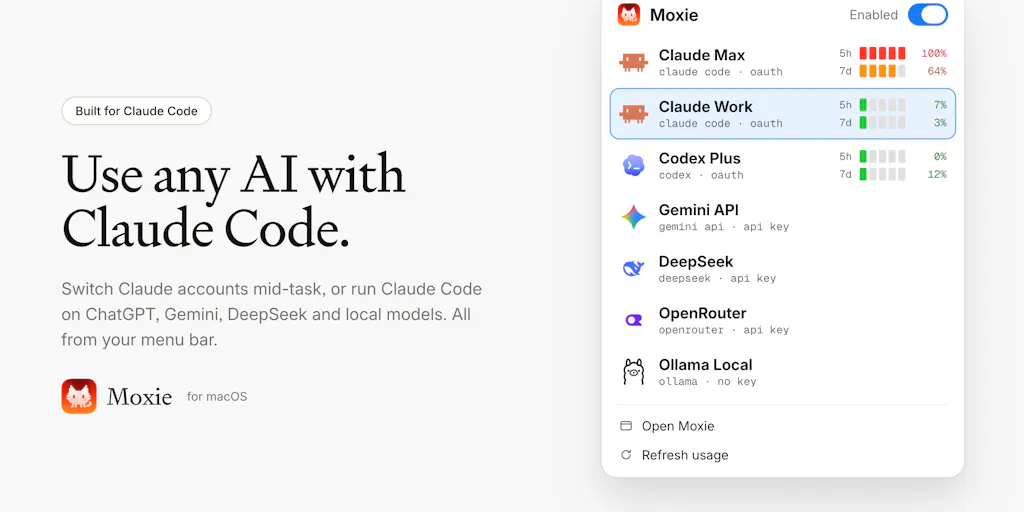
Vachhani’s pitch is refreshingly specific. He says he spends most of his day in Claude Code and two things kept breaking his flow: hitting the 5-hour limit halfway through a task, and wanting to try other models without leaving the tool. His previous fixes were “a config file here, a router there, signing out and back in, restarting the session.” Moxie collapses that into a menu-bar app.
The feature list, as stated on the launch page:
- Use any AI with Claude Code — your ChatGPT plan, Gemini, DeepSeek, OpenRouter, or local models in Ollama.
- Switch accounts mid-task. One click, and the same session keeps going on your other account.
- See every account’s 5-hour and weekly limits, with a heads-up before you run out.
- It sets up Claude Code for you, in the CLI and the VS Code extension.
On privacy, Vachhani is explicit: everything runs on your Mac, keys stay in your Keychain, requests go straight to the provider you pick, and there’s no Moxie account. It’s free to try. Pricing beyond that is not disclosed.
If you’re an Amazon FBA brand owner reading this and wondering what a Mac menu-bar app for Claude Code has to do with you — stay with me, because the architectural insight is the whole point.
The real product isn’t “model switching.” It’s session continuity.
The most interesting exchange in the thread is between Vachhani and Gal Dayan of Dial. Dayan asks the obvious operator question: when you switch accounts mid-task, does the actual conversation context carry over, or does Claude Code just start a fresh session and you’re re-explaining where you left off?
Vachhani’s answer is the entire thesis of the product: Claude Code technically has no idea that the account or model changed. Its session never got interrupted at all. It naturally transitions to the new account on next turn without realizing it. Dayan then correctly infers that Moxie sits below Claude Code at the transport/API layer rather than inside the session.
That’s the design pattern. Not “a better AI,” not “a smarter router” — an interception layer that makes the underlying account invisible to the thing doing the work. In e-commerce terms, it’s the difference between a multi-store ERP that requires you to log into each Seller Central account and one that treats “which account” as a routing parameter.
How It Compares to What Cross-Border Sellers Already Use
The honest comparison set here isn’t other AI tools. It’s the plumbing you already pay for.
OpenRouter is the closest functional analog — a single API that fans out to many models. But OpenRouter is a developer primitive, not an operator tool. It doesn’t manage your Claude Code session, doesn’t read your 5-hour window, and doesn’t care whether your Mac’s Keychain holds the keys. Moxie is OpenRouter for people who don’t want to touch a config file.
Ollama gives you local model execution but no account abstraction at all. If you’re running a local Llama for PII-sensitive work — say, parsing supplier invoices or customer service transcripts you don’t want leaving your machine — Ollama is the engine. Moxie is the dashboard that lets you decide, per task, whether the engine runs local or remote.
Claude Code itself is the incumbent Moxie is extending, not replacing. Anthropic’s own tooling assumes one account, one model family, one session. That assumption is fine for a solo dev. It’s terrible for an agency running twenty client stores.
The e-commerce parallel is closer to Shopify’s multi-store admin versus a third-party like Sellbrite or Codisto. Shopify wants you in one store at a time. The aggregators let you treat “which store” as a dropdown. Moxie applies the aggregator logic to AI sessions.
Why Amazon sellers should care more than Shopify ones
A Shopify DTC operator usually has one store, one Klaviyo account, one Meta Ads manager. The account-switching pain is real but occasional.
An Amazon FBA brand owner is a different animal. You likely have: - A US Seller Central account and an EU one, possibly under different legal entities. - Separate Helium 10 or Jungle Scout seats per region because the tools price per marketplace. - A TikTok Shop seller account that may or may not be linked to the same business entity as your Amazon store. - A Temu or SHEIN seller portal that shares almost nothing with the above.
Every one of those is a separate login with a separate session. Every time you context-switch, you pay a re-orientation cost — and worse, you lose the thread of whatever you were investigating. The Moxie insight is that the work should survive the account change. If your AI assistant is helping you draft a listing, analyze a competitor’s reviews, or triage a return dispute, that conversation shouldn’t die because you hit a rate limit or because you need to check something in a different marketplace.
What Cross-Border Sellers Should Actually Borrow From Moxie
Forget the app for a second. Here are the transferable design principles.
1. Session continuity is worth more than tool quality.
Most operators optimize for “best tool.” The better question is “which tool lets me keep working when the primary fails?” A Helium 10 subscription that goes down mid-product-research costs you more than a slightly worse tool that never goes down. Same logic applies to your payment stack: Stripe versus PayPal versus a regional processor like Adyen — the redundancy isn’t about which is best, it’s about which keeps the checkout alive when the other hiccups.
2. Rate limits are a routing problem, not a capacity problem.
Vachhani’s core insight — see every account’s 5-hour and weekly limits, with a heads-up before you run out — maps directly to how you should think about your ad spend caps, your API quotas on Amazon SP-API, and your email send limits on Klaviyo. If you’re running close to a limit across multiple accounts, the fix isn’t “buy more capacity.” It’s “route the work to the account that has headroom.”
3. Local-first is a compliance feature, not just a privacy one.
Keys stay in your Keychain, requests go straight to the provider you pick, and there’s no Moxie account. For a cross-border seller handling EU customer data under GDPR, or Chinese supplier contracts under local data rules, “the vendor never sees my traffic” is a procurement argument, not a marketing one. It’s the same reason some operators insist on self-hosted n8n over Zapier for workflows that touch customer PII.
4. The “no account” model is underrated.
Moxie doesn’t require you to sign up. That’s unusual and worth noting. Every SaaS account you create is another credential to rotate, another vendor to audit, another breach surface. If you’re running a lean cross-border op, count your vendor accounts. Then count how many you actually log into monthly. The ratio will depress you.
Where My Judgment Says This Falls Short
I want to be fair to Vachhani — he built a small, focused tool and shipped it. But the launch thread surfaces two real weaknesses, and operators should hear them before they get excited.
The model-swap consistency problem is real and unsolved.
Chris of Likely AI raised the sharpest objection in the thread: swap the model tomorrow and the memory transfers but the reasoning resets. Different weights, different floor. The 11-models-behind-one-API play optimizes for cost. It sacrifices consistency.
Vachhani’s reply — not really if you are switching to an on-par or higher model — is technically true but dodges the harder case. If you’re mid-task and your Claude account runs dry, and you switch to a different model family, the new model inherits the conversation but not the implicit judgment calls the first model was making. Dayan pushes on exactly this and Vachhani concedes the point: you control what model picks it up when you switch the account. It is only as smart as the model for judgement calls it makes. Moxie facilitates the switch mechanism, you as a user control what model inherits it.
So the tool is neutral on model choice. That’s a defensible design decision, but it means the operator carries the cognitive load of deciding when a downgrade is acceptable. For a dev writing boilerplate, fine. For an operator asking an AI to interpret a supplier contract or draft a compliance response, the answer is “never downgrade mid-task,” which limits how often Moxie’s cross-model feature is actually useful.
There’s no audit trail of which model did what.
Dayan’s final question in the thread is the one that should worry any operator running AI in a regulated workflow: does Moxie keep any local record of which model handled which stretch of a session? Not for the model’s sake, for mine. If something goes sideways three hours later I’d want to know it was the dumbed-down model making that call, not dig through my own memory of when I switched.
As of the scrape, that question is unanswered. If Moxie doesn’t log model handoffs, that’s a gap. For a cross-border seller, “which model wrote this product description / translated this customer email / summarized this supplier dispute” is exactly the kind of thing you want on record when a marketplace flags your listing or a customer escalates. An audit log is table stakes for anything touching customer-facing output.
Mac-only is a real limitation.
Vachhani built this as a small Mac app that lives in the menu bar. That’s fine for the Claude Code demographic, which skews Mac. But cross-border operations teams are often Windows-heavy, especially in Shenzhen, Yiwu, and Vietnam-based fulfillment shops. A Windows or web version isn’t mentioned. If Moxie stays Mac-only, it stays a solo-operator tool, not a team tool.
The Bigger Bet: Why This Pattern Matters Beyond AI
Here’s what I actually think is happening. The Moxie launch is a small signal of a larger shift: the session is becoming the unit of work, not the account. Every SaaS tool you use was built around the assumption that one human = one account = one session. That assumption is breaking under the weight of multi-store, multi-marketplace, multi-region operations.
Watch how this plays out across the stack:
- Ads: Meta and Google both assume one business manager per entity. Agencies running cross-border clients need session-level abstraction, which is why tools like Madgicx and Revealbot exist.
- Payments: Stripe assumes one account per legal entity. Cross-border sellers with US, EU, and HK entities need routing, which is why Airwallex and Payoneer exist.
- Fulfillment: Amazon FBA assumes one seller account per marketplace. 3PLs like ShipBob and ShipMonk abstract that away.
- AI: Claude Code assumes one account per user. Moxie is the first tool I’ve seen that abstracts it.
The pattern is consistent: whoever owns the session layer owns the operator’s attention. That’s a much more defensible position than owning any single tool.
What I’d Watch / Test Next
If you’re an operator reading this, here’s what I’d actually do this week.
First, audit your own session breaks. For three days, note every time you lose work because an account, seat, or rate limit interrupted you. I bet you’ll find two or three recurring patterns — probably around Helium 10 limits, Klaviyo sends, or SP-API throttling. Those are your Moxie-shaped problems.
Second, if you use Claude Code or any AI assistant in your workflow, test Moxie specifically for the account-switch case. The free tier makes this cheap. The real test isn’t “does model switching work” — it’s “when my primary account dies mid-task, does the work survive?” If yes, that’s a genuine productivity unlock. If the answer requires you to re-explain context, it’s not.
Third, press the audit-log question. If you’re evaluating Moxie for anything customer-facing, ask Vachhani directly whether handoffs are logged. If they aren’t, treat the tool as a personal productivity hack, not a team workflow component.
Fourth, watch for the Windows and team versions. The pattern is right. The current packaging is narrow. If Moxie stays a Mac menu-bar app for solo devs, the cross-border e-commerce version of this — some kind of session-continuity layer across Seller Central, Shopify, TikTok Shop, and your AI stack — will get built by someone else. That’s the product I’d actually pay for.