Why a Motion Design Tool Is Suddenly Relevant to Your DTC Conversion Rate
If you’ve been running cross-border e‑commerce for more than a quarter, you already know the cheat code: video and motion outperform static imagery on every metric that matters — click‑through, add‑to‑cart, and post‑purchase retention. But most sellers treat motion as a one‑off production cost: hire a freelancer, get an After Effects file, export a few loops, and call it done. That model breaks when you need brand‑consistent animation for a new product variant on Amazon, a TikTok Shop carousel, and a Shopify welcome popup — all in the same week. This is why LottieFiles’ Lottie Creator 2.0 caught my attention. It’s not just a browser‑based animation tool; it’s a bet that motion can be systematised, branded, and shipped at scale without a dedicated motion designer on payroll. For the cross‑border operator who’s already juggling Amazon Seller Central, Shopify’s online store, and TikTok Shop’s short‑form feed, that bet has real implications for conversion spend and creative velocity.
What Problem This Actually Solves for E‑Commerce Teams
The surface‑level pitch — “After Effects for the web” — is compelling, but let’s be specific about where the friction lives for a seller’s team. Most product animations today fall into two camps.
Camp one: you hand a brief to a freelancer in After Effects, wait three days, get a heavy .mp4 that you then compress for Amazon’s 15‑second video slot or TikTok’s 9:16 ratio. Repeat for every colour variant, every language version, every seasonal update.
Camp two: you use Canva’s built‑in motion tools and get passable results, but the animations are locked to Canva’s frame, can’t be edited programmatically, and the file sizes balloon on mobile.
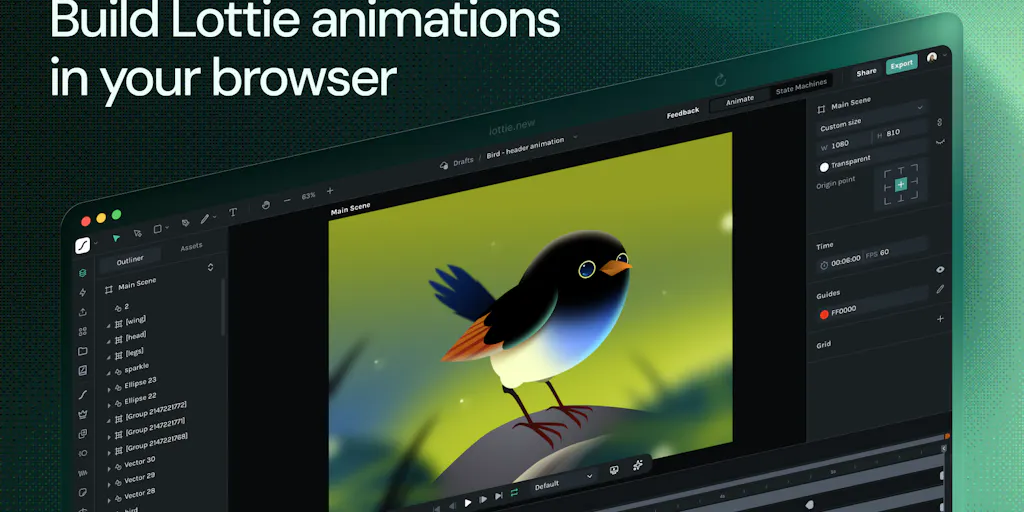
Lottie Creator 2.0 attacks the middle ground. It’s a browser‑based vector animation tool that outputs Lottie JSON files — the same lightweight format that already powers NBA’s score overlays, Airbnb’s onboarding, and Duolingo’s mascot. For an e‑commerce use case, that means you can create a product‑demo loop, drop it into a Shopify store via the LottieFiles Shopify integration (or any custom implementation using the Lottie‑Web player), and keep the file under 50 KB. No streaming buffering. No impact on page load time. And because it’s vector, it scales to any screen size without blur.
The real unlock, though, is the Motion Systems and Motion Tokens features that the LottieFiles team highlighted in their launch thread. A Motion System lets you define a brand’s motion language — duration curves, entry/exit behaviours, colour palettes — and apply it across multiple animations. For a seller with a dozen SKUs, that eliminates the “why does this variant’s zoom animation feel different from the flagship” problem. Motion Tokens take it further: you can parameterise parts of an animation (e.g., a price badge’s colour, a “Buy Now” button’s scale) so that a developer or even a shop‑update script can change them without reopening the animation tool. This is the cross‑border version of “design tokens,” and it’s what turns motion from a one‑off cost into a scalable asset.
Why Amazon Sellers Should Care More Than Shopify Ones
On Shopify, you can easily embed a Lottie file into a theme’s liquid code, use the Lottie‑Web player, and have a lightweight, responsive animation on a product page in minutes. The barrier is low, and the benefit is real: animated product‑benefit comparisons or size‑guide illustrations reduce bounce rates.
But on Amazon, the value proposition is sharper. Amazon’s A+ Content allows video, but it’s constrained to .mp4 files with a 15‑second limit and it can’t autoplay without sound in many placements. Lottie files won’t run natively inside Amazon’s iframe, so you can’t drop them into A+ modules directly. However, you can use Lottie animations to rapidly prototype and export high‑frame‑rate GIFs or short video clips for your Amazon product videos. More importantly, for off‑Amazon advertising (Sponsored Brands video, DSP assets), you need a steady pipeline of motion creative. Creator 2.0’s Motion Copilot — an AI assistant that starts with a text prompt and generates an editable timeline — lets a brand owner or a junior associate produce a first draft of a “how this product works” loop in seconds, not hours. That speed matters when you’re running seven tests across four marketplaces and need fresh creative every week.
How It Differs From the Incumbents
The elephant in the room is Adobe After Effects. It remains the gold standard for complex motion, but it’s a desktop‑only, installation‑heavy, subscription‑locked tool. The average cross‑border seller’s team doesn’t have a full‑time motion designer; they have a graphic designer who occasionally dabbles in animation or a product photographer who can stitch clips together. For that team, After Effects is overkill and under‑accessible.
The direct browser‑based competitors — Rive, Haiku Animator (now deprecated), and the animation modules inside Canva — each have trade‑offs. Rive is excellent for interactive state machine animations (think toggle buttons, progress indicators) and has its own runtime, but its export options are more limited for non‑Rive environments. Canva’s motion is glorified keyframing on a timeline; it works for social posts but not for production‑grade product interactions.
LottieFiles differentiates in three ways:
True vector timeline with graph editor. The
Graph Editorin Creator 2.0 gives you per‑frame control over easing curves, velocity, and spatial interpolation — the same precision you’d expect from After Effects’ graph editor, but running in a browser tab. For a seller who wants a perfectly eased “card flip” animation for a product comparison module, that level of control matters.State machine logic bundled inside the export. This is the feature that engineering teams will pay attention to. As the LottieFiles team explained in the comments, state machine logic (states, transitions, conditions, actions) is embedded inside the
.lottiefile. The dotLottie player handles the runtime transitions for clicks, hovers, and pointer events without requiring the developer to write custom JavaScript. For a product detail page that changes a hero image on hover or expands a warranty card on click, this reduces the handoff from “designer exports a static video” to “designer exports a single interactive asset that the front‑end engineer just has to point to.”AI copilot that actually produces editable timelines. The
Motion Copilotfeature takes a natural‑language prompt like “a hand placing a phone on a wireless charger, with a glowing blue light” and returns a keyframe‑based timeline you can then refine. Most “AI animation” products generate a finished render that you can’t edit — you get a video, not a project. Lottie Creator 2.0 gives you an editable project, which is the difference between a one‑off asset and a reusable template.
Where the Math Breaks
No tool is magic, and Creator 2.0 has clear boundaries. The reviews on Product Hunt mention that the UI can feel confusing or sparse — a critique echoed by several users who found the colour controls and editing workflow not fully polished. For a non‑designer seller trying to assemble a quick ad loop, that friction may be enough to send them back to Canva or a video‑editing app. The tool also lacks full support for After Effects expressions and plugins; as one commenter noted, “full expressions/effects support is usually where these web‑based tools hit a ceiling.” If your motion needs include particle effects, 3D extrusion, or complex masks, you’ll still need AE.
Additionally, the Lottie format itself has runtime limitations. Not every Lottie feature is supported across every player; the LottieFiles team acknowledges that runtime compatibility varies. If you’re deploying on a TikTok Shop custom page or an eBay listing that doesn’t support custom JavaScript, you can’t use Lottie directly—you’ll fall back to a GIF or video export, which defeats the lightweight purpose.
What Cross‑Border Sellers Can Borrow From It
The practical takeaway isn’t “go learn Lottie animation.” It’s that the workflow around systematised motion is now within reach for a small e‑commerce team. Here are three things you can borrow without hiring a motion designer:
1. Build a brand motion kit using Motion Systems. Instead of each animation being a bespoke file, define a set of curves (fast‑in, slow‑out for product reveal; linear for loader), a colour‑token set (primary CTA, secondary sale badge), and a state‑machine template for common interactions (click‑to‑zoom, hover‑to‑swatch). Store that in Creator 2.0 as a Motion System. Now any freelancer or internal designer you hand the project to automatically adheres to the same motion language.
2. Use Motion Copilot for rapid A/B test creative. Need to test a “sliding compare” animation vs. a “fade‑in” for a product image? Prompt both in Copilot, get two editable timelines, export as lightweight Lottie files, and serve them via a split‑test tool like Google Optimize or VWO on your Shopify PDP. Measure engagement. The asset production time drops from hours to minutes.
3. Treat interactive animations as part of the checkout experience. State machines bundled in the .lottie file open the door for interactive “checkout upsells” — imagine an animated progress bar that responds to a mouse hover, or a shipping‑tier selector that visually shows the benefit of the expedited option. These microinteractions increase average order value and reduce abandonment when done right, and they’re far more performant than embedding a JavaScript library that polls for state changes.
Where I’d Still Proceed With Caution
The dependency on the dotLottie player means you’re locking into a specific runtime. While the dotLottie 2.0 specification is open, the player is maintained by LottieFiles. If your brand relies heavily on these interactive assets, you inherit that company’s development pace and bug‑fix timeline. For mission‑critical product page interactions, I’d still want a fallback that doesn’t break the user experience if the player has a hiccup.
Also, the learning curve is non‑zero. The graph editor and state machine UI assume you understand easing and event‑driven logic. If your strong suit is PPC optimisation and not motion design, you’ll still need to train a team member or hire a hybrid designer‑developer who can operate in both worlds. The tool lowers the barrier to entry, but it doesn’t eliminate it.
What I’d Watch / Test Next
This week, I’ll take a concrete step: I’ll ask a designer on my team to pick a single product variant — a best‑selling SKU that we promote across Amazon, Shopify, and TikTok Shop — and produce three Lottie assets in Creator 2.0: a hero‑image zoom‑in loop, a “how it works” sequential reveal, and a hover state for a “Quick View” button. I’ll export each as a Lottie JSON and as a high‑quality GIF, then compare the file sizes (target: <80 KB for the JSON, <200 KB for the GIF) and the render quality on an iPhone SE and a Galaxy A‑series. If the file sizes hit, I’ll deploy the Lottie on the Shopify PDP using the Lottie‑Web player and measure the impact on page‑load time via Lighthouse. I’ll also test the state machine approach on a simple “size‑selector” interaction — does the bundled logic actually work without a developer touching JavaScript? The LottieFiles team’s State Machines tutorial gives me a starting point.
If the results hold, I’ll then push the Motion System approach into our brand guidelines, so every new animation for Q4 campaigns inherits the same timing and colour logic. That’s the real win: turning motion from a creative bottleneck into a repeatable, measurable lever for conversion. For a cross‑border seller who competes on speed of iteration, that’s worth a lot more than the cost of a Creative Cloud subscription.