Why a Designer’s Pet Project Is Actually a Logistics Lesson for Cross-Border Sellers
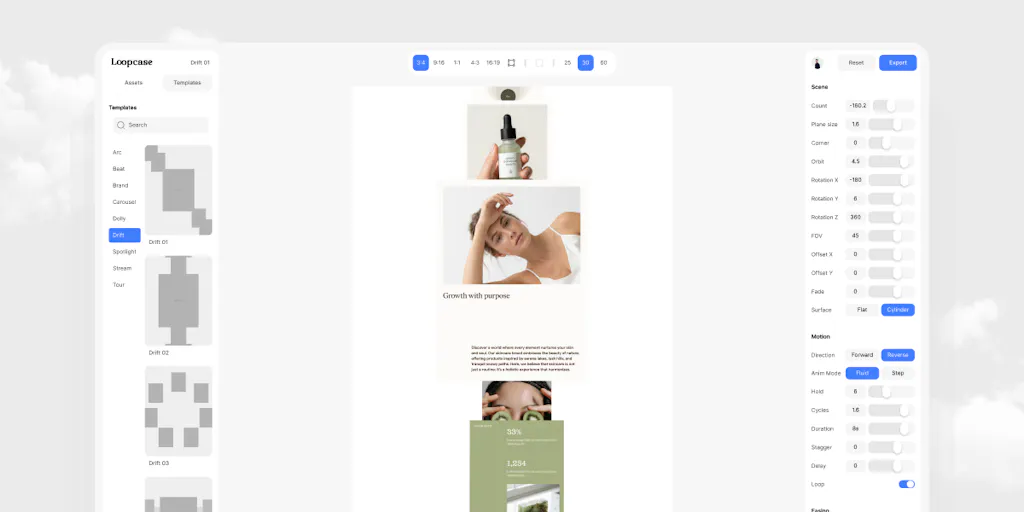
Every cross-border operator I know has the same dirty secret: we spend thousands on product photography, A/B test our PDPs to death, and then butcher the final presentation with a static image carousel that looks like it was built in 2009. We obsess over the product but treat the story as an afterthought. That’s why a tiny tool called Loopcase caught my eye on Product Hunt this week. It’s not built for sellers. It’s built for designers who hate After Effects. But the core insight — that motion shouldn’t require a motion graphics degree, and that a “good enough” loop beats a “perfect” render that never ships — maps directly onto how we should be thinking about listing videos, ad creatives, and even internal reporting. If you’re an Amazon FBA brand owner or a Shopify DTC operator, you’re leaving money on the table if you ignore this. Not because you’ll buy Loopcase, but because the philosophy behind it exposes how bloated your current creative workflow has become.
The Problem: Your Creative Pipeline Has a 9 PM Emergency
Kim, the maker of Loopcase, describes the origin story in the Product Hunt launch post: every time she finished a case study, the presentation was tomorrow, and it needed motion. Her options were opening After Effects at 9 pm or paying a freelancer for something she’d want to tweak five times anyway. I’ve lived that exact scenario, except the “case study” was a new product launch and the “presentation” was a TikTok Spark Ads campaign that needed to go live before the competitor’s price drop went viral.
The problem Loopcase solves is not “designers are lazy.” It’s that the tooling gap between static design and motion design is a chasm. For a cross-border seller, this gap manifests in three concrete ways:
- The listing video bottleneck. Amazon now pushes video-rich A+ content, and TikTok Shop requires video-first creatives. But most sellers don’t have a video editor on staff. They either outsource to agencies that charge $500 per cut or they use template tools that produce generic, logo-slapping slop that gets ignored by the algorithm.
- The iteration death spiral. You get a video back from the agency. You ask for a color change. They send a new render. You ask for the logo to appear 0.5 seconds earlier. They sigh. You sigh. The launch date passes.
- The “seamless loop” myth. Even when you get a good video, it often doesn’t loop cleanly. On Instagram Reels or a PDP carousel, a jump cut at the loop point screams “amateur.” Loopcase’s claim — that every export loops seamlessly, frame zero equals the last frame, guaranteed by how the animations are constructed rather than by trimming — is a technical detail that matters more than most sellers realize. A hard cut at the loop point is a conversion killer on a product page.
Loopcase’s answer is brutally simple: pick a template, drop in your images, adjust the motion with live sliders, export. No keyframes, no timeline, no render queue. It’s a constraint-based approach. The template catalogue is deliberately short because each motion style is tuned rather than generated. This is the opposite of the “give me 200 templates” approach that dominates the Canva-ification of design tools. For a seller, this means the tool makes decisions for you, which is exactly what you need when you’re staring at a deadline and your brain is fried from managing freight forwarders.
How It Differs: Not a Canva Killer, a Canva Corrective
The obvious comparison is to Canva or Adobe Express. Those tools let you animate anything, which means you can also mess up anything. You get 500 options and zero taste. Loopcase’s bet is that for a specific use case — a portfolio piece, a case study, a product highlight — you don’t need 500 options. You need one good option that’s been tuned by someone who understands motion.
The second comparison is to After Effects, which is the industry standard but also the industry’s biggest time sink. The learning curve is a cliff. Even if you know it, the render queue is a black hole. Loopcase doesn’t even pretend to compete with AE for complex work. It’s a scalpel for a specific incision.
The third, and most relevant for this audience, is the comparison to Pictory or InVideo — the AI video generation tools that promise to turn a blog post into a video. Those tools are great for repurposing content, but they produce that “AI slop” look: generic stock footage, robotic voiceovers, and a visual rhythm that feels like a PowerPoint on Adderall. Loopcase is the opposite: it’s not AI-generated. It’s human-tuned templates. The maker explicitly says the motion styles are “tuned rather than generated, because a case study needs one good move, not two hundred mediocre ones.” That’s a philosophy that should resonate with any seller who’s been burned by “AI-powered” tools that produce 200 variations of garbage.
Why Amazon Sellers Should Care More Than Shopify Ones
Here’s a hot take: Shopify store owners can get away with static images. The conversion path is more forgiving, the brand story is more narrative-driven, and the customer is already in a browsing mindset. Amazon sellers don’t have that luxury. On Amazon Seller Central, you’re fighting for attention in a grid of identical white-background photos. The only differentiator is video. And not just any video — a video that loops seamlessly in the main image carousel, because Amazon’s autoplay feature will cut you off at the loop point if you’re not careful.
I’ve seen A/B tests where adding a 15-second looped video to the main image slot increased conversion by 12-18%. The issue is that most sellers can’t produce that video without either (a) hiring a studio, or (b) using a tool that produces a non-looping mess. Loopcase’s “frame zero equals the last frame” guarantee is the kind of technical spec that sounds nerdy but has a direct revenue impact. A clean loop means the customer sees a continuous story, not a jarring restart that breaks their attention.
Where the Math Breaks: Pricing and Scale
The pricing model is “founding lifetime pricing” for the first 50 people, and the free plan exports real files with no trial wall. That’s a great customer acquisition play, but it’s also a red flag for scalability. A lifetime deal means the maker is betting on a small, passionate user base, not on enterprise growth. For a solo seller or a small team, that’s fine. For a brand doing 500 SKUs, you’re not going to build a video pipeline on a tool that has a deliberately short template catalogue.
The math also breaks on the “no timeline” promise. For a single case study or a single product highlight, yes, sliders are enough. But the moment you need to sync motion to a voiceover or a music beat, you’re back in the timeline world. Loopcase is not a replacement for CapCut or Premiere Pro for that kind of work. It’s a tool for a specific deliverable, and you need to know that boundary before you buy in.
What Cross-Border Sellers Can Borrow (Without Buying the Tool)
You don’t need to be a Loopcase customer to steal its core ideas. Here’s what I’m taking from this launch and applying to my own operations:
- Constraint is a feature, not a bug. Stop giving your creative team 500 templates. Give them one. Force them to make it work. The “deliberately short” template catalogue is a lesson in focus. For your ad creatives, pick one format (e.g., 9:16 with captions) and master it before you expand.
- Seamless loops are a requirement, not a nice-to-have. Audit your current video assets. Do they loop cleanly? If not, fix them. On TikTok Shop and Amazon, a clean loop is table stakes. Use tools that guarantee it, or learn how to edit for it in CapCut — it has a “loop” feature that can help, but you still need to check the frame boundaries manually.
- The browser is the new render farm. Loopcase runs everything in the browser, and the maker emphasizes that “your images stay yours.” This is a privacy and workflow win. For sellers, this means you can approve creatives from a hotel lobby in Shenzhen without firing up a VPN and a rendering laptop. Cloud-based tools like Figma and Canva have already won this battle for static design; motion is next.
The “Free Plan Exports Real Files” Lesson
The most underrated line in the entire launch post is: “The free plan exports real files. No trial wall, no locked export button.” In the cross-border SaaS world, we’re drowning in free trials that watermark our work and lock our exports. Loopcase’s approach is a masterclass in trust. They’re betting that if you see the quality of the output, you’ll pay for the convenience. As a seller, you should apply the same logic to your own customer experience. If you’re gating your product demos behind a form fill, you’re losing customers. Show the goods first. The sale will follow.
This is also a lesson for the tooling you choose. I’ve seen too many sellers lock themselves into Helium 10 or Jungle Scout because of a “lifetime deal” that turned out to be a lifetime of frustration. The free-export approach is a signal of confidence. When evaluating any new SaaS for your stack, ask: does the free tier actually give me something I can use, or is it a teaser? Loopcase passes that test. Most tools don’t.
Where My Judgment Says It Falls Short
Let me be clear: Loopcase is not a tool for cross-border sellers in its current form. It’s a tool for designers and agencies. The use case is a portfolio case study, not a product listing video. The templates are tuned for “one good move” — which is perfect for a hero shot, but useless for a multi-feature product demo that needs to show three angles and a size chart.
The second shortfall is the lack of text animation. A product video needs captions, price callouts, and “free shipping” badges. Loopcase’s “drop in your images” workflow doesn’t handle that. For sellers, this is a dealbreaker. You’d still need to composite text overlays in another tool, which defeats the “no timeline” promise.
The third, and most critical for this audience, is the absence of any e-commerce integration. There’s no direct export to Amazon, TikTok Shop, or Shopify. You’re exporting a file and then uploading it manually. That’s fine for a portfolio, but for a seller managing 50 SKUs, that’s a non-starter. The tool is solving a designer’s problem, not a merchant’s problem.
The “Founding Lifetime Pricing” Trap
I’m always suspicious of lifetime deals, and this one is no exception. The maker says “the first 50 people get founding lifetime pricing.” That’s a classic Product Hunt play to drive velocity. But for a cross-border seller, a lifetime deal on a tool that might pivot or die is a bad bet. You’re not buying software; you’re buying a promise. The safer play is to use the free plan, export your files, and see if the tool sticks around. If it does, and if they add e-commerce features, then consider paying.
The other risk is that the “deliberately short” template catalogue means the tool will feel stale quickly. A designer might use it for five case studies and then hit the ceiling. A seller would hit that ceiling after one product line. This is a tool for a moment, not a workflow.
What I’d Watch / Test Next
Here’s what I’m actually going to do this week, and I suggest you do the same:
- Audit your current video assets for loop quality. Take your top 10 selling products. Open their main videos. Watch the last frame and the first frame. If there’s a jump cut, fix it. Use Loopcase’s free plan to see if it can handle a simple product hero shot. If it can, you’ve just saved yourself an agency fee.
- Test the “constraint” philosophy on your ad creatives. Pick one template style in your current tool (whether that’s Canva or Adobe Express) and force yourself to use it for all new creatives for two weeks. Measure the performance against your previous “kitchen sink” approach. I’d bet money that the constrained version outperforms.
- Watch for e-commerce integrations. If Loopcase adds an export to TikTok Shop or a direct upload to Amazon Seller Central, it becomes a different beast. Until then, it’s a curiosity. But keep it on your radar — the “seamless loop” guarantee is a feature that every video tool should copy.
- Steal the “free plan exports real files” approach for your own funnel. If you’re a DTC brand, are you gating your product demos? Are you forcing email signups before showing your value? Change that this week. Show the product. Let them play. The trust will convert better than any pop-up.
Loopcase is a reminder that the best tools are the ones that solve a specific, painful problem without pretending to be everything to everyone. For cross-border sellers, the takeaway isn’t to buy the tool — it’s to borrow the mindset. Constrain your creative options. Guarantee your technical quality. And above all, ship the thing that’s “good enough” today instead of waiting for the perfect render that never comes. Your conversion rate will thank you.