The Notch Is a Fulfillment Center: What a Tiny Mac App Teaches Cross-Border Operators About Attention Arbitrage
Every cross-border seller I know runs the same ragged stack: sixteen browser tabs, three Slack workspaces, a supplier on WhatsApp, a VA pinging about a stranded FBA shipment, and a Shopify admin quietly bleeding a checkout error nobody noticed. The scarce resource in 2025 isn’t capital or catalog — it’s glanceable attention. So when an indie developer from Turkey ships a native Swift app that turns the dead space around a MacBook notch into a live operations surface, I pay attention. Kishi Notch is a $19.99 one-time utility, not an e-commerce platform. But the design philosophy behind it — push, don’t pull; surface, don’t search — is exactly the philosophy most seller tooling still gets backwards. That’s why it’s worth twenty minutes of your Sunday.
What Kishi Notch Actually Solves
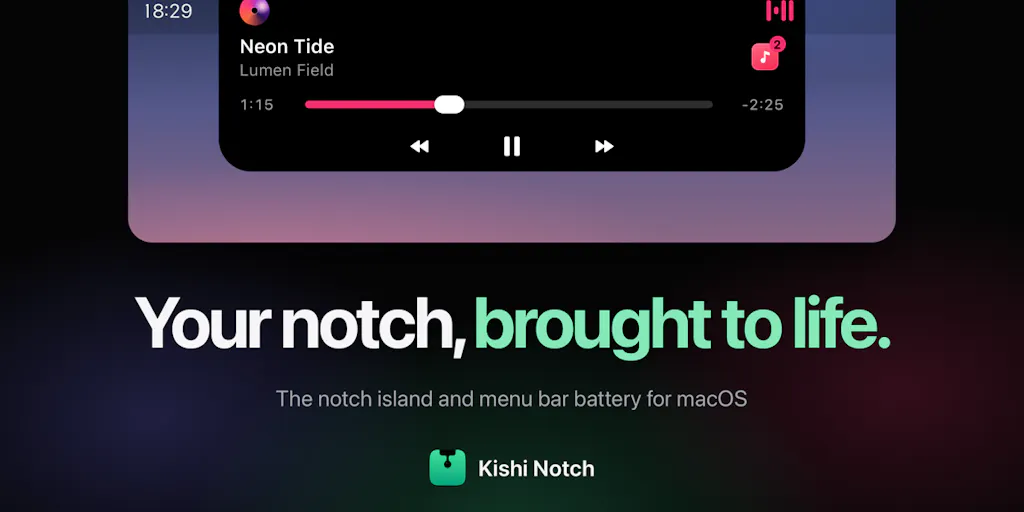
The pitch from Özhan Gebeşoğlu is deceptively simple: the notch on a MacBook “always felt like wasted space, and the things I actually wanted to see were hidden in menus.” His fix is a small native app that “grows a soft, interactive island out of the notch” — a persistent, always-visible strip that absorbs the ambient signals a knowledge worker checks fifty times a day.
Concretely, per the launch page, it does six things:
- Messages from WhatsApp, Messages, Mail, and Slack drop into the notch with an inline Reply box — type, hit Return, never leave your current window.
- Your next meeting counts down, and Join opens Zoom, Google Meet, Teams, Webex, or FaceTime.
- Music from Spotify and video in Safari or Chrome, with a vinyl-style player, waveform, and source switcher.
- AirPods and other earbuds show left/right/case battery the moment they connect.
- Timer, stopwatch, volume and sound output, camera/mic-in-use indicator, Focus status, and a file shelf with AirDrop.
- A styleable menu bar battery with health, cycle count, live power draw, and time remaining.
The privacy posture is explicit: no account, no analytics, no tracking, everything stays on your Mac. Compatibility is macOS 14 or later, Apple silicon and Intel. Pricing is free for 7 days, then a one-time $19.99 license for 2 Macs, no subscription.
That’s the whole product. No AI copilot, no “agentic workflow,” no Series A deck. And that modesty is precisely what makes it instructive for people running seven-figure Amazon or TikTok Shop operations.
Why this is a seller-tooling story, not a Mac-utility story
Cross-border operators live inside a specific failure mode: the signal-to-noise ratio of their own dashboards is inverted. The thing that actually matters right now — a listing suppressed for a pricing error, a Temu price-match undercutting your margin, a return rate spiking on one ASIN — is buried three clicks deep in Amazon Seller Central or behind a Klaviyo flow report you check weekly. Meanwhile, the thing that interrupts you — a Slack ping about a design mockup — arrives with full urgency.
Kishi Notch inverts that by choosing what deserves permanent screen real estate. That’s a product-management decision, and it’s one every seller-tooling vendor you pay for has made badly.
How It Differs From the Incumbents (and What That Says About Your Stack)
The obvious comparison set for Kishi Notch is the crowded Mac productivity-utility category: Bartender, NotchNook, Alcove, and Apple’s own Stage Manager. Bartender hides menu bar clutter; NotchNook and Alcove claim the notch as a media/Dynamic-Island-style surface; Stage Manager reorganizes windows. Kishi’s differentiation is the inline-reply mechanic plus the breadth of ambient telemetry — battery health, mic-in-use, Focus, file shelf — bundled without a subscription.
Now map that against the tooling you actually pay for as a seller:
| Category | Incumbent | What Kishi’s design exposes |
|---|---|---|
| Amazon ops | Helium 10, Jungle Scout | Insights live in a tab you must visit; nothing pushes to you |
| Email/SMS | Klaviyo | Beautiful reports, zero ambient presence |
| Support | Gorgias, Zendesk | Ticket volume is invisible until it’s a crisis |
| Ads | Amazon Ads console, TikTok Ads Manager | ACOS drift discovered weekly, not hourly |
Every one of those tools is pull-based. You go to it. Kishi Notch is push-based — it comes to you, in the corner of your eye, at the exact moment a signal fires. That’s the gap.
Why Amazon sellers should care more than Shopify ones
Shopify merchants have it comparatively easy: one admin, one checkout, one analytics surface, and Shopify’s own mobile app already pushes order and payout notifications. The blast radius of a missed signal is usually a delayed refund.
Amazon FBA brand owners face a nastier topology. Inventory sits in FBA warehouses, listings can be suppressed without warning, Buy Box can be lost to a hijacker in minutes, and the Account Health dashboard is where careers end. The number of independent systems that can hurt you — pricing, ads, inventory, reviews, IP complaints — is an order of magnitude higher. If you’re running multi-channel across Amazon, Walmart, and TikTok Shop, the ambient-signal problem compounds.
So when I look at Kishi Notch, I’m not thinking “cute Mac toy.” I’m thinking: this is the interaction pattern my ops stack should have had five years ago. A persistent strip that flashes “ASIN B0XXXX Buy Box lost” is worth more than another weekly PDF.
What Cross-Border Sellers Can Borrow From It
Three transferable lessons, in descending order of how fast you can act on them.
1. Build a “notch layer” for your own operation — even if it’s ugly
You don’t need Swift. You need one always-visible surface that aggregates the five signals that actually cost you money. In practice I’ve seen operators do this three ways:
- A Slack channel fed by webhooks from Seller Central notifications, your 3PL, and your ad platform — pinned, muted, checked by a VA every 30 minutes.
- A Geekbot or Zapier digest that pushes a 6-line morning brief to WhatsApp.
- A Notion or Airtable dashboard on a second monitor, refreshed by Make or n8n.
None of these are as elegant as a native notch app. All of them beat the status quo of “I’ll check it later.” The Kishi lesson isn’t the notch — it’s the curation discipline: pick six signals, no more, and make them impossible to miss.
2. One-time pricing is a wedge, and your SaaS vendors know it
The $19.99 one-time, two-Mac license is a deliberate shot at the subscription-fatigue market. For a solo operator, that’s a rounding error. For a seller paying Klaviyo, Helium 10, Jungle Scout, and a 3PL all on monthly billing, it’s a reminder that the subscription stack has a ceiling. When you renegotiate tooling contracts this quarter, ask each vendor what a one-time or annual-prepaid tier would cost. You’ll be surprised how often there’s an unpublished discount.
3. Privacy-as-a-feature is now a procurement filter
“No account, no analytics, no tracking, everything stays on your Mac” is a line that would have been invisible in 2019. In 2025 it’s a differentiator, and it maps directly to cross-border compliance reality: if your ops tool touches customer PII and stores it offshore, you’ve added a GDPR and CCPA surface you didn’t need. Tools that keep data local or in-region are quietly winning procurement at mid-market DTC brands. Kishi’s stance is a small proof point of a large shift.
Where My Judgment Says It Falls Short
I like the product. I’m not going to pretend it’s a category-definer.
The single-machine constraint. Two Macs per license, no team tier, no shared state. For a one-person operation, fine. For a five-person ops team, useless — nobody sees the same notch. Cross-border teams are distributed by definition (sourcing in Shenzhen, ops in Manila, brand in Los Angeles), and a local-only utility doesn’t cross those borders.
The platform lock. macOS 14+, Apple silicon and Intel, no Windows, no iPad. The majority of Amazon agency and VA workforces run Windows. That’s a hard ceiling on the addressable market, and it’s the single biggest reason I’d hesitate to recommend it as anything more than a founder’s personal tool.
The integration surface is shallow by design. WhatsApp, Messages, Mail, Slack — all consumer-grade. No Zendesk, no Intercom, no Front, no Gorgias. If your customer support runs on a helpdesk, the notch won’t see it. The inline reply is a lovely mechanic that, for a seller, mostly replies to the wrong inbox.
No analytics is a double-edged sword. I applaud the privacy stance. But “no analytics” also means no crash telemetry, which means bugs linger, which means a $19.99 tool can quietly rot. For a solo dev, that’s the tradeoff. For a seller betting workflow on it, it’s a risk.
The pricing math is generous — maybe too generous. Free for 7 days, then $19.99 for 2 Macs, no subscription. That’s a hobbyist’s price for something that, if it works, becomes load-bearing. It signals the developer isn’t trying to build a company around it. Which is fine — but don’t build your ops cadence on a tool that might not get a macOS 16 update.
Where the math breaks
If you value your time at $100/hour and Kishi Notch saves you even four minutes a day across a 250-day work year, that’s roughly 16.7 hours — call it $1,670 of recovered attention against a $19.99 outlay. The ROI is absurd if the inline-reply mechanic actually changes your behavior. The honest question isn’t whether the math works; it’s whether you’ll still be using it in week three. Most productivity utilities die at the novelty cliff, and there’s no data in the launch page — no retention numbers, no user counts, not disclosed — to suggest this one is different.
What I’d Watch / Test Next
Three concrete moves for this week, in order of effort:
Install it and run a two-week attention audit. Track how many times you leave your primary window to check a message, a meeting, or a battery. That number is your baseline. If Kishi Notch cuts it by half, you’ve learned something about your own workflow that no dashboard will teach you. If it doesn’t, you’ve spent $19.99 and 20 minutes — cheap tuition.
Build the seller equivalent for one signal. Pick the single most expensive thing that goes wrong in your operation — Buy Box loss, ad-spend spike, inventory stockout on a hero SKU — and wire one push notification to your phone or Slack via Amazon’s SP-API or a Zapier trigger. Not six signals. One. Get it working. Then add the second. This is the Kishi method applied to your P&L.
Renegotiate one subscription. Open your SaaS billing page, find the tool you use least per dollar, and ask for a one-time or annual-prepaid option. Kishi’s $19.99 perpetual license is a negotiating anchor — use it.
The bigger bet: watch whether Apple absorbs this pattern into macOS natively, the way it absorbed widgets and Live Activities. If it does, Kishi Notch becomes a footnote — but the interaction grammar of ambient, glanceable, push-based signal surfaces becomes the default for every tool you buy. And that’s the thing worth stealing today, notch or no notch.