Why a Mac Battery App Is the Best UX Lesson You’ll Get This Year
The cross-border e-commerce ecosystem is drowning in dashboards. We have inventory alerts, repricing triggers, ad spend caps, and margin thresholds—yet the real losses happen in the gaps between those alerts. A vendor whose Amazon PPC budget bleeds past a profitable ACOS? A DTC brand that runs out of stock on a bestseller because the reorder notification arrived two hours too late? These aren’t analytics failures; they are attention failures. The signal was there, but it wasn’t urgent enough at the moment that mattered.
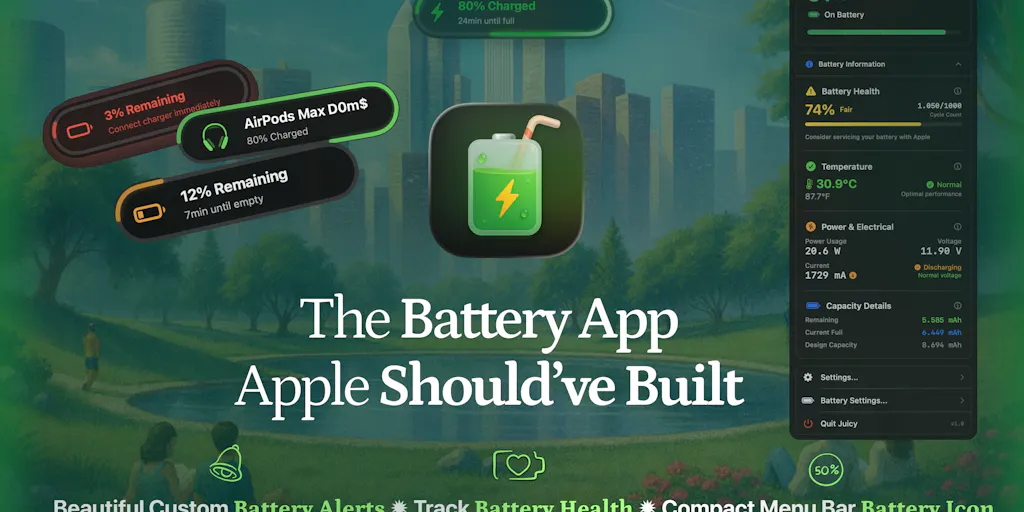
Enter Juicy, a Mac battery utility that has nothing to do with e-commerce and everything to do with how we should design the interrupt layer for mission-critical decisions. Its core insight—that the default macOS battery warnings at 10% and 5% are both too late and too easy to ignore—maps directly to the way our tools alert us about stockouts, exchange-rate shifts, or sudden spikes in return rates. If you run a seven-figure Amazon FBA operation or a multi-channel DTC brand, you should care about Juicy not because you need a battery app, but because its approach to alerts, health monitoring, and charge-limiting is a blueprint for building better operational feedback loops.
The Problem: Your Tools Alert You at the Wrong Levels, in the Wrong Tone
Every cross-border seller knows the sinking feeling: a notification pops up on your phone that your inventory is low, but by the time you read it, the buy box is gone and the restock window has closed. The failure isn’t the data—it’s the delivery. Most e-commerce platforms treat notifications as an afterthought: a standard email, a push alert in the app that you’ve learned to swipe away, or a red banner in Seller Central that you check once a day. They are designed to conform to the platform’s notification system, not to your operational urgency.
Juicy attacks the same problem on macOS. The default battery warnings are hard to miss? Hardly. They’re a small dialog box you can hit “Later” on, buried under other windows. So the app builds a different stack: native-style notification pills that slide in, screen glow that changes your environment, and custom sounds that you assign per percentage. You set an alert at 50% if you know your Mac will die in thirty minutes—way before the system’s 10% emergency. The effect, as one commenter on the launch page put it, is “aligned instead of extractive” aggression—the interruption serves your goal, not the system’s convenience.
How many times have you missed a reorder point because Amazon’s low-inventory alert came only after you were already out of stock? Or ignored a currency fluctuation email because it looked like the same spammy newsletter? Juicy’s approach forces a question: what if your inventory management tool let you set custom, escalating alerts at 30% of safety stock, with a visual cue on your desktop that you can’t miss? What if your ad spend limit triggered a screen glow rather than an email that gets lost in the inbox?
Juicy even monitors connected devices—AirPods, iPhone, Magic Mouse—giving you a single pane for all battery states. The e-commerce parallel: a unified dashboard for all marketplace health metrics. But the real power is the timing customization. You decide the threshold, the intensity, and the medium. That’s the first principle every ops tool should borrow.
How Juicy Differs from the Incumbents (and Why That Matters for Ops)
The Mac battery ecosystem already has popular tools: AlDente for charge limiting and coconutBattery for health stats. Kamile, a commenter on the launch page, said she “replaced my usual stack of AlDente and coconutBattery with Juicy this week.” That’s a telling consolidation. Juicy bundles charge limiting, health monitoring, per-app energy insights, and custom alerts into one native Swift app that uses under 0.1% CPU. No accounts, no cloud, no tracking. One-time payment, not a subscription.
For cross-border sellers, the lesson in bundling is obvious: the best tool stacks are the ones that reduce context-switching. We already pay for Helium 10, Jungle Scout, SellerSprite, Keepa, and a dozen other SaaS tools—each with its own login, its own notification system, its own data model. The dream is a unified alert layer that draws from all of them and triggers based on your priorities, not each tool’s default thresholds. Juicy achieves that for battery data; the same architecture could be replicated for e-commerce data.
But the deeper difference is execution. Juicy is not Electron; it’s native Swift. That matters because it sips resources—most of the time under 0.1% CPU. Compare that to the typical SaaS tool that runs a heavy web view or a Chrome extension that drains your battery while you’re trying to manage your store. If your ops stack is bloated, it’s not just a productivity drag—it’s actually hurting the machine you depend on. Juicy’s lightweight design is a reminder that good tooling should be invisible until needed.
Why Amazon Sellers Should Care More Than Shopify Ones
Amazon sellers live in a world of time-sensitive windows: lightning deals, restock limits, 24-hour performance windows before a listing’s rank drops. Shopify DTC operators have more control over their storefront and can schedule alerts with fewer external constraints. The consequence is that an alert that fails to interrupt at the exact moment can cost an Amazon seller thousands in lost sales or storage fees. Juicy’s custom alert at 15% (while the system defaults to 10%) is a direct analog: being proactive rather than reactive. I see more Amazon sellers using Juicy’s philosophy to rethink their inventory and repricing alerting than I do Shopify brands—because the margin for error is thinner.
What Cross-Border Sellers Can Borrow from Juicy
1. The “Impossible to Ignore” Alert Design
Juicy uses screen glow, custom sounds, and native-style notifications. The core principle: the alert should change your physical environment enough that you cannot continue what you’re doing without acknowledging it. In an office with multiple monitors, a screen glow that shifts the entire room’s lighting is dramatically more interruptive than a small dialog. For an e-commerce ops team, this could mean a dedicated monitor that flashes a specific color when a critical threshold is crossed—like a red glow when your account health drops below “At Risk.” It sounds theatrical, but it works because it triggers a visceral response. Tools like Pushover or custom Zapier integrations with smart bulbs can approximate this. The lesson: don’t rely on the platform’s default notification; build your own sense of urgency.
2. Per-App Energy Insights: Finding the Leaks
Juicy shows you which app on your Mac is draining battery—so you know to blame that one Chrome tab running a heavy JavaScript app. Cross-border sellers have analogous “app drains”: the ad channel that spends 40% but converts 2% (you could call it a “battery killer” for your margin). Juicy gives you the data to act: “I see this app is using 10x the normal energy, so I close it.” In e-commerce, that means running a weekly analysis of ad spend by channel, or a daily review of return rates by SKU. But the key is the prominence of the data—one glance in the menu bar. Most sellers don’t lack data; they lack a prioritized, at-a-glance view of the biggest drain. Build a dashboard that highlights the top 3 margin killers, just like Juicy highlights the top 3 battery hogs.
3. Charge Limiting as Sustainable Growth
Juicy’s “Sailing Mode” keeps your Mac’s battery in the 50-80% healthy zone, extending its lifespan. For a seller, the equivalent is managing cash flow so you’re never below a healthy runway. Charge limiting is a metaphor for growth-stage discipline: don’t charge to 100% (i.e., don’t max out your ad budget just because you can) and don’t let it drop below 20% (don’t run out of cash). The app even turns your MagSafe LED green when the limit is hit—a physical signal that you’re in the optimal zone. What’s the e-commerce equivalent? A green light on your desk when your net margin target is met, or a red light when your inventory turnover drops below a threshold. The feedback loop should be ambient and physical, not buried in a spreadsheet.
4. Native, Lightweight, No Tracking
Juicy is a native Swift app that stores everything locally. That’s a cynical win in an era where every tool wants to siphon your data. For sellers handling sensitive sales data, sourcing contacts, and proprietary strategies, the principle of data locality matters. Many third-party tools require you to log in with your Amazon MWS or Shopify API key, and suddenly your data lives on some server you don’t control. Juicy’s approach—no accounts, no cloud, no tracking—is a reminder that you can build a powerful tool without a backend. While that’s not possible for most e-commerce SaaS (because they need to sync across devices), you can at least vet tools for their data hygiene. Ask: where does my data live? Can I export it? Is there an offline mode? Juicy passes all those tests.
Where the Math Breaks
For all its elegance, Juicy isn’t a silver bullet for your operations. Let’s be honest about its limitations.
It’s Mac-only. If your team runs Windows or Linux, this app is irrelevant. And in the cross-border world, many sourcing agents and warehouse managers use Windows for compatibility with ERP systems. The alert philosophy translates, but the tool itself doesn’t.
The charge limiting is unaudited. One sharp commenter, Narek, asked whether Juicy uses Apple’s official API or a low-level SMC path that could break on a macOS point release. Maker Dominik Sobe didn’t answer that question publicly. If you’re a seller who relies on your Mac for live profitability tracking, a broken charge limiter is a minor annoyance. But the uncertainty is a reminder that when you depend on third-party tools for critical operations, you need to understand their durability. The same applies to your e-commerce tool stack: does that new repricing tool use Amazon’s official API or a scraper that could get you banned? Ask before relying on it.
It’s a one-person show. Dominik Sobe, the indie maker, is responsive on Product Hunt, but there’s no enterprise support. For a solo dev tool, that’s fine. For a cross-border operation handling millions in revenue, you need SLAs and uptime guarantees. The lesson: don’t let a beautifully designed tool become a single point of failure. Juicy is great for your personal Mac, but don’t build your ops command center around a tool maintained by one person—unless you have a fallback.
The per-app energy insights are actionable but limited. Juicy shows you which app is draining battery, but it doesn’t tell you why or how to fix it. Similarly, a dashboard that shows your ACOS is high is useless without the next step: “pause this keyword” or “increase price.” Good tools diagnose and prescribe. Juicy diagnoses but leaves the prescription to you. In e-commerce, that’s a step up from nothing, but the real value comes when your tool recommends an action (like auto-pausing a losing campaign). Juicy is a manual tool, and that’s fine—but the gap is worth noting.
Where the Math Breaks: The One-Stack Fallacy
A commenter said “Replaced my usual stack of AlDente and coconutBattery with Juicy.” That’s a win for consolidation, but it assumes one tool can replace multiple specialized ones. In e-commerce, the equivalent is trying to use one all-in-one tool for listing optimization, PPC management, inventory forecasting, and accounting. Tools like SellerSprite try to do everything, but they often excel in one area and are mediocre in others. Juicy does battery alerts very well, health monitoring decently, and charge limiting with caveats. The lesson: consolidate where it makes sense, but don’t sacrifice performance for simplicity. Know the primary use case and be willing to keep a specialist tool for the rest.
What I’d Watch / Test Next
This week, I’m going to apply Juicy’s alert philosophy to one operational workflow I know is broken in my own business: inventory replenishment for my top-selling Amazon SKU. Instead of relying on Amazon’s “low inventory” email (which comes when you’re already below safety stock), I’ll set up a custom Zapier automation that monitors my Helium 10 inventory tracker and triggers a desktop alert on my Mac using a native notification app (like Growl or a Slack webhook with a specific emoji). I’ll test different thresholds: 40% of projected stock remaining, then 25%—and measure whether I can prevent a stockout that historically costs $3,000 in lost sales.
Next, I’ll look at whether any cross-border operations tool offers per-“app” (per-channel) energy insights—i.e., which marketplace is draining my margin the most. Most analytics tools show aggregate profit, but rarely break it down to the level of a single ad campaign or SKU. Juicy’s per-app view proves that granularity is possible and valuable. If no existing tool does it well, I might build a simple Google Sheet that pulls daily PPC spend and sales by channel, then colors the cell red if a channel’s profit is negative for three consecutive days. The screen glow equivalent: a red background on that tab.
Finally, I’ll watch for a macOS update that breaks Juicy’s charge-limiting feature—and see how fast Dominik patches it. That will tell me whether I can trust the tool for production use. The answer will inform my overall strategy for relying on indie tools in my e-commerce stack: they can be brilliant, but they demand awareness of the failure mode.
Juicy is a battery app. But it’s also a case study in building alerts that respect your attention, bundle essential functions without bloat, and keep your data where it belongs. If your cross-border operation isn’t applying those same principles, you’re leaking money in the gap between a notification and a decision.


