The Attention Economy Just Broke Your Product Demos — Here’s the Fix That Matters for Cross-Border Sellers
Every cross-border seller I know is drowning in the same paradox: we spend thousands of dollars and dozens of hours perfecting a product listing, only to watch potential buyers scroll past it in 1.2 seconds. We obsess over keyword placement, A+ content, and review velocity, but we keep missing the real bottleneck — the human attention span. When you’re selling on Amazon, Shopify, or TikTok Shop, you’re not competing against the seller next door; you’re competing against a cat video, a breaking news alert, and a group chat that just pinged. Your product demo has roughly the same cognitive real estate as a meme. This is why the launch of isolate.video — a tool that strips away everything except the one feature you want a buyer to see — matters more than its humble Product Hunt debut suggests. It’s not just a video editor for indie hackers; it’s a lens into how every seller should be rethinking their visual content strategy, especially when you’re trying to convert a stranger on the other side of the world who has no reason to trust you yet.
The Real Problem: Your UI Is Eating Your Conversion Rate
The maker of isolate.video, Vignesh Warar, articulated the core frustration better than most SaaS marketing teams ever do: when you’re making a product video, “theres usually one feature I want people to focus on, but the rest of the UI keeps competing for attention.” That’s not just a cosmetic annoyance — that’s a conversion killer. Think about what happens when you’re selling a software product or a physical product with a software companion app. Your buyer lands on your demo video, sees a cluttered dashboard, and their brain immediately starts calculating the learning curve. They don’t see the value; they see the work. This is the same reason why Amazon listing videos that show a product in a messy lifestyle setting underperform those that isolate the product on a clean background. The human visual cortex is wired to seek out a single focal point, and when you force it to parse competing elements, you lose the sale.
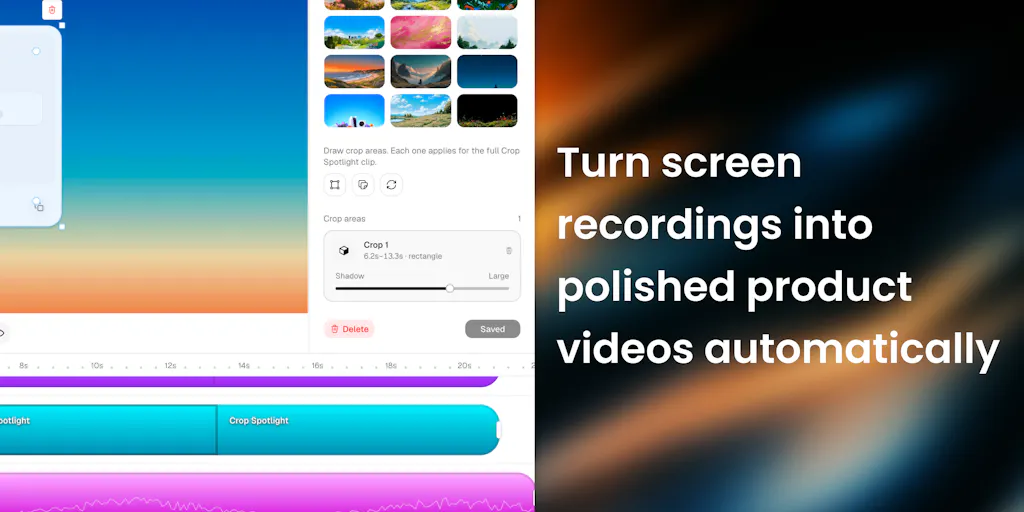
The tool’s approach is deceptively simple: you select the part of the UI you want to show, and it tracks that region, isolates it from the rest of the screen, and turns it into a focused scene. This is the digital equivalent of a photographer using a shallow depth of field to blur out a distracting background. For cross-border sellers, this has immediate implications beyond just software demos. If you’re selling a physical product with an app interface — a smart home device, a fitness tracker, a wireless earbuds companion app — your buyers are making a purchase decision based on how easily they can imagine using the product. Showing them a cluttered screen recording from your phone or a static screenshot with arrows drawn in MS Paint is not going to cut it.
What makes this especially relevant is the context of the Product Hunt discussion where the maker explicitly notes he’s building this because “full-blown video editors are too hard for me to use.” That’s the exact same sentiment I hear from Amazon FBA sellers who know they need better video content but can’t justify hiring a video editor for a product that sells for $29.99. The tool is positioned as a bridge between raw screen recording and polished product video — a gap that most sellers don’t even realize they’re falling into until they see their click-through rates flatline.
Why Amazon sellers should care more than Shopify ones
If you’re a Shopify seller with your own domain and a well-designed store, you might think you’re immune to this problem because you control the entire experience. But that’s exactly the trap. On Shopify, you’re already paying for the traffic — whether through paid ads or content marketing — and you have the luxury of a full brand experience. Your video can afford to be slower, more atmospheric, and more contextual because the buyer is already in your ecosystem. Amazon is a different beast. Your video thumbnail competes in a grid of seven other sellers, all fighting for the same click. The moment your video shows a cluttered UI or a confusing interface, the buyer clicks back and buys from the seller who made the value proposition obvious in the first two seconds. Isolation isn’t a nice-to-have on Amazon; it’s a survival tactic.
How This Differs From the Incumbent Toolset
Let’s be honest about the landscape here. The current options for creating product videos are a graveyard of half-measures. You’ve got the heavyweight editors like Adobe Premiere Pro and Final Cut Pro that have a learning curve steeper than a Himalayan pass — they’re overkill for a 30-second demo of a widget. Then you have the screen recording tools like Loom and ScreenFlow, which are great for capturing your screen but offer almost nothing in the way of post-production focus or motion graphics. Finally, you have the AI-driven video tools that promise magic but deliver generic templates that all look the same.
What isolate.video is attempting is a middle path that none of these incumbents have really nailed: automated focus tracking combined with a timeline-based editing experience. The maker mentions he’s adding “motion zooms, editable effects on a timeline, and generated background music” — which is essentially saying he’s building a lightweight version of what a professional video editor would do manually, but automated for the specific use case of UI demos. This is smart because it acknowledges that the buyer of this tool isn’t a video editor; they’re a founder, a marketer, or a seller who needs to ship content without learning a new craft.
The comparison that matters most for cross-border sellers is against the existing AI video generation tools that have flooded the market. Most of those tools generate video from text prompts, which is great for b-roll but terrible for showing a specific product feature in a specific UI. The problem with text-to-video is that it hallucinates — it doesn’t show your actual product, it shows a plausible approximation. For a seller who needs to demonstrate a precise workflow or a unique feature, that’s useless. isolate.video’s approach is fundamentally different because it starts with your actual screen recording and then enhances it. It’s not generative; it’s transformative. That’s a distinction that matters when you’re selling a product that has to work exactly as shown.
Where the math breaks
The ambitious part of this tool is the promise of “generated background music.” I’ve seen this feature kill more indie video tools than any other. The problem is that music is deeply subjective, and a generated track that doesn’t match the pacing of your video can feel worse than no music at all. For cross-border sellers, this is a landmine. If you’re selling to a global audience, the last thing you want is a default lo-fi beat that screams “template” to a buyer in Germany or Japan. The tool needs to offer either a robust library of licensed tracks or a way to easily import your own. Until that’s solved, I’d recommend keeping the music off and using a voiceover instead — which brings me to another gap I noticed in the Product Hunt comments: no mention of AI voiceover or text-to-speech integration.
What Cross-Border Sellers Can Borrow From This (Even If You Never Use the Tool)
The deeper lesson here isn’t about the tool itself — it’s about the philosophy of visual isolation. Every cross-border seller should be auditing their product content through this lens right now. Go look at your Amazon listing images, your Shopify product page, your TikTok Shop creatives. Ask yourself: what is the one thing the buyer needs to see to make the purchase decision, and is everything else in the frame competing with it? If the answer is yes, you have a conversion problem that no amount of ad spend will fix.
Start with your product photography. If you’re selling a physical product, your hero image should have the product isolated on a clean background — this is Amazon’s own recommendation for a reason. But then look at your secondary images. Are you showing the product in use with a cluttered lifestyle background? Are you trying to show three features in one image? The discipline of isolation means one image, one feature, one message. This is the same principle that makes Apple’s product pages so effective: the product is always the hero, and the context is always minimal.
For your video content, the application is even more direct. The next time you record a screen demo of your software or your app, don’t just upload the raw recording. Take the time to zoom in on the specific button or menu you want the buyer to notice. If you’re not using a tool like isolate.video, you can achieve a similar effect with Kapwing or Descript by manually cropping and adding motion to your key frames. It’s more work, but the principle remains: your buyer’s attention is finite, and you need to spend it like it’s your last advertising dollar.
The TikTok Shop angle: short attention spans demand surgical precision
If you’re selling on TikTok Shop, you already know that your video has about three seconds to hook a viewer before they swipe away. The entire format is built around the idea of a single, focused moment. Yet I still see sellers uploading videos that try to cram an entire product catalog into one clip. The isolation principle maps perfectly to TikTok’s algorithm: pick one feature, one use case, one emotional trigger, and build the entire video around it. The tool’s ability to track a moving element and keep it focused while blurring the rest is essentially a TikTok-native editing style that most sellers are paying agencies to replicate manually.
Where I Think This Falls Short (And What I’d Want to See)
For all the promise, there are some gaps that would make me hesitate to recommend this as a core tool in a cross-border seller’s stack. First, the maker’s response to the question about MCP integrations — he mentions working on “MCP and Codex/Claude integrations” — suggests this is being built as a developer-adjacent tool. That’s fine for SaaS founders, but the average Amazon FBA seller doesn’t know what MCP is, and they shouldn’t have to. The tool needs to get to a point where the output is so turnkey that it can be plugged directly into a listing without any further editing.
Second, the question from Tori Seidenstein about whether you can use it on product interfaces you don’t own — like if your product lives inside Slack — is a critical one. The maker’s answer is that you “screen record your product, then upload and edit it,” which is technically true but glosses over the tracking challenge. If you’re recording a third-party interface, the tracking algorithm has to work with whatever UI elements are present, which can be unpredictable. For sellers who are building integrations with major platforms, this is a risk.
Third, the pricing and business model are not disclosed, which is always a yellow flag. For a tool that’s positioned as a lightweight alternative to full-blown editors, the pricing needs to be aggressive — think a one-time fee or a low monthly subscription, not a per-video charge that scales with your content volume. If this becomes a $50/month tool, it’s not going to displace the free or freemium options that sellers are already using.
Finally, the biggest omission is collaboration. Cross-border sellers rarely work alone — they have VA teams, freelance editors, and marketing agencies. If this tool doesn’t have a way to share projects, leave comments, or export to a shared drive, it’s going to be a solo-player tool, which limits its utility for anyone scaling their content production.
What I’d Watch / Test Next
If you’re a cross-border seller, here’s what I’d do this week, regardless of whether you sign up for isolate.video:
Audit your current video content. Pull up your top three product videos — on Amazon, your Shopify store, and your TikTok Shop — and watch them with the sound off. Note every moment where your eye wanders away from the product or the key feature. If there’s more than one wandering moment in a 15-second clip, you’ve found your conversion leak.
Test the isolation concept manually. Take your best screen recording and use a free tool like Kapwing to create a version that zooms into the key feature and blurs the rest. Run it as a split test against your current video for a week. The data will tell you if the attention-isolation thesis holds up for your product.
Sign up for isolate.video and try it on a real product demo. Don’t wait for the feature set to be complete. The core tracking and isolation is the value proposition, and that’s already live. Create one video for your most complex product — the one with the steepest learning curve — and see if the focused version converts better than your existing explainer.
Watch for the MCP and Claude integrations. If the maker follows through on those, this tool could become a piece of a larger automation stack where you generate a video, get AI feedback on the pacing, and push it directly to your listing. That’s the future of content ops, and it’s worth tracking.
The bottom line is that attention is the scarcest resource in cross-border e-commerce, and most sellers are still treating video content like it’s 2015. The tools are finally catching up to the problem. Whether it’s isolate.video or a competitor that emerges next month, the sellers who adopt the isolation mindset now will be the ones who win the click three seconds faster — and that’s where the money is made.