The agent-sprawl problem just landed on your ops desk, whether you asked for it or not
Cross-border sellers spent the last two years wiring AI into the boring parts of the stack — listing copy, ad variants, support macros, supplier emails. That worked fine when you had one assistant in one tab. It stops working the moment you run three of them at once, which is exactly where serious operators are heading: one agent drafting Amazon A+ content, one scraping competitor pricing, one rewriting TikTok Shop hooks. The bottleneck is no longer model quality. It’s situational awareness — knowing which agent is mid-task, which one is stuck, and which one is quietly waiting on you. That’s the problem Hypervibe, launched by maker Lucio, is trying to solve on macOS. And even if you never touch a terminal, the design thinking behind it is worth stealing for your own workflow.
What Hypervibe actually is, stripped of the launch-page gloss
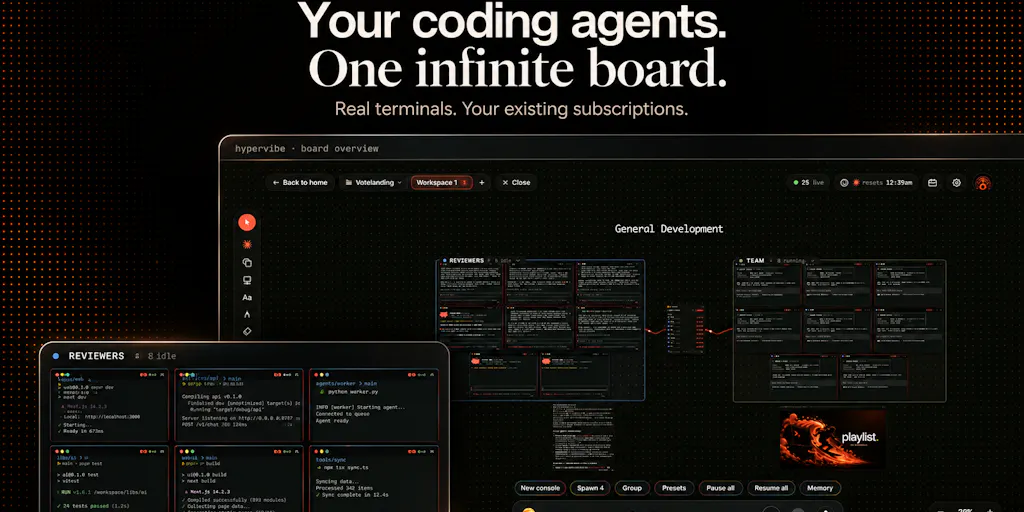
Hypervibe is a native macOS app (Apple Silicon, macOS 14+) that puts multiple coding agents — Claude Code, Codex, and Gemini, each running in a real terminal with its own CLI and your existing account — onto a single infinite canvas. Instead of tab-hopping between terminals, you arrange agents spatially: group them into teams, park live web previews, a kanban, and notes next to the terminals doing the work. You can coordinate the board by voice, and keep project memory close so you can push context to an agent when you choose. Dictation is transcribed locally on the Mac; voice planning and spoken replies hit hosted services. Agent subscriptions are billed separately — Hypervibe is the workspace, not the model.
That’s the whole pitch. The interesting part isn’t the feature list. It’s the diagnosis in the maker’s own framing: running several agents is easy, but keeping track of what each one is doing gets messy fast — terminals in different tabs, a browser somewhere else, notes disconnected from the work. Anyone who has managed a five-person VA team across Seller Central, a 3PL portal, and a Slack channel will recognize that failure mode instantly. It’s not a tooling gap. It’s a coordination gap.
Why this reads like a supply-chain control tower, not a dev tool
Strip away the coding-specific language and Hypervibe is a control tower: a single surface where heterogeneous workers (agents with different CLIs, different accounts, different strengths) are visible, grouped, and interruptible. That’s the same mental model behind a good logistics dashboard — you don’t care that one carrier is FedEx and another is a freight forwarder; you care which shipment is moving, which is stuck, and which needs a human decision. The maker’s framing that you should “see which agents are working or need your attention” is literally the exception-management view every ops lead already wants. The fact that it’s packaged for developers first is a market-timing detail, not a conceptual limit.
How it differs from the incumbent options you’re probably already using
Most cross-border operators running multiple AI agents today are doing it one of three ways, and each has a known ceiling.
The tab-and-terminal approach. Open three terminal windows, one per agent, and alt-tab. This is what Claude Code, OpenAI’s Codex CLI, and Google’s Gemini CLI assume by default — each is a standalone CLI with no shared awareness of its siblings. It’s free and it works until it doesn’t, which is around agent number three.
The chat-wrapper approach. Tools like Cursor or Windsurf give you a nicer single-agent surface, but they’re editor-centric. They’re built around you writing code with AI assist, not around supervising a fleet of autonomous workers. Different job.
The orchestration-framework approach. LangChain, CrewAI, and similar frameworks let you program multi-agent pipelines. Powerful, but they’re code-first, they don’t give you a visual board, and they assume you want to define the graph yourself. Hypervibe’s bet is that a lot of people — including non-developers — want to arrange agents spatially and watch them, not script them.
The closest conceptual cousin is probably Zapier or Make for the automation crowd: a visual canvas over something that used to require code. Hypervibe is applying that same “make the invisible visible” move to agent fleets. Whether that’s a durable category or a feature that gets absorbed into the next Cursor release is the real question — and I lean toward “feature” unless the board earns its keep in ways a sidebar can’t.
Where the math breaks
Here’s the honest arithmetic. If you’re running two agents, a board is overkill — you can hold two states in your head. The value curve only bends upward at four or five concurrent agents, and it bends hard. Below that threshold, Hypervibe is a nicer terminal multiplexer. Above it, it’s the difference between supervising and guessing. Most cross-border sellers aren’t there yet. But the ones building content pipelines for TikTok Shop at scale — dozens of SKUs, dozens of hook variants, dozens of compliance checks — will be within a year.
What cross-border sellers should actually borrow from this
You don’t need Hypervibe to steal its operating principles. Four things transfer immediately, regardless of whether your “agents” are LLMs, VAs, or SaaS tools.
1. Spatial beats sequential for parallel work. A kanban column is a queue; a board is a map. When you’re running five supplier conversations, three ad campaigns, and two listing rewrites simultaneously, a linear inbox lies to you about state. The maker’s choice to use an infinite board rather than a list is the load-bearing design decision, and it’s the one your own internal dashboards should copy. If your ops tracker is a spreadsheet with a status column, you’re running a queue. If it’s a board with lanes, you’re running a map. Maps scale; queues don’t.
2. Group workers into teams, not pools. Hypervibe lets you group agents into teams and coordinate them as a unit. That’s the same logic behind splitting your VA bench into “listing team” and “support team” instead of one undifferentiated pool. The coordination cost of a flat pool grows quadratically; the cost of a small number of teams grows linearly. This is old ops wisdom, but agent tooling is rediscovering it, and it’s worth re-auditing your own org chart against it.
3. Keep memory close and push it deliberately. The feature where you keep project memory nearby and push it to an agent when you choose is quietly the most important one. The default failure mode of AI-assisted work is context leakage — the agent doesn’t know your brand voice, your margin floor, or your compliance constraints unless you tell it, every time. A visible, controllable memory layer beats a hidden one. If you’re using ChatGPT or Claude for listing work today, you should already be maintaining a “brand context” doc you paste in deliberately, not relying on the model to remember.
4. Voice is an underrated input for ops work. Coordinating a board by voice sounds gimmicky until you’ve spent a day context-switching between a supplier call, a Slack thread, and a listing edit. Voice as a planning input — not just dictation — is a real ergonomic win for people whose hands are already full. The privacy split here is also worth noting: dictation transcribes locally, voice planning uses hosted services. That’s a reasonable default for a tool that might touch supplier names and pricing.
Why Amazon sellers should care more than Shopify ones
Shopify operators tend to run lean, single-brand stacks — one storefront, one Klaviyo account, one Meta Ads account. The coordination surface is small. Amazon FBA brand owners, by contrast, are running a genuinely multi-headed beast: Seller Central for listings and ads, a separate Amazon Advertising console, Helium 10 or Jungle Scout for research, a 3PL portal, a returns tool, and increasingly a TikTok Shop or Temu storefront on the side. That’s six or seven surfaces, each with its own state, each capable of hiding a problem. The agent-sprawl problem Hypervibe names is already the Amazon seller’s problem — just with humans and dashboards instead of CLIs. The tooling is new; the pain isn’t.
Where my judgment says it falls short
Three honest reservations, in descending order of how much they’d affect a cross-border operator.
It’s Mac-only, Apple Silicon only. The maker is explicit that it’s “Mac only for now since it’s fully native,” and a commenter on the launch thread — Etienne Lescot — noted he’s on Windows and “can only watch for now.” For a cross-border audience, that’s a real constraint. Ops teams are heterogeneous; your Shenzhen sourcing lead is probably on Windows. A tool that only runs on the founder’s laptop is a tool that doesn’t run on the team.
No per-agent git granularity yet. Lescot’s critique is sharp and the maker conceded it: Hypervibe tracks git per repo — current branch, pending changes, ahead/behind — but doesn’t break that down per agent when each agent lives in its own git worktree. The maker called this “the next step for the git side” and agreed that branch-plus-last-test-result on each card is “the right shape for it.” For a coding workflow, that’s a meaningful gap. For a cross-border ops workflow, translate it: you want per-worker status, not just per-project status. A board that shows “campaign X is healthy” but not “agent 3 is stuck on the compliance check” is only half a control tower.
The category might get absorbed. This is the strategic risk, not a product flaw. Every major AI coding surface — Cursor, Windsurf, and whatever Anthropic or OpenAI ship next — is racing toward multi-agent orchestration. A standalone board is a great wedge, but wedges get swallowed. The question for anyone adopting Hypervibe is whether the board becomes a hub (where you live) or a view (where you glance). The maker’s bet, visible in the voice-planning and memory features, is hub. I’d give that maybe 40% odds against the platform players.
The pricing question nobody answered
The launch page doesn’t disclose pricing for Hypervibe itself — it only notes that agent subscriptions are billed separately. That’s a real gap for an operator trying to model TCO. If you’re already paying for Claude, Codex, and Gemini seats, adding a workspace layer on top needs to justify itself against the cost of just… using three terminal tabs. The maker didn’t put a number on it, and I’m not going to invent one. But “not disclosed” is itself a signal: early-stage pricing usually means the value prop is still being tested.
What I’d watch / test next
This week, three concrete moves regardless of whether you ever install Hypervibe.
First, audit your own agent sprawl. List every AI tool you currently run in parallel — ChatGPT, Claude, Perplexity, a listing optimizer, an ad-copy generator. Count them. If it’s more than three, you have the coordination problem Hypervibe describes, and you should be designing a board (even a physical one, even a Notion page) rather than a list.
Second, build a pushable memory doc. One page: brand voice, margin floor, compliance red lines, top-three objections to overcome. Paste it into every agent session deliberately. This is the single highest-leverage habit the Hypervibe design implies, and it costs you nothing to start today.
Third, watch the git-granularity and Windows threads on the launch page. Those two features — per-agent status and cross-platform support — are the ones that determine whether this becomes a team tool or a solo tool. If the maker ships both within a quarter, the calculus changes. If not, treat Hypervibe as a well-designed preview of where every ops dashboard is heading, and steal the ideas without buying the app.