Why a Hex Editor Matters to Someone Who Sells on Amazon
Let me be honest with you: when I first saw this launch, my immediate reaction was, “Why is a hex editor on my radar?” Then I thought about the last time I had to debug a corrupted product feed, or trace a bad EDI 940 file from a 3PL, or figure out why a batch of PNG images from a supplier in Shenzhen was getting rejected by Amazon’s image checker. That’s when it clicked. Cross-border e-commerce is a business of moving files — product data, images, manifests, invoices, and, increasingly, machine-readable data files — and most of us are doing it with tools that feel like they were ported from 2003. This tool, Hexel Editor, is a native macOS hex editor that treats raw bytes like something a modern operator can actually read, and it’s a reminder that the gap between “developer tooling” and “seller tooling” is shrinking. The thesis here isn’t that you’ll become a reverse engineer. It’s that the next time a file breaks your workflow, you won’t be stuck squinting at terminal output or paying a freelancer $50 to tell you what’s wrong.
The Real Problem: Your Entire Operation Runs on Files You Can’t See
Every DTC operator and Amazon seller has been here. You export a product catalog from your ERP, you map it to Amazon’s flat file template, and the upload fails with a generic error. Or your supplier sends you a ZIP of product images, and half of them are corrupt. Or you’re dealing with a feed from a marketplace like Temu or SHEIN that requires a specific encoding, and your CSV has a stray byte that breaks the import. The problem isn’t the format — it’s that you have no way to see what’s actually in the file. You’re working with a black box.
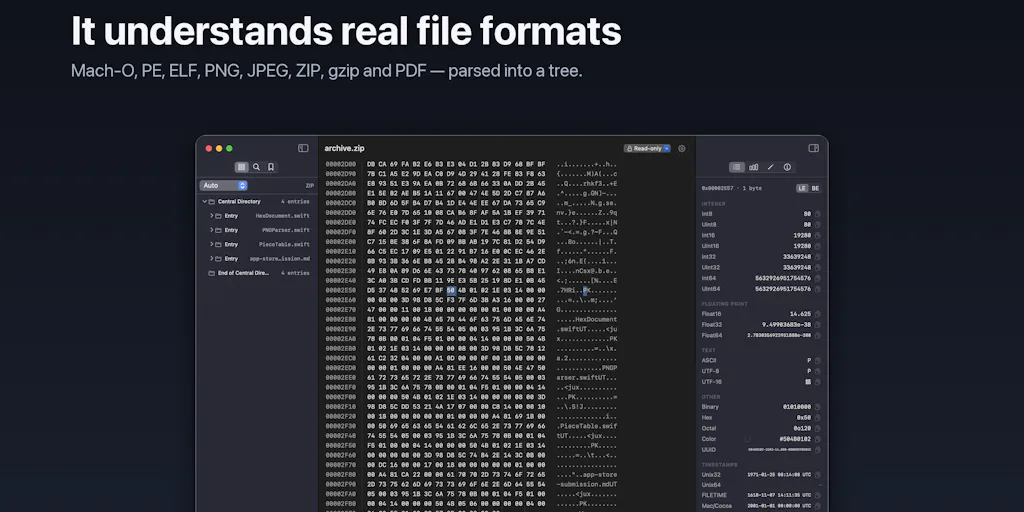
This is where Hexel Editor’s core pitch gets interesting. It’s not just a hex viewer; it’s a tool that tells you what the bytes mean. It decodes integers, floats, binary, and strings at the cursor, with instant little- or big-endian toggling. For a seller, this means you can finally answer the question: “Is this file actually what my supplier says it is?” You can check if a product image file has the right header, verify that a price field isn’t being corrupted by a hidden character, or confirm that a shipping manifest from your 3PL is structurally sound before it hits customs. The built-in parsers for ZIP, gzip, and PDF are particularly relevant — those are the containers your invoices, contracts, and product data ships in every day.
The memory-mapped performance is another angle that matters more than you’d think. The maker notes that large files are memory-mapped, so a multi-GB binary opens as fast as a 2 KB one. In e-commerce, your product database exports, your log files from your ad campaigns, and your inventory reconciliation files are often enormous. If you’re using a tool that chokes on a 500 MB file, you’re not going to use it. You’ll just guess. And guessing is expensive.
How It Differs from the Incumbents You Might Actually Be Using
If you’re a technical founder or you’ve hired a developer to build your internal tools, you’ve probably seen them use xxd in a terminal or maybe a dated GUI tool like 0xED. The maker of Hexel Editor explicitly calls this out — the experience of being in a terminal “squinting at xxd output” is the pain point. The difference here is that Hexel Editor is built for macOS, natively, with an Xcode-style document window: navigator on the left, hex grid in the middle, live inspector on the right. It’s a tool that respects your time and your screen.
But let’s compare it to something you might actually be using today: Helium 10 or Jungle Scout for product research. Those tools are great for market data, but they don’t help you with the file layer. They’re not going to tell you why your Amazon Seller Central flat file is being rejected. There’s a whole category of “file debugging” that sits between your data sources and your marketplace uploads, and it’s almost entirely unserved by the mainstream e-commerce SaaS stack. Hexel Editor is a different animal — it’s a precision tool for when something goes wrong, not a dashboard for when things are going right.
The closest comparison in the developer tooling space would be something like Synalyze It! or 010 Editor. Those are powerful, but they’re also heavy, expensive, and often feel like they were designed for Windows 98. Hexel Editor’s advantage is its focus on the macOS experience and its built-in parsers for common formats. The maker’s roadmap — letting users define their own parsers — is the killer feature that would push it ahead of the incumbents, but it’s not there yet.
Why Amazon Sellers Should Care More Than Shopify Ones
Here’s a judgment call: if you’re a Shopify DTC operator, your file formats are mostly handled for you. Shopify’s CSV importer is forgiving, and your app ecosystem handles the rest. You rarely need to look at raw bytes. But if you’re an Amazon FBA seller, you live in a world of flat files, category-specific templates, and strict validation rules. A single bad character in a UPC or a missing field in an inventory file can delay your shipment or get your listing suppressed. Amazon’s error messages are famously unhelpful. Having a tool that lets you inspect the exact bytes of your file, check the encoding, and verify the structure is a legitimate operational advantage. It’s the difference between staring at a wall and actually seeing the crack.
What Cross-Border Sellers Can Borrow from This Tool (Even If You Never Open It)
This is where I want to get practical. You don’t have to become a hex editor expert to benefit from the philosophy behind this tool. The first thing to borrow is the idea of verification. Hexel Editor’s CRC32, MD5, SHA-1, and SHA-256 checksums are a gift for anyone dealing with suppliers. When you download a batch of product images from a manufacturer in Yiwu, you can verify the checksum to ensure the file wasn’t corrupted in transit. When you receive a CSV from a freight forwarder, you can check the file’s integrity before you upload it to customs. This is a habit that costs 30 seconds and saves you hours of back-and-forth.
The second thing to borrow is the annotate feature. Hexel Editor lets you add named, colored bookmarks and plain-text notes on any byte range, exportable as .hexel files. For a cross-border operation, this is a documentation tool. You can mark the exact byte offset where your product title starts in a feed, note that a certain field is always little-endian, and share that with a remote developer or a VA. It’s a way to institutionalize knowledge about your data files that usually lives in someone’s head.
Third, the privacy angle. The maker emphasizes that the app is private by design: no network access, no analytics, no tracking. For anyone dealing with proprietary product data, supplier contracts, or pre-launch listings, this is non-negotiable. You don’t want your product research or your internal pricing data being sent to some cloud analytics service. The fact that a modern tool is built with privacy as a default, not a premium feature, is a standard you should demand from every SaaS tool in your stack.
Where the Math Breaks: My Honest Judgment on the Shortfalls
Let’s not get carried away. This is a niche tool, and its limitations are real. First, it’s macOS only. If you’re running your operation on a Windows machine or in a Linux-based cloud environment, this is a non-starter. The maker is clearly a Mac developer, and while that’s a great market, it’s not the entire world. Second, the built-in parsers are limited to Mach-O, PE, ELF, PNG, JPEG, GIF, BMP, ZIP, gzip, and PDF. For e-commerce, that’s a good start — those cover most image and archive formats — but it doesn’t cover the data formats you’ll encounter daily, like CSV, XML, or EDI. The maker mentions that user-defined parsers are on the roadmap, but until that ships, you’re limited to what’s built in.
Third, the price. The Product Hunt page doesn’t disclose a price, which usually means it’s not free or it’s a paid app. For a solo seller or a small team, paying for a hex editor might feel like an unnecessary expense when you can get a free trial of a cloud-based tool or just use a terminal command. The value proposition is clear for a developer, but for a non-technical operator, the learning curve is steep. You need to understand what a byte is, what endianness means, and why a file header matters. That’s a high bar for someone whose primary job is sourcing products and managing PPC campaigns.
The “Just Use a Freelancer” Fallacy
I’ve seen sellers burn more money on Upwork freelancers to “fix” a file than they’d ever spend on a decent tool. The problem with outsourcing file debugging is that it’s a black box. You don’t learn anything, and the next time a similar issue comes up, you’re paying again. Hexel Editor, or any tool like it, gives you the ability to build a capability in-house. It’s not about becoming a technical expert; it’s about having the visibility to ask better questions. When a freelancer tells you “your CSV has a bad encoding,” you can ask, “Which byte range? Show me.” That’s a power shift.
What I’d Watch / Test Next
If this tool resonates with you, here are three concrete steps you can take this week, even if you’re not a developer.
First, download the free trial (if available) and use it to inspect a file you’re currently struggling with. Take a product image from your latest supplier batch and open it. Look at the file header. See if the magic bytes match the expected format for a JPEG or PNG. This is a 15-minute exercise that will demystify what’s going on under the hood.
Second, create a checksum verification habit. When you download any critical file from a supplier or a platform, run a checksum and save the result. If you’re using Hexel Editor, use its built-in hashing. If not, use a free tool like HashCheck for Windows or the built-in shasum command on macOS. This will catch corrupted downloads before they cause an upload failure.
Third, watch the roadmap for user-defined parsers. If the maker delivers on that promise, this tool becomes significantly more valuable for e-commerce operators. You’ll be able to define parsers for your specific flat file templates or your 3PL’s EDI format. Until then, use the built-in parsers for images and archives, and treat the tool as a learning aid rather than a daily driver.
The broader lesson here isn’t about hex editors. It’s about the growing importance of data literacy in cross-border e-commerce. The tools we use to move money, products, and information are getting more complex, and the ones who succeed will be the ones who can see what’s actually happening in their files — not just what a dashboard tells them. Hexel Editor is a small, well-crafted reminder that sometimes, the most valuable tool is the one that lets you look under the hood.