Why This Matters More Than Another Mac Utility
Every cross-border operator I know has the same dirty secret: the most valuable automation in their business isn’t in their tech stack — it’s in their head. You know the repetitive sequence you run every morning before you even open Seller Central. The one where you check the same three dashboards, copy the same competitor ASINs into a spreadsheet, and reformat the same supplier email into a purchase order. You’ve never automated it because the tools that could automate it — the visual workflow builders, the scripting environments, the “just learn to code” suggestions — all demand you think like a developer. But you think like a merchant. You think in terms of “when this happens, do that thing with these items.” That gap between merchant thinking and machine logic is where thousands of hours of cross-border seller time evaporate every single week. So when I saw a Mac automation tool that claims to let you describe what you repeat in plain English, Portuguese, Spanish, Japanese, and seven other languages, I didn’t see a productivity gadget. I saw a potential bridge across that gap — one that deserves a hard look from anyone running an Amazon FBA operation, a Shopify DTC brand, or a marketplace arbitrage play.
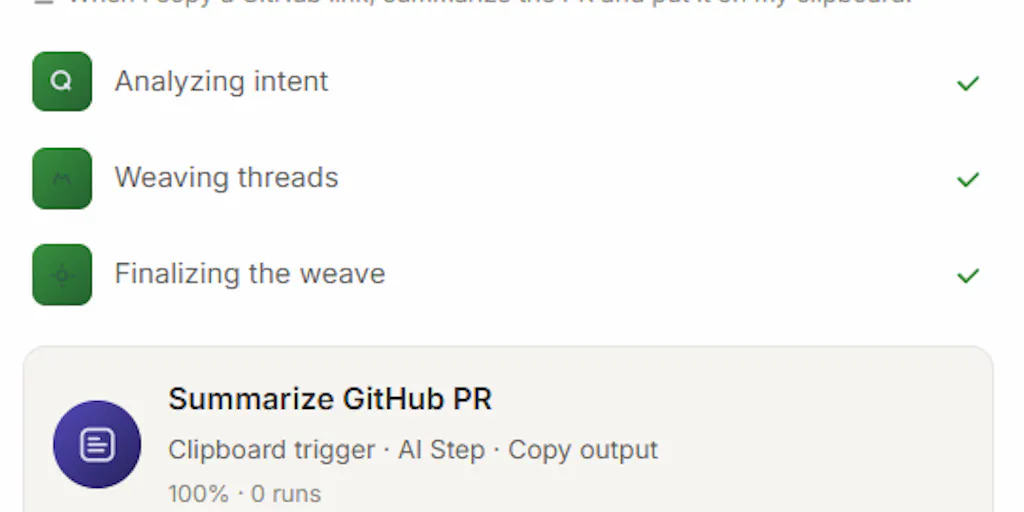
The product is Trama, built by ErnandesCavalheiro, and it has no visual editor at all. You press Cmd+Option+X anywhere on your Mac, describe what you repeat in your own language, and it builds the automation, shows you the steps in readable language, and runs it in the background on whatever trigger fits: clipboard, schedule, screenshot, file change, or incoming email. That’s the entire pitch. No node-based canvas. No drag-and-drop logic blocks. No “if this then that” wizard staring back at you like a pop quiz. Just describe the work, and the machine figures out the workflow.
For a cross-border seller, that’s either the most dangerous overpromise I’ve seen this quarter or the most practical tool to hit the Mac in years. The truth, as always, lives somewhere in the middle — and the middle is where the real operational value hides.
The Problem It Actually Solves: The Automation Ceiling for Non-Developers
Let’s be honest about the state of automation for e-commerce operators. The incumbent tools have created a two-tier system. Tier one is the visual automation platforms — the Zapier and Make of the world — which work beautifully for web-based triggers and API calls but fall apart when the work happens on your desktop. Tier two is the scripting layer — Python, AppleScript, shell scripts — which can do almost anything but require the operator to think in code. The Mac’s own Shortcuts app sits awkwardly in between: powerful but still fundamentally a visual programming environment that demands you understand concepts like variables, conditionals, and output types. One commenter on the Trama launch, Lisa, put it perfectly: “Shortcuts always made me feel like I failed a programming exam, so describing the thing in my own words is the version of automation I’ve been waiting for.”
That’s the gap Trama targets. It’s not trying to replace Zapier for web workflow automation. It’s not trying to replace Python for heavy data processing. It’s trying to eliminate the cognitive overhead of translating your work into a machine’s vocabulary. For a cross-border seller, that translation cost is real. You’re already juggling time zones, currency conversions, and marketplace policy changes. The last thing you need is to spend an afternoon learning how to structure a conditional loop in AppleScript just so you can automate the process of renaming product export files.
The maker’s description of the interaction model is telling: you press a keyboard shortcut, describe what you repeat in your own language, and the tool builds the automation, shows you the steps in readable language, and runs it in the background. That “shows you the steps in readable language” part is critical. It’s not a black box that silently does something opaque. It’s a translator that shows you the logic it derived from your description, so you can catch misinterpretations before they become costly mistakes. For an operator managing inventory across multiple marketplaces, that transparency is the difference between trusting the tool with a routine task and trusting it with your reconciliation process.
Why Amazon sellers should care more than Shopify ones
Here’s a judgment call I’ll make without hedging: Amazon FBA sellers have more to gain from this category of tool than Shopify DTC operators, at least in the short term. The reason is structural. Shopify sellers live in a web-based ecosystem where APIs are first-class citizens and tools like Klaviyo and TripleWhale already automate most of the repetitive digital work. Amazon sellers, by contrast, still live in a world where Seller Central is a web portal that feels like it was designed in 2012, where bulk operations require spreadsheet uploads, and where a shocking amount of the daily grind involves copying data from one browser tab to another. The desktop-centric nature of Amazon seller work — the constant switching between Seller Central, Helium 10, Jungle Scout, and supplier email — is exactly the kind of repetitive desktop activity that a tool like Trama could theoretically address.
The clipboard trigger is particularly interesting in this context. The maker explicitly states the tool “classifies each copy into a type - link, code, email address - then throws the text away.” So when you copy an ASIN from a competitor listing, the tool knows it’s a product identifier, not because it reads the text, but because it recognizes the pattern. That’s a meaningful privacy boundary, and it’s one that should matter to anyone who handles supplier pricing data or customer information. The system stores only “the type, a timestamp, and a salted one-way fingerprint” so that identical copies can be detected without retaining the actual content. That’s a design decision that respects the sensitivity of commercial data in a way most automation tools don’t even think about.
How It Differs From What You’re Already Using
The comparison that matters most for cross-border operators isn’t Trama versus Shortcuts or Trama versus Zapier. It’s Trama versus the habit of not automating at all. Most sellers I know have accepted the manual grind as the cost of doing business. They’ve tried automation tools, hit the learning curve, and retreated to the comfort of doing things by hand. The genius of the Trama approach is that it lowers the barrier to entry so dramatically that the “I’ll just do it manually” excuse stops holding water.
But let’s compare it against the actual alternatives you might already have in your stack. Zapier is the default choice for web-based automation, and it’s genuinely powerful — but it requires you to think in terms of triggers, actions, and data mapping. Make offers a visual canvas that’s more flexible but also more complex. Both of these tools live in the cloud, which means they can’t touch your local files, your desktop applications, or your clipboard without workarounds. Trama’s bet is that the desktop is where the untapped automation value lives for knowledge workers, and that the language barrier — not the technical barrier — is what’s been holding people back.
The maker’s comment about the trigger system is worth parsing carefully: the automation runs “on whatever trigger fits: clipboard, a schedule, a screenshot, a file change, an incoming email.” That’s a broader trigger set than most desktop automation tools offer. Screenshot triggers are particularly interesting for e-commerce operators because so much of the work involves visual verification — checking that a listing looks right, that a competitor’s pricing page renders correctly, that a supplier’s product images meet marketplace requirements. A tool that can watch for visual changes and trigger a workflow is addressing a genuinely unmet need.
Where the math breaks
Now let me do the math that the marketing doesn’t do. The maker’s response to a privacy question reveals a critical limitation: “a workflow you build does send data out when it runs - if it summarizes an email, that email goes to the AI provider you picked.” So the privacy guarantees apply to the suggestion engine — the part that notices your habits — but not to the execution engine — the part that runs your workflows. If you build a workflow that processes supplier emails, that email content leaves your machine and goes to whatever AI provider you selected. The maker notes you can choose a model running locally via Ollama to keep everything on-device, but that’s a configuration choice, not the default behavior.
For a cross-border seller, this distinction matters enormously. Supplier emails often contain pricing, lead times, payment terms, and sometimes even bank details. Sending that to a third-party AI provider, even one you’ve chosen, is a data governance decision that needs to be made consciously. The tool gives you the choice, which is more than most competitors offer, but the default behavior is still cloud-based processing. If you’re handling sensitive commercial information, you need to either configure the local model option or accept the data flow as a business decision.
There’s also the question of reliability. The maker’s description of the noticing mechanism — “it classifies each copy into a type - link, code, email address - then throws the text away” — suggests the suggestion engine is pattern-based rather than semantic. That means it can detect that you copy the same type of thing repeatedly, but it can’t understand why you’re doing it. The automation it suggests will be based on surface patterns, not on an understanding of your actual workflow. For simple repetitive tasks, that’s fine. For complex multi-step processes that involve judgment, it’s going to fall short. The tool builds automations from descriptions, not from deep analysis of your intent.
What Cross-Border Sellers Can Borrow From This Approach
The product itself may or may not end up in your daily workflow — that depends on your Mac usage patterns, your tolerance for AI data flows, and whether your automation needs are desktop-centric or web-centric. But the philosophy behind Trama is something every cross-border operator should steal immediately.
The core insight is that automation should start from the language of the work, not the language of the machine. When you describe a repetitive task in your own words, you’re articulating the intent — the outcome you want — rather than the mechanism — the specific steps required. That’s a profound shift. Most automation tools force you to specify the mechanism first, and the intent gets lost in translation. Trama’s approach inverts that: describe the intent, let the machine figure out the mechanism.
For cross-border sellers, this inversion maps directly onto some of the most painful operational problems. Consider the process of reconciling orders across multiple marketplaces. The intent is simple: “make sure every order is accounted for.” The mechanism involves exporting reports from Amazon Seller Central, Shopify, and eBay, normalizing the data, cross-referencing against your inventory system, and flagging discrepancies. Every step of that mechanism is automatable, but the description of the intent is what matters. If a tool can take “reconcile yesterday’s orders across all marketplaces” and turn that into a working workflow, it’s solved a problem that has plagued operators for a decade.
The other borrowable idea is the privacy-by-design approach to the noticing mechanism. The maker’s explanation — “It never reads what you copy. It classifies each copy into a type - link, code, email address - then throws the text away” — is a masterclass in building trust through data minimization. It doesn’t store your data, doesn’t send your data to the cloud, and gives you a settings page showing exactly what it holds with a button to erase it. That’s the standard every SaaS tool should be held to, especially in e-commerce where the data flowing through your operations includes customer PII, supplier commercial terms, and marketplace credentials.
The cross-border workflow that actually benefits
Let me get concrete about where I’d test this first. The highest-value use case I can identify for a cross-border operator is the supplier communication workflow. Every seller who works with overseas suppliers has the same weekly ritual: check email for updates from factories, extract order status information, update the internal tracking spreadsheet, and flag any delays to the team. This is repetitive, error-prone, and exactly the kind of task that a natural-language automation tool should handle.
The workflow would look like this: Trama watches for incoming emails from your supplier domain, classifies them by type (order confirmation, shipping notice, delay notification), extracts the relevant details, and updates your tracking system. The trigger is the incoming email. The action is the data extraction and spreadsheet update. The description in plain language would be something like “when an email arrives from my supplier, check if it mentions shipping dates and update the order tracker.” That’s a description any operator could write in thirty seconds, and it’s a workflow that would save hours every week.
The screenshot trigger is another underrated capability. For sellers who monitor competitor pricing or listing quality, the ability to trigger a workflow when a screenshot changes is genuinely novel. Imagine watching a competitor’s product page for price drops or listing changes, with the tool capturing the change and triggering a notification or a repricing action. That’s a capability that doesn’t exist in the standard automation stack, and it’s one that could give sellers a genuine competitive edge.
Where I’m Skeptical: The Gap Between Description and Execution
Now let me be the skeptic in the room. The fundamental challenge for any natural-language automation tool is that language is ambiguous, and automation is unforgiving. When you describe a task in plain English, the tool has to interpret your intent and translate it into precise, deterministic steps. If it misinterprets, the resulting workflow will do the wrong thing — and depending on the trigger, it might do the wrong thing automatically, without asking for confirmation.
The maker’s description addresses this partially: “it builds the automation, shows you the steps in readable language, and runs it in the background.” The “shows you the steps” part is the safety valve. But the question is whether that review step is a speed bump or a full checkpoint. If the tool presents you with a generated workflow and asks for approval before enabling it, that’s a reasonable safety mechanism. If it just shows you what it built and then immediately starts running it on triggers, that’s a risk. The source material doesn’t clarify this, and it’s the single most important operational detail for anyone considering using this for business workflows.
There’s also the question of complexity ceilings. Natural language is great for describing simple, linear workflows: “when this happens, do that.” But real-world e-commerce operations are rarely linear. They involve conditionals (“if the order total is over $500, apply this shipping rule”), loops (“for each SKU in this list, check inventory levels”), and error handling (“if the API call fails, retry three times then notify me”). Can a natural-language tool handle that level of complexity? The source material doesn’t say, and my instinct is that the current version is optimized for simpler workflows. That’s fine — it’s a starting point — but it means the tool’s ceiling might be lower than the ambition.
The language limitation nobody’s talking about
The maker highlights support for ten languages: “English, Portuguese, Spanish, Japanese, ten in total.” That’s genuinely impressive for a desktop automation tool. But here’s the thing nobody’s talking about: the output of the tool — the workflows it generates, the steps it shows you — is presumably also in your chosen language. That’s fine if you’re a solo operator working in one language. But cross-border operations are inherently multilingual. Your supplier communications are in Chinese or Vietnamese, your marketplace interfaces are in English, and your internal documentation might be in any language.
The question is whether the tool can handle mixed-language workflows. Can you describe a task in English that involves processing Chinese-language supplier emails? Can the tool understand that “check the tracking number” refers to a number embedded in a Japanese shipping notification? The source material doesn’t address this, and it’s a genuine gap for cross-border operators who live in a multilingual reality.
What I’d Watch / Test Next
Here’s my practical takeaway for any cross-border operator who read this far and is wondering whether to try Trama. Don’t install it and immediately try to automate your entire reconciliation process. That’s a recipe for frustration and, potentially, for automating a mistake at scale. Instead, run a disciplined test over the next week.
First, spend two days just noticing your own repetitive actions. Every time you catch yourself doing the same sequence of steps — copying an order ID from one window to another, checking the same dashboard at the same time, reformatting the same type of supplier data — write it down. This is the “notices-what-you-repeat” behavior that the tool itself is designed to do, but you should do it manually first. You need to know your own automation opportunities before you can evaluate a tool’s ability to address them.
Second, pick the single most annoying, most repetitive, and safest workflow you identified. “Safest” means a task where a mistake won’t cause financial damage or customer harm. Something like renaming export files, organizing screenshots, or formatting a daily summary email. Describe that workflow to Trama in your own words, review the steps it generates, and run it in a controlled way for a few days. Pay attention to two things: how accurately it translated your description into executable steps, and how much time you actually saved compared to doing it manually.
Third, make a deliberate decision about the data flow. If your workflow involves sensitive commercial data — supplier pricing, customer information, proprietary product data — either configure the local model option via Ollama or decide consciously that the convenience is worth the data leaving your machine. Don’t leave this as a default. Make it an explicit choice.
The broader lesson here isn’t about Trama specifically. It’s about the direction the automation category is heading. The next generation of automation tools won’t make you think like a developer. They’ll meet you where you are — in your own language, with your own way of describing your work. Trama is an early bet on that future, and for cross-border sellers who are drowning in repetitive desktop work, it’s worth a weekend of experimentation. The worst case is you learn something about your own workflow. The best case is you eliminate a few hours of weekly drudgery and finally automate the things you’ve been doing by hand for years.