Why a “Brand Data API” Matters More Than Another White-Label Tool
Every cross-border seller eventually hits the same wall: you win a B2B account, a wholesale deal, or a marketplace partnership, and suddenly the buyer expects your software, your portal, or your fulfillment dashboard to look like their company. Not your logo. Theirs. The request comes in as “white label,” and if you’ve scaled past one or two enterprise clients, you know the manual grind—exporting logos, hand-checking hex codes against contrast ratios, maintaining a folder of stale brand assets that nobody updates—is a silent tax on your gross margin. It doesn’t scale, it breaks the moment a client rebrands, and it makes your onboarding feel like 2015. That’s the problem HermAI is attacking, and it’s worth your attention not because it’s a shiny new API, but because it sits at the intersection of two things cross-border operators constantly underinvest in: first-impression personalization and operational automation. If you run a Shopify app, an Amazon Seller Central tool, or a logistics dashboard that serves multiple brands, this is a “borrow the idea even if you don’t buy the tool” moment.
The Core Problem: White Labeling Is a Data Problem, Not a Design Problem
Let’s be honest about what happens today. You close a deal with a mid-sized European retailer. They want your order management system to carry their branding. You assign a developer to “handle it.” That developer spends two days scraping their website for the logo, another day guessing at color variables, and a third day hardcoding a theme that breaks when the client’s marketing team decides to “refresh” their brand palette six months later. Multiply that by every new client, and you’ve built a hidden department dedicated to logo retrieval and CSS tweaking.
The founder of Techintern.io (the company behind HermAI) frames it exactly right in the launch thread: white label kept showing up as a deal requirement the moment we sold past one company, and doing it by hand doesn’t survive self serve signup. That’s the crux. Manual white labeling works for one or two accounts. It collapses when you have a self-serve signup flow where a new user types in their work email and expects your platform to instantly look like their company. You can’t have a designer on call for every signup.
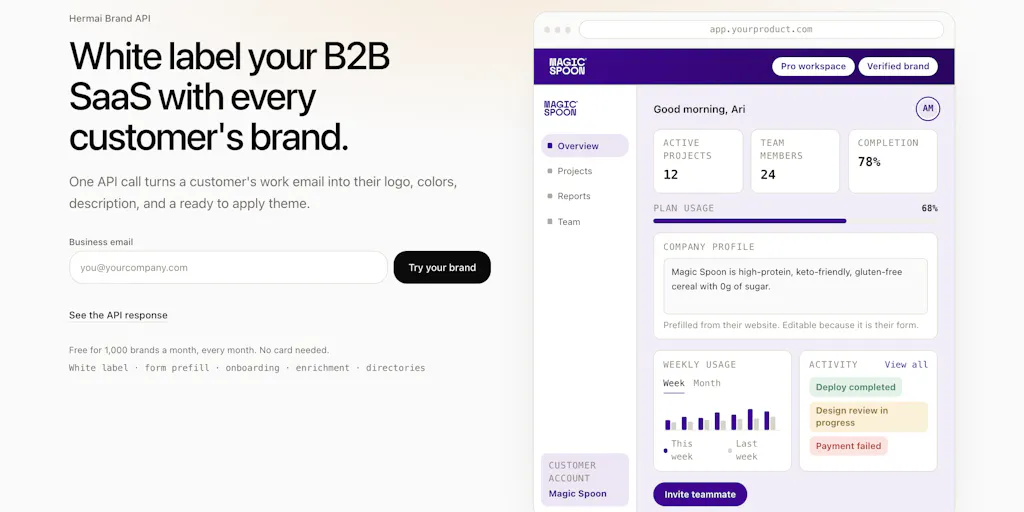
HermAI’s thesis is that this is a data retrieval and processing problem, not a visual design problem. The API takes a domain or work email, and returns a structured payload: the logo, a contrast-checked color theme, fonts (when declared), and the company’s own description of what they do. Every field carries its source, so you can audit where the data came from. That’s the difference between a magic black box and a tool you can trust in a production environment. For a cross-border seller, this translates directly to reducing the time-to-first-value for new B2B clients. Instead of a week of back-and-forth to get brand assets, you get it in one API call.
How It Differs From the Incumbents (and Why That Matters)
If you’ve been in the SaaS ecosystem for a while, you’re probably thinking: “Can’t I just use Clearbit or a logo API?” You could, but the comparison is instructive. Clearbit (now part of HubSpot) gives you company data, including a logo URL, but it’s a generalist data provider. It doesn’t give you a contrast-checked theme, and it doesn’t parse the company’s own description for onboarding context. HermAI is purpose-built for the “make my app look like it belongs to them” use case.
The other comparison is to manual asset management tools like Brandfetch, which is excellent for finding a logo, but it’s a lookup tool, not an integration engine. HermAI’s differentiation is the output format: a ready-to-apply theme that’s already contrast checked. That’s a meaningful technical detail. Anyone can grab a logo URL. Knowing that the extracted color palette passes WCAG contrast ratios before you apply it to your UI saves you from shipping an interface where the client’s light-gray brand color makes your text unreadable.
The founder also made a critical architectural decision that should resonate with anyone who’s been burned by AI hype: there’s no LLM in the request path; the extraction is deterministic—parsers, ranking rules, contrast math—so nothing drifts when a model updates. This is a direct response to a commenter who said their own attempt failed due to “model drift” with every new Claude or ChatGPT version. For cross-border operators, this is a reliability feature. You don’t want your onboarding flow to break because OpenAI shipped a new model that interprets colors differently. Boring on purpose is a feature, not a bug.
What Cross-Border Sellers Can Borrow From This (Even Without the API)
The “Source on Every Field” Discipline
The most underrated feature in the launch thread is the provenance tracking. Every field carries its source, so you can trust it or show it. In a cross-border context, this is a lesson in auditability. When you’re dealing with international clients, tax documents, and customs forms, having a source attached to every piece of data you collect isn’t just nice—it’s a compliance requirement. Borrow this principle for your own tooling. If you’re using AI to extract data from supplier invoices or to categorize products, make sure your system records where each data point came from. It saves you when a client disputes a charge or a customs broker questions a product classification.
The “Local Skill” Demo Pattern
The founder mentioned a local skill that renders your actual dashboard in real brands on their machine before writing any integration code. The command is npx skills add hermai-ai/hermai-skills --skill brand-preview. This is a brilliant sales motion. Instead of asking a prospect to imagine what their branded dashboard would look like, you show them. For cross-border sellers, this is a lesson in demoing. If you sell a tool to international sellers, don’t just show them your default dashboard—show them what their store’s data looks like in your interface. It’s a small touch that dramatically increases conversion.
The “One Domain, One Identity” Default
A commenter asked about companies with multiple brands under one domain. The founder’s answer was pragmatic: one domain resolves to one identity, the one that domain itself presents; pg.com gives you P&G, and sub brands on their own domains like tide.com each come back with their own logo. This is the right default for a signup flow. Someone signing up with a pg.com email expects the P&G identity, not a prompt to choose between five sub-brands. The lesson here is about friction reduction. In cross-border e-commerce, every extra field in a signup form costs you conversion. Defaulting to the simplest correct answer is a principle that applies to checkout flows, customs forms, and tax ID collection.
The Takedown and Trademark Answer
One commenter raised the legitimate concern about trademark rights and implied endorsement. The founder’s response was clear: this mostly shows a customer their own brand inside their own account, so the only people seeing Shopify’s logo are Shopify employees; nobody’s implying endorsement to themselves. This is a subtle but important distinction. If you’re building a marketing showcase page with client logos, that’s a different legal territory. But for internal theming, the risk is minimal. For cross-border sellers, this is a reminder to think about where you display partner logos. A “Powered by” badge on your storefront is different from a testimonial page.
Where the Math Breaks (My Judgment Call)
The “100 Domains, Zero Wrong” Claim Is Impressive but Narrow
The founder claims they ran 100 domains it had never seen, zero wrong company. That’s a good result, but it’s a sample size of 100. The long tail of the internet is messy. Regional brands, companies with no website, or sites that are primarily JavaScript-rendered single-page apps could trip up deterministic parsers. The source tracking helps with debugging, but it doesn’t prevent the failure.
The Free Tier Is Generous but Unsustainable (for You or Them)
Free for 1,000 brands a month is a great way to get developers hooked, but it’s worth asking what the paid tier looks like. Not disclosed in the launch thread. If you’re a high-volume platform with tens of thousands of signups, you need to model the cost. If the API is truly deterministic and doesn’t rely on expensive model calls, the marginal cost per lookup is low, which is good. But if you’re integrating this into a self-serve flow, you need to think about rate limits and caching strategies.
The “Sleeper” Feature Is Actually the Hardest to Get Right
The founder calls the company description “the sleeper” — prefill their profile, suggest the features that fit what they do, shape onboarding around their business. This is a great idea, but it’s also the hardest part to execute well. A company’s own description of what they do is often marketing copy, not a structured taxonomy. “We help businesses grow” doesn’t tell you what features to suggest. The logo and colors are deterministic; the description is semantic. The API returns it, but the intelligence to act on it still lives in your application logic.
Why Amazon Sellers Should Care More Than Shopify Ones
The B2B Wholesale Angle
Shopify app developers love this because white labeling is a core feature request for agencies. But Amazon sellers, specifically those running Amazon Seller Central B2B wholesale operations, should pay closer attention. When you’re selling to other businesses through Amazon Business, the buyers are often procurement managers who have to justify their purchases to internal stakeholders. If you’re also running a separate portal or a replenishment dashboard for your wholesale clients, making that portal look like their company is a trust signal. It tells them you’ve built the tool for them, not just repackaged a generic SaaS.
The Marketplace Multi-Brand Problem
If you’re a seller who operates multiple brands on Amazon or Etsy, you have the opposite problem. You need to keep your brands distinct. HermAI’s “one domain, one identity” default works for a signup flow, but it’s a limitation if you’re trying to manage a portfolio of brands. You’d need to handle the mapping yourself. The API gives you the raw material; it doesn’t solve your internal brand architecture.
What I’d Watch / Test Next
This week, don’t just bookmark this and move on. Here’s what I’d do if I were running a cross-border operation:
Test the demo on your own domain. Type your company domain into the box on the Product Hunt page and see if the returned theme actually looks like your brand. If it does, that’s a proof point for your own team. If it doesn’t, that’s a data point about the tool’s limits.
Run the local skill against your actual dashboard. The npx command they mentioned is a low-risk way to see what your UI would look like in a client’s brand without writing any integration code. It’s a five-minute experiment that could change how you pitch to your next enterprise client.
Map the “source on every field” principle to your own data pipeline. Whether you use HermAI or not, audit your own tooling. Do you know where your product data, your supplier lead times, or your customs classifications come from? If not, that’s the real takeaway from this launch.
Model the cost for your signup flow. If you’re processing 10,000 signups a month, the free tier doesn’t cover you. Check what the paid pricing is. If it’s not disclosed, reach out to the maker. The fact that they’re actively answering questions in the comments suggests they’re responsive.
The broader lesson here is that “white label” is not a feature request—it’s a data integration challenge. The tools that solve it well will be the ones that treat brand assets as structured, auditable data, not as design files. Whether HermAI becomes the standard or just a proof point, the direction is clear. The brands that win in cross-border e-commerce will be the ones that make their software feel native to every market they enter.