Why a Repo-Mapping Tool Matters More Than Another AI Marketing Dashboard
Let’s be honest about the current state of cross-border e-commerce tooling. We’ve spent the last eighteen months drowning in AI wrappers that promise to write listing copy, generate ad creatives, and auto-reply to customer emails. The market is saturated with SaaS products that look great in a Product Hunt demo but fall apart when they touch your actual operational stack. The real bottleneck for a serious DTC operator or an Amazon FBA brand owner isn’t generating content—it’s managing the chaos of the code that runs your business. Whether you’re running a headless Shopify storefront, a custom inventory management script, or a scraper that tracks competitor pricing on Amazon, your operational edge is now defined by how well you control your software. The problem is that most of us are using AI agents to write and modify that software, and we have absolutely no visibility into what those agents are actually doing. We hand a task to Claude Code or Codex, walk away for a cup of coffee, and come back to a repository that has been mutated in ways we don’t understand. That’s the problem Flare solves, and it’s why I’m paying attention even though it’s not a marketing tool, a logistics tool, or a payments tool. It’s a developer tool that addresses the trust deficit we all have with the AI we’ve invited into our operations.
The Real Problem: Your AI Agent Is a Coworker You Can’t See
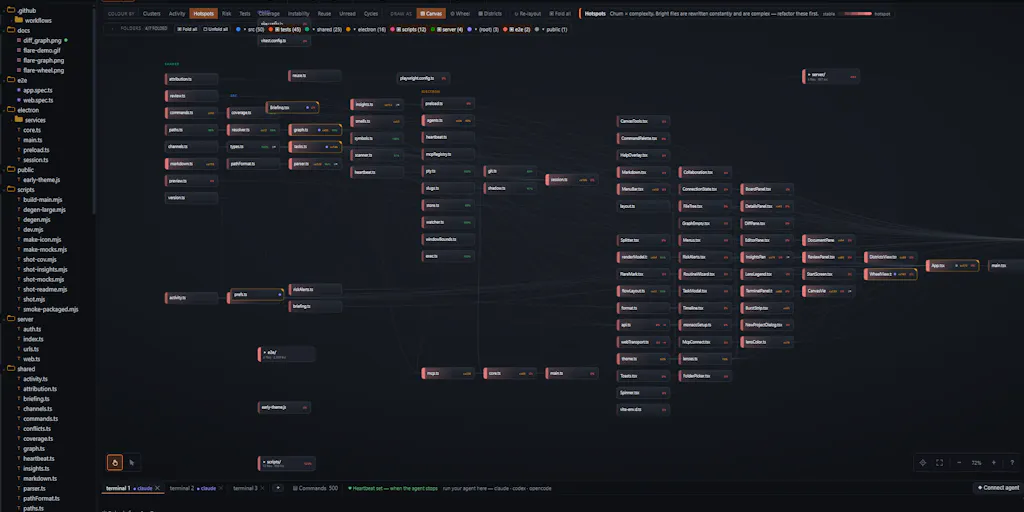
The pitch from AlgoMauro, the maker behind Flare, is deceptively simple. He built it because he kept losing track of what his agents were doing. The standard workflow for anyone using AI coding assistants is a chat transcript. You ask the agent to add a feature, fix a bug, or refactor a module. Twenty minutes later, you have a transcript that tells you what the agent said it was doing. But that transcript doesn’t tell you that one of the files it changed is imported by nine others, or that the one change nothing tests is the one holding the app together. That’s the gap Flare targets. Instead of reading the conversation, it reads the repository. Files become nodes, imports become edges, and the map updates in real-time as the agent writes. Every change is attributed to the specific agent that made it, so when two agents cross over the same file, you see it as a crossing on the map—not as a merge conflict you’ll discover tomorrow morning when your deployment pipeline explodes.
For a cross-border operator, this is immediately relevant. Think about your tech stack. You’re probably running a Shopify store, but you might also have a custom middleware layer that syncs inventory between Shopify and your 3PL’s API. You might have a Python script that pulls daily sales data from Amazon Seller Central and feeds it into a Google Sheet for your finance team. You might have a scraper monitoring Temu or SHEIN for pricing changes. These are the connective tissues of your business, and they’re exactly the kind of code that AI agents are now writing for you. The problem is that these scripts are fragile. They depend on undocumented API endpoints, on the exact structure of a CSV export, on the timing of a webhook. When an AI agent makes a change to one of these scripts, it might not break the script itself. It might break the import that the script depends on. It might change a function signature that another script relies on. The chat transcript won’t tell you that. The repo graph will.
The key insight here is that Flare treats the codebase as a system of relationships, not a collection of files. This is a fundamentally different approach from what you get with GitHub Copilot or even the built-in diff viewers in VS Code. Those tools show you what changed in a file. Flare shows you what changed in the context of the entire project. It’s the difference between seeing a single car crash and seeing the traffic jam that the crash caused on the entire highway. For a solo operator or a small team, this is the difference between catching a problem before it hits production and discovering it after your customers start seeing 404 errors on your product pages.
Why Amazon Sellers Should Care More Than Shopify Ones
If you’re a Shopify merchant, you might be thinking that this doesn’t apply to you because you don’t write code. You use themes, apps, and a page builder. But here’s the thing: the era of no-code is ending. The most successful DTC brands are moving to headless commerce, where the frontend is a custom React app and the backend is a set of microservices. They’re using AI to generate the components, the API routes, and the data models. And they’re doing it without any visibility into the changes. Amazon sellers, on the other hand, are in a different boat. They’re less likely to be running headless storefronts, but they’re more likely to be running automation scripts. The Amazon ecosystem is built on tools like Helium 10, Jungle Scout, and custom scrapers that track Buy Box prices, monitor review velocity, and automate PPC bid adjustments. These scripts are often run by a single person who wrote them years ago and now relies on an AI agent to maintain them. That person is flying blind. Flare gives them a map. It shows them when an agent changes the logic that determines their daily bid adjustments, and it shows them what else that change might affect. For Amazon sellers, the cost of a broken script is immediate and measurable: lost sales, wasted ad spend, and possibly a suspension if the script does something that violates Amazon’s terms of service. The cost of a broken script on a Shopify site is also immediate, but it’s more visible—you’ll see the broken page. The Amazon seller might not see the problem for days.
How Flare Differs From the Incumbent Tools
The obvious comparison here is to GitHub’s Copilot and the various AI coding assistants that have become standard in the developer toolkit. But those tools are about generating code. Flare is about observing the code that’s being generated. It’s a telemetry layer for AI-assisted development. That’s a category that barely exists yet. There are tools like Sentry for error tracking and DataDog for infrastructure monitoring, but those are designed for production environments. They tell you what’s happening with your app when it’s running. Flare tells you what’s happening with your codebase while it’s being written. That’s a different time horizon and a different set of concerns.
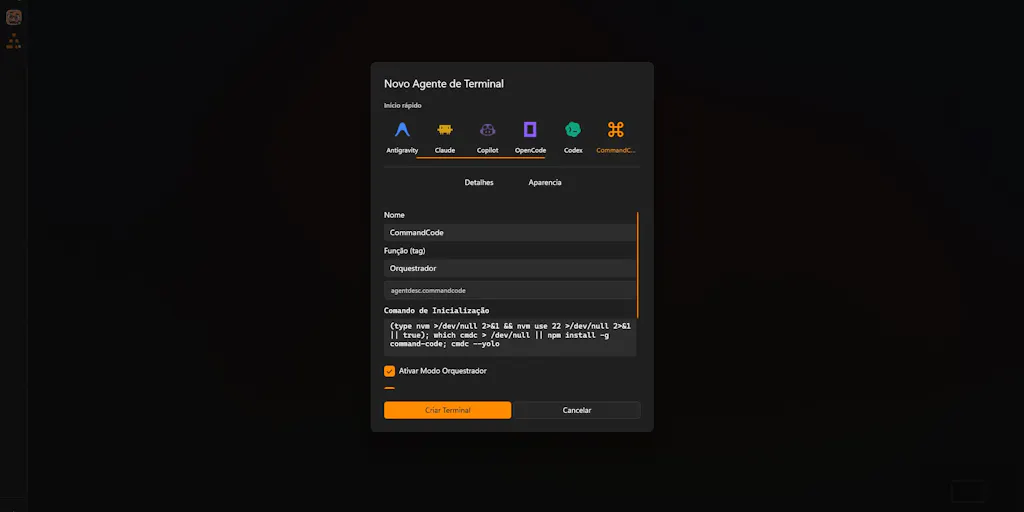
The maker’s description highlights a few specific differentiators. First, the terminal is a real terminal. Flare doesn’t wrap the agent, proxy it, or touch your API keys. You bring your own agent—whether that’s Claude Code, Codex, or something else—and Flare just watches what happens. This is crucial for trust. If you’re running a business, you don’t want another SaaS tool sitting in the middle of your agent’s traffic, especially if that agent has access to your production database or your payment processor credentials. Second, every change burst is snapshotted locally. You can diff and revert one file or the entire tree without involving git. This is a huge deal for operators who aren’t git experts. Git is powerful, but it has a learning curve. Flare’s local snapshots give you a safety net that’s accessible without understanding git rebase or git cherry-pick. Third, the task board is exposed over MCP (Model Context Protocol), so the agent can pick up work and ask questions there. You’re both looking at the project rather than at each other’s messages. This is a subtle but important shift. Instead of the agent sending you a message that you have to interpret, it leaves a note on the task board that’s attached to the actual code. Finally, it all runs on your machine. No account, no telemetry, no cloud. MIT licensed. In an era where every tool is trying to push you to a cloud dashboard and harvest your data, this is a refreshing stance.
Where the Math Breaks
Let’s be realistic about the limitations. Flare is a developer tool, and it requires a certain level of technical sophistication to use effectively. If you’re a non-technical founder who has never touched a command line, this tool is not for you. The maker’s pitch is aimed at people who are already using Claude Code or Codex, which means they’re already comfortable with the terminal. That’s a specific audience. For cross-border sellers, that audience is the technical co-founder, the CTO, or the in-house developer who’s responsible for the glue code that holds your operations together. It’s not the marketing manager or the supply chain lead.
There’s also a question of scale. Flare is designed for individual developers or small teams. The maker mentions that it shows crossings when two agents cross over the same file. That’s a feature for parallel workflows. But if you’re running a large engineering organization with dozens of agents working on a monolithic codebase, the graph could become noisy. The tool doesn’t seem to have sophisticated filtering or aggregation features yet. It’s a map, but it’s a map of the whole territory, not a filtered view that shows you only the areas you care about. For a solo operator, that’s fine. For a team, you might need more.
Finally, there’s the question of adoption. Flare is MIT licensed and runs locally. That’s great for privacy and control, but it also means there’s no hosted version, no team dashboard, no collaboration features beyond the local task board. If you’re working with a remote team, you’d need to figure out how to share the graph or the snapshots. The tool is positioned as a personal tool, not a team tool. That’s a conscious choice, but it limits its utility for larger organizations.
What Cross-Border Sellers Can Borrow From Flare’s Philosophy
Even if you don’t adopt Flare tomorrow, there are three principles from this tool that you should apply to your own operations. The first is local-first visibility. Flare runs entirely on your machine. There’s no cloud, no telemetry, no account. This is a reminder that your operational data—your sales numbers, your inventory levels, your supplier communications—should not be unnecessarily exposed to third-party tools. The more SaaS tools you use, the more attack surface you have. Local-first tools reduce that risk.
The second principle is change attribution. Flare attributes every change to the agent that made it. This is a form of accountability that’s missing from most AI workflows. When you’re using an AI agent to manage your Amazon PPC bids or to draft responses to customer complaints, you should be able to trace every action back to a specific prompt and a specific decision. This isn’t just about debugging. It’s about compliance and trust. If something goes wrong, you need to know what the AI did and why.
The third principle is graph-based thinking. Flare represents the codebase as a graph of nodes and edges. This is a powerful mental model for any complex system. Your supply chain is a graph. Your customer journey is a graph. Your product catalog is a graph. When you’re making a change—whether it’s to your code, your inventory levels, or your shipping routes—you should think about the edges. What else is connected to this node? What will be affected by this change? Flare forces you to think this way about your code. You should force yourself to think this way about your entire operation.
The MCP Integration Is the Sleeper Feature
The most interesting technical detail here is the MCP integration. The maker says the task board is exposed over MCP, so the agent picks up work and asks its questions there. MCP, or Model Context Protocol, is an open standard that allows AI models to interact with external tools and data sources. This is the same protocol that’s powering the new wave of AI-native tools from companies like Anthropic and OpenAI. By exposing the task board over MCP, Flare is positioning itself as a hub for AI-agent coordination, not just a monitoring tool. This is a forward-looking move. The future of development isn’t just about generating code; it’s about orchestrating multiple agents that work together on a shared codebase. Flare is building the infrastructure for that future.
For a cross-border seller, this suggests a broader trend: the tools you use will increasingly be AI-native, and they will be connected through protocols like MCP. Your inventory management system might have an MCP endpoint that allows an AI agent to check stock levels. Your email marketing platform might have an MCP endpoint that allows an AI agent to segment your list. The question is whether you’re building your stack to be AI-ready. Flare is a small example of this, but it points to a larger shift.
Where I’m Skeptical
I’m not going to pretend this is a perfect tool. The biggest issue I see is the adoption barrier. Flare is a tool for developers, and it requires a level of comfort with the terminal and with concepts like import graphs and diff sub-graphs. The average cross-border seller is not a developer. They’re a marketer, a supply chain manager, or a finance person. They might use AI agents to help with listings or customer service, but they’re not running Claude Code locally. So the immediate audience for Flare is narrow.
There’s also a question of long-term value. The maker says that every change burst is snapshotted locally, so you can diff and revert without involving git. That’s useful, but it’s not clear how these snapshots are managed over time. Do they accumulate forever? Is there a storage limit? What happens when your local disk fills up with snapshots? The maker doesn’t specify, and that’s a gap.
Finally, I’m skeptical about the graph visualization itself. The idea of seeing your codebase as a map is compelling, but maps can be misleading. A graph that shows every import relationship in a large codebase can be overwhelming. The maker says the map updates as the agent writes, but he doesn’t show what that looks like in practice. Is it a live view? A heat map? A sequence of frames? The description is vague, and the screenshots on the Product Hunt page are minimal. I’d want to see a demo before I commit to using this as a daily tool.
What I’d Watch / Test Next
If you’re a technical operator who’s already using AI agents to maintain your e-commerce infrastructure, here’s what I’d do this week. First, clone the Flare repository and run it against your most critical script—the one that syncs inventory between your Shopify store and your 3PL. Use it to make a small change, like updating a product description or adjusting a shipping rate. Watch the graph and see if it reveals any dependencies you didn’t know about. Second, set up a second agent to work on a different part of the same script simultaneously. See how the crossing visualization works in practice. Does it actually help you avoid merge conflicts, or is it just a pretty picture? Third, test the revert functionality. Make a change that breaks something, then use Flare’s local snapshot to revert just that one file. Measure how much time you save compared to using git.
For non-technical operators, the takeaway is different. Don’t install Flare. Instead, apply the philosophy. Start asking your AI tools for change logs. When you use an AI agent to update your Amazon listings, ask it to show you exactly what it changed and why. When you use an AI agent to draft an email campaign, ask it to show you the underlying data it used. Demand visibility. The tools that thrive in this new era will be the ones that give you a map of what the AI is doing, not just a transcript of what it’s saying. Flare is an early example of that trend. Watch it, learn from it, and start demanding more transparency from every AI tool you use.