The bookmark graveyard is a supply-chain problem, not a productivity problem
Cross-border sellers run on scavenged intelligence. A supplier’s spec sheet saved at 2 a.m., a competitor’s PDP screenshot from a different marketplace, a TikTok ad you want your creative team to clone, a freight quote buried in a PDF, a factory address pinned on a map. None of it lives in your ERP. All of it lives in a sprawl of screenshots, Safari tabs, WeChat saves, and Notion pages that nobody ever reopens. So when I look at FaveNest, a new capture-and-organize app from maker Dion Purushotham that launched on Product Hunt, I’m not evaluating it as a note-taking toy. I’m asking whether it can become the intake layer for the messy, unstructured research that precedes every sourcing decision, every listing rewrite, and every ad test.
What FaveNest actually is, stripped of launch-day gloss
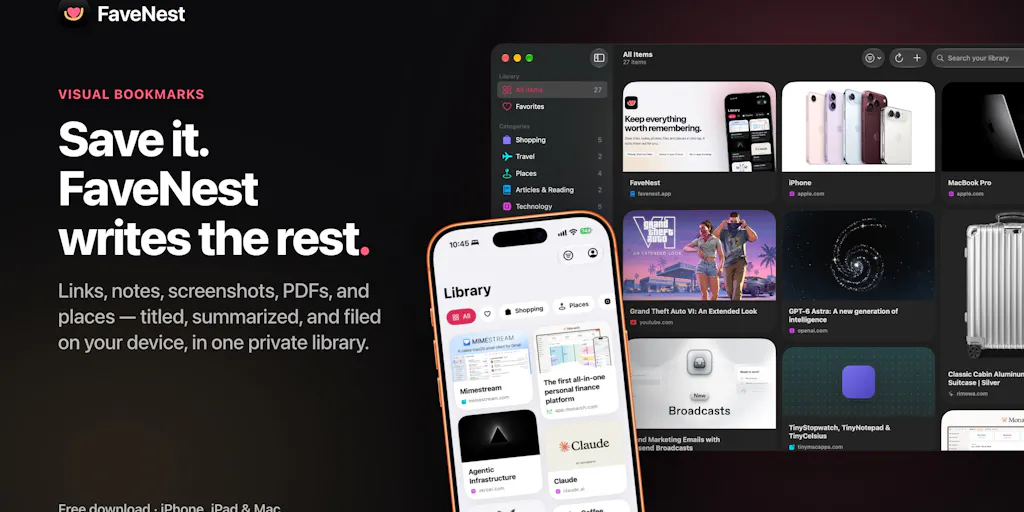
The pitch is deliberately narrow: saving should take one tap, and the tidying should happen without you. You share a link, note, screenshot, PDF, or map pin from any app, or hit the heart in Safari’s toolbar, and it’s saved instantly — including offline. Then Apple Intelligence reads the item and writes a real title, a short summary, a category, and a few tags, all on-device. Search covers the page text, your notes, and the words inside screenshots, either in-app or from Spotlight. Map links render as a map with Look Around; product links retain their price. There’s no account and no FaveNest server — your library syncs through your own iCloud, and the app ships with no analytics, ads, or third-party code. It’s native on iPhone, iPad, and Mac.
Pricing is stated up front: saving, sync, search, and export are free with no cap on saves. Pro covers the AI write-ups plus Places, Shopping, unlimited categories, and all the tints, at $2.99/month or $19.99/year with a 7-day trial, or a $49.99 one-time purchase shared with your family. If your device lacks Apple Intelligence, Pro can route through your own OpenAI or Anthropic key. And if you stop paying, everything Pro already wrote stays.
That last clause matters more than it reads. Most SaaS in this category holds your data hostage the moment a card expires. FaveNest explicitly doesn’t.
The privacy architecture is the actual differentiator
Most “AI bookmark” tools work by shipping your saves to a server, embedding them, and indexing them in a vector store you don’t control. That’s fine for recipe links. It is not fine when the thing you saved is a supplier’s quotation, an unannounced product photo from a factory visit, or an internal margin sheet you screenshotted from your own dashboard. On-device processing plus iCloud sync means the sensitive material never touches a third-party inference endpoint unless you deliberately hand Pro your own OpenAI or Anthropic key. For operators working across jurisdictions with real NDAs, that’s the whole ballgame.
Where it sits against the tools you already pay for
The honest comparison set isn’t Apple Notes. It’s Notion, Obsidian, Raindrop.io, Readwise, and whatever screenshot chaos you currently call a system. Each fails a cross-border operator in a specific way.
Notion is a database you have to feed manually. It’s excellent once data is in, terrible at capture — you’re still copying, pasting, and tagging by hand, which is exactly the labor that kills these systems after three weeks. Obsidian gives you local-first ownership but demands you build the whole pipeline yourself; there’s no native mobile share-sheet capture that feels like one tap, and no OCR search across screenshots out of the box. Raindrop is a strong bookmark manager, but it’s browser-centric and cloud-hosted, which puts supplier documents on someone else’s infrastructure. Readwise is built for reading highlights, not for mixed-media operational intake.
FaveNest collapses capture, OCR, classification, and search into one gesture, and does the classification locally. That’s a meaningfully different shape. It’s not a knowledge base you maintain. It’s an inbox that files itself.
Why Amazon sellers should care more than Shopify ones
A Shopify DTC operator’s research mostly lives inside tools that already have memory: Klaviyo holds your campaign history, Triple Whale holds attribution, your Meta Ads Manager holds creative performance. The unstructured stuff is a smaller slice of the job.
An Amazon seller’s world is the opposite. Competitive intelligence arrives as screenshots of competitor listings, PDFs of supplier certifications, images of packaging mockups, and map pins of factory locations. None of it lives in Seller Central. It lives in phone camera rolls and WeChat threads. That’s precisely the input mix FaveNest is designed for — screenshots with searchable text inside them, PDFs, map pins, and product links that retain price. If you’re running sourcing across Alibaba, 1688, and a handful of trading companies, the ability to Spotlight-search “MOQ 500 silicone” and hit the screenshot you took six weeks ago is not a nice-to-have. It’s the difference between re-negotiating from memory and re-negotiating from evidence.
Why TikTok Shop and Temu operators should care too
If your acquisition engine runs on TikTok Shop or you’re benchmarking Temu pricing weekly, your research velocity is brutal. Creative references, hook screenshots, competitor price changes, UGC you want to brief against — it all arrives as images and links, and it all decays fast. A tool that captures from the share sheet and OCRs the text inside a screenshot means you can find that one ad three weeks later by searching the on-screen copy. That’s a real workflow upgrade over scrolling your camera roll.
What cross-border operators should borrow from this launch
Three transferable lessons, independent of whether you install the app.
One-tap capture beats a beautiful system nobody feeds. The reason your research wiki is empty is friction, not features. Any internal tooling you build — supplier trackers, creative libraries, competitor dashboards — should optimize the capture step first. If logging a data point takes more than a few seconds on mobile, your team won’t do it.
On-device processing is a procurement argument, not a privacy slogan. If you’re evaluating any AI tool that touches supplier quotes, cost sheets, or unreleased product imagery, “where does inference happen” is a legitimate vendor question. FaveNest’s answer — nothing leaves the device unless you supply your own key — is the standard you should hold other vendors to. Your legal team will thank you when an NDA audit lands.
Own your data’s exit. The promise that Pro-written content survives cancellation is unusual and worth demanding elsewhere. When you negotiate with any SaaS vendor, ask what happens to generated metadata if you churn. If the answer is “it’s gone,” price that into your switching cost.
Where the math breaks
A few hard limits I’d flag before you restructure anything around this.
The maker confirmed in the launch thread that the app works with files up to 100MB, but title and summary generation currently reads only the first 100,000 characters. For a 40-page supplier agreement or a dense compliance PDF, that means the classification is based on the opening section, not the whole document. The maker says expanding this is under consideration. Until it ships, don’t treat FaveNest as your contract-analysis layer — treat it as your capture-and-find layer.
There’s also no import path yet. Asked directly whether you can bring in an existing bookmark library from Safari or a read-later app, the maker said imports are “high up on the roadmap” and coming soon. That means today you start from zero. For an operator with three years of accumulated research in Raindrop or a browser, that’s a real migration tax, and it’s the single biggest reason to wait if you’re mid-quarter.
And the platform lock is real. Native iPhone, iPad, and Mac only. If your sourcing team runs Android and Windows — which many do — this is a non-starter regardless of how good the on-device story is. No Android or web client was mentioned in the launch material.
The question nobody asked on launch day
Thread commenters raised good points — Simon Clark asked about large PDFs, Stanly Thomas asked how a long PDF surfaces after processing and whether you can jump back to a marked page, Alexandra Protsenko asked about imports, and Noah Anderson and Pranav Bhatia both flagged the no-account setup and the inspiration-capture use case. But nobody asked the operator question: how does this interact with shared team research? A single-player, iCloud-synced library is great for a founder. It’s not obviously great for a five-person sourcing team that needs a common view of supplier intel. Family Sharing is mentioned for the one-time purchase, but that’s a consumer feature, not a team collaboration model. If you’re evaluating this for a team, assume single-player until proven otherwise.
What I’d watch / test next
This week, run a two-hour experiment before you commit anything. Pick your messiest active research thread — a sourcing negotiation, a competitor teardown, or a creative swipe file — and capture every artifact into FaveNest as it arrives: screenshots, PDFs, product links, map pins. Then, 48 hours later, try to answer three real questions from search alone: what was that supplier’s stated MOQ, what did the competitor’s price look like last Tuesday, and where is that factory. If Spotlight surfaces all three, the tool has earned a place in your stack. If it doesn’t, you’ve learned your capture discipline is the bottleneck, not the software.
Second, pressure-test the 100,000-character limit with one actual document you care about — a supplier agreement or a compliance certificate — and see whether the generated title and category are useful or misleading. Third, audit your current bookmark or read-later tool for export capability now, before you need it, so you’re ready to migrate the day imports ship. And if your team is on Android or Windows, don’t waste the evaluation cycle — wait for a platform commitment, or look at local-first alternatives that already cover your devices.