Why a Mac Cursor App Should Matter to People Who Sell Things
Let me be direct: if you sell on Amazon or run a Shopify store, a macOS cursor customization app is not the product you were waiting for today. But that’s exactly why it’s worth your attention for twenty minutes. The cross-border e-commerce graveyard is full of sellers who built “better” products — better specs, better materials, better pricing — and still lost to competitors who understood presentation, delight, and the psychology of tiny recurring purchases. Cursor Craft v2 is a masterclass in the latter. It’s a product that sells a feeling of personalization for a device you stare at eight hours a day, and it’s being rebuilt around user feedback at a speed most DTC brands can’t match. If you can read this launch as a case study in product-market fit, iteration velocity, and the economics of micro-niches, you’ll walk away with ideas you can apply to your own catalog this week.
The Problem: Your Most-Used Interface Element Is Ugly, and Nobody’s Fixing It
The maker, Birang, frames the original thesis simply: your Mac is beautiful, but your cursor usually stays the same, even though it’s something you use all day. That’s the entire pitch, and it’s honest. The cursor is the one element of your operating system that you interact with more than any icon, window, or menu — and for most users, it’s been a static white arrow since 1984. The problem isn’t that users are desperately unhappy about this. It’s that they’ve never been offered a better option, and once they see one, the upgrade feels obvious.
This is the same dynamic that drives so many successful cross-border products. Nobody wakes up needing a bamboo cutting board with a juice groove. But once they see it on their feed, the flat cutting board they own suddenly feels inadequate. Cursor Craft is selling that same manufactured dissatisfaction, but with a much lower price point and zero shipping costs. For sellers, the lesson is in how the problem is framed: not as “your cursor is broken” but as “your cursor is leaving aesthetic potential on the table.” That’s a framing that works across categories, from phone cases to desk organizers.
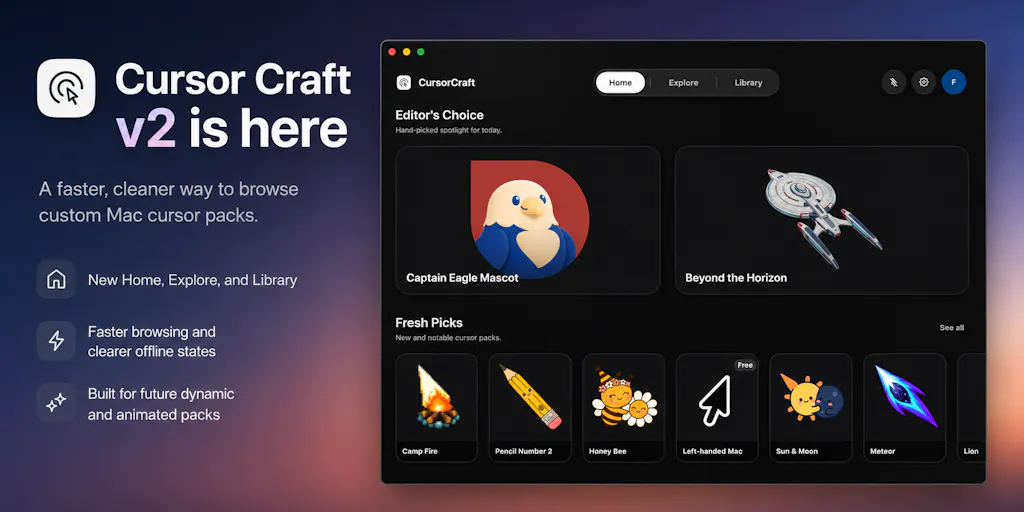
The v2 rebuild addresses the friction points from the first launch: faster browsing, clearer pack pages, better previews, and a smoother way to find and apply cursor sets. The new Home screen highlights hand-picked packs and recent releases, Explore lets you filter by category and preview before applying, and Library keeps purchased packs together. The pack page itself has been simplified so preview, price, description, and the apply button are all on one screen. This is the unglamorous work of e-commerce: reducing steps to purchase, clarifying the product image, and making the catalog navigable. It’s the same playbook you’d apply to a Shopify collection page or an Amazon listing — and it’s worth noting that Cursor Craft is applying it to a native Mac app, not a web store.
Why Amazon Sellers Should Care More Than Shopify Ones
Here’s where the cross-border lens gets sharper. On Amazon, your listing is your storefront, and you have almost no control over the surrounding chrome. You can’t redesign the search results page, you can’t change the buy box layout, and you’re competing against a dozen identical products on the same page. Cursor Craft’s entire value proposition is control over a piece of the interface that Apple left untouched. That’s a fundamentally different kind of product — one where the creator owns the full experience from discovery to application. Shopify sellers have more of that ownership, but they still operate inside a browser. Cursor Craft is native, which means it can do things web apps can’t: render cursors with more control, cache packs offline, and eventually support dynamic and animated cursors that update in real time. For Amazon sellers, the takeaway is brutal: if you’re competing on a platform where you can’t control the interface, you need to win on the product itself or the listing creative. Cursor Craft is a reminder that the most defensible products are the ones where the experience is the product.
How It Differs from the Incumbents
The cursor customization space on macOS is not crowded, but it’s not empty either. The obvious comparison is to apps like Mosaic or BetterTouchTool, which have offered cursor customization as a side feature for years. There’s also the open-source route — sites like Cursor.cc or RealWorld Cursors that offer free cursor packs you can download and install manually. What Cursor Craft does differently is treat cursors as a curated, purchasable catalog rather than a file dump. The difference is the same as between a marketplace and a boutique.
The launch page doesn’t disclose pricing for individual packs, but the model is clear: free app, paid packs, with some free options presumably available. This is the classic freemium tier that DTC brands use to acquire users cheaply and monetize the committed ones. The curation angle is the key differentiator. Instead of 10,000 random cursors of varying quality, Cursor Craft offers hand-picked packs and recent releases on the Home screen. That’s a quality signal that free libraries can’t match, and it’s exactly what a cross-border seller should study: curation is a feature, not a filter.
The other difference is technical. The maker notes that v2 includes improved cursor rendering and “a better foundation for dynamic and animated cursor packs.” This is the moat. Static cursors are a commodity — anyone can ship a PNG. Dynamic cursors that update over time or react to changing information are a technical challenge, and they’re the kind of feature that keeps users coming back. The first dynamic packs are already live: Year Progress and Date. These are small, but they demonstrate the direction. For sellers, the lesson is about product roadmaps: don’t just ship a better version of what exists; build the infrastructure for what doesn’t exist yet.
What Cross-Border Sellers Can Borrow from This Launch
Let’s get practical. There are four specific things in this launch that you can steal for your own operation this quarter.
First, the feedback loop. The maker asked for feedback on the first launch and then rebuilt the app around it. That sounds obvious, but most sellers don’t do it. They launch a product, get reviews, and move to the next SKU. Cursor Craft’s v2 changes — faster browsing, clearer pack pages, better previews — are all direct responses to user complaints. For a DTC brand, this means actually reading your reviews and changing your product, not just your ad copy.
Second, the preview problem. One of the biggest friction points in any online purchase is uncertainty: will this look good in my home? For a cursor, the equivalent is: will this look good on my screen? The v2 pack pages put preview, price, description, and apply button on the same screen. That’s the digital equivalent of a 360-degree product photo or a size guide. Every cross-border seller should audit their listings and ask: is the buyer’s key question answered on the first screen, or do they have to scroll or click to find it?
Third, the offline and error states. The v2 release mentions “clearer offline and error states” and “cached purchased packs and categories when available.” This is backend reliability work that users rarely thank you for but punish you for when it’s missing. For sellers, this translates to your fulfillment and customer service: what happens when a package is delayed or a product arrives damaged? The brands that win are the ones that make the error state clear and the recovery path smooth.
Fourth, the dynamic cursor bet. The maker is betting that users will want cursors that update over time or react to information — a cursor that shows the year progress, or the date. This is a bet on engagement over utility. A static cursor is pure utility; a dynamic cursor is a tiny piece of ambient information that keeps the user looking at your product all day. For sellers, the equivalent is the subscription model or the consumable refill: how do you turn a one-time purchase into a recurring touchpoint?
Where the Math Breaks
Let’s be honest about the economics. This is a niche product in a niche category. The total addressable market is “people who own a Mac, care about aesthetics, and are willing to pay for a cursor.” That’s a small slice of a small slice. The pricing model — free app, paid packs — means the revenue per user is low, and the maker is dependent on volume or on premium dynamic packs that justify higher prices.
For cross-border sellers, the warning is clear: don’t build a business on a niche this small unless you have a path to scale. Cursor Craft’s path might be expanding to Windows, or licensing packs to enterprise users, or becoming the default cursor store for a platform like Setapp. But as it stands, this is a passion project with a revenue stream, not a growth business. The lesson is to be honest about your market size before you invest heavily in inventory or ads.
Where My Judgment Says It Falls Short
The launch is polished, and the maker is responsive — the comment section shows a conversation about screen recording tools and a quick test with QuickTime, with a video recording to prove the cursor works as expected. But there are gaps.
First, the animated cursor risk. One commenter, Asad M., makes a sharp point: a cursor is meant to disappear into your hand, and motion pulls attention back onto it. A pack that looks great in a store preview can be exhausting an hour into real work. The maker’s response is to suggest packs that animate on click and sit still while idle — that’s the right direction, but it’s not clear if the current infrastructure supports that level of control. For sellers, this is a reminder that novelty wears off fast. A product that’s fun for five minutes needs to be comfortable for five hours, or it won’t get repeat use.
Second, the platform risk. Cursor Craft is macOS-only, which means it’s betting on Apple’s continued tolerance for cursor customization. Apple has historically been restrictive about system-level customization, and there’s no guarantee that a future macOS update won’t break the rendering foundation the maker is building on. For sellers, this is the classic platform risk of selling on a marketplace you don’t control — the same risk Amazon sellers live with every day.
Third, the discovery problem. The Product Hunt launch is a spike, but sustained discovery is harder. There’s no obvious content marketing engine, no community, no social presence beyond a Twitter/X account. The maker is relying on the catalog itself to sell. For sellers, the lesson is that a great product without a distribution strategy is a hobby. Cursor Craft needs to answer: where do Mac users discover new cursors? If the answer is “the App Store” or “Product Hunt,” that’s a fragile funnel.
What I’d Watch / Test Next
If you’re a cross-border operator, here’s what I’d do this week, borrowing from this launch:
Audit your listing’s first screen. Open your best-selling product on Amazon or your Shopify store. Does the first screen answer the buyer’s key question — size, color, fit, use case — or do they have to scroll? If it’s the latter, redesign the creative so the answer is above the fold. Cursor Craft’s pack page is a model of this: preview, price, description, and apply button on one screen.
Test a “dynamic” element in your product. Not a literal animated cursor, but a product that changes with time or context. A coffee mug that reveals a design when hot. A notebook with a date-stamped cover. A supplement pack with day-of-the-week labels. The dynamic cursor is a bet on engagement; find the equivalent for your category.
Read your reviews for friction patterns. The maker rebuilt the app around feedback about speed, previews, and navigation. Do the same for your product. What are the top three complaints? Fix those before you launch a new SKU or scale your ads.
Watch the dynamic cursor experiment. If Cursor Craft’s dynamic packs gain traction, it’s a signal that users are willing to pay for ambient, information-rich product details. If they flop, it’s a signal that novelty doesn’t sustain. Either way, you’ll learn something about your own customers’ appetite for “alive” products.
The takeaway from this launch isn’t about cursors. It’s about the discipline of listening to users, the value of curation, and the courage to bet on a feature that doesn’t exist yet. Those are the same muscles you need to build a brand that survives beyond the first product. Cursor Craft might be a small product, but it’s built the right way — and that’s worth studying, no matter what you sell.


