Why a Phone-Sized Control Deck Matters More Than Another AI Dashboard
Every cross-border operator I know is drowning in the same paradox: we’ve automated the boring stuff, only to discover that the automation itself now demands constant babysitting. Your Amazon repricing tool fires off a 2 AM alert. Your TikTok Shop ad account flags a payment issue. Your Shopify inventory sync decides to throw a tantrum right as your bestseller runs out of stock. The tools were supposed to give you back your evenings, but instead they’ve turned you into a glorified notification responder — tethered to a laptop, refreshing dashboards, waiting for something to break. That’s the real bottleneck in modern e-commerce operations, and it’s not a software problem. It’s an interface problem. We’re still using a keyboard-and-mouse paradigm designed for the 1980s to supervise AI agents that work at machine speed. So when I saw CTRL Micro launch on Product Hunt, I didn’t see another gadget — I saw a potential answer to a question every serious operator should be asking: how do I supervise my automated stack without chaining myself to a desk?
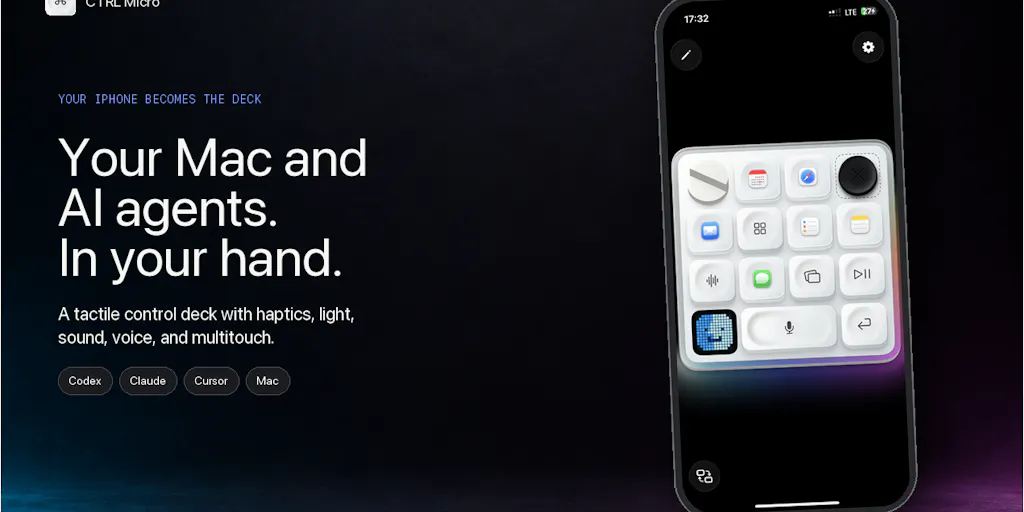
The pitch is deceptively simple. Instead of buying dedicated hardware that’s perpetually out of stock, the maker — Andrew Flores — built an iPhone app that turns the phone already in your pocket into a physical control deck for AI coding agents like Codex, Claude, and Cursor. It pairs with your Mac, shows you a live desktop view, lets you move the pointer, click, type, dictate, and — most importantly for the e-commerce crowd — feel when an agent needs attention through haptic feedback. No account required, end-to-end encrypted remote access, and a free tier that covers full Mac controls. It’s not built for e-commerce at all. That’s exactly why I think it’s worth your attention.
The Problem: Your Automation Stack Has Become a Second Job
Let me paint a picture that will feel uncomfortably familiar. You’ve invested in the full modern toolbelt: Helium 10 for keyword research, Klaviyo for email flows, some AI-powered listing optimizer that rewrites your product titles while you sleep. You’ve got a Shopify storefront, an Amazon Seller Central account, maybe a TikTok Shop experiment running. And you’ve started dabbling with AI agents — the ones that draft your customer service responses, analyze your ad spend, or generate product descriptions. The theory was that these agents would be your tireless employees. The reality is that they’re more like interns: capable, but requiring constant supervision. They get stuck. They ask for approval. They produce output that’s 90% right and 100% unusable without a human check.
The current solution to this problem is a mess. You keep a browser tab open with the agent’s chat interface. You toggle back and forth between that tab and your actual work. You miss notifications because you’re in a different window. You approve something you shouldn’t have because you were half-paying attention. And God forbid you step away from your desk — the agents either stall waiting for input or run wild making decisions you’ll regret. CTRL Micro’s core insight is that this supervision work shouldn’t require your full visual attention. It should be something you can feel. The maker specifically highlights how the Apple Taptic Engine allows different haptic patterns for different events — a buzz for “task complete,” a different buzz for “task failed,” a third for “needs your approval.” One commenter on the launch page nailed it: “A different buzz for done vs failed is the bit I’d actually feel all day, without looking at the screen.”
Now translate that to e-commerce. Your repricing tool catches a competitor undercutting you at 3 AM — buzz. Your inventory management system flags a stock discrepancy — buzz. Your ad account hits a spending threshold — buzz. You don’t need to see it. You need to feel it, glance at your phone, and decide whether it’s worth interrupting your evening. That’s a fundamentally different relationship with your automation stack, and it’s one that dedicated hardware like the Codex Micro (which the maker notes is out of stock) was trying to solve — but with the obvious drawback that you have to buy, carry, and maintain another physical device.
Why Amazon sellers should care more than Shopify ones
Here’s a hot take: this kind of ambient control interface matters more for Amazon FBA operators than for Shopify DTC brand owners. Why? Because Amazon’s ecosystem is built on time-sensitive, irreversible actions. A price change that goes wrong can cost you the Buy Box for days. An inventory sync error can trigger a stockout that tanks your ranking. A policy violation notification that goes unread for four hours can escalate into a listing suspension. The stakes are higher, the windows are shorter, and the consequences are stickier. Shopify sellers, by contrast, have more forgiving systems — you can catch a fulfillment error in the morning and fix it before it ships. Amazon doesn’t give you that luxury. So when you’re thinking about whether a tool like this is worth the setup effort, weight it against the cost of a single missed Amazon notification. The math usually works out in favor of the tool.
What CTRL Micro Actually Does — and How It Differs From the Alternatives
Let’s get specific about the feature set, because there’s more here than just haptic alerts. The full list from the launch includes: monitoring Codex, Claude, and Cursor with attention alerts; opening tasks, reading responses, answering prompts, and acting on approvals; a live Desktop View of your Mac; trackpad and keyboard surfaces for pointer control, scrolling, clicking, and typing; dictation into desktop apps with local transcription; and both nearby and remote connections with end-to-end encryption. The free tier covers “full Mac controls,” with agent management available as an upgrade. The remote connection uses Apple Bonjour for nearby connections and an end-to-end encrypted relay for remote, per the maker’s response to a commenter asking about the protocol.
Now, how does this stack up against what’s already out there? The obvious comparison is dedicated hardware decks like the aforementioned Codex Micro, or the broader category of Stream Deck-style devices from Elgato. Those are great for tactile shortcuts, but they’re static — you program them once and they do the same thing forever. They don’t dynamically reflect the state of an AI agent’s workflow. They can’t show you a live desktop view. And they’re physical objects you have to buy, which means they’re subject to supply chains, stockouts, and the general hassle of acquiring hardware. CTRL Micro’s bet is that the iPhone you already own is a superior control surface — it has a screen, a touch interface, a Taptic Engine, a microphone, and a network connection. It’s a general-purpose computing device that’s already in your pocket. The only thing missing was the software to turn it into a control deck. That’s a genuinely different approach.
The other comparison is software-only remote desktop tools. TeamViewer, AnyDesk, Chrome Remote Desktop — these all let you control your Mac from your phone, and they’re all free or cheap. But they’re designed for occasional access, not ambient supervision. They require you to actively open the app, connect, and navigate. They don’t sit in the background and buzz you when something needs attention. They don’t integrate with agent workflows. CTRL Micro is trying to occupy a different niche: not “remote control when you need it,” but “ambient presence when you don’t want to be at your desk.” That’s a meaningful distinction, and it’s why I think the haptic pattern differentiation matters more than the remote desktop features.
Where the math breaks
Let’s be honest about the limitations before we get too excited. The most obvious one is platform lock-in: this is an iPhone and iPad app paired with a Mac host. If your operation runs on Windows — and a lot of e-commerce back-office work still does, especially for sellers who use Windows-based tools for accounting or logistics — this tool is useless to you. The maker doesn’t disclose any Windows or Android plans, so as of now, this is an Apple-only play. The second limitation is that the agent integrations are specifically for coding agents: Codex, Claude, and Cursor. If your AI stack is built around e-commerce-specific tools — say, a Jasper subscription for copy or a Copy.ai workflow for product descriptions — there’s no integration here. The tool is solving a problem for developers and technical operators, not for the average Amazon seller who’s using AI tools that don’t expose an agent API. Third, the “free with upgrades” model means the features you actually want — the agent management, presumably the most useful part for e-commerce supervision — are likely behind a paywall. The maker says you can “test the agent management and upgrade only if you need to,” but pricing isn’t disclosed. That’s a red flag for budget-conscious operators who want to know the total cost of ownership before they invest setup time.
What Cross-Border Sellers Can Actually Borrow From This
Here’s where I shift from product review to strategic lesson. Even if you never download CTRL Micro — and honestly, if you’re not a Mac user running coding agents, you probably shouldn’t — there are three ideas worth stealing for your own operation.
First, the concept of ambient supervision. The most successful e-commerce operators I know aren’t the ones who work the hardest; they’re the ones who have built systems that surface the right information at the right time without demanding constant attention. CTRL Micro’s haptic approach is a physical manifestation of that principle. You can apply it without the app: set up your Slack alerts so that critical notifications come through with a distinct mobile notification sound, while routine updates are silent. Configure your Zapier or Make workflows so that only exceptions trigger alerts, not normal operations. The goal is to reduce the noise so that when something buzzes, it actually means something.
Second, the “use what’s in your pocket” philosophy. So many e-commerce operators fall into the trap of buying specialized hardware or software for problems that can be solved with tools they already own. Your phone is a powerful computer with a camera, a microphone, a screen, and a network connection. Before you buy a dedicated barcode scanner, try using your phone’s camera with a scanning app. Before you buy a dedicated hotspot device, check if your phone plan includes tethering. The CTRL Micro approach — repurposing the iPhone as a control deck — is a reminder that the marginal cost of software is often zero, while the marginal cost of hardware is always positive.
Third, the privacy-by-design architecture. The maker emphasizes that screen, input, command, and dictation content are processed locally and encrypted, and that no account is required. That’s a selling point for a reason: in an era where every tool wants your data, a tool that explicitly doesn’t is refreshing. For cross-border sellers, this matters doubly. You’re handling customer data, payment information, and proprietary business logic. Every third-party tool you add to your stack is a potential liability. When you evaluate new SaaS, ask the same question CTRL Micro’s architecture answers: does this tool need my data, or is it just collecting it because it can? The tools that don’t need your data are the ones worth trusting.
The Game Boy factor
One detail from the launch that caught my eye: the maker specifically asks for feedback on the “Game Boy-style Desktop View.” That’s a deliberate design choice, and it’s smarter than it sounds. A retro, low-resolution view of your desktop isn’t a limitation — it’s a feature. It forces you to see the big picture without getting lost in details. When you’re supervising an AI agent, you don’t need to read every line of code or every word of a response. You need to see that something happened, assess whether it looks right, and either approve or intervene. A simplified view reduces cognitive load. That’s a lesson for e-commerce dashboards too: most of the analytics tools we use show us too much, not too little. The best dashboards show three numbers, not thirty. When you’re building your own reporting, ask yourself what the Game Boy version would look like.
My Judgment: Where It Works, Where It Falls Short
Let me give you my honest read. For the specific use case CTRL Micro is built for — supervising coding agents from an iPhone — this looks genuinely useful. The haptic differentiation, the local processing, the no-account-required architecture, and the free tier for basic controls all add up to a product that respects your time and your privacy. The maker’s decision to build on the iPhone rather than waiting for dedicated hardware to come back in stock is pragmatism in its best form. If you’re a developer or a technically-minded operator running Codex, Claude, or Cursor, this is probably worth a download.
For the broader cross-border e-commerce audience, though, the value is more indirect. The tool doesn’t integrate with Amazon Seller Central, Shopify, TikTok Shop, or any of the other platforms we actually run our businesses on. It doesn’t monitor repricing tools, inventory systems, or ad platforms. It’s solving a problem that’s adjacent to ours — supervising AI agents — but not the same problem. The coding agents it supports are the tools we use to build software, not the tools we use to run our stores.
That said, the direction is right. The next generation of e-commerce tools will increasingly be AI agents that handle routine tasks with human oversight. When that happens, we’ll need interfaces like this — ambient, tactile, attention-efficient — to supervise them. CTRL Micro is early to that future, and even if it’s not the tool that wins, the design principles it demonstrates will be. The haptic feedback model alone is worth studying. The local-processing privacy architecture is worth demanding from every vendor you work with. The “use what’s in your pocket” philosophy is worth applying to your own tooling decisions.
The fall short part is predictable: platform lock-in, limited agent integrations, undisclosed pricing for the features that matter most, and a fundamental mismatch with the e-commerce stack. If you’re not a Mac user running coding agents, this tool isn’t for you — not yet, anyway. The maker’s roadmap is not disclosed, so we don’t know if e-commerce integrations are coming. My guess is they’re not, at least not soon. This is a developer tool, built by a developer, for developers. The e-commerce application is a stretch.
What I’d Watch / Test Next
If you’re intrigued but not ready to commit, here’s what I’d do this week.
First, download the app and connect it to your Mac — it’s free, and the setup cost is minimal. Even if you don’t run coding agents, test the remote desktop functionality and the haptic alerts. Get a feel for what it’s like to have your Mac’s status in your pocket. You might discover that the ambient awareness alone is worth the setup time. If you do run any of the supported agents, test the agent management features and see if the haptic differentiation actually changes how you work. The maker specifically asked for feedback on the Desktop View, so if you try it, tell them what you think.
Second, audit your own notification stack. List every tool that sends you alerts — Amazon, Shopify, your ad platforms, your shipping software, your accounting tools. Categorize each alert as “needs immediate action,” “can wait,” or “informational.” Then configure your tools so that only the first category makes noise. This is the ambient supervision principle applied without any new hardware.
Third, when you evaluate your next SaaS purchase, ask the privacy question: does this tool need my data, or is it just collecting it? CTRL Micro’s no-account, local-processing architecture sets a bar that most e-commerce tools won’t meet. That’s not necessarily a reason to reject them — some tools genuinely need your data to function — but it’s a reason to demand a clear answer. The tools that can’t explain why they need your data are the ones that will eventually leak it.
Finally, keep an eye on this category. The intersection of AI agents and e-commerce operations is where the next big efficiency gains will come from. Tools like CTRL Micro are the early experiments. Some will fail, some will pivot, and some will get acquired and integrated into the platforms we already use. The operators who understand the design principles — ambient supervision, attention efficiency, privacy by default — will be the ones who benefit when the mature versions arrive. Don’t wait for that. Start experimenting now, with whatever tools are available. The future of e-commerce operations isn’t more dashboards. It’s fewer, smarter, and more tactile ones.