The real reason a Mac-native email builder should matter to cross-border operators
Email is still the highest-margin channel most cross-border sellers under-invest in, and the reason is rarely strategy — it’s production drag. A Klaviyo flow for a Shopify store, a post-purchase sequence for Amazon FBA buyers you’re trying to pull off-marketplace, a TikTok Shop win-back blast: each one needs a template, and each template needs a brand-consistent build. That build step is where small DTC teams lose days. So when a tool shows up that treats email design as something both a human and a coding agent can edit in the same workspace, I pay attention — not because it’s novel, but because it attacks the exact bottleneck I see operators complain about most. Maildun for Mac, launched by maker Dunn, is worth dissecting through that lens.
What the product actually is, stripped of launch-page gloss
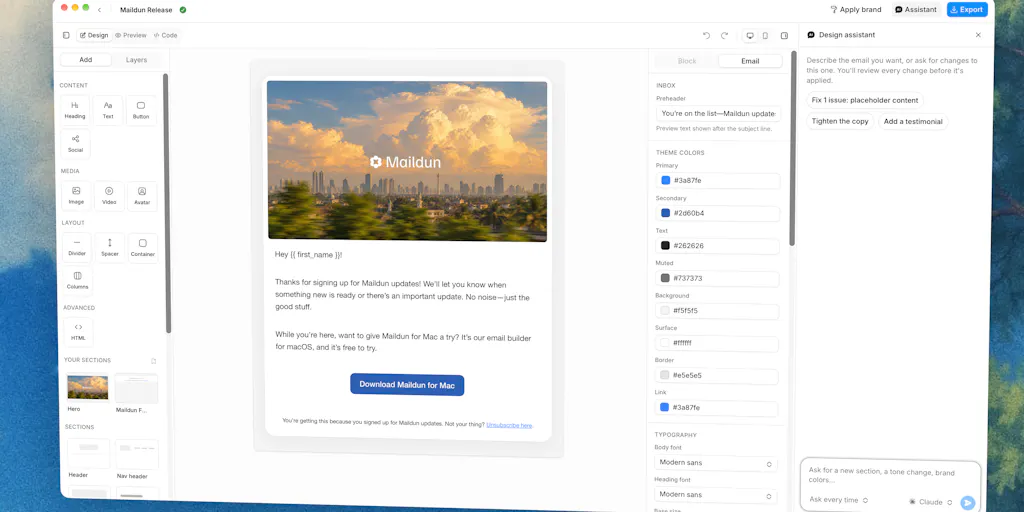
Maildun for Mac is an agentic email builder that runs natively on macOS. It’s built with Tauri 2, React 19, and shadcn/ui, and deliberately reuses the same UI kit, theme tokens, fonts, and icons as the existing Maildun web product — so if you already use Maildun, the desktop app feels identical. The maker’s framing is the interesting part: design by hand when you want control, hand it to AI when you don’t, and let your coding agents work on the same designs.
Concretely, the feature set breaks into four buckets:
- Manual editing: a drag-and-drop editor with blocks, sections, an inspector panel, and desktop/mobile preview.
- AI editing: bring your own Claude, ChatGPT, Gemini, or Grok API key. The assistant edits through the editor’s validated tools, and every change surfaces as a proposal you accept or reject — nothing silently mutates your template.
- Agent editing over MCP: flip on the built-in MCP server and Claude Code, Codex, Claude Desktop, or Cursor can list, create, and edit emails in your active workspace, complete with its brand assets and media. No Node.js required.
- Workspaces and brand: one workspace per client or product, each with its own designs, brand, and media storage. Brand includes colors, fonts, a Markdown brand guide, and component styles that behave like shadcn/ui for email — button style, shape, size, image corners, cards, dividers. New designs start on-brand, “Apply brand” restyles existing ones, and the assistant respects the guide.
There’s also a saved-sections system (save a header or footer once, reuse it anywhere in the workspace), media handling that uploads to your own Cloudflare R2 or Amazon S3 bucket with images resized and converted to WebP locally on your Mac first, and a publish-to-Maildun flow that shares a design as a public or draft template on maildun.com — republishing updates the same template so the link stays stable.
That’s the factual recap. Now the part that matters for anyone running cross-border commerce.
Where this fits against the tools you already pay for
The incumbents Maildun is implicitly competing with
If you’re a Shopify operator, your email stack is probably Klaviyo or Omnisend, with templates either hand-built in their drag editors or pulled from their template libraries. If you’re an Amazon FBA brand owner, you’re likely using Amazon’s own Buyer-Seller Messaging plus a third-party layer like Helium 10’s follow-up tooling or a standalone ESP. If you’re running a DTC brand with an engineering-adjacent team, you might be on Resend, Postmark, or SendGrid for transactional sends, with design handled separately in Figma and exported.
Maildun for Mac doesn’t replace any of those send layers. It replaces the design layer — the part where a Figma file gets translated into HTML that survives Gmail, Outlook, and Apple Mail. That’s a narrower claim than “email platform,” and it’s a more honest one.
Why the “bring your own key” model is a bigger deal than it looks
Most AI email tools in 2025 bundle inference into a subscription and charge per generation. Maildun’s model is the opposite: you supply your own Claude, ChatGPT, Gemini, or Grok key. For a cross-border operator, that has three practical consequences.
First, cost transparency. You see exactly what AI generations cost because they hit your own API bill. Second, model choice. If Anthropic ships a better model next month, you switch without waiting for the vendor. Third, and most underrated: data residency and vendor risk. If you’re selling into the EU and your email copy touches customer data, knowing which model provider processes your prompts is a compliance question, not a preference. Bringing your own key means you can answer that question.
The tradeoff is obvious too: you now manage API keys, rate limits, and spend across multiple providers. For a solo operator, that’s friction. For a team running twenty client workspaces, it’s arguably the correct architecture.
Why Amazon sellers should care more than Shopify ones
This is the counterintuitive take. Shopify merchants already have decent template tooling inside Klaviyo and Omnisend. The drag editors are competent, the brand kits are functional, and the ecosystem is mature. The marginal gain from a Mac-native builder is real but incremental.
Amazon FBA sellers are in a different situation. Amazon’s messaging system is deliberately constrained — no marketing emails, no promotional content, strict templates. The workaround most brand owners use is to capture the buyer off-Amazon via insert cards, then run lifecycle email through an ESP. That means the email templates you build are often the first branded touchpoint a customer sees from you as a company rather than as an Amazon listing. Brand consistency there isn’t cosmetic; it’s the whole point of the off-Amazon strategy.
A tool that lets you define a brand guide once, apply it across every template, and have an AI assistant respect that guide while drafting is meaningfully more useful to an Amazon-to-DTC migration than to a Shopify store that’s already been running Klaviyo for three years. The same logic applies to Temu and SHEIN sellers trying to build a direct relationship with buyers who currently only know them as a marketplace SKU.
Where the MCP angle gets interesting for operators with dev resources
The MCP server is the feature I’d watch most closely. If you have a developer — or you are one — the ability to have Claude Code or Cursor list, create, and edit emails in a workspace means you can script template generation. Imagine a workflow where your product catalog lives in a database, and every time you launch a new SKU on TikTok Shop, an agent generates a matching launch email using the workspace’s brand guide and saved sections. That’s not speculative; it’s the literal capability described.
The “no Node.js needed” detail is a small but telling signal. It means the MCP server ships inside the app, not as a separate runtime you install. For operators who’ve tried to wire up MCP tooling before and hit dependency hell, that’s a genuine quality-of-life improvement.
The media pipeline is quietly the most operator-friendly feature
Uploading to your own Cloudflare R2 or Amazon S3 bucket, with images resized and converted to WebP on your Mac before upload, is the kind of detail that only matters if you’ve been burned by it. Most email builders host your images on their CDN, which means your templates break if you churn, and your image URLs are tied to a vendor. Owning the bucket means your assets survive any tool migration. The local WebP conversion means you’re not paying egress on oversized PNGs and you’re not shipping 2MB hero images to mobile inboxes.
For anyone running email at volume — say, a 50,000-subscriber list with weekly sends — that’s a real cost and deliverability consideration, not a checkbox feature.
What cross-border sellers can borrow from this launch
Even if you never install Maildun, the product’s design decisions encode lessons worth stealing.
Treat brand as a machine-readable spec, not a PDF
The Markdown brand guide is the smartest thing in the feature list. Most brands have a brand PDF that no tool can read. A Markdown guide that both humans and AI assistants can parse is a different artifact entirely — it’s a spec. If you’re running multiple storefronts (Shopify for DTC, Amazon for marketplace, TikTok Shop for social), you likely have subtle brand drift between them. A single machine-readable brand guide that every template generator references is how you stop that drift.
Separate the design layer from the send layer
Maildun doesn’t try to be your ESP. It designs, then hands off. That separation is worth copying in your own stack. If your email templates are locked inside Klaviyo’s editor, migrating to a different ESP later means rebuilding everything. If they live as portable HTML you can export, you keep optionality. The unanswered question in the Product Hunt thread — from Jose Paulino, who asked whether export is plain HTML sendable through any provider like Resend, or whether sending routes through maildun.com — is exactly the question I’d want answered before committing. The maker hasn’t responded in the captured thread, so as of this writing that’s not disclosed.
Let AI propose, not commit
The accept/reject proposal model for AI edits is the right pattern for any AI tooling you adopt in operations. An AI that silently rewrites your product descriptions or your ad copy is a liability. An AI that shows you a diff and waits is a collaborator. When you evaluate AI tools for your storefront — whether it’s product listing generation, ad creative, or customer service — prefer the ones that make changes reviewable by default.
Where my judgment says this falls short
I like the architecture. I have real reservations about the fit for most cross-border operators today.
Platform lock. It’s Mac-native. That’s a deliberate choice and it produces a better app, but a meaningful share of cross-border operations run Windows, especially in Shenzhen, Guangzhou, and Yiwu-based teams. If your ops lead is on Windows, this tool isn’t for them. Not disclosed whether a Windows or web version is planned.
The workspace model assumes agency or multi-brand. One workspace per client or product is elegant if you’re an agency or a portfolio operator. If you’re a single-brand DTC seller, you have one workspace and the feature is neutral. The value scales with the number of brands you manage, which means it’s a better fit for agencies and aggregators than for solo founders.
Publish-to-Maildun is a soft lock. Publishing templates to maildun.com, where republishing updates the same link, is convenient — but it also means your template distribution depends on a third-party domain. If you’re publishing templates for clients or for a template marketplace, understand that the link is only as durable as the vendor.
The AI quality question is unaddressed. “Bring your own key” means output quality depends entirely on which model you wire up and how well the editor’s validated tools constrain it. The maker says every change shows up as a proposal you accept or reject, which is good, but there’s no published benchmark for how well the assistant respects complex brand guides. That’s a test-it-yourself situation.
Pricing is not disclosed in the source. No pricing detail appears in the launch page. For a tool that supplements Klaviyo or Resend rather than replacing them, the price has to be low enough to justify being a third line item. I can’t evaluate that without a number.
Where the math breaks
If you’re sending under 5,000 emails a month and your templates are simple, the ROI on adding another design tool is negative — you’re adding a subscription and a workflow step to solve a problem you don’t have. Maildun’s value curve starts bending upward when you’re managing multiple brands, shipping templates frequently, or coordinating between human designers and AI agents. Below that threshold, Klaviyo’s built-in editor is fine.
What I’d watch / test next
Three concrete things to do this week if this category interests you.
First, before installing anything, audit where your email templates currently live and whether they’re portable. If they’re locked inside your ESP’s editor, that’s your real risk — not which builder you use next.
Second, if you’re on Mac and running more than one brand or client, spin up a single workspace in Maildun for Mac and test the “Apply brand” flow on an existing template. Maxime Legeay flagged this in the thread as the feature that saves rebuilding emails when a client changes colors — that’s the highest-leverage test, because it tells you in ten minutes whether the brand-guide model actually holds.
Third, ask the maker directly — in the thread or via the Maildun site — the two questions the launch page leaves open: what does export actually look like (plain HTML or vendor-bound), and does dark mode render as its own block. Those two answers determine whether this is a design tool you own or a design tool you rent. For cross-border operators who’ve been burned by platform dependency before, that distinction is the whole decision.


