Why a Cloud Desktop for AI Agents Changes the Game for Cross-Border Operators
Every cross-border seller I know runs the same silent tax: the 2–3 hours a day spent copying data between five tools, chasing invoice discrepancies, triaging support tickets that all say the same thing, and updating CRMs that nobody trusts. We’ve all bought the AI pitch — “automate your busywork” — and then watched a chatbot reason for a minute to perform a ten-second task, burn tokens like they’re free, and produce output that requires more fixing than the original manual work. The gap between what AI vendors promise and what operators actually experience isn’t a model problem; it’s an infrastructure problem. Agents need more than a chat window. They need a persistent workspace, memory that survives a session, and the ability to keep working when you close your laptop. That’s the gap Construct is trying to fill, and for anyone running an Amazon catalog, a Shopify storefront, or a marketplace arbitrage operation, it’s worth understanding why this architecture matters more than the specific product.
The Real Problem: Agents That Forget, Stall, and Cost You Twice
Let me be blunt about the state of AI agent tooling in 2025. Most of what’s marketed as “automation” is a glorified script with a chat interface. You prompt, it reasons, it produces something, and then the context window evaporates. The next time you need the same task done, it reasons all over again — and you pay for that reasoning twice. This is the “token tax” that quietly bleeds budgets dry, and it’s especially painful for cross-border operators who run on thin margins and can’t afford to pay for the same thinking twice.
The founders of Construct — Ankush Singh and Nischal Naik — clearly felt this pain themselves. Singh’s backstory is telling: his previous dev tool hit 30k users and got acquired, but the hard part wasn’t the code. It was being the CRM, the support inbox, the follow-up guy, and the fundraiser simultaneously, with runway math that said no to hiring. When he tried existing AI agents, he found they “reasoned for a minute to do a ten second task, burned tokens like they were free, and I spent more time fixing its work than doing my own.” That’s not a niche complaint; that’s the universal experience of anyone who’s tried to run a business on current agent tooling.
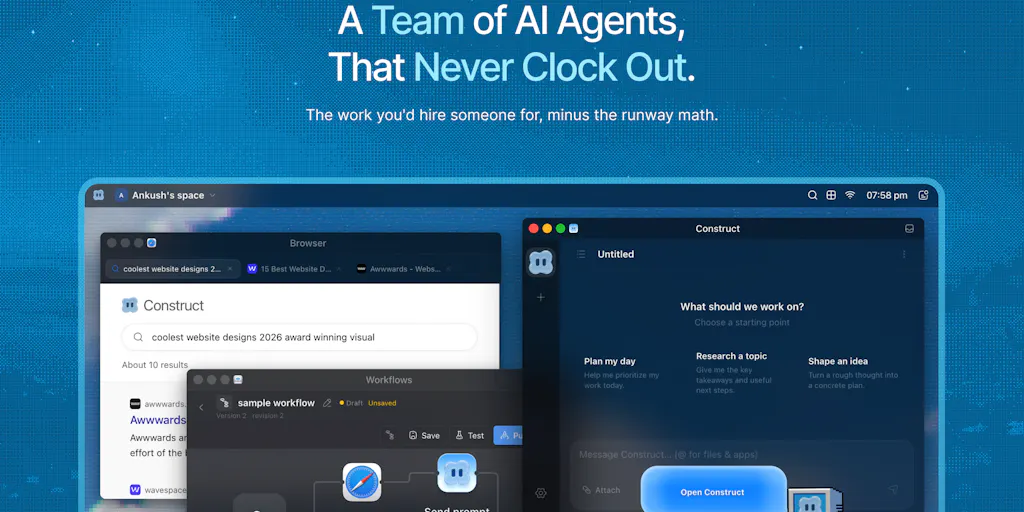
The core insight here is that agents need a computer, not a conversation. Construct gives each agent its own browser-based cloud desktop — browser, terminal, files, email, calendar, and persistent memory across sessions. You hand it work, close your laptop, and it keeps going because it runs in the cloud, not on your machine. You can open the screen from any device, watch it work, take the controls back, or nudge it in a different direction. This is fundamentally different from the prompt-and-pray model that most agent products operate on.
How Construct Differs from the Incumbents
If you’ve been paying attention to the agent space, you’ve seen the landscape: Grok Bot, YC-backed QM, OpenClaw, and a dozen others all claiming to solve the same problem. The competitive differentiation matters, and Singh and Naik are refreshingly clear about where they sit.
Grok Bot is the closest competitor — both are trying to solve problems in the same space. But Construct’s positioning is a fully managed end-to-end workspace, while many tools “target tech native orgs as their ICP, and many times need technical know how to get various things setup.” That’s a real gap. If you’re running a cross-border operation, you don’t have a dedicated engineering team to configure MCP servers and deploy agent infrastructure. You need something that works like an app store: install, configure, run.
QM, on the other hand, is more like open-source agent infrastructure that teams deploy and customize themselves. That’s fine if you have the technical know-how, but most sellers don’t. Construct is opinionated and fully managed — agents, humans, apps, workflows, cloud desktops, and internal tools all live in one workspace. The founders claim they started building early, in February-March, before competitors had announced anything, and that the later entrants only validated their market.
The “workflows” feature is where the cost math gets interesting. Once a job runs correctly, you can lock it in. Next time it’s one command — no re-thinking, no token burning, and your team can trigger it too. This directly addresses the criticism that most agent products “quietly bill you twice for the same thinking.” When a workflow breaks because an API changed, the agent gets a failure notification and alerts the workspace owner, who can tell it to fix the problem. It’s not fully autonomous self-healing, but it’s honest about the limitations.
Why Amazon Sellers Should Care More Than Shopify Ones
Amazon sellers have a specific pain point that makes Construct’s architecture more relevant than it might be for Shopify store owners. Amazon Seller Central is a walled garden with terrible APIs, inconsistent data exports, and a support system that punishes automation. The tasks that eat seller time — listing optimization, inventory reconciliation, buy box monitoring, review analysis, repricing — are all multi-step browser tasks that require persistent context. You can’t just prompt an agent to “check my buy box percentage”; it needs to log in, navigate the seller dashboard, cross-reference with your repricing tool, check your inventory levels, and then decide whether to adjust pricing. That’s a session that spans hours, not seconds.
Shopify store owners, by contrast, have cleaner APIs and a more mature ecosystem of automation tools like Klaviyo and Gorgias that handle the common workflows natively. The marginal value of a persistent agent desktop is lower when your core tools already integrate. For Amazon sellers, though, the agent-as-remote-hire model — with its own cloud desktop, persistent memory, and the ability to work while you sleep — is closer to a genuine breakthrough. The founders’ own use case — sourcing and qualifying leads, building pipeline in the CRM, emailing a morning summary — maps directly to what an Amazon operator needs for supplier research and inventory planning.
What Cross-Border Sellers Can Actually Borrow
Let me be practical about what you can take from this launch, regardless of whether you adopt Construct itself. The first lesson is the “lock it in” principle. Most operators treat automation as a one-time setup, but the real cost driver is re-planning solved tasks. If you’re using Zapier or Make for integrations, audit your workflows for ones that re-run the same logic with fresh tokens every time. Can you cache the decision tree? Can you convert a successful run into a template that doesn’t need to re-reason? That’s where the savings are.
The second lesson is the “multiplayer” environment. Construct allows teams to collaborate in the same workspace, invite teammates to existing agents, and let agents coordinate with other agents. The installed apps aren’t just integrations; they’re building blocks for dashboards and internal tools shared across the organization. This is a fundamentally different model from the solo-agent-in-a-chat-window approach. For a cross-border team — where you might have a VA in the Philippines, a logistics coordinator in Shenzhen, and a PPC specialist in Eastern Europe — the ability to share agent access and workflows across time zones is genuinely powerful.
The third lesson is the “watch it work” transparency. Construct’s cloud desktop lets you see what the agent is doing in real time, take the controls back, or nudge it in a different direction. Most agent products are black boxes — you prompt and wait. For operators who’ve been burned by automation failures, this visibility is the trust bridge that makes delegation possible. You don’t hand over your supplier outreach or inventory forecasting to a black box; you hand it to something you can supervise.
Where the Math Breaks: Costs, Failure Modes, and the “Stale Steps” Problem
Now let me be the skeptic in the room. The comment section of the launch thread has some sharp questions, and the founders’ answers reveal real limitations. One commenter asked what happens when a locked workflow breaks because an API changed under it — does the agent notice and re-plan, or run stale steps and report success? The answer is that the agent gets a failure notification and alerts the workspace owner, who can then tell it to fix the problem. That’s not autonomous self-healing; it’s supervised failure handling. For a cross-border operator running on Singapore time while your agent works on US market data, that supervision window could be hours of dead time.
The pricing is also a consideration. The launch offer is 7 days free on the Pro plan, then 40% off for the first year, or 20% off monthly. The base pricing isn’t disclosed in the source, which is a red flag for anyone who’s been burned by agent tools that charge per-token or per-seat with opaque overage bills. If you’re running a high-volume operation — say, 50,000 SKUs across three marketplaces — the token burn on agent reasoning could eclipse your tooling budget entirely. The “lock it in” workflow feature mitigates this, but only if you invest the time to build and validate workflows before letting them run unattended.
There’s also the question of the “desktop companion” that the founders mention — a feature where the cloud agent could hand over tasks to a local desktop app. They’re “still experimenting with the UX side of things,” which means it’s not ready. For sellers who need agents to interact with local tools — like a repricer that only runs on Windows or a logistics portal that requires a local certificate — this limitation is real.
The Bigger Shift: From Chatbots to Coworkers
The most interesting line in the entire launch thread is Singh’s response to a competitor question: “There is overlap, but all three are validating the same bigger shift away from chatbots toward agents that actually work.” That’s the thesis that matters for cross-border operators. The era of the chatbot — where you type a question and get a text answer — is ending. The era of the agent — where you delegate a job and supervise the outcome — is beginning.
For cross-border sellers, this shift has specific implications. The tasks that eat your week — lead research, CRM updates, chasing invoices, support triage, weekly reports, copying data between tools — are exactly the tasks that agents with persistent workspaces can handle. But the transition requires a mindset change. You’re not “using a tool”; you’re “managing a remote hire.” That means briefing, supervision, and quality control. It means accepting that the first few runs will need correction, and that the workflow-locking process is where the real value accrues.
The founders’ launch-day reflections are worth reading for anyone who’s ever launched a product on a marketplace. Singh’s observation that “nobody asks the question you come prepared for, instead they will ask the most obscure things” is true for Amazon listings, Shopify product pages, and Product Hunt launches alike. The upvote spammers who found him within hours of launching — “trying to sell me upvotes and ‘we will get you to top 3 rank’” — are the same scammers who sell fake reviews on Amazon and fake followers on TikTok Shop. The lesson is universal: organic support beats botnets every time.
What I’d Watch / Test Next
If you’re a cross-border operator reading this, here’s what I’d do this week, not next quarter.
First, sign up for Construct’s free trial — the 7-day Pro plan with 40% off for the first year is a reasonable entry point — and pick one task that currently eats two to three hours of your week. Don’t start with something mission-critical. Start with something annoying and repetitive, like consolidating your daily sales data from Amazon Seller Central and Shopify into a single spreadsheet, or triaging your support tickets into priority buckets. Run it through Construct’s workflow builder, watch it work on the cloud desktop, and see if the “lock it in” feature actually saves you the token burn on the second run.
Second, audit your current automation stack for the “double billing” problem. Look at your Zapier or Make workflows and ask: which ones re-reason the same decision every time? Which ones could be converted into cached templates? The savings here are immediate, regardless of which agent platform you ultimately adopt.
Third, watch the competitor landscape. The comment thread mentions Grok Bot, QM, and OpenClaw — all worth a look if you’re evaluating options. The space is moving fast, and the “multiplayer agents” feature that Construct is building — where teams collaborate with the same agents and share workflows — is likely to become table stakes within the year.
Finally, set a budget for agent spend that’s separate from your software budget. The token burn on agent reasoning is a variable cost that will surprise you if you don’t cap it. The “lock it in” workflow feature is the mitigation, but discipline matters more than tooling.
The shift from chatbots to coworkers is real, and Construct is a meaningful data point in that shift. Whether it’s the right tool for your operation depends on your technical tolerance, your team structure, and your willingness to supervise rather than prompt. But the architecture — persistent cloud desktop, locked workflows, multiplayer collaboration — is the direction the entire industry is heading. Sellers who start building the supervision muscle now will be ahead of the curve when the next generation of agent tools arrives.


