Why a Mac Quick Look extension matters to anyone selling across borders
Let me start with something that sounds unrelated to your P&L: how fast you can see a file. Every cross-border operator I know lives in a swamp of CSV exports, JSON API dumps, log files from tracking webhooks, and half-finished scripts that reconcile Amazon settlements against Shopify payouts. Your team wastes hours every week opening files that your OS refuses to preview, hunting for the one malformed row that broke a bulk listing upload, or squinting at minified code in a browser tab because Finder gave up. That friction is not a developer problem. It is a margin problem, because every minute a supply chain manager or a paid media analyst spends fighting their own laptop is a minute they are not auditing ad spend, catching a shipping discrepancy, or spotting a pricing error before it bleeds into a dozen marketplaces. This is why I pay attention when a small utility like CodeLook ships — not because I need another syntax highlighter, but because the underlying philosophy of local-first, instant, zero-permission tooling is exactly the mindset that separates operators who scale profitably from those who drown in their own operational chaos.
The problem: your operating system is a bottleneck you stopped noticing
Walk through any serious e-commerce operation and you will see the same scene. A logistics coordinator has eight tabs open in Chrome because their warehouse management system exports CSVs that macOS refuses to preview in Finder. A content manager double-clicks a JSON feed from a supplier and gets a wall of unformatted text in TextEdit. A developer who maintains your Amazon SP-API integration has to open a dedicated IDE just to check whether a webhook payload arrived correctly. Every one of those people has internalized the delay as normal. It is not normal. It is a tax on your throughput that you have been paying so long you forgot the toll booth exists.
The core issue is that Quick Look on macOS — the spacebar preview feature that Apple built into the operating system — was designed for images, PDFs, and Office documents. It was never built for the messy, semi-structured text files that power modern e-commerce operations. Code files, configuration files, data exports, and logs are the invisible infrastructure of every cross-border business, yet the OS treats them as second-class citizens. You either install a heavyweight code editor just to peek at a file, or you accept the productivity drag of opening everything in the wrong tool.
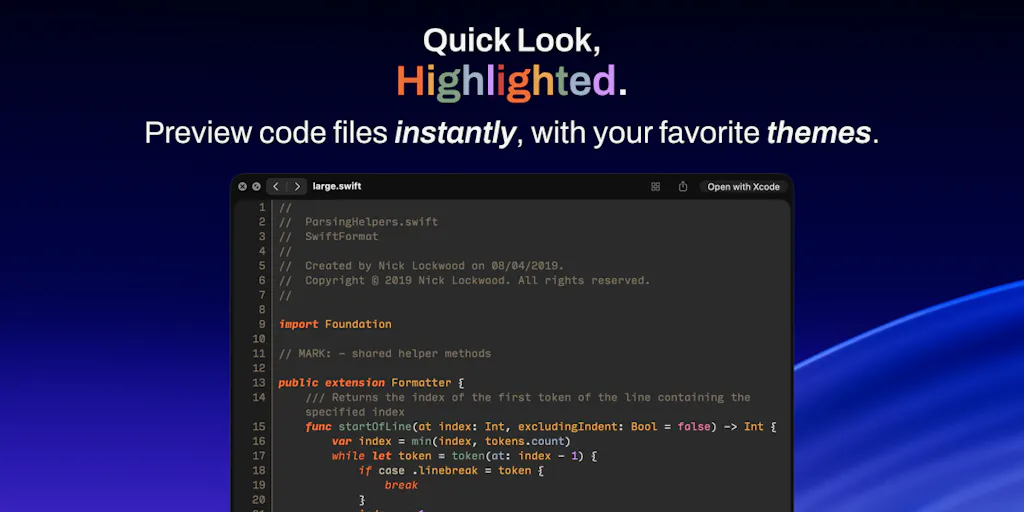
CodeLook attacks that specific pain point. It is a Quick Look extension that renders code files with real syntax highlighting — not the regex-based guessing that most lightweight previewers rely on, but actual parsing through the same tree-sitter grammars used by Zed and Neovim. The distinction matters more than most sellers realize. A regex highlighter looks at a file and guesses what a token is based on patterns. A parser actually understands the structure. That means colors are not just cosmetic — they are semantic. When you open a Python script that generates your TikTok Shop reporting, you can instantly distinguish a variable from a string from a function call. You can spot a malformed JSON key before it crashes your next sync. You can verify that a shell script is not going to delete the wrong directory before you run it.
For a cross-border operator, this is not a developer nicety. It is an operational safety net. The files that break your business — the corrupted product feed, the misconfigured shipping rates file, the API response that came back with an unexpected field — are exactly the files that your OS refuses to show you clearly. CodeLook removes that blind spot for a one-time fee of $4.99 on the Mac App Store, with no subscription and no in-app purchases. That is less than the cost of one mistaken reorder on a single SKU.
How it differs from what you are probably using now
If you are a non-technical operator, you might think this problem is already solved. It is not. The existing options fall into three buckets, and none of them serve the cross-border workflow well.
First, there are the full IDEs — VS Code, Sublime Text, JetBrains products. These are powerful, but they are overkill for a quick look. Opening a 260,000-line C file in VS Code takes seconds just to boot the editor, let alone render the file with extensions loading in the background. For a quick verification, that is like starting a forklift to move a single box. Second, there are the generic preview utilities that attempt to handle many file types but do none of them well. They tend to use regex matching, which means they colorize based on guesses. The result is pretty but useless — and often wrong enough to mislead you into thinking a file is valid when it is not. Third, there is the default macOS behavior, which for many code file types shows nothing at all or a plain-text rendering with no structure.
CodeLook takes a different approach. The highlighting runs inside the extension itself — no subprocess, no HTML and JavaScript — which is why a 9 MB C file with over 260,000 lines opens fully highlighted in about one second. That performance matters when you are dealing with large product catalogs, full order exports, or inventory reconciliation files that span tens of thousands of rows. It also works everywhere Quick Look works: Finder, Spotlight, Open and Save dialogs, and third-party apps like Raycast. That system-wide integration is the killer feature that standalone preview apps cannot replicate, because they require you to remember to use them. CodeLook is just there, in the flow of your existing work, every time you hit the spacebar.
The privacy angle is worth a pause as well. The extension asks for no permissions and has no network access at all. Files never leave your Mac. In an era where every SaaS tool wants to phone home with your data, a utility that processes everything locally is a rare commodity. For cross-border sellers dealing with supplier price lists, customer data from multiple marketplaces, and proprietary sourcing strategies, that local-first design is not paranoia — it is prudent operations.
Why Amazon sellers should care more than Shopify ones
If you run a Shopify store, your data life is relatively clean. Shopify’s admin dashboard gives you structured views of orders, products, and customers. The CSV exports are predictable. You can mostly live in the browser and never touch a raw file. Amazon Seller Central, by contrast, is a different beast. Flat-file uploads, inventory reports, settlement files, and FBA fee previews arrive as dense, semi-structured text. A single misplaced tab or comma in a flat file can trigger a cascade of listing errors that take hours to untangle. The settlement reports are notoriously opaque — rows and rows of fees, deductions, and adjustments that require careful parsing to understand your true margins. When you are reconciling Amazon payouts against your accounting system, you are not reading a dashboard. You are reading raw data files. CodeLook’s ability to render those files with real syntax highlighting — distinguishing keys from values, strings from numbers — turns a tedious forensic exercise into a quick visual scan. For Amazon-heavy operators, this is not a convenience. It is a competitive advantage in speed.
What cross-border sellers can borrow from this product
Beyond the specific utility, CodeLook is a case study in how to think about your own tooling stack. The product embodies three principles that every DTC operator and marketplace seller should apply when evaluating their own software.
Principle one: local-first is a feature, not a limitation. CodeLook processes everything on-device. No accounts, no analytics, no network calls. For a Mac utility, that is a selling point. For your e-commerce operations, the same logic applies. Every time you send customer data or supplier pricing to a third-party SaaS tool, you are creating a liability. The more of your workflow you can keep local — or at least in systems you control — the fewer attack surfaces you have. When you evaluate your next tool, ask not just what it does with your data, but what it does without your data. A tool that does not need your data to function is a tool that cannot leak it.
Principle two: parsing beats matching. The difference between tree-sitter parsing and regex matching is the difference between understanding and guessing. In cross-border e-commerce, this distinction shows up everywhere. A tool that matches on patterns will tell you that a product title fits Amazon’s guidelines. A tool that parses the actual policy structure will tell you whether the title violates a specific rule. The former is cheaper; the latter is correct. When you evaluate AI tools, marketing automation, or even review-generation software, ask whether the underlying engine understands the structure of your problem or just pattern-matches its way to an answer. The operators who win in the long run are the ones who insist on parsing, not matching.
Principle three: speed is a feature of architecture, not hardware. CodeLook renders a 260,000-line file in about a second because of how it is built — native TextKit, no subprocess, no web technologies in the rendering path. The same logic applies to your operations. A fulfillment workflow that takes 12 steps will be slow no matter how fast your warehouse staff move. A reconciliation process that requires exporting from three systems and merging in a spreadsheet will be slow no matter how powerful your laptop is. Speed is not a hardware problem; it is a design problem. When you look at your own standard operating procedures, ask where the slowness comes from. If it comes from handoffs, approvals, or manual data transcription, no amount of investment in faster computers will fix it.
Where the math breaks
Let me be clear about CodeLook’s limitations, because every product has them and pretending otherwise helps no one. First, the file type support is still narrow. CodeLook supports 17 file types right now — Swift, Rust, C, C++, Go, Ruby, Python, CSS, JavaScript, JSX, TSX, Shell, Lua, JSON, JSONC, JSONL, YAML. That covers a lot of developer and data workflows, but it misses some formats that cross-border operators actually touch. HTML and TypeScript are conspicuously absent, and the maker notes that macOS reserves those for its own handlers, which means no third-party extension can preview them. If your operation deals with email templates, landing pages, or TS-based integrations, CodeLook will not help you there. Second, it requires macOS 26 or later and Apple Silicon. If you are running an older Intel Mac or a version of macOS that is not current, you are out of luck. For a tool that costs $4.99, the hardware requirement is a significant barrier for teams that do not refresh their hardware on Apple’s schedule.
Third, the theme system, while extensive, is a double-edged sword. 700+ themes from Zed’s registry sounds impressive, but it also means you will spend time browsing themes instead of working. The app does let you pick one dark and one light theme and follow your system appearance, which is the right default, but the sheer volume of choice is a distraction. For a tool whose entire value proposition is speed, theme browsing is a time sink.
Fourth, and most importantly for cross-border operators: this is a solo developer’s first app. The maker, Edden Amber, is transparent about that, and the underlying Swift highlighting engine is open source under MIT. That is commendable, but it also means the roadmap is uncertain. A tool that you build your workflow around — even a small one — carries risk if the developer moves on. The open-source component mitigates that somewhat, but the Quick Look extension itself is closed and distributed through the Mac App Store. If you adopt this and the developer abandons it, you are stuck with a tool that may break on the next macOS update.
What I would watch and test next
CodeLook is not going to transform your cross-border business. It is a small utility that solves a specific pain point elegantly. But the thinking behind it is worth stealing, and the product itself is worth a test if you are on Apple Silicon with macOS 26. Here is what I would do this week.
First, download the trial or buy the $4.99 license and spend one day using it deliberately. Every time you need to check a file — a CSV export, a JSON API response, a log file — hit the spacebar and see what CodeLook shows you. Pay attention to whether the syntax highlighting actually helps you spot anomalies faster. If it does, the one-time cost pays for itself in a single session. If it does not, you are out five dollars and you have learned something about your own workflow.
Second, audit your own tooling stack with the three principles above. Which of your SaaS tools actually need your data to function, and which are just harvesting it as a side effect? Which of your operational processes are pattern-matching when they should be parsing? Where is your slowness a design problem rather than a hardware problem? Write those answers down and act on them.
Third, if you have any technical staff — even a part-time contractor who maintains your integrations — have them look at the open-source Swift highlighting engine that powers CodeLook. Not because you need to build your own preview tool, but because understanding how a well-architected parser works will change how your team thinks about data validation. The same tree-sitter grammars that power CodeLook, Zed, and Neovim can be embedded in your own data pipelines to validate product feeds, check API responses, and catch errors before they reach your marketplaces.
Fourth, watch how the product evolves. The maker is actively responding to feedback on the Product Hunt launch page, and the theme repository is updated on every app release. If the file type support expands to include more data formats — TSV, XML, or the flat-file formats Amazon uses — this becomes a genuinely useful tool for operations teams, not just developers. For now, treat it as a small bet on a smart developer with the right philosophy. At $4.99, it is the cheapest operational improvement you will make this quarter.