The Coming Content Arbitrage: Why Your Next Viral Ad Might Be Hiding in Your Own Hard Drive
Every cross-border seller I know is sitting on a content graveyard. Not the polished product shots you paid a studio for — I mean the messy, unglamorous terabytes of raw footage, old livestream recordings, UGC clips that didn’t make the cut, and Zoom calls with suppliers that you swore you’d organize “someday.” We treat this media like digital hoarders, convinced it has value but unable to find anything in it when the creative team needs a fresh angle for a TikTok Spark Ads campaign or a new A+ Content module. The problem isn’t that we lack content; it’s that we lack a retrieval system that understands what’s inside the content. This is precisely why the launch of Clipto and its new Clipto MCP layer matters to operators who think they’ve already automated everything else in their funnel. It’s not a video editor, and it’s not another cloud DAM. It’s a semantic search layer that lets AI agents — and by extension, you — finally interrogate your own media library as if it were a searchable database. For a DTC operator drowning in raw footage from three different marketplaces, that’s not a nice-to-have; that’s the difference between reusing an asset and rebuying it.
The Problem: Your Media Library Is a Black Hole, and Your Agency Bills Are the Event Horizon
Let’s be brutally honest about how most cross-border brands handle video content today. You’ve got a Google Drive folder that hasn’t been sorted since 2022, a bunch of WeTransfer links from influencers that expired, and a hard drive in Shenzhen that your factory partner keeps promising to ship. When the performance marketing manager needs “a clip of someone using the product with a smile,” they don’t search the library — they either film new footage (expensive), ask the agency to scrub through hours of raw files (slow), or just run the same three ads until they fatigue (lazy). The core issue is that traditional file management is metadata-blind. Your folder names are cryptic (“Final_FINAL_v3_export”), and the actual content — the dialogue, the product usage, the specific facial expressions — is locked inside video frames and audio waveforms that no spreadsheet can index.
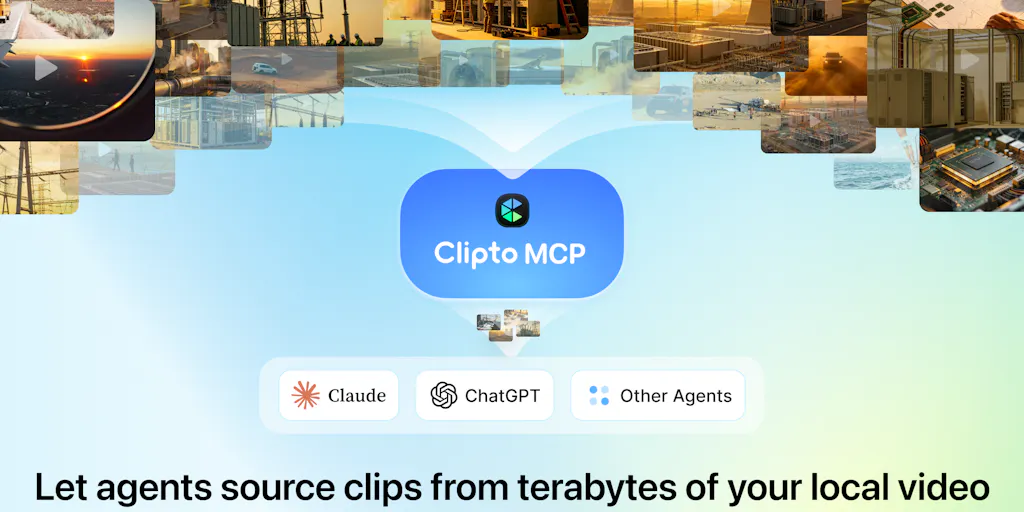
This is the gap that Clipto’s fully local, natural language search targets. It’s not a cloud service where you upload and pray; it’s a local engine that indexes terabytes of media on your machine. The pitch from maker Henry Kang is straightforward: AI agents can already access your files, but they can’t understand what’s inside them. Clipto MCP gives agents that semantic understanding. For a brand owner, this means you could theoretically ask, “Find every clip where the customer mentions the waterproof feature,” and get a timestamped list of moments from a year’s worth of UGC — without manually watching a single frame.
The “fully local” angle is more than a privacy talking point; it’s a strategic advantage for sellers dealing with proprietary product designs or unreleased seasonal lines. Uploading that footage to a third-party AI tool is a leak risk. Keeping the indexing and search on your own Mac or PC means your 2026 Q4 product roadmap doesn’t become someone else’s training data. In a world where Amazon Seller Central terms of service already feel like a minefield, controlling your media pipeline locally is a quiet form of risk management.
How Clipto MCP Actually Changes the Game (and Where It’s Just a Party Trick)
The MCP launch — which stands for Model Context Protocol, the emerging standard for connecting AI models to external tools — is the interesting pivot here. The original Clipto was a search engine for humans. MCP is a bridge for agents. The difference is subtle but massive: instead of you typing a query and reading results, you hand the query to an agent like Claude and let it do the browsing, selecting, and even editing. The demo they ran — feeding a library of 1,000 Elon Musk clips to an agent and asking it to produce something creative — is a stunt, sure. But the underlying workflow is a blueprint for content operations.
The agent didn’t just search for “Elon talking about space.” It analyzed the song “Around the World” by Daft Punk, decided where Musk’s words could fit the rhythm, used Clipto to retrieve exact moments, and assembled a video with FFmpeg. The prompt they shared is a masterclass in instruction design — it specifies word-level forced alignment, pronunciation integrity, and audio mixing rules. For a seller, this is the difference between “make me a video” (vague, useless) and “find every unboxing clip where the customer says ‘battery life,’ cut them into a 15-second montage with a beat drop, and output a vertical MP4.” You’re not just automating search; you’re automating judgment.
This is where I see the real divergence from incumbents. Tools like Visla or PodcastorAI are trying to generate content from scratch or repurpose it with rigid templates. Clipto MCP is trying to make your existing content legible to a reasoning engine. It’s a subtle shift from “AI creates” to “AI curates and assembles.” For cross-border sellers, curation is often more valuable than generation because you’ve already paid for the raw materials. The cost of a UGC campaign isn’t the shoot — it’s the hour-long review sessions where you scrub through footage looking for the one usable clip. Clipto MCP automates that review.
Why Amazon Sellers Should Care More Than Shopify Ones
Let me be specific about who benefits most. Shopify store owners tend to run leaner creative teams and rely heavily on stock footage or quick product mockups. They might find Clipto MCP useful, but they don’t have the volume to justify the setup cost. Amazon FBA sellers, on the other hand, are drowning in a specific kind of media hell: compliance clips, unboxing videos, instructional demos, and review responses. The Amazon Seller Central ecosystem demands constant A/B testing of main images and video, and the platform’s algorithm increasingly prioritizes brands that have rich media content. If you’ve got 500 product videos across 50 SKUs, you need to find “the clip where we show the measurement markings” — not for a TikTok trend, but for a listing update that could increase conversion by 2%. That’s a direct revenue impact. Clipto MCP’s ability to index and retrieve precise moments from a messy local archive is uniquely suited to the Amazon operator’s need for speed and specificity.
The “Where the Math Breaks” Section: Indexing Is the Tax You Can’t Avoid
Here’s my skepticism. The maker’s response to a question about performance was telling: “Once your library has been indexed, search performance stays fast and consistent… The more challenging part is the initial analysis and indexing.” That is the dirty secret of every “AI search” tool. The demo with 1,000 Elon clips is cute because it’s a bounded set. A real seller’s library is not 1,000 clips; it’s 10,000 clips of product demos, some of which are 4K, some of which are vertical phone shots, and a bunch of which are corrupted files from a cheap SD card. The indexing process — transcribing, detecting speakers, analyzing scenes — is computationally expensive. The maker mentions “several processing modes” to balance speed and system usage, but the reality is that indexing a terabyte of mixed media is not a five-minute coffee break. It’s an overnight job, and if you’re on a laptop, it’s a “don’t plan to use this machine for anything else” job.
The math breaks down further when you consider the “local” constraint. The selling point is privacy and no cloud upload, but that means the heavy lifting is done on your hardware. If you’re a solo seller with a MacBook Air, you’re going to be waiting a long time. If you’re a brand with a dedicated media server, this is fine. The tool is arguably built for the latter, but the Product Hunt launch energy is aimed at the former. It’s a positioning mismatch that could lead to churn when a casual user realizes their first indexing session takes six hours.
The Prompt Is the Product: Borrowing the “Non-Negotiable” Framework
Even if you never download Clipto, the Elon Musk lyric supercut prompt is worth stealing for your own AI workflows. Look at how it’s structured: it defines the effect, specifies non-negotiables (alignment must be real, pronunciation must be complete, audio must be clean, failure must be honest), and dictates the delivery format. This is how you should be briefing any AI tool, whether it’s for ad copy, image generation, or video editing. Most sellers write prompts like “make a good ad” and get garbage. The Clipto team’s prompt is a spec document. It tells the agent what “good” means, what to do when it can’t achieve “good,” and how to report back. If you’re using Klaviyo flows or Helium 10 for listing optimization, you already know that garbage in equals garbage out. The same logic applies to agent-based video editing. The prompt is the product.
What Cross-Border Sellers Can Actually Borrow (Without Buying Anything)
Here’s the pragmatic takeaway. You don’t need to rush out and buy Clipto MCP this week to benefit from its existence. But you should absolutely steal its architectural logic for your content operations. First, start structuring your media with the assumption that an AI will eventually need to read it. That means consistent naming conventions, even if the tool claims to be “metadata-blind.” A messy archive is still a messy archive; Clipto just makes it searchable, not organized. Second, adopt the “non-negotiable” prompt framework for any AI content task. Whether you’re using a tool like Memmy Agent or just experimenting with ChatGPT, write your briefs like the Clipto team wrote their editing prompt: specify the effect, define what failure looks like, and demand an honest report.
Third, and this is the strategic move — start treating your local media as an asset that can be queried. The next time you’re about to pay a video editor to “find some b-roll,” ask yourself if you could have found it in 30 seconds with a semantic search. The answer, right now, is probably no. But the fact that Clipto MCP exists means the expectation is shifting. Your competitors who adopt this early will be able to repurpose a single shoot into ten different ad variations across TikTok Shop and Etsy listings, while you’re still waiting for your agency to email you a Dropbox link.
Where I’d Push Back: The MCP Hype vs. The Reality of Your Workflow
I’m bullish on the concept, but I’d be remiss if I didn’t flag the integration friction. The demo prompt mentions installing WhisperX, PyTorch, and other dependencies. That is not a typical seller’s skill set. The average Amazon FBA operator is comfortable with SellerBoard and Jungle Scout, not with debugging a Python environment. The “preflight and guided installation” section of the prompt is a polite way of saying “you need a technical person on staff.” For a solo DTC operator, that’s a barrier. The Product Hunt launch is aimed at early adopters and developers, but the long-term value for cross-border sellers will only materialize when the tool becomes a one-click install with no terminal commands. Until then, it’s a power user’s tool.
The other pushback is the “local only” constraint. For a seller with multiple team members in different time zones — a brand manager in New York, a content lead in Shenzhen, a freelance editor in Manila — a local index on one machine is a bottleneck. The privacy benefits are real, but so is the collaboration cost. Cloud-based DAMs like Bynder or Canto are clunky but shareable. Clipto MCP, in its current form, is powerful but solitary. If you’re a team of one, that’s fine. If you’re a team of ten, you’ll need a strategy for who “owns” the index.
What I’d Watch / Test Next
This week, I’m not going to tell you to abandon your current stack and go all-in on Clipto MCP. But I am going to suggest three concrete tests. First, take a small, bounded set of your own media — say, 50 clips from your last product launch — and run it through Clipto’s indexing process. Measure the time it takes and the quality of the semantic search results. If it can find a specific mention of “shipping time” in a customer testimonial, that’s a win. Second, grab the B-roll Starter Library they provided and try the agent workflow with a simple prompt of your own. Don’t do the Elon Musk thing — do something practical like “make a 15-second montage of people smiling at a desk.” See if the agent can handle a basic task without hand-holding.
Third, and most importantly, audit your own media storage. If you can’t find a specific clip from last quarter within five minutes, you have a problem that Clipto MCP might solve — but you also have a problem that a simple folder reorganization would solve. Don’t buy a hammer if you just need to clear the workbench. The tool is promising, and the 1-month free offer with code PHLNCH is a low-risk way to test it. But the real takeaway from this launch isn’t the software — it’s the mindset shift. Your media library is not a graveyard; it’s a mine. The only question is whether you have the right equipment to extract the ore. Clipto MCP is pointing the way, but the pickaxe is still in your hands.