The Email Rendering Tax Is Quietly Killing Your Retention Campaigns
Every cross-border seller I know has felt this specific, gut-twisting dread: the campaign is scheduled, the audience is segmented, the discount code is live — and then a customer forwards you a screenshot of your beautifully designed abandoned-cart email looking like a 1998 GeoCities page. The hero image is broken, the button color has shifted to an unreadable gray, and your carefully chosen typography has collapsed into a wall of Times New Roman. You lost that conversion, and worse, you lost the trust that took three touchpoints to build.
We spend tens of thousands of dollars on acquisition — on Amazon PPC, on Meta ads, on TikTok influencer placements — and then we let the cheapest part of the funnel, the email that actually closes the sale, fail silently in the one inbox that matters. The problem isn’t your copy. It’s not your offer. It’s that email rendering is a fragmented, undocumented nightmare of client quirks, and most of us are designing blind, praying that Outlook doesn’t eat our layout.
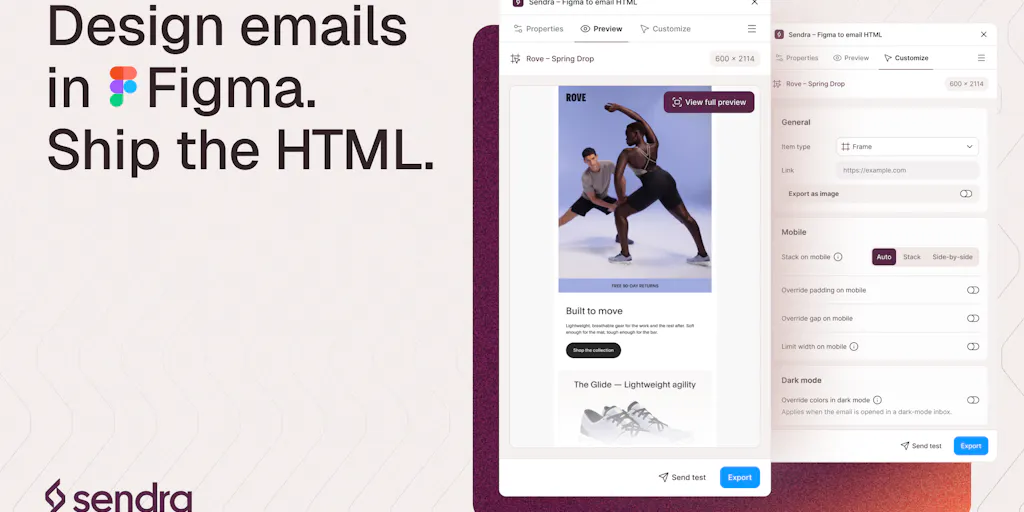
That’s why a tiny Figma plugin called Sendra caught my attention this week. It’s not a flashy AI tool or a new marketplace. It’s a boring, practical solution to a problem that costs DTC operators real money every single week. And in a landscape where everyone is chasing the next viral hook, boring infrastructure wins. Let me break down why this matters for your stack, where it fits, and where I think it still has holes.
The Real Problem: Previews Lie, Clients Don’t
Here’s the core issue that Joseph Azzi, the maker behind Sendra, articulates better than most: preview screenshots are a fiction. When you design an email in Figma, you’re looking at a static, idealized version of your work. But the email doesn’t ship as a static image — it ships as HTML that gets parsed and rendered by whatever client your customer happens to be using. And those clients are a lawless frontier.
Think about your actual customer base. You’ve got the Apple Mail user on an iPhone who sees your email in dark mode. You’ve got the Gmail user on Android where your carefully chosen brand colors are being forcibly converted. You’ve got the Outlook desktop user on Windows who is still, in 2025, using a rendering engine that behaves like it’s 2007. And you’ve got the corporate gatekeeper who forwards your email to a colleague, only for the entire layout to collapse because of a missing table attribute.
The maker’s own admission in the comments is telling. When asked which client breaks last, he points to Gmail on mobile in dark mode — where colors shift unpredictably — and Outlook, which “breaks the most.” This isn’t a niche concern. This is the daily reality of email marketing for anyone selling cross-border, where your audience is split across iOS and Android, across Gmail and Outlook, across desktop and mobile.
The standard workaround has been to either: 1. Use a drag-and-drop builder like Klaviyo or Mailchimp that generates code for you, but which limits your design freedom. 2. Hire a developer to hand-code templates, which is expensive and slow to iterate on. 3. Design in Figma, export to HTML, and pray — which is exactly the workflow that produces those forwarded screenshots.
What Sendra does differently is that it checks every rendering rule against real clients on real devices rather than preview screenshots. That’s the key distinction. It’s not simulating what Gmail might do; it’s testing against what Gmail actually does. For a seller who has ever lost a Black Friday email campaign to a rendering glitch, that’s not a nice-to-have. That’s the difference between a 3% conversion rate and a 0.3% conversion rate on a list of 50,000.
Why Amazon Sellers Should Care More Than Shopify Ones
If you’re a pure Shopify DTC brand, your email list is your lifeline. You own it, you can segment it, and you can send them whatever you want whenever you want. You’re probably already using Klaviyo or Omnisend and you have some template flexibility.
But if you’re an Amazon FBA seller, email is a different beast. You don’t own the customer relationship. Amazon owns it. Your email list is built on the thin sliver of data you can legally extract from order history, and you’re using tools like Helium 10 or Jungle Scout to manage your PPC, while your email marketing is often an afterthought, relegated to a Seller Central campaign that has all the design flexibility of a fax machine.
Here’s the thing: when you do get that rare chance to email an Amazon customer — a post-purchase follow-up, a product registration, a warranty reminder — the email must be perfect. You don’t get a second shot. The customer’s default expectation is that you’re a faceless Chinese factory or a drop-shipping middleman. A broken email confirms that bias. A beautifully rendered, brand-consistent email that works flawlessly on their iPhone and their work Outlook is a trust signal that’s worth more than a five-star review.
For those sellers, a tool like Sendra isn’t just about aesthetics. It’s about making sure that one email you’re legally allowed to send actually lands with the intended impact. It’s about not wasting the only touchpoint you have.
How Sendra Differs From the Incumbent Stack
Let’s be clear about what Sendra is and isn’t. It’s not a full email marketing platform. It’s not going to replace Klaviyo’s automation flows or Mailchimp’s audience management. It’s a Figma plugin that sits in the design phase of your workflow. You design the email in Figma, select the frame, and it hands you the HTML.
The two recent additions that the maker highlights are telling: - Image hosting: Sendra hosts your images, so your export ships with real URLs instead of placeholders you fill in yourself. This is a huge time-saver. In the old workflow, you’d design in Figma, export assets, upload them to your CDN (or worse, leave them as Figma links that break), and then paste the URLs into your email builder. Sendra eliminates that step. - In-plugin test sends: You can send a test to your own inbox from inside the plugin. This closes the feedback loop. You don’t have to export, upload, paste into Klaviyo, and send a test to see if it works. You do it all from Figma.
Compared to the incumbent workflow — designing in Figma, manually slicing assets, using a tool like Anima or Zeplin to hand off to a developer, and then testing in Litmus or Email on Acid — Sendra compresses the entire process into a single tool. For a solo operator or a small team without a dedicated email developer, that’s a massive efficiency gain.
The free tier is also smart. It’s free for your first 10 exports. That’s enough for a small brand to test it on a welcome email or a product launch announcement and see if it solves their pain point. It’s a low-friction entry into a workflow that could save you from a catastrophic campaign failure.
Where the Math Breaks
Let’s talk about the economics of email rendering. I’ve seen brands spend $200–500 a month on Litmus or Email on Acid to test their campaigns across a matrix of clients. That’s a significant line item for a small DTC brand. Sendra’s approach — checking against real clients as part of the design process — has the potential to make that expensive testing layer less necessary for the design phase.
But here’s where the math gets tricky. The cost of a broken email isn’t just the lost conversion on that one campaign. It’s the increased churn rate from customers who unsubscribe because they’re annoyed. It’s the damage to your sender reputation when your emails get marked as spam because they look like phishing attempts. It’s the support tickets from customers who can’t see your discount code.
When you’re sending to a list of 100,000, a 1% drop in conversion due to rendering issues is 1,000 lost sales. If your average order value is $50, that’s $50,000 in lost revenue. Suddenly, a $30/month plugin or a $300/month testing tool looks like the cheapest insurance you’ll ever buy.
What Cross-Border Sellers Can Borrow From This Approach
Beyond the specific tool, there’s a broader lesson here for cross-border operators. We’re obsessed with the acquisition side — the new marketplace, the viral TikTok trend, the secret Amazon keyword hack. But the retention side, the trust-building side, is where the compounding returns are.
Here’s what I’d steal from Sendra’s playbook, regardless of whether you use the plugin:
Test on the devices your customers actually use. If you’re selling to a US audience, that’s iPhone and Gmail. If you’re selling to a European audience, that might be more Outlook and Android. Don’t just test on your own devices. Build a testing matrix based on your actual customer data.
Automate the boring stuff. The image hosting and test-to-inbox features are about removing manual steps that introduce errors. Look at your own workflow — where are you manually copying and pasting? Where are you uploading and re-uploading? That’s where your errors are hiding. Whether it’s using Zapier to automate your data entry or using a plugin to automate your email export, reducing manual steps is a direct path to reducing errors.
Design for the worst case, not the best case. Your email should look good in the best client, but it must be readable in the worst client. That means using web-safe fonts, avoiding complex layouts, and testing your color palette in dark mode. The maker’s comment about Gmail dark mode is a reminder that “good enough” in one client is “broken” in another.
Where I’d Push Back
For all its promise, Sendra isn’t a silver bullet. Here’s where I’d temper my enthusiasm:
It’s still a design tool, not a marketing tool. Sendra solves the rendering problem, but it doesn’t solve the deliverability problem. You can have a perfectly rendered email that still lands in the promotions tab or, worse, the spam folder. You still need a proper email service provider with a good reputation, proper SPF and DKIM authentication, and a warm IP address. Sendra is one piece of the puzzle, not the whole puzzle.
The testing matrix is still opaque. The maker talks about checking against “real clients on real devices,” but the specifics aren’t fully disclosed. How many clients? How recent are the device profiles? Is it a cached simulation or a live test? For a tool that’s positioning itself on accuracy, the lack of transparency on the testing infrastructure is a slight concern. I’d want to see a public list of supported clients and a changelog of when they’re updated.
The Figma dependency is a limitation. If you’re not a Figma user — if you’re a Canva loyalist or you’re using a drag-and-drop builder exclusively — then Sendra is irrelevant to you. The tool is only as useful as your design workflow. For a solo seller who doesn’t have a design team, Figma might be a steep learning curve just to use a plugin.
The Workflow Question
The bigger strategic question is: should you even be designing emails in Figma? For a small brand, the answer might be no. If you’re using Klaviyo’s drag-and-drop builder and you’re satisfied with the templates, you don’t need this. But if you’ve invested in a strong brand identity and you want your emails to look as polished as your website, then Figma-to-HTML is the professional workflow, and Sendra makes that workflow accessible to non-developers.
The real value of Sendra is that it lowers the barrier to entry for professional-grade email design. It’s not for everyone, but for the DTC operator who cares about brand consistency and who has been burned by a bad render, it’s a tool that deserves a spot in the stack.
What I’d Watch / Test Next
If you’re intrigued, here’s how I’d approach testing Sendra this week, without overhauling your entire workflow:
Pick a low-stakes, high-visibility email. Don’t test it on your Black Friday campaign. Pick your abandoned cart email or your post-purchase thank you. These are emails that go out automatically and represent a significant portion of your revenue. If they’re broken, you’re losing money every single day.
Design a new version in Figma. If you’re not a Figma user, this is a good excuse to learn the basics. If you are, take an existing email template and rebuild it in Figma. Use your brand colors, your logo, your standard layout. The point is to have a clean design that you can compare against your current template.
Use the plugin to export and send yourself a test. The test-to-inbox flow is the killer feature. Send it to your Gmail, your Outlook, your Apple Mail. Open it on your phone and your desktop. Look at it in dark mode. The maker admits that Gmail dark mode is still a rough edge — that’s your opportunity to see if the tool flags it as a “known risk” before you send, or if you’re left to eyeball it.
A/B test it against your current template. If you’re on Klaviyo, set up a flow with two versions — your old one and the new Sendra-exported one. Let it run for two weeks and compare the click-through and conversion rates. The data will tell you if the rendering fidelity actually moves the needle on revenue, not just on aesthetics.
The bottom line: email isn’t dead, and it isn’t going away. It remains the highest-ROI channel for most DTC brands, especially in the cross-border space where you’re fighting for attention against a flood of promotional noise. The brands that win are the ones that sweat the details — and there’s no detail more important than whether your customer can actually read what you sent them. Sendra is a small tool, but it’s aimed at a very real, very expensive problem. Give it a shot on your next campaign and see if it saves you from that forwarded screenshot.


