Why Every Cross-Border Seller Should Steal the Philosophy Behind a Drum Transcription App
If you’ve ever used an AI listing generator to write a product description for Amazon or Shopify, you already know the pain: the output looks passable at first glance, but the moment you try to adjust a key benefit or tone-shift for a different marketplace, you’re fighting the tool. Most AI content tools treat their first guess as sacred. They’re black boxes—upload your raw data, get a locked PDF, done. That’s the exact opposite of what a serious operator needs. We need tools that give us a strong starting point, then get out of the way so we can edit, remix, and export for every channel. So when I saw Backbeat Forge — a drum transcription app that runs entirely locally, outputs an editable score on a traditional five‑line staff, and exports to MIDI — I didn’t care about the snares. I cared about the architecture. This approach, applied to the AI tools we use every day in cross‑border e‑commerce, would fundamentally change how fast we can scale product content across marketplaces, protect our proprietary data, and reduce the cost of manual cleanup. Let me explain why.
What Problem This Product Actually Solves
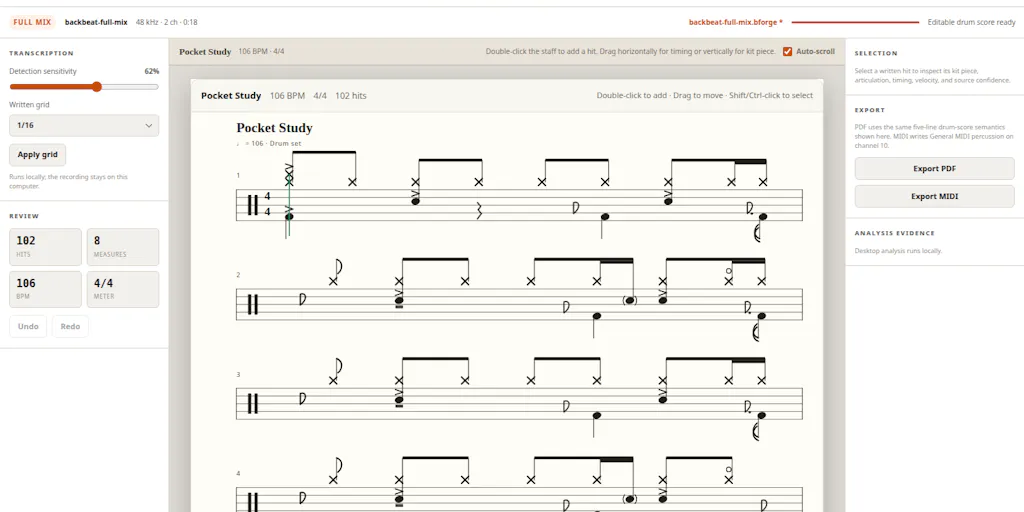
Backbeat Forge is a desktop tool that listens to a recorded drum track and converts it into standard music notation. For a drummer or producer who just recorded a live take, manually transcribing every kick, snare, hi‑hat, and cymbal hit onto a staff is tedious and error‑prone. Existing solutions — cloud‑based transcription services like Sibelius or MuseScore’s audio import — often require uploading audio to a server, which raises privacy concerns for unfinished sessions, and they typically dump you into a rigid piano roll that feels unnatural for drummers. Worse, their first transcription is often wrong, and editing it inside their proprietary GUI is a nightmare. Backbeat Forge solves that specific workflow: it runs AI locally on your machine (so no upload), outputs onto a familiar five‑line staff, keeps every note editable, and lets you export the result as a standard MIDI file that you can continue working on in any DAW or notation software.
For a cross‑border seller, the problem isn’t drum transcription — it’s product content. You have a spreadsheet of product specs, maybe some raw copy from a supplier, and you need a thousand variations for Amazon US, Amazon UK, Shopify, TikTok Shop, and Temu. The industry standard is to throw that into ChatGPT or a SaaS tool like Klaviyo’s AI content generator, accept the output, and then manually tweak each version. That’s the equivalent of getting a locked PDF. You waste time because the tool doesn’t understand your taxonomy, your brand voice, or the subtle differences between “Amazon’s bullet points” and “Shopify’s collection descriptions.” Backbeat Forge’s core philosophy — AI should remove the blank page, not trap you in its first guess — is exactly what we need in our listing tools.
How It Differs From Existing Options — and Why That Matters to Your Stack
Local‑First Processing Isn’t Just About Privacy
Most AI writing tools for e‑commerce are cloud‑only. You paste your product data into a web form, hit “Generate,” and the data leaves your machine. That’s fine for generic kitchen gadgets. But what if you’re selling proprietary electronics, private‑label supplements, or a design patented in three countries? You don’t want your raw ingredient lists, supplier pricing, or unpatented designs flowing through someone else’s API. Backbeat Forge’s local‑only processing is a direct counterpoint: the maker, hannes wan, explicitly states that “unfinished sessions never have to leave your computer.” That’s a feature, not a limitation. For cross‑border sellers, especially those dealing with FBA inventory in China‑based factories or sensitive trademark filings, a local‑first AI writing tool would be a game changer. You could run it on an offline laptop in your sourcing office and generate first‑draft listings without ever exposing your data to a third‑party server.
Editable Output on a Familiar Canvas
The drum‑world equivalent of a standard notation staff is our product detail page template. Amazon sellers know the exact structure: title, bullet points, description, backend keywords. Shopify merchants have their own style. Yet most AI tools output a generic block of text that you then have to reformat manually. Backbeat Forge outputs directly onto a five‑line staff — the notation format drummers already know — and then lets you click on any note to correct it. One user commented, “Hand‑correcting beats on a five‑line staff feels way more natural than clicking grid cells.” That’s exactly what we need: an AI that outputs into our existing workflow, not into a proprietary sandbox. Imagine an AI listing tool that generates a set of bullet points that appear inside a familiar Amazon‑style editor, where you can click on any bullet to rewrite it, and the tool preserves the formatting and keyword density. That would cut editing time by 60% or more.
Multi‑Format Export as a Core Feature
Backbeat Forge exports to MIDI, which is the universal interchange format for music production. You can take that MIDI and drop it into any DAW, notation software, or even a drum machine. Similarly, a cross‑border seller needs outputs that can be dropped into Amazon Seller Central, Shopify’s backend, a Google Merchant feed, or a Klaviyo email template. Today most tools output plain text or HTML. That’s like exporting only PDF—fine for printing, useless for reworking. A tool that exports native “Amazon flat file” columns, Shopify metafields, and TikTok Shop’s specific JSON schema would be the e‑commerce equivalent. Backbeat Forge’s GM‑compatible export is a small feature in music, but the principle — “a transcription should be something you can keep working with, not just a static PDF” — is a mantra every e‑commerce tool builder should adopt.
What Cross‑Border Sellers Can Borrow From It — Right Now
You don’t have to build a local‑first AI listing generator from scratch. You can steal the philosophy and apply it to your existing toolchain today.
1. Demand editable first drafts. When you use ChatGPT or Claude for listing copy, don’t accept the first version. Instead, use it to generate a “starter” set of bullet points, then treat those points as raw material. Force yourself to rewrite at least 30% of the copy manually. This isn’t about perfectionism; it’s about brand defensibility. Amazon’s algorithm increasingly penalizes duplicate content across sellers, and AI‑generated text that’s too similar can hurt your ranking. Backbeat Forge’s maker put it well: “AI should give the musician a useful starting point, not pretend its first result is untouchable.” That’s your new mantra for product descriptions.
2. Run sensitive product data through local models. If you’re producing copy for a new private‑label supplement or a patented electronic accessory, consider using a local LLM like Ollama or LM Studio to generate the first draft. Yes, the output quality may be slightly lower than GPT‑4, but the data never leaves your machine. You can then polish the text in a cloud tool if needed, but the raw materials stay private. This mirrors Backbeat Forge’s local‑only processing — a deliberate choice for “drum stems and rough mixes” that you don’t want to upload.
3. Build a content export pipeline that mirrors MIDI. Most sellers manually copy listings from one platform to another. Instead, define a canonical “content model” for your products (title, bullets, description, specs, keywords) and then write simple scripts or use a tool like Zapier to transform that model into each marketplace’s format. Backbeat Forge’s GM‑compatible MIDI export means you can move the transcription into multiple downstream tools. Your content model should be the same — one master record, multiple export formats.
Why Amazon Sellers Should Care More Than Shopify Ones
This may seem counterintuitive — Shopify is more flexible, so why should its sellers care less? Because Amazon’s rigidity makes the “editable output” feature far more valuable. On Amazon, you have strict character limits for titles, a specific bullet‑point structure for key features, and backend search terms that need to be optimized without keyword stuffing. If an AI tool spits out a title that’s 220 characters when the limit is 200, you have to edit it. If it puts the brand name in the wrong position, you have to fix it. A tool that outputs into an editable, Amazon‑style template saves you minutes per ASIN, and across a catalog of 500 SKUs, that’s hours. Shopify sellers, by contrast, can often get away with longer descriptions and more flexible formatting, so the editing cost is lower. But the philosophy still applies — just the ROI per SKU is smaller.
Where the Math Breaks
Backbeat Forge acknowledges a real limitation: tempo drift. A user pointed out that “slight drift in the source clip often throws off the whole chart.” The maker agreed, saying “a slightly wrong tempo estimate can shift the whole grid and create far more cleanup than the transcription itself.” That’s exactly the problem we face with AI in e‑commerce. When a listing generator misinterprets your brand’s tone (e.g., making a luxury product sound casual because the training data skews that way), the “drift” causes cleanup that takes longer than if you’d written from scratch. The math breaks when the AI’s error rate is high enough that post‑editing consumes more time than you saved on generation. For drum transcription, the threshold is low — a few wrong notes per bar. For product copy, the threshold is higher: if an AI generates text that violates Amazon’s style guide (e.g., using “100% organic” when the product isn’t certified), the cleanup isn’t just time — it’s risk of account suspension. Backbeat Forge’s honest admission that “you may still need to correct some closely spaced kick hits by hand” is refreshing. We need the same honesty from e‑commerce AI tools: “This might save you 50% of the time, not 100%.” Plan for that.
Where My Judgment Says It Falls Short — and What It Tells Us
Backbeat Forge currently lacks a tempo‑adjustment step before transcription. You can’t nudge the detected BPM to match the actual feel of the recording, which forces manual note‑moving later. For a musician, that’s a missing feature. For a cross‑border seller, the analogous gap is the inability to set “brand voice parameters” before generating content. Most AI tools let you choose a tone (professional vs. casual) but not nuanced instructions like “avoid superlatives unless certified” or “use local spelling for UK listings.” That forces post‑generation editing. Tools that add a “pre‑processing parameter editor” — where you can define constraints like max bullet count, mandatory keywords, prohibited terms — would drastically reduce cleanup. Backbeat Forge’s maker said he’s “considering adding a tempo adjustment step” based on user feedback. I’d love to see AI listing tools do the same.
The other shortfall is cymbal bleed — the AI misclassifies hi‑hat, ride, and crash hits in dense mixes. In our world, that’s the AI confusing “waterproof” with “water‑resistant” or conflating two similar product variants. It happens. The solution in Backbeat Forge is the editable score; you just click to correct. In e‑commerce, the solution is a review step where you can quickly swap a word or a phrase without regenerating the whole block. But most tools either regenerate everything (wasting time) or lock the wrong content. The editable‑output pattern is the fix — and Backbeat Forge proves it works.
What I’d Watch / Test Next
Here are three concrete steps you can take this week.
1. Try a local LLM for your next 10 product descriptions. Set up Ollama with a model like Llama 3 or Mistral, and feed it a structured prompt with your product specs, brand voice, and a target marketplace. Generate a draft, then compare the edit time vs. using ChatGPT. I’ve found that local models require 20–30% more editing on average, but for sensitive products, the data‑security gain is worth it. Over time, you can fine‑tune your prompt to reduce the difference.
2. Build a reusable “editable template” in Google Docs or Notion for each marketplace. Create a document with placeholders for every field (title, bullets, description). Use an AI tool to fill the placeholders, then manually review and edit each field. This forces you to treat the AI output as a draft, not a final. Backbeat Forge’s user comments show that even a five‑line staff — a simple template — drastically reduces correction time. Your marketplace templates will do the same.
3. Audit your current AI tool for export flexibility. Does it output a format you can feed directly into Amazon’s flat file or Shopify’s CSV? If not, demand it. Or build a small script that converts its plain text into the required columns. The principle is “one master, many outputs.” Backbeat Forge’s MIDI export is the gold standard. Your content workflow should be just as portable.
The drum transcription app that nobody in e‑commerce would normally look at holds a quiet lesson: the best AI tools are the ones that get out of your way once they’ve done their job. They generate a starting point, not a prison. They run locally when your data is sensitive. They export to formats you can use elsewhere. That’s the stack I want to see more of. And until the SaaS giants deliver it, I’ll be building my own — one editable template at a time.


![Theos[RFM]](https://ph-files.imgix.net/6c7c6c41-57ef-46ff-8765-3b6415509a07.jpeg?auto=format&fit=crop&frame=1&h=512&w=1024)