The demo tax every cross-border seller pays — and why a free MIT screen recorder just became strategic infrastructure
Every cross-border operator I know runs the same invisible tax: the demo tax. It’s the hours burned producing product walkthroughs for TikTok Shop listings, Amazon A+ modules, Shopify landing pages, Kickstarter-style crowdfunding videos, and the onboarding clips your VA team in Shenzhen needs to explain a returns workflow to a buyer in Ohio. Screen recording is the least glamorous line item in your stack, and it’s the one you redo most often — every pricing change, every UI tweak, every new SKU variant. So when a polished, MIT-licensed, cross-platform screen recorder with a local MCP server lands on Product Hunt, I don’t file it under “designer toys.” I file it under margin.
What OpenScreen 2 actually is, and the problem it solves
OpenScreen 2 is a free, open-source screen recorder maintained by Etienne Lescot, who took over the project from original creator Siddharth Vaddem after Vaddem archived it in June. Lescot describes 2.0 as “four months of work since then,” with 137 contributors to date. It runs on Windows, macOS, and Linux, requires no account, and stamps no watermark — a combination that is genuinely rare at this polish level, as one commenter noted.
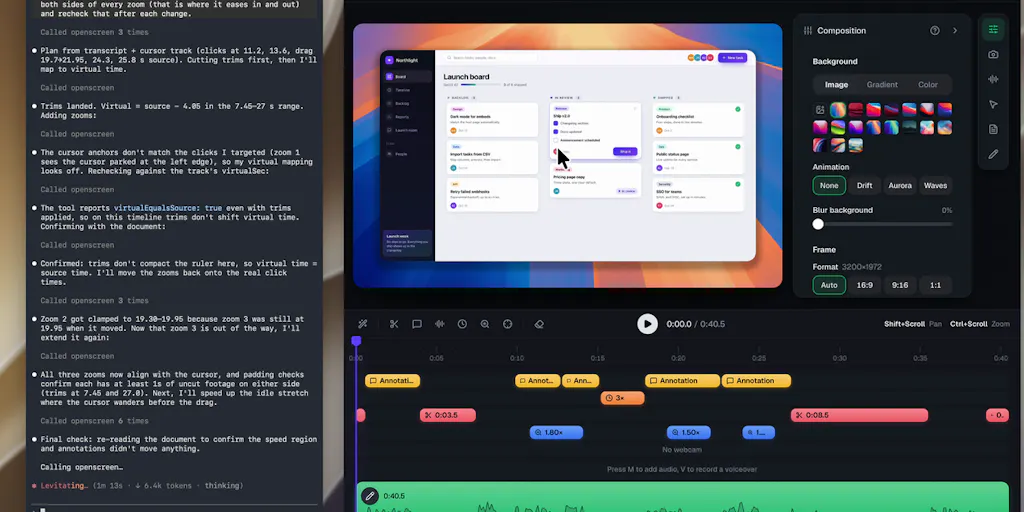
The headline feature set, per the maker’s launch post: a local MCP server so an agent like Claude Code can perform edits, zooms planned automatically from your clicks (grouped as shots, not one zoom per click), transcript-based cutting where you delete words to cut video, locally transcribed captions, webcam overlay with background blur or removal, a native GPU renderer that exports roughly 15x faster than the previous version on their reference laptop, a 3D camera that moves with your zooms, and five cursor themes with sculpted 3D variants.
For a cross-border seller, strip away the creator-economy framing and what remains is this: a zero-marginal-cost pipeline for turning raw screen captures into publishable demo assets, with the edit step delegated to an LLM you already pay for.
Why this matters more to marketplace sellers than to SaaS founders
SaaS founders make one demo and iterate quarterly. Marketplace sellers make demos continuously and locally. A TikTok Shop seller needs a vertical clip per hero SKU, refreshed when the creative fatigues. An Amazon FBA brand owner needs A+ content modules and Amazon Seller Central video assets that survive a compliance review — no watermarks, no third-party branding, clean exports. A Shopify DTC operator needs localized walkthroughs for EU and LATAM storefronts. A Temu or SHEIN supplier needs spec videos for buyer review, often under NDA pressure and time pressure simultaneously.
The common thread: high volume, low per-asset budget, and a hard requirement that the output look like you paid for it. A tool that is free, MIT, accountless, and watermarkless removes three procurement objections at once — the licensing review, the seat cost, and the “why does this vendor’s logo appear on my product page” conversation.
How it differs from the incumbents you’re probably paying for
The obvious comparison set is Screen Studio, the macOS-only recorder that made auto-zoom-and-polish the default expectation; Loom, which owns async video messaging but is cloud-first and account-bound; Camtasia, the enterprise workhorse with a price tag and a learning curve; and Descript, which pioneered transcript-based editing at the cost of a subscription and a cloud round-trip.
OpenScreen 2’s differentiation is structural, not cosmetic:
- Local-first. Transcription and captions happen on-device. For sellers handling unreleased product, supplier pricing sheets, or ad account dashboards on screen, “the video never leaves my laptop” is a compliance feature, not a privacy nicety.
- Agent-native via MCP. The local MCP server means an agent can cut the recording for you. This is the piece I’d watch hardest, because it’s the first credible bridge between “creative tool” and “automation pipeline.”
- Cross-platform. Screen Studio’s macOS-only constraint has excluded a large chunk of the operations world — the Windows machines running your Helium 10 workflows, your 3PL dashboards, your Klaviyo segmentation screens.
- Free and MIT. No seat math. No per-export metering. No “contact sales for team pricing.”
Where the incumbents still win: Loom’s sharing and comment layer, Descript’s collaborative editing, Camtasia’s template ecosystem, Screen Studio’s years of polish on macOS specifically. OpenScreen 2 is competing on the capture-and-cut layer, not the distribution layer.
What cross-border sellers can borrow from this launch
Three transferable patterns, independent of whether you ever install the tool.
Pattern one: local-first as a compliance posture
If you’re a Shopify Plus merchant selling into the EU, or an Amazon brand owner whose ad account contains spend data, every cloud tool in your stack is a data-processing question. OpenScreen 2’s local transcription and accountless operation is a template for how to evaluate your entire creative stack: which tools require uploading customer-adjacent imagery to a third party, and which don’t? I’d apply the same lens to your Etsy listing photo pipeline and your eBay listing video workflow.
Pattern two: MCP as the new integration surface
The MCP server is the most strategically interesting line in the launch. It signals that the editing layer is becoming programmable. For an operator, the implication is that your creative production can be triggered by events — a new SKU in your PIM, a price change in your ERP, a restock notification — rather than by a human opening an app. That’s the same shift that happened when Zapier made SaaS actions composable; MCP is doing it for agent-driven work.
Where the math breaks
Here’s my skeptical read. The transcript-based cutting works by deleting words. Lescot confirms the agent “cuts by word ID, not by text,” so a misheard word still cuts at its own audio timing. For English and French, word timings come from a forced aligner, so cuts land on word boundaries. For other languages, it falls back to Whisper’s own timings, “which are looser.”
A commenter, Gal Dayan, flagged exactly the right problem: the tool is weakest precisely where you need it most. Cross-border sellers produce content in Spanish, Portuguese, German, Japanese, Vietnamese, and Thai. Those are the languages running on looser timing. Dayan’s suggestion — ship a review-before-apply mode for non-aligned languages first — is the correct prioritization, and Lescot acknowledges no review step exists yet. Each edit lands as a single undo step, and cuts appear on the timeline where you can drag the edges. Undo is the safety net.
For a seller shipping 40 localized demo clips a month, “undo is the safety net” is not a workflow. It’s a liability. I’d treat OpenScreen 2 as production-ready for English and French assets today, and as a preview for everything else.
Where the agent edit quality actually lands
A commenter asked how Claude or ChatGPT compares to specialized video-editing AI. Lescot’s answer: it depends on the harness (Claude Code, Codex) and the model. He cites Opus 5.5 and GPT-6.1 Sol as “very good at that kind of task.” That’s a maker’s honest answer, and it tells you the quality ceiling is a function of which agent you wire in — which means your results will vary with your existing AI subscription tier. Budget accordingly, and don’t assume a single configuration.
Where my judgment says it falls short
No review-before-apply mode. For any workflow where a wrong cut means a re-record, this is the gap. Lescot says it’s “something we’ve looked at.” Until it ships, treat transcript cutting as a draft-generation step, not a final-edit step.
Localization is second-class. As above. The forced aligner covers English and French; everything else is looser. If your growth markets are LATAM, SEA, or DACH, you’re on the thinner path.
No collaboration or review layer. If your creative process involves a VA in Manila, a designer in Lisbon, and a brand manager in Toronto, OpenScreen 2 gives you files, not a workspace. You’ll still need Frame.io, Dropbox Replay, or a Google Drive folder with a comment thread.
Governance risk of a solo-maintained fork. Lescot took over an archived project with the original creator’s approval. That’s a healthy open-source story, but it’s also a bus-factor story. 137 contributors is real momentum; a single maintainer is still a single maintainer. If you build this into a production pipeline, mirror the repo internally.
The 15x export claim is a reference-laptop number. It’s directionally credible given the native GPU renderer, but it’s not a guarantee on your 2021 MacBook Air. Benchmark before you promise your team a faster turnaround.
What I’d watch / test next
This week, do three things.
First, install OpenScreen 2 on the machine you actually record on — not a test VM — and produce one English-language product demo end to end. Time it against your current workflow. The 15x export claim and the click-planned zooms either save you real minutes or they don’t, and you’ll know within an hour.
Second, wire the local MCP server into Claude Code or your agent of choice and run a transcript-cut on a two-minute clip with deliberate filler words. Watch where the cuts land. Then repeat the test in Spanish or German and compare. That single experiment tells you whether this is a production tool or a preview for your specific market mix.
Third, audit your creative stack for local-first alternatives. OpenScreen 2’s accountless, on-device model is a benchmark. Ask which of your current tools would fail that benchmark, and what the compliance exposure actually is. You may find the answer changes your vendor list before it changes your video workflow.


