The Desktop Is a Fulfillment Center: What Turfs Taught Me About Operator Tooling
Cross-border sellers spend their days inside browser tabs — Amazon Seller Central, Shopify admin, TikTok Shop, a freight forwarder’s portal, three Klaviyo flows, a Slack channel with the 3PL. But the actual working surface of an operator is messier than any dashboard: supplier spec sheets, HS code references, product photos, customs invoices, ad creative exports, and a graveyard of “final_v3_FINAL.xlsx” files. That mess is where margin quietly leaks. So when a solo developer launches a Mac utility called Turfs — a tool that lets you draw named zones on your desktop and drop files into them — it sounds trivial. It isn’t. It’s a small, sharp lesson in how operators should think about their own tooling stack: pay once, own the surface, and stop renting your workflow.
What Turfs Actually Solves — and Why “Fences for Mac” Is a Decade-Late Answer
The maker, Ludwig Fun, is refreshingly blunt about the origin story: he built it for himself “after more than a decade of waiting for someone to bring Fences to the Mac.” That’s the entire pitch. Fences has been the canonical desktop-organizer on Windows for years, and Mac users have been stuck with Finder’s icon grid, Stacks, and a rotating cast of half-abandoned utilities. Turfs is the direct answer.
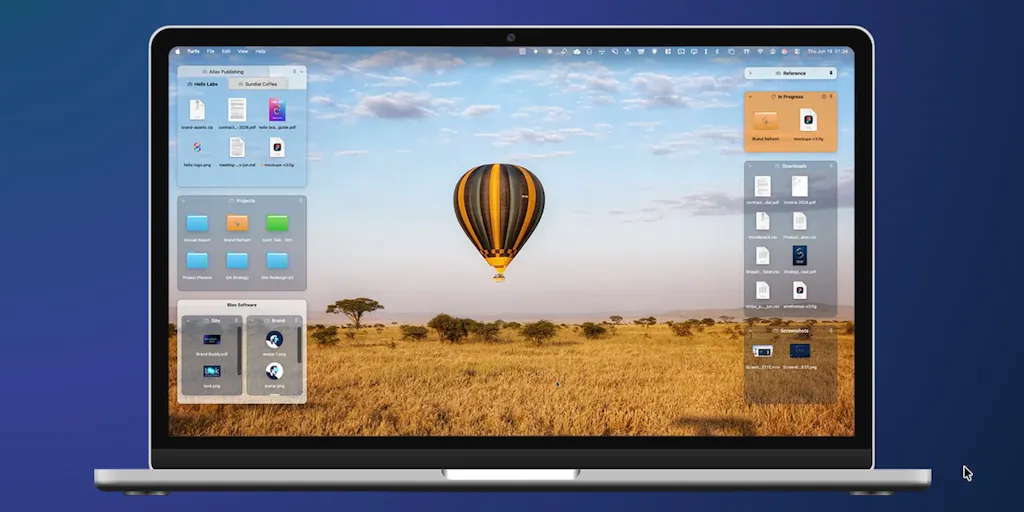
The mechanics are straightforward. You draw a named area on your desktop, drop files in, and they stay there. The interesting part is what backs a turf. It can be backed by a real folder, so the turf and the folder stay in sync both ways — move a file out of the turf, it leaves the folder; add a file to the folder, it appears in the turf. It can be backed by a Finder tag, so the turf becomes a live view of everything on your Mac carrying that tag. Or it can be backed by nothing at all — a pure visual container for things that don’t belong in any folder structure.
It also works across multiple monitors and Spaces, with each Space keeping its own turfs, and you can configure what Mission Control does with them. The claim that matters most for an operator: quit the app and your desktop is exactly as it was — nothing moved, nothing locked in. That’s a deliberate anti-lock-in design choice, and it’s the kind of thing you should be demanding from every tool in your stack.
The Show Desktop Problem Is the Whole Product
The most technically interesting part of the launch post is the explanation of why this took so long. macOS treats the desktop as a fixed backdrop and sweeps away everything else when you trigger Show Desktop. So the only way for a third-party layer to genuinely belong to the desktop is to replace Finder’s own icon layer. That’s what Turfs does — and per the maker, it’s also why it can never be sandboxed, which means it can never ship on the Mac App Store. He decided “that was a trade worth making.” It’s a direct download, notarized, and self-updating.
That single paragraph is worth more to a cross-border operator than most SaaS onboarding calls. It explains, in plain language, why the best tools for a specific job sometimes can’t live inside the walled garden — and why you should be suspicious of any tool that only exists inside one.
How Turfs Compares to the Tools You’re Probably Already Using
Let’s be honest about the competitive set, because “desktop organizer” is a category with real incumbents. On Windows, Stardock Fences is the reference implementation. On Mac, the closest analogues are Default Folder X for file navigation, Hazel for rule-based file automation, and a long tail of menu-bar utilities that promise to “tidy” your desktop. None of them do quite what Turfs does, and the differences matter.
Fences gives you the visual grouping. Hazel gives you the automation — move anything matching a pattern to a folder, rename, tag, archive. Turfs sits in a narrower lane: visual grouping that’s optionally backed by a real folder or tag, so the visual layer and the filesystem stay honest with each other. That’s the differentiator. A desktop organizer that lies to you about where files live is worse than no organizer at all.
Where Turfs genuinely diverges from the SaaS-shaped tools in your stack: $29 once, no subscription, with a 10-day trial that doesn’t ask for a card. Compare that to the per-seat, per-month pricing of almost everything else an operator touches. It’s a pointed reminder that not every problem needs a recurring revenue model — and that the tools you use to run your business don’t have to be the tools you resell into your business.
Why Amazon Sellers Should Care More Than Shopify Ones
This is where I’ll make a judgment call. If you’re a Shopify-first DTC operator, your working surface is mostly browser tabs and a design tool; your desktop is a parking lot, not a warehouse. Turfs is nice-to-have.
If you’re an Amazon FBA brand owner or a marketplace account manager, your workflow is file-heavy in ways Shopify operators rarely appreciate. Supplier quotes, packing lists, FBA shipment spreadsheets, reimbursement claims, invoice PDFs for customs, product photography batches, A+ content assets, and the inevitable folder of Helium 10 and Jungle Scout exports. You are constantly moving files between your desktop, Drive, and whatever the 3PL emailed you at 2am. A tag-backed turf that gathers every file tagged “Q3-restock” across the whole Mac is a genuinely useful primitive. A folder-backed turf that mirrors your actual Drive folder structure is even better. And the “quit the app and nothing moves” guarantee means you’re not betting your file organization on a solo developer’s continued existence.
Where the Math Breaks
Let’s run the honest numbers. $29 once versus, say, a $10/month utility is a payback period under three months. That’s trivially good math. But the real cost of a desktop organizer isn’t the license — it’s the switching cost and the maintenance risk. A solo developer shipping a direct-download, non-sandboxed app that replaces Finder’s icon layer is making a bet on macOS not breaking his approach in the next major release. He’s also making a bet on his own bandwidth. The 10-day no-card trial is the right way to de-risk that: install it, run it through a full work week, and see whether it survives a macOS point update before you commit.
There’s also a real limitation worth naming. Because it can’t be sandboxed and can’t be on the Mac App Store, you’re relying on the developer’s own notarization and update mechanism. For most operators that’s fine. For anyone in a regulated or enterprise-adjacent environment, it’s a conversation with IT you’ll have to have.
What Cross-Border Sellers Should Borrow From This Launch
Strip away the product and there are three transferable lessons for anyone running a cross-border operation.
First: your desktop is a fulfillment center, and it should be organized like one. If you can’t find a file in under ten seconds, you have a picking-and-packing problem, not a storage problem. The Turfs model — named zones, each backed by a real folder or tag — is essentially a bin-location system for your own files. That’s the same logic you’d apply to a 3PL warehouse layout. Apply it to your Mac.
Second: prefer tools that don’t lock you in. The “quit the app and your desktop is exactly as it was” design is the opposite of how most SaaS behaves. When you evaluate the next Klaviyo alternative or Gorgias replacement, ask the same question: if I stop paying tomorrow, what do I still own? If the answer is “nothing,” price it accordingly.
Third: watch the solo-developer trade-off. The maker explicitly chose a technical path that forecloses the Mac App Store. That’s a real strategic decision, and it’s the same one you make when you decide to sell on Amazon versus your own Shopify store: reach versus control. Amazon gives you demand and takes a cut; Shopify gives you control and asks you to bring your own traffic. Turfs chose control. Most sellers should run both — and most operators should have at least one tool in their stack that they own outright.
A Sidebar for the Tooling-Stack Obsessed
If you’re the kind of operator who reads Product Hunt launches for fun, you already know the pattern: most “productivity” launches are thin wrappers around a feature that should be free. Turfs is the opposite — a narrow, technically hard problem, solved by someone who actually had the problem, priced as a product rather than a subscription. That’s the profile of tooling worth paying attention to. It’s also the profile of tooling you should be building internally if your operation is big enough to have an ops hire. The best internal tools look exactly like this: one job, done well, owned outright.
What I’d Watch / Test Next
Concrete steps for this week, in order of effort-to-payoff.
- Install the trial and run it for a full work week. It’s a 10-day trial with no card required, so the cost of finding out is zero. Set up three turfs: one folder-backed for your current restock cycle, one tag-backed for everything tagged with your top SKU, and one empty turf for the “I’ll deal with this Friday” pile.
- Audit your desktop against your actual workflow. If your Amazon shipment files, supplier quotes, and ad creative exports are all in one undifferentiated blob, you’ve found your bottleneck. Map the zones you’d want, then see whether Turfs or plain folders get you there faster.
- Apply the ownership test to one subscription. Pick the tool you’d miss least and ask whether a $29 one-time alternative exists. Cancel the subscription for a month and see if anyone notices.
- Watch the macOS update cycle. The next major macOS release is the real test of whether the Finder-icon-layer approach survives. If it does, the $29 is a steal. If it breaks, you’ll know within a week of updating — which is exactly why you run the trial now, not after you’ve built your workflow on top of it.
The bigger takeaway isn’t about Turfs specifically. It’s that the tools you use to run a cross-border operation should be as deliberate as the ones you sell to customers. Own the surface. Question the subscription. And if you’ve been waiting a decade for someone to build the thing you need, maybe build it yourself — or at least pay the person who did.