The terminal is the wrong place to look for your next ops advantage — but the workspace around it isn’t
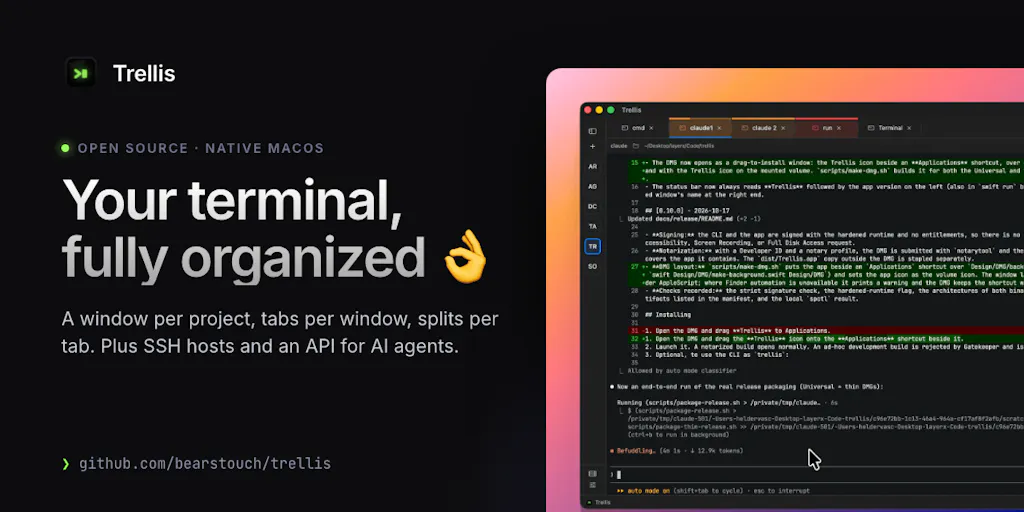
Cross-border sellers spend their days shuttling between Seller Central, Shopify admin, a dozen supplier portals, a 3PL dashboard, an ad console, and a spreadsheet that quietly runs the whole operation. The tooling gap isn’t another dashboard; it’s the connective tissue between the systems you already pay for. That’s why a niche macOS terminal launch caught my attention this week. Trellis is a native Swift terminal app from maker Hélder Vasconcelos that reframes the terminal as a managed workspace — saved hosts, reproducible layouts, a command palette, and a scratchpad beside your panes. On the surface, that’s a developer toy. For an operator running inventory syncs, feed uploads, and API pulls across marketplaces, it’s a useful provocation about how much of your “stack” is really just unmanaged windows.
What Trellis actually solves, and why it’s not a terminal feature list
Strip away the launch-page framing and Trellis is solving one problem: the terminal is where real operational work happens, but it has never been treated as a workspace. Vasconcelos’s own framing is blunt — most terminals stop at “a window with a shell in it,” and he wanted one place for everything around the shell. That distinction matters more than it sounds.
The concrete pieces: a Smart Workspace with managed windows in a sidebar, color-labeled tabs, nested splits, and sessions that keep running after you quit or can be saved to a file. A Laundpad (yes, that spelling) that runs .trellis/launch.json tasks from the pane header and lets you check your layout into the repo. A Hosts library with ~/.ssh/config discovery and optional Keychain passwords. A Command Palette on ⇧⌘P that searches actions, windows, tabs, saved hosts, tasks, and themes. A scratchpad beside your panes for writing a script with syntax highlighting, checking it, running it in the focused pane, or saving it as a task. And a privacy posture: no telemetry, and terminal output and typed input are never logged. It’s free and MIT-licensed.
For a seller, the interesting primitive isn’t the terminal emulation — it’s the idea that a working environment should be declarative and portable. .trellis/launch.json is the same conceptual move as a Docker Compose file or a Terraform plan, applied to your day-to-day operating surface. In a comment thread on the launch, JC pressed exactly the right question: checking a layout into the repo makes the workspace reproducible in a way tabs never are — but how do you handle absolute paths or tasks that only make sense on one person’s machine? Vasconcelos’s answer was that it doesn’t matter where the code is checked out; it opens relative paths and commands. That’s the correct answer, and it’s the same answer you’d want from any ops tooling you adopt.
Why this matters more to marketplace operators than to pure developers
Here’s the uncomfortable truth about cross-border operations: a meaningful share of your critical workflows already live in a shell or a script, even if nobody calls them that. Bulk listing uploads, feed transformations, image resizing pipelines, inventory reconciliation between Amazon Seller Central reports and your ERP, scheduled pulls from the Shopify Admin API, log-tailing a webhook receiver for TikTok Shop order events — these are cron jobs and CLI tools wearing a business costume. The people who run them are usually the most overloaded person on the team, and their “workspace” is fifteen Terminal tabs and a Notion page nobody updates.
A reproducible layout checked into a repo is, functionally, documentation that executes. That’s a bigger deal for a 12-person DTC brand than for a 200-person dev shop, because the DTC brand has no platform team to build internal tooling. If your ops lead quits, the difference between “the commands are in a .trellis/launch.json” and “the commands are in Dave’s head” is measured in weeks of ramp time.
How it differs from what you’re probably comparing it to
The honest comparison set isn’t iTerm2 alone. It’s iTerm2 plus Warp plus a pile of glue.
Against iTerm2: iTerm2 is a superb emulator with splits, profiles, and deep customization, but it is not opinionated about workspace state. Trellis’s sidebar of managed windows and the launch.json task runner are the differentiators. If you’ve ever rebuilt your tab layout after a crash, you know the gap.
Against Warp: Warp brought a modern input model, blocks, and AI assistance to the terminal, and it’s the closest thing to a “terminal as product” competitor. Trellis is narrower and more native — Swift, macOS-only, no telemetry — and its bet is on workspace organization and SSH host management rather than AI command generation. Different thesis, overlapping audience.
Against tmux and a dotfiles repo: This is the real incumbent for anyone technical. tmux gives you sessions and panes that survive disconnects; a dotfiles repo gives you reproducibility. Trellis is, in effect, a GUI-native attempt at the same guarantees with a lower floor for non-developers. Whether it beats tmux depends entirely on whether your ops team is comfortable in tmux — and most cross-border ops teams are not.
Against the “just use a SaaS dashboard” instinct: This is where I’d push back on the reflex to buy another subscription. If your workflow is “log into six portals and click,” no terminal workspace helps you. If your workflow is “run this script, check this feed, tail this log,” a workspace tool can consolidate real estate that’s currently spread across your Dock.
The SSH host library is the sleeper feature for anyone with overseas infrastructure
Cross-border sellers accumulate servers the way they accumulate SKUs: a proxy box for regional price monitoring, a VPS running a scraping or repricing script, a staging environment for your storefront theme, maybe a self-hosted n8n instance wiring marketplace webhooks into Klaviyo flows. The Hosts library with ~/.ssh/config discovery and optional Keychain passwords is unglamorous, but it’s the difference between “I know which of these eleven IPs is the repricing box” and a five-minute hunt every time. For teams juggling regional infrastructure across the US, EU, and Southeast Asia, that’s not a developer convenience — it’s an operational control.
What cross-border sellers should borrow from this launch
I don’t expect many DTC operators to switch terminals because of a Product Hunt post. I do think there are three transferable ideas here that are worth stealing regardless of whether you ever install Trellis.
1. Make your operating environment declarative. The launch.json pattern — a checked-in file that describes what should be running and where — is the right mental model for any repeatable ops workflow. Even if you never use Trellis, the discipline of writing down “these are the tasks, these are the paths, this is the layout” pays off the first time someone else has to run your process. If you’re on the Shopify side, this pairs naturally with Shopify Flow for the no-code parts and a versioned script repo for everything Flow can’t reach.
2. Treat scratchpads as first-class, not as throwaway. The scratchpad-beside-panes detail is small but pointed: the path from “one-off command” to “saved team task” should be short. Oleksii Sekundant made exactly this observation in the comments — turning a scratchpad command into a saved project task is the moment a one-off becomes something the rest of the team needs. Vasconcelos agreed it’s handy for building commands on the fly. In seller terms: the ad-hoc script your ops person writes to reconcile a returns report should have an obvious promotion path to a scheduled, documented job. Most teams have the ad-hoc script and no promotion path.
3. Privacy-by-default is a procurement criterion, not a nice-to-have. “No telemetry, and terminal output and typed input are never logged” is a sentence I want to see in more vendor pages. If you’re running scripts that touch customer PII, order data, or supplier pricing, the logging behavior of your tooling is a compliance question, not a preference. This is the same reason I tell sellers to read the data-processing terms on their Amazon SP-API integrations carefully rather than assuming the middleware vendor handled it.
Where the math breaks
Let’s be clear about the limits. Trellis is macOS-only and native Swift. That immediately excludes the Windows-heavy back offices that a lot of cross-border sellers still run, and it excludes Linux servers entirely. The MIT license and free pricing remove the budget objection, but they also mean there’s no support contract — fine for a solo operator, less fine for a team that needs an SLA before putting a workflow on it.
The bigger limitation is conceptual. Trellis organizes your machine. It does not solve the actual hard problems of cross-border operations: multi-marketplace inventory truth, landed-cost calculation, returns reconciliation, or the fact that your 3PL’s API and your marketplace’s API disagree about what “shipped” means. A beautiful workspace around a broken process is still a broken process. If you adopt something like this expecting it to fix your ops, you’ll be disappointed; if you adopt it to make an already-sound process reproducible, you’ll get real value.
Why Amazon sellers should care less than Shopify ones — and Temu sellers should care least
A quick segmentation, because “cross-border seller” is not one audience. Shopify DTC operators are the best fit: they tend to have scriptable storefront infrastructure, theme pipelines, and app webhooks that reward a real workspace. Amazon FBA brand owners are a mixed bag — much of their work is inside Seller Central’s UI and Helium 10 or Jungle Scout, and the scriptable surface is narrower, though bulk feed work and SP-API pulls still qualify. Marketplace account managers on Temu and SHEIN are the weakest fit right now: those platforms’ seller tooling is more portal-centric, and the operational leverage from a local terminal workspace is correspondingly lower. Etsy and eBay sellers sit in the middle — eBay in particular has enough API surface to make scripted workflows worthwhile.
Where my judgment says it falls short
Three reservations, stated plainly.
First, the naming and positioning are developer-coded in a way that will cost it the operator audience it could actually help. “Laundpad” is a typo-grade name for a feature that’s conceptually the most interesting thing in the product. The launch copy leads with splits and themes, which reads as terminal-enthusiast bait, when the genuinely differentiated story is reproducibility and SSH host management. If I were advising the maker, I’d reframe around “your ops workspace, checked into git” and let the terminal enthusiasts find the rest.
Second, the MCP/agent story is underdeveloped in exactly the way that matters. JC asked whether an agent can only run checked-in tasks or can open arbitrary panes and hosts too. Vasconcelos’s answer: right now an agent can only open windows, panes, and hosts, and task-running could be added “quite easily” in future versions. That’s an honest answer, but it tells you the automation layer is early. For a seller, the interesting future state is an agent that can execute a documented reconciliation task end-to-end — not one that can open a pane. Until task execution lands, the agent angle is a demo, not a workflow.
Third, the value is entirely contingent on workflow discipline you probably don’t have yet. A tool that makes layouts reproducible only helps if someone bothers to check the layout in. The failure mode is predictable: install it, enjoy the sidebar for two weeks, drift back to fifteen loose tabs. The product can’t fix that; only a team norm can. That’s not a knock on Trellis specifically — it’s true of every workspace tool, from Notion to Linear — but it’s the reason I’d temper expectations.
What I’d watch / test next
This week, before you install anything, do one exercise: list every recurring operational task your team runs that involves a command line, a script, or a scheduled job. If that list is empty, Trellis is not for you and neither is this essay’s advice — your bottleneck is elsewhere. If the list has five or more items, you have a workspace problem worth solving.
Then, concretely: (1) download Trellis and try to encode one real workflow — say, your daily inventory reconciliation — as a .trellis/launch.json task with relative paths, and see whether it survives a fresh clone. (2) Test the Hosts library against your actual ~/.ssh/config and confirm Keychain integration behaves the way you’d need for shared team machines. (3) Watch the repo for the task-execution capability Vasconcelos flagged as a near-term addition, because that’s the feature that turns this from a nice terminal into an automation surface. (4) Regardless of whether you keep the app, steal the pattern: write down your ops workflows in a versioned file this month. The tool is optional; the discipline isn’t.