Why a Subtitle Tool Is Suddenly a Cross-Border Operations Problem
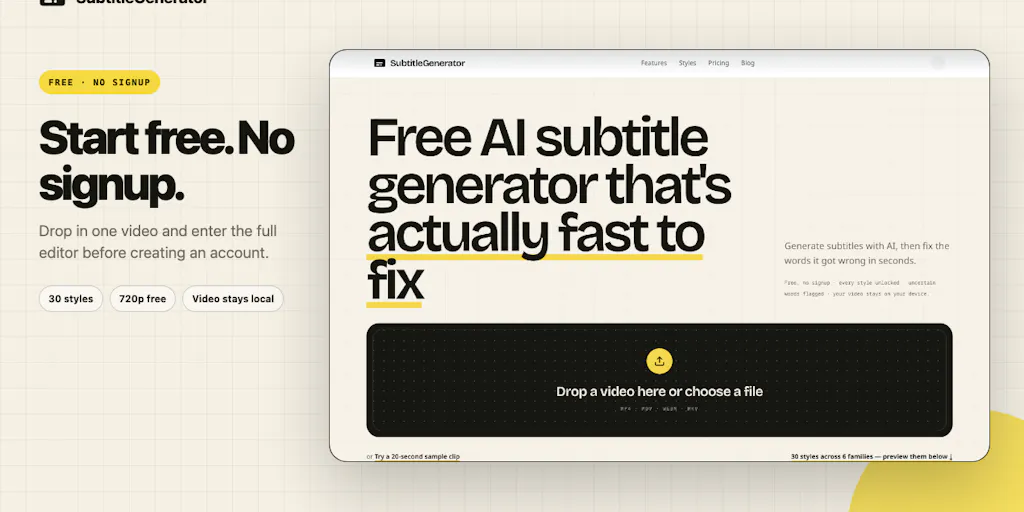
Every serious cross-border seller has hit the same wall: you’ve got a product video that converts beautifully in English, and you need a German, Japanese, or Spanish version that doesn’t look like an afterthought. The old workflow is a graveyard of half-finished projects — transcribe in one tool, fix timings in another, translate in a third, export in a fourth, and pray the encoding doesn’t break. That’s not a creative bottleneck; it’s a unit economics problem. If localization costs more than your ad creative budget, you simply don’t expand. That’s why a browser-based subtitle editor deserves your attention, even if you’ve never thought about caption files in your life. The tool in question is SubtitleGenerator, built by Yana Li, and it’s trying to collapse that entire pipeline into one screen. The pitch is simple: take a video from AI transcription to final export without bouncing between tools. For a DTC operator running ads on TikTok Shop and Amazon, that’s not a convenience — it’s a margin saver.
The Actual Problem: Your Localization Pipeline Is Leaking Money
Let’s be blunt about what most cross-border sellers do when they need subtitles. They either ignore them entirely and lose the mute-scrolling shopper, or they outsource to a freelancer who delivers an SRT file three days late with timings that drift after the first edit. The middle ground — doing it yourself — means learning the arcane syntax of subtitle files, fighting with free tools that watermark your exports, and losing your original video quality in the process. The maker of SubtitleGenerator clearly lived this pain as a YouTuber, and the product is built around a specific insight: the hardest part of subtitling isn’t the transcription — it’s the fixing. The tool flags uncertain source words, keeps a visible count of remaining review items, and gives you a clear “All clear” finish line. That’s a workflow design choice that respects your time, not just your output.
For cross-border operators, the translation angle is where this gets interesting. The product supports full-track translation while keeping the original intact. That means you can produce a Spanish subtitle track for your Amazon listing video without destroying the English master. In the world of Shopify stores and Amazon Seller Central, where A/B testing creative is a constant grind, having a clean source file and a translated overlay is worth real money. The free workflow includes all 30 styles and 720p export with a small watermark — which is generous enough to test the tool on one video without committing. The Pro and Max tiers add high-accuracy transcription, full-track translation, HD without a watermark, eight subtitle formats, custom fonts, and saved brand styles. There’s also a PAYG option for operators who need more subtitle time but refuse to add another subscription to the stack.
Why Amazon sellers should care more than Shopify ones
Shopify store owners can get away with minimal subtitles because their traffic is often warm — people who clicked an ad and landed on a product page. Amazon is a different beast. Your video is competing in a carousel of thumbnails, and the customer is one scroll away from a competitor. Subtitles are not decorative; they’re conversion infrastructure. The Amazon video requirements are strict about quality and content, and a poorly timed subtitle track screams “amateur.” If you’re selling on Amazon, the ability to fix timing errors visually — rather than guess at timestamps in a text editor — is a direct lift to your conversion rate. The “Fix” flow in SubtitleGenerator, which flags uncertain words and shows you a remaining review count, is exactly the kind of quality gate that keeps your listing video from looking like a rushed afterthought.
How It Differs From the Incumbents You Already Know
If you’ve been in the e-commerce content game for more than a year, you’ve probably touched Rev for transcription or Kapwing for quick edits. Rev gives you accurate transcripts but sends you back to a separate editor for timing fixes. Kapwing is a solid all-in-one but leans toward social clips rather than subtitle-first workflows. What SubtitleGenerator does differently is treat the subtitle file as the primary object, not the video. The browser editor is built around text and timing, with the video as a reference layer. That’s a meaningful distinction for sellers who need to produce multiple language versions of the same asset.
The privacy angle is also worth noting. The original video stays in the browser; only extracted audio is sent for transcription, and that audio is deleted after transcription is complete. For sellers handling unreleased product footage or proprietary demos, that’s a real consideration. The maker confirmed this was a deliberate choice — a response to both user privacy concerns and the practical need to avoid large video uploads. In a world where Temu and SHEIN are scraping every piece of public data they can find, keeping your source footage local is not paranoia; it’s competitive intelligence hygiene.
Where the math breaks
Let’s talk about the pricing math, because that’s where cross-border sellers need to be honest with themselves. The free tier with 720p and a watermark is fine for testing, but the moment you need clean HD exports for paid ads, you’re looking at a paid plan. The Pro and Max tiers add high-accuracy transcription and full-track translation — but the actual price points are not disclosed in the launch page. That’s a red flag for operators who need to budget content production per SKU. If the Pro tier lands above $30 a month, it’s competing with the likes of Descript, which offers a broader editing suite for a similar price. The PAYG option is smart — it acknowledges that subtitle usage is bursty, not steady — but the per-minute rate is not disclosed either. For a seller producing 50 product videos a quarter, the difference between $0.10 and $0.30 per minute adds up fast.
What Cross-Border Sellers Can Borrow From This Tool
Even if you never open SubtitleGenerator, the design philosophy here is worth stealing. The “Fix” flow — flagging uncertain words, showing a remaining count, and giving a clear finish line — is a template for any quality-check process in e-commerce. Think about your product listing reviews, your ad copy approvals, your translation QC. Most sellers run these as open-ended checklists that never feel done. The SubtitleGenerator approach makes the work finite and measurable. That’s a psychological trick you can apply to your own operations: define what “all clear” looks like, and make it visible.
The translation feature, which keeps the original track intact while adding a new one, is also a lesson in asset management. Too many sellers overwrite their source files when creating localized versions. Then when they need to update a price or a feature, they’re re-editing from scratch. The “keep the original” principle is a simple version-control habit that saves hours downstream. The tool’s support for eight subtitle formats also matters more than it sounds — different marketplaces and ad platforms accept different formats, and having a single tool that exports to all of them is a small but real operational win.
The speaker labeling gap
One commenter on the launch page raised the question of speaker labeling — specifically, what happens when two people talk over each other in an interview or podcast clip. The maker’s response was honest: early two-speaker tests identified all four speaker turns correctly with confidence scores between 0.94 and 1.00, but overlapping speech is acknowledged as the harder case, and speaker labels are planned for v2. For cross-border sellers, this matters if you’re producing testimonial videos or influencer collaborations where multiple people speak. The current tool is more aimed at single-speaker content like tutorials and voiceovers. If your content mix is heavy on UGC-style clips with multiple speakers, you’ll want to wait for v2 or stick with a manual labeling workflow.
Where My Judgment Says It Falls Short
The tool is early, and it shows in a few places. First, the lack of disclosed pricing on the paid tiers is a friction point for B2B buyers. Cross-border sellers are used to evaluating tools on a per-minute or per-SKU basis, and hiding the numbers behind a signup flow slows down the evaluation. Second, the browser-based approach is a double-edged sword. It’s great for privacy and speed, but it means your processing power is capped by the browser’s memory and the local machine’s capabilities. For long videos — say, a 20-minute product demo — you might hit performance walls that a desktop app wouldn’t.
Third, the translation feature is clearly a v1. Keeping the original track intact is nice, but the quality of the translation itself is not described in detail. Is it machine translation? Is it post-edited by humans? The launch page doesn’t say, and for cross-border sellers who need accurate technical translations — think compliance language, ingredient lists, or warranty terms — machine translation alone is a liability. If the tool offers a human-in-the-loop option, it should say so. If it doesn’t, sellers need to budget for a separate review step.
Finally, the tool is aimed at individual creators and small teams, not at the multi-user, multi-role workflows that DTC brands and agencies need. There’s no mention of team workspaces, role-based permissions, or approval flows. For an agency managing subtitles for ten client accounts, that’s a non-starter. The tool is a solid individual productivity win, but it’s not yet an operations platform.
What I’d Watch / Test Next
Here’s what I’d do this week if I were running a cross-border operation, and I mean this week — not next quarter.
First, take one of your top-performing product videos — the one with the highest conversion rate on your Amazon listing or your TikTok Shop storefront — and run it through the free tier of SubtitleGenerator. Don’t pay for anything yet. Just test the Fix flow and see how long it takes you to get to “All clear.” If it takes more than 15 minutes for a two-minute video, the tool isn’t saving you time yet. If it takes less, that’s your signal to evaluate the paid tier.
Second, test the translation feature on a video that has a lot of technical jargon. Run the output through a native speaker — not a machine check — and see if the accuracy holds up. If it does, you’ve found a way to produce localized video ads in hours instead of days. If it doesn’t, you’ve saved yourself from shipping a bad ad to your German or Japanese market.
Third, watch the Product Hunt page for updates on speaker labeling. The maker has been responsive in the comments, and v2 is clearly on the roadmap. If you do a lot of testimonial or interview content, that feature will be the difference between a nice-to-have tool and a core part of your stack. Until then, keep your manual labeling workflow handy.
And here’s the broader takeaway that goes beyond this one tool: the subtitle workflow is a microcosm of the entire cross-border content problem. The tools are getting better, and the barriers are getting lower, but the operational discipline — knowing when to automate, when to review, and when to pay for human eyes — is still on you. SubtitleGenerator is a step in the right direction. It’s not the final answer, but it’s a useful one. And in this game, useful is worth testing.