The operator’s case for per-app audio control (and what a tiny Mac utility teaches us about tooling discipline)
Cross-border sellers obsess over the visible stack — the storefront, the ad account, the fulfillment node — and almost never audit the machine the operator actually sits behind. That blind spot costs real money: a buyer call where the prospect can’t hear you, a supplier negotiation half-missed because a browser tab drowned out the headset, a recorded product walkthrough with boomy voice audio that never converts. So when a small macOS utility lands that treats audio per-app instead of system-wide, I pay attention — not because I need an equalizer, but because it’s a clean case study in how narrow, opinionated tools beat bloated suites. The product is SOUND, built by Fekry Aiad, and it’s free on the Mac App Store.
What SOUND actually solves — and why the “one volume slider” problem is an operator problem
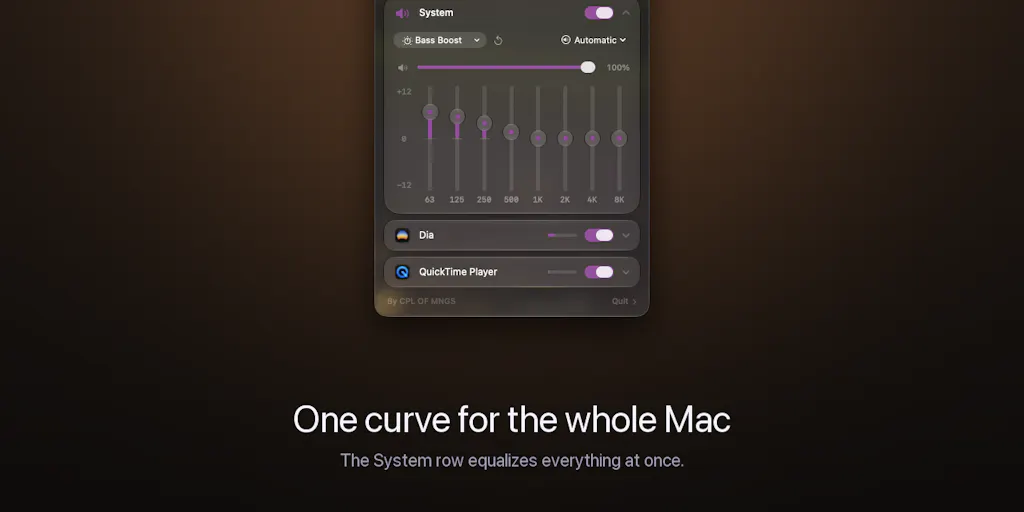
The maker’s framing is disarmingly simple: macOS gives you exactly one volume and no equalizer at all. A podcast is boomy, a game is harsh, one browser tab runs twice as loud as everything else, and the only lever the OS offers is “turn it all down.” That’s the entire pitch, and it’s honest. SOUND lives in the menu bar; every app currently producing audio shows up with its own 8-band EQ spanning 63 Hz to 8 kHz at ±12 dB, its own volume, and its own output device. There’s a System master for anything you haven’t touched, six presets to start from — Flat, Reduce Bass, Bass Boost, Vocal, Podcast, Bright — and a single power toggle that reverts every app to untouched audio.
Now translate that to a cross-border operator’s day. You’re running a supplier call on Zoom through speakers while a Shopify admin tab plays a training video and Spotify hums in the background. On stock macOS, the only move is to mute the machine or fight three separate in-app sliders that don’t agree on scale. With per-app routing, the call pins to the speakers and the music keeps going to headphones — exactly the use case that commenter Raaed Muggo flagged as the one he’d “use constantly.” That’s not a luxury feature. That’s the difference between a clean negotiation and a re-scheduled one.
Why Amazon sellers should care more than Shopify ones
Here’s my judgment call, and it’s a strong one: if you’re a pure Shopify DTC operator with a lean team, per-app audio is a nice-to-have. If you’re an Amazon FBA brand owner or a marketplace account manager juggling Amazon Seller Central, TikTok Shop, and a Temu dashboard in the same browser session, it’s closer to infrastructure. Why? Because marketplace operators live in voice. Supplier calls across time zones, Helium 10 walkthroughs recorded for a VA, dispute calls with Amazon Seller Performance, livestream prep for TikTok Shop — the audio quality of your output is a business input. A boomy, clipped voice on a supplier call reads as amateur, and amateur reads as low volume, and low volume reads as worse terms. The EQ presets alone — Vocal, Podcast — are worth the install for anyone whose calendar is 40% calls.
Where the math breaks
Let’s be clear about the constraint, because the maker is admirably upfront about it: SOUND requires macOS 26. It’s built on the modern Core Audio process-tap API and the Liquid Glass design system. That’s precisely what lets it work with zero virtual audio drivers — no kernel extension, no fake output device, nothing to uninstall later. The trade is hard: older macOS versions simply can’t run it. Commenter Bonnie Lu called this out directly as “a pretty big requirement,” and the maker’s response was refreshingly non-defensive — he pointed to other tools for earlier versions and said he’d “gotta wait for those updates.”
That’s a legitimate strategic choice, but operators should price it correctly. If your team is on a mix of macOS 14, 15, and 26 machines, you cannot standardize on this. You’d be deploying a tool that half your VAs can’t open. For a solo operator on a current Mac, it’s a free win. For a 12-person cross-border team with mixed hardware, it’s a pilot, not a rollout.
How it differs from the incumbents you’re probably already paying for
The per-app audio category isn’t empty, and any operator evaluating SOUND should benchmark it against what’s already on the market. The most obvious comparison is Loopback from Rogue Amoeba, the long-standing Mac audio routing tool that lets you create virtual devices and combine sources. Loopback is more powerful for complex routing — but it’s also a paid product and, historically, leans on virtual audio driver architecture. SOUND’s entire differentiation is that it doesn’t. The maker’s line — “no kernel extension, no fake output device, nothing to uninstall later” — is the pitch, and it’s a real one for anyone who’s ever had a virtual driver break after a macOS update.
The second comparison is SoundSource, also from Rogue Amoeba, which does per-app volume and EQ on Mac. It’s the closest functional analog. The difference is architectural and philosophical: SoundSource is a mature, paid, driver-based tool with a deep feature set; SOUND is free, driverless, and deliberately narrow. If you need per-app audio routing today on macOS 14 or 15, SoundSource is the answer. If you’re on macOS 26 and want the cleanest possible install with no system-level baggage, SOUND is the more modern bet.
The third comparison is the one nobody makes: Windows. Windows has had per-app volume mixing in its volume mixer for years, and third-party tools like EarTrumpet pushed it further. Mac users have been underserved here for a decade, which is exactly why a tiny menu-bar utility can generate genuine enthusiasm. The lesson for tool-builders in our space: platform gaps that feel obvious to users are often the most durable product wedges.
The privacy angle is a sales angle
One detail deserves more attention than it got in the launch thread. SOUND asks for system audio permission once — the OS gate for reading an app’s audio so it can be equalized. The maker states plainly: nothing is recorded, stored, or uploaded; processing happens locally, in real time, in the audio callback; there’s no account and no server to send anything to.
For a cross-border operator, this isn’t just a nice privacy story — it’s a compliance story. If you’re running supplier calls, buyer calls, or any conversation that touches GDPR or CCPA territory, you do not want a third-party audio tool that phones home. A local-only, no-account architecture is the kind of thing you can put in a vendor risk review without flinching. That’s a real procurement advantage, and it’s the sort of detail that separates a tool you can deploy across a team from one you can’t.
What cross-border sellers can borrow from this launch
Strip away the audio specifics and SOUND is a masterclass in narrow product positioning that our own category badly needs. Three borrowable moves:
1. Name the annoyance in the user’s own words. The maker didn’t open with “AI-powered audio intelligence.” He opened with “my Mac has exactly one volume, and no equalizer at all.” That’s how you write a Shopify product page, an Amazon A+ content block, or a TikTok Shop hook. Specific annoyance beats abstract benefit every time. If your listing copy says “premium quality,” you’ve lost. If it says “the zipper that doesn’t snag on your jacket,” you’ve won.
2. Ship the constraint, not just the feature. The maker volunteered the macOS 26 requirement before anyone asked. That’s counterintuitive but correct: pre-empting the objection builds more trust than hiding it. Cross-border sellers should steal this for return policies, shipping windows, and sizing notes. The operator who says “this ships in 12–18 days and here’s why” converts better than the one who buries the timeline in a FAQ.
3. Free as a distribution strategy. SOUND is free, ships in 10 languages, and follows your system language. For a solo maker, free is a growth lever — it removes all friction from the install decision and lets word-of-mouth do the work. For a cross-border brand, the analog is a genuinely useful free tool, calculator, or template that pulls your ICP into your ecosystem. Not a lead magnet with a form wall — an actual free thing.
The tooling-stack lesson nobody’s writing about
Here’s the meta-point I keep coming back to. Cross-border operators spend enormous energy on the big-ticket stack — Klaviyo for retention, Helium 10 for Amazon research, a 3PL for fulfillment, a payments provider for checkout. All correct. But the marginal productivity gains increasingly come from small, cheap, single-purpose tools that fix one specific friction. SOUND is a $0 utility that fixes one friction. Multiply that across a team and you get compounding hours back.
The discipline is knowing which small tools to adopt. My filter: does it remove a recurring annoyance that touches revenue-adjacent work (calls, content, research), does it install cleanly without system-level risk, and does it have a credible privacy posture? SOUND clears all three for a solo operator on macOS 26. That’s a narrow but real win.
Where my judgment says it falls short
I’ll be direct about the weaknesses, because that’s the job.
The macOS 26 gate is a genuine adoption killer for teams. The maker’s own comment thread shows users asking about earlier versions, and his answer is essentially “wait.” For a solo operator, fine. For any cross-border team with mixed hardware — which is most of them, especially ones using VAs on older machines — this is a blocker until the fleet catches up. Not a flaw in the product, but a real constraint on who can use it today.
Free products have unclear roadmaps. SOUND is free with no account and no server. That’s great for privacy and friction, but it raises the obvious question: what’s the business model, and what happens if the maker moves on? For a utility this small, the risk is low — worst case, you uninstall it. But operators standardizing tooling should think about longevity. A free menu-bar app from a solo maker is a different bet than a paid product with a company behind it.
The feature set is deliberately shallow. 8 bands from 63 Hz to 8 kHz is fine for voice and casual listening, but it’s not a mastering-grade EQ, and the routing is per-app rather than per-device-graph. If you need complex audio routing — say, feeding a specific app’s output into a recording pipeline for content production — you’ll outgrow SOUND fast and end up back at Loopback. That’s fine. It’s just not the tool for that job.
The launch thread is thin on hard numbers. No user counts, no pricing (it’s free, so that’s moot), no roadmap. The maker is clearly in build-and-listen mode, which is healthy, but it means you’re adopting on the strength of a clean architecture and a good pitch rather than a track record. For a free utility, that’s an acceptable trade. For anything mission-critical, it wouldn’t be.
What I’d watch / test next
Concrete moves for this week, in priority order. First, if you’re on macOS 26, install SOUND from the Mac App Store and run it through one real supplier or buyer call. Set the Vocal or Podcast preset on your call app, route music to headphones, and see whether the call quality actually reads better on the other end. That’s a 20-minute test with a measurable outcome. Second, if you’re on an older macOS, benchmark SoundSource instead — it does per-app volume and EQ today, and it’s the mature paid alternative. Third, audit your team’s hardware mix before you standardize on anything: if more than a third of your machines aren’t on macOS 26, treat SOUND as a personal productivity tool, not a team rollout. Fourth, steal the positioning lesson regardless of the tool — rewrite one product listing or ad hook to open with the specific annoyance instead of the abstract benefit, and A/B it against your current copy. Fifth, watch the maker’s comment thread over the next few weeks; his stated intent is to let user feedback drive what he builds next, and if per-app routing or older-OS support shows up, the calculus for team adoption changes. The tool is small. The habit of auditing your own operator stack is not.