As an industry observer who spends most days elbow-deep in the operational sludge of cross‑border e‑commerce — the endless spreadsheet pivots, the return‑fraud heuristics, the 3 a.m. PPC bid adjustments, and the Kafka‑esque approval chains for listing changes — I’ve watched the AI‑agent hype cycle roll through our corner of the internet like a fog. Everyone promises “autonomous operations.” What usually lands is a brittle script that hallucinates a price floor, or a customer‑service bot that tells a German buyer their package is arriving via “camel express.” The real bottleneck isn’t a lack of AI models; it’s the 15‑tool stack we stitch together to make any agent actually act on data. That’s why Sim Studio — an open‑source visual workspace for building and deploying AI agents — caught my attention. It doesn’t just promise another chatbot. It proposes a unified canvas where a cross‑border seller could, in theory, wire a Slack alert for a stock‑out, a Google Sheets update for landed‑cost changes, and a Shopify inventory sync all inside one agent workflow, without burning a weekend on API glue code. The question is whether the tool is production‑ready for an Amazon‑first operator who needs SOC2 compliance, no vendor lock‑in, and a cost model that doesn’t evaporate margin. The initial signs are surprisingly good. Let me walk you through why you should care, even if your technical team is just you and a freelancer on Upwork.
The Problem Sim Actually Solves: Stitching and Token Bleed
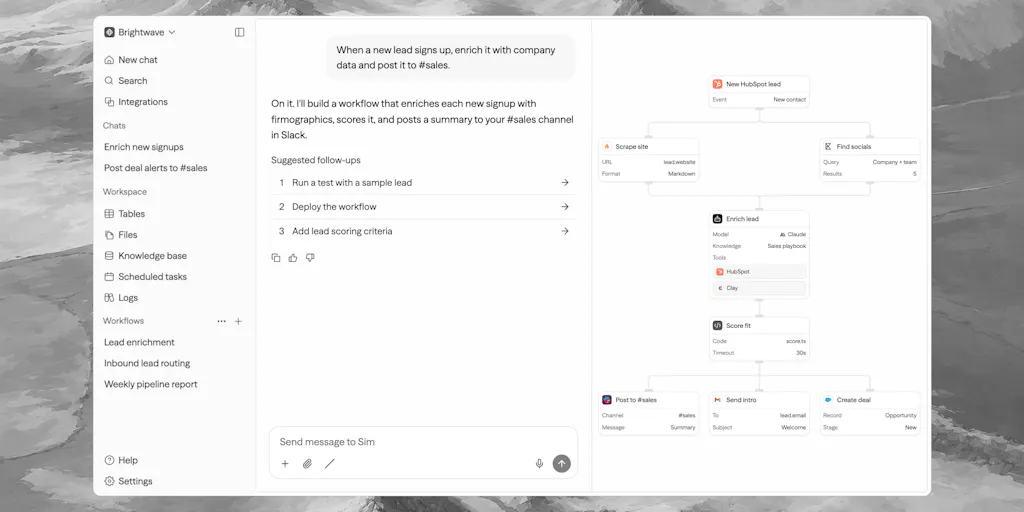
Every cross‑border seller I know runs some version of the Frankenstein stack. You have Zapier for shipping notifications, a custom Python script for repricing on Amazon, another script for scraping competitor prices, and maybe a Helium 10 export that lands in a spreadsheet. Then you try to add an LLM step — “summarize this return reason and suggest a refund threshold” — and suddenly you’re chaining three Zapier steps, a GPT‑4 call, and a conditional loop that costs $0.80 per run. The maker of Sim, Emir Karabeg, describes exactly this mess: “stitching together frameworks, one‑off scripts, and brittle automations that break the moment anything changes.” The product’s core pitch is that it replaces that stack with a single workspace where workflows, knowledge bases, tables, and files live together, so an agent can share memory without constant data‑movement costs.
For a seller, this directly attacks two pain points. First, observability — when a price‑adjustment agent mis‑fires at 2 a.m., you need to see the exact chain of LLM calls, tool outputs, and decisions. Sim’s built‑in logs and tracing (reviewed on Product Hunt) give you that in‑canvas visibility. Second, token waste — most “AI automations” use an LLM to decide whether today is Tuesday, wasting pennies on every trivial step. Sim swaps token‑hungry tool calls for deterministic code steps where possible, which is a clever cost‑saving hack for high‑volume workflows like inventory alerts or category‑rule checks. For a seller running 10,000 product‑level checks a month, those pennies add up.
How Sim Differs From What You’re Probably Using
If you’ve built any automation in e‑commerce, you’ve touched either Zapier for simple triggers or n8n for more complex pipelines. Both are solid, but neither was designed for agentic workflows — where an LLM decides the next step, not a fixed IF‑THIS‑THEN‑THAT rule. The Product Hunt review by Andrew nails it: “Once you need branching based on model outputs or agents calling other agents, you hit a wall.” Sim is AI‑native, built from the ground up on TypeScript with a visual canvas, a chat‑to‑build interface, and full support for multi‑agent loops.
What separates Sim from code‑only frameworks like CrewAI is the visual introspection. CrewAI gives you flexibility, but you can’t see your agent’s conversation tree without heavy logging. Sim lets you drop into code node‑by‑node or stay on the canvas — a hybrid approach that matters when your operations manager (who isn’t a developer) needs to tweak a workflow. The pricing model is also radically different. Zapier’s enterprise tier squeezes you on task limits; n8n uses a “fair code” license that restricts commercial deployment. Sim is fully open source under Apache 2.0, self‑hostable, and already SOC2 certified — a combination that should make any Amazon seller sleeping easier about compliance.
Why Amazon Sellers Should Care More Than Shopify Ones
Shopify sellers have the luxury of a closed ecosystem with built‑in automation through Shopify Flow and apps like Klaviyo. Amazon Seller Central, by contrast, is a walled garden with throttled APIs, limited webhook support, and a Byzantine permissions model. An open‑source agent workspace that you can deploy locally and connect to Amazon’s SP‑API via a custom integration is actually a bigger unlock for FBA operators than for Shopify drop‑shippers. You can build an agent that monitors buy box share, checks inbound shipment delays, and pings you on Slack — all inside a single, auditable canvas. Sim’s claim of “1,000+ integrations” doesn’t yet include Amazon (I’d bet on a community connector soon), but the architecture makes it straightforward to add. The SOC2 cert, too, is a huge differentiator — most open‑source projects can’t pass security reviews that Amazon’s marketplace requires for any automated tool handling PII.
What Cross‑Border Sellers Can Borrow From Sim’s Architecture
Even if you never deploy Sim in production, the design patterns it uses are worth stealing for your own tooling decisions. Here are three takeaways I’d apply this week:
1. Separate deterministic work from LLM work. The biggest mistake I see sellers make is routing every operation through a language model. Sim’s engine intentionally uses “deterministic steps and real code” for routine tasks — think “if stock < 10, raise alert” — and only calls an LLM for judgment calls like “is this return reason eligible for a refund?”. You can apply this principle immediately by auditing your current automation: move any IF‑THEN rule out of GPT prompts into a simple conditional block. Your token bill drops 60 % overnight.
2. Use the chat‑to‑build interface for rapid prototyping. According to Emir, “more than 90 % of the platform’s usage comes from the chat.” Non‑technical team members — a logistics coordinator, a customer‑service lead — can describe a workflow in plain English (“when a return is marked delivered, check the inventory level, and if under 10 send a Slack message to the purchasing team”) and get a deployable agent in seconds. This lowers the barrier for sellers who can’t afford a dedicated developer.
3. Embrace self‑hosting for compliance. Many cross‑border platforms (Amazon, Walmart, eBay) have strict data residency rules. Sim’s ability to run entirely locally via Docker (npx simstudio) means you can keep all sales data, customer info, and pricing logic behind your own firewall. That’s a compliance win that closed‑source tools like Salesforce Einstein or Zendesk Answer Bot can’t match.
Where My Judgment Says It Falls Short
I want to like Sim unreservedly, but a few sharp edges temper my enthusiasm for immediate adoption by a typical cross‑border operator.
Documentation and edge‑case handling. As the review notes, “documentation and edge‑case error handling are still maturing.” If you’re not a TypeScript developer, you’ll struggle when a workflow breaks silently. The chat‑to‑build feature works well for simple chains, but when you need to debug why an agent called the wrong integration endpoint, the current logs (while better than nothing) aren’t as granular as what you’d get from Datadog or New Relic. For a high‑volume seller, an undetected error could mean 2,000 wrong pricing adjustments before you wake up.
Over‑ambition trap. One reviewer confessed that Sim made him “a little too ambitious” — he started automating everything, processes that shouldn’t have been automated. I see this risk amplified in e‑commerce, where the temptation to build a single “master agent” that handles listings, customer service, and logistics is strong. In practice, each domain has different latency needs and error tolerances. A returns agent can take 30 seconds; a repricing agent must fire in under 2 seconds to win the buy box. Sim’s current architecture is workflow‑centric, not role‑based. Introducing explicit “role, goal, backstory” constructs (similar to CrewAI’s paradigm) would let you separate concerns more cleanly.
Integration depth, not just breadth. 1,000+ integrations is a big number, but for cross‑border sellers, the critical ones are Amazon SP‑API, eBay API, Walmart API, and carrier tracking APIs (UPS, FedEx, DHL). I didn’t see those listed in the source. The maker says “your agent says ‘message me on Slack when a deal closes’ and it just works” — which is great for internal comms, but the core e‑commerce integrations will likely need community contribution or custom building. If you’re not comfortable writing a TypeScript adapter, you’re limited to the built‑in connectors (Slack, Gmail, HubSpot, Salesforce, Notion).
Where the Math Breaks: Self‑Hosting vs. Cloud
Sim is free and open‑source, but self‑hosting isn’t free. You need a server, a database (PostgreSQL or similar), and someone to handle upgrades and security patches. For a solo seller with 50 SKUs, the cloud offering (which has a paid tier for the “Sim agent chat” feature) might be cheaper than managing infra. Emir confirms the cloud version has paid offerings, but the core agent platform remains free. The math shifts based on scale: if you run 100,000+ agent runs per month, self‑hosting saves you from per‑task pricing. But for a mid‑size seller, the cloud option’s convenience — with SOC2, automatic updates, and no ops overhead — might outweigh the open‑source benefits. My advice: test with the cloud first (it’s free for limited usage), then migrate to self‑hosted once you have a clear volume profile.
What I’d Watch / Test Next
If you’re a cross‑border operator curious about Sim, here are three concrete steps to take this week:
Build a “price drop alert” agent using the chat interface. Connect your Gmail (for competitor price‑alert emails) and a Slack channel. Describe: “Read my Gmail for any email from Keepa with a price drop notification, extract the ASIN and new price, and post a formatted message to the #pricing Slack channel.” Deploy it in your cloud sandbox. This takes 15 minutes and proves whether Sim can handle real email parsing and conditional formatting without hallucinating.
Audit your current token‑heavy automations. List all automated processes that use GPT‑4 or Claude, and identify steps that could be replaced with deterministic logic. For example, if you use an LLM to check whether a product title contains the word “iPhone,” replace it with a simple string‑match node. Sim’s architecture explicitly encourages this swap — adopt the pattern even if you don’t use Sim.
Evaluate the self‑hosting path. Run
npx simstudiolocally with Docker (as recommended by the maker in the Product Hunt comments) to see how it feels. Test a workflow that touches a local database (like an SQLite file of your inventory). If the local canvas performs well and you can easily extend it with a custom Amazon API node, you have a compliance‑friendly foundation for scaling.
Sim Studio isn’t a silver bullet. No tool is. But for cross‑border sellers tired of paying the “tool‑to‑tool tax” — the hours spent exporting CSV, pasting into another SaaS, and hoping nothing breaks — it offers an open, unified, and cost‑conscious alternative. Start small, watch your token spend, and don’t automate the things that only look automatable on paper. The agents are coming; it’s your job to wire them up without wiring yourself into a corner.