Why a Coding Tutorial Tool Just Became Your Most Underrated E-commerce Hire
Every cross-border operator I know is drowning in the same paradox: we sell to the world, but we understand less and less of the technology that lets us do it. We outsource our Shopify theme tweaks, our Amazon listing automation, our TikTok Shop ad pixel integration — and then we pay the price in agency delays, miscommunication, and invoices that make no sense. The gap between what our tools can do and what we can actually operate ourselves is widening faster than our PPC budgets. So when I see a platform that has spent ten years teaching developers to code by merging the IDE and video into one interface, and has now shipped an AI tutor that turns any question into a narrated, animated video in seconds, I don’t see a coding bootcamp. I see a template for how every e-commerce team should be onboarding new hires, documenting internal processes, and finally understanding the stack they pay for.
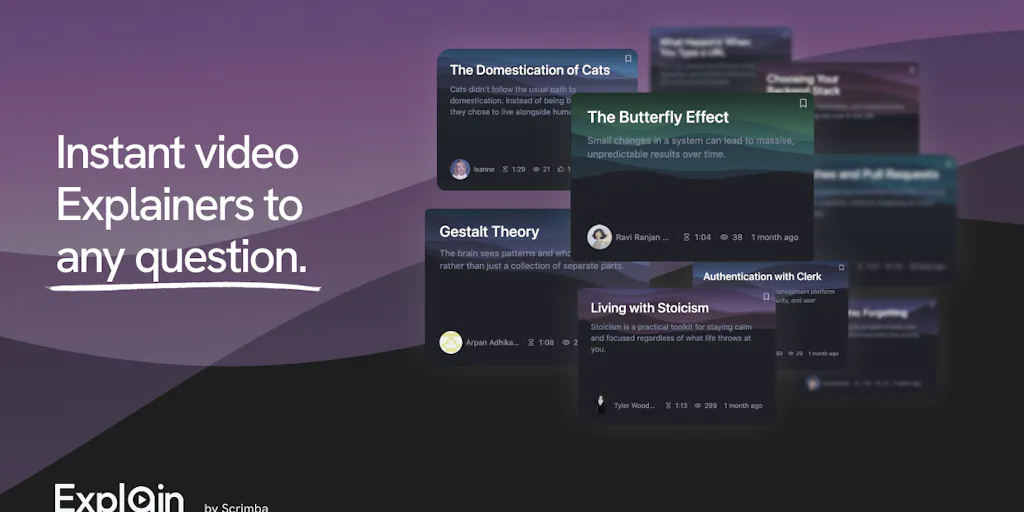
That platform is Scrimba, and its new feature, Scrimba Explain, is the most interesting piece of AI-driven documentation tooling I’ve seen this quarter — not because it’s flashy, but because it solves a problem every seller has: the “wall of text” problem. We write SOPs nobody reads. We record Loom videos that go stale in a week. We paste ChatGPT answers into Slack that nobody scrolls back to find. Explain’s bet is that the future of internal knowledge isn’t a document or a video — it’s a generated, interactive explanation that feels like a YouTube tutorial but costs nothing to produce. For a cross-border team spread across Shenzhen, Berlin, and Austin, that could be the difference between a new hire ramping in two weeks or two months.
The Problem: Your Team Doesn’t Read, and Your Videos Are Already Outdated
Let’s be honest about how e-commerce teams actually operate in 2025. Your logistics manager in Dongguan needs to understand why the Amazon API keeps rejecting inventory feeds. Your virtual assistant in Manila needs to learn the difference between a Shopify draft order and a subscription order. Your new media buyer needs to grasp how the TikTok Shop affiliate commission structure works before they start negotiating with creators. Right now, how do they learn?
They either read a help center article — which is text, and as the Scrimba community notes, “a lot of people are feeling the text fatigue these days” — or they watch a screen recording that was made three platform updates ago. The problem isn’t the information. The problem is the format. Reading a technical explanation requires sustained attention and the ability to hold abstract concepts in your head. Watching a video requires you to follow someone else’s pace, pause, rewind, and then still end up with a static artifact that can’t be edited when the API changes.
Scrimba’s core insight, which they’ve been building on for a decade, is that the gap between watching and doing is where learning dies. Their reviewers consistently praise the “live practice environment” that lets you “pause the instructor and start typing code immediately in the same interface.” That’s not a nice-to-have; that’s the entire ballgame. When you’re teaching a VA how to reconcile a Shopify payout report, the lesson doesn’t stick until they’ve clicked the buttons themselves. Explain takes that same philosophy and applies it to the generation of the lesson itself. Instead of a human instructor recording a tutorial, an AI builds a narrated, animated walkthrough of your specific question, with your files and your links, in seconds.
For cross-border operators, this is the difference between a training manual that lives in a Google Drive folder nobody opens and a knowledge base that can be regenerated on demand every time a process changes. The old model was: document once, hope it stays accurate. The new model, if Explain delivers on its promise, is: ask a question, get a fresh explanation, throw it away when it’s obsolete, and ask again.
How It Works: The “DOM-Based Video” Trick That Beats Every AI Video Generator
Here’s where I got genuinely interested, because the technical approach matters more than the feature list. Per Borgen, Scrimba’s CEO, explains in the launch thread that Explain is “MUCH faster than any of the video generation models, as we naturally use DOM-based videos (like scrims) as opposed to pixel-based.” That sentence is the key to why this tool isn’t just another AI video wrapper.
Most AI video tools — think of the ones that generate a talking head from a script, or animate a scene from a prompt — work pixel by pixel. They generate a sequence of images, encode them into a video file, and hope the result looks coherent. That process is expensive, slow, and often produces uncanny results. Scrimba’s approach is fundamentally different. Instead of generating pixels, it generates a structured document — their own “home-made format,” as Borgen describes it in response to a question about the integration — that the Scrimba frontend then renders into an interactive video canvas. Think of it like the difference between shipping a finished painting and shipping a set of instructions that a printer can execute locally. The latter is faster, cheaper, and infinitely more editable.
This is a lesson that applies directly to how we should be thinking about our own e-commerce tooling. The best solutions aren’t always the ones that do the most; they’re the ones that do the least wastefully. When you’re building a product listing workflow, you don’t need a video of someone typing in the Amazon Seller Central fields — you need the fields themselves, structured in a way that can be filled, validated, and pushed. When you’re setting up a Klaviyo flow, you don’t need a pixel-perfect render of an email — you need the logic of the flow to be testable. Explain’s DOM-based approach is a reminder that the future of AI in operations isn’t about generating fake reality; it’s about generating structured reality that can be interacted with.
Why Amazon sellers should care more than Shopify ones
If you’re a Shopify brand operator, you probably have a decent handle on your own store’s code. Liquid templates, theme sections, app integrations — it’s fiddly, but it’s manageable. Amazon, on the other hand, is a black box. Seller Central is a labyrinth of forms, policies, and APIs that change without warning. The difference in operational complexity is enormous.
That’s why Explain’s ability to ingest “files, links, or pasted code” and generate a walkthrough is potentially more valuable for an Amazon FBA operator than for a Shopify DTC brand. When Amazon drops a new fee structure or changes a listing policy, you don’t need a philosophical explanation — you need a step-by-step, visual walkthrough of what changed and what to do about it. The fact that Explain can take a URL or a document and turn it into a narrated video means you could, in theory, feed it the latest Amazon Seller News announcement and get a digestible briefing in the format your brain actually processes. That’s not a coding feature; that’s an operations feature.
What Cross-Border Sellers Can Actually Borrow From This (Beyond the Tool Itself)
I’m not going to tell you to rush out and rebuild your entire training stack around Scrimba Explain — it’s a beta, it’s free, and it’s clearly aimed at developers. But the principles behind it are transferable to how you run your e-commerce operation today, and they’re worth stealing even if you never open the tool.
First, the “2-3 second” response time is the real product. Borgen emphasizes that Explain is “as fast as a chatbot” and “as engaging as a video.” The speed is not a technical detail; it’s a psychological feature. When a new hire has a question, the friction of waiting for an answer is what makes them either give up or bother you on Slack. If you can give them a visual, narrated explanation in seconds, they’ll actually use it. The lesson for your own SOPs: don’t write a 2,000-word document when a 90-second screen recording will do. And don’t record a 90-second screen recording if you can just answer the question in a way that’s immediately visual.
Second, the “end-of-video quiz” is the engagement loop you’re missing. One of the reviewers, Developete, noted that Explain “asked me a question at the end to check whether I actually understood the explanation.” Borgen confirms they’re planning to expand this into inline coding challenges. This is a direct hit on the biggest failure of e-commerce onboarding: we show people how to do something, but we never check that they can do it. If you’re hiring a new operations manager or a VA to handle your Etsy customer service, the training isn’t done when they’ve watched the video — it’s done when they’ve answered the quiz, handled the mock ticket, or processed the test order. Build a verification step into every training process, or you’re just hoping for the best.
Third, the GitHub PR integration is a masterclass in meeting people where they work. Scrimba built a plugin that generates video explainers of pull requests, which Borgen says has been “a godsend for us internally.” The lesson for cross-border teams is to stop forcing your team into your documentation platform and instead embed your explanations into the tools they already use. Don’t make your logistics team log into a separate knowledge base to understand a shipping carrier change — push the explanation into their Slack channel, their email, or their dashboard. The tool that reduces friction wins.
Where the Math Breaks: My Honest Skepticism
For all the enthusiasm, I have to put my operator hat on and ask the uncomfortable question: what does this cost at scale, and what’s the quality ceiling?
Borgen says the goal is “to keep costs as low as humanly possible so that we can continue to offer a generous free plan for students.” That’s a noble mission, and it’s currently free during beta. But the economics of AI-generated video — even DOM-based video — are not trivial. Every explainer you generate is a call to a language model, a rendering job, and a hosting cost. If Scrimba is serious about a free tier for students, they’re either subsidizing it heavily or the quality ceiling is lower than it appears. For a cross-border seller who wants to generate dozens of explainers for internal training, the cost per explainer will eventually matter. There’s no pricing information disclosed in the launch, which tells me they’re still figuring it out.
More importantly, the quality of the content is only as good as the underlying model. Explain can generate a video about “how a Circle Becomes Music” or “Understanding CORS” — but those are topics with clear, factual answers. E-commerce operations are messier. If I ask it to explain “why our Amazon listing lost the Buy Box last Tuesday,” it’s not going to have the answer, because it doesn’t have access to my account data. The tool is a format revolution, not a knowledge revolution. It can explain how the Buy Box algorithm generally works, but it can’t tell you why your specific listing lost it. That’s still your job.
Where the math breaks
Let’s do some rough back-of-the-envelope math on the cost of video documentation, because I think it’s a trap a lot of sellers will fall into. A typical Loom video for a process walkthrough is 5-10 minutes. To produce it, you need to record, edit (if you’re fancy), host, and maintain it. If a process changes, you re-record. The cost is your time, which is not zero.
Explain’s pitch is that you type a question and get a video in seconds. But if the video is generated from a model, it’s not your process — it’s a generic explanation of a process. For a truly proprietary workflow — say, your specific method for handling a Shopify returns request with a custom app — the model can’t generate that from scratch. It needs your files, your links, your code. So you’re back to feeding it context, which takes time. The “seconds” are only for the rendering, not for the context-gathering. The math only works if you’re explaining something generic, or if you have a systematic way to feed it your proprietary knowledge.
What I’d Watch / Test Next
Here’s what I’d actually do this week if I were running a cross-border operation and wanted to pressure-test this idea without getting distracted by the “AI tutor” hype:
Test the Chrome Extension on your own help docs. The source mentions a Chrome Extension that makes it easier to create explainers anywhere. Take your most confusing internal SOP — the one that generates the most Slack questions — and paste the URL into Explain. See if the generated video is actually clearer than the document. If it is, you’ve found a new pattern for training. If it’s not, you’ve learned that your SOP needs rewriting before it can be explained.
Try the MCP support for your coding agents. If you have a developer on your team who uses Cursor or Claude to build out your Shopify theme or your custom integration, have them connect Scrimba’s MCP server and generate a video explainer of a recent code change. Borgen says it’s been a godsend for reviewing pull requests. Even if you’re not a coder, watching a video of what your developer actually changed is a thousand times more useful than reading a commit message.
Don’t build your training stack around it yet. It’s free, it’s beta, and it’s aimed at developers. Use it as a proof-of-concept for the format — narrated, animated, interactive explanations — and start planning how you’d apply that format to your own operations. The tool you end up using in six months might be Scrimba, or it might be a competitor that copies the DOM-based video trick with a focus on business SOPs. The principle is what matters, not the vendor.
The bottom line is this: cross-border e-commerce is an information arbitrage business. The teams that onboard faster, understand their tools better, and adapt to platform changes quicker win. Scrimba Explain is a reminder that the bottleneck isn’t the information — it’s the format. And the format is finally getting an upgrade.