The $49 question every cross-border seller should be asking about their demo stack
Most cross-border sellers I talk to are running a quiet, expensive video problem they never budget for. Product pages need screen recordings. Amazon A+ content needs demo clips. TikTok Shop affiliate kits need something an affiliate can actually film against. Support macros need walkthroughs. And almost every operator I know has solved this by paying a monthly subscription to a tool that only runs on one operating system, uploading client and account screens to someone else’s server, and then manually placing zoom keyframes for forty minutes per video. ScreenCursor is a small launch that pokes at all three of those assumptions at once, and I think it’s worth twenty minutes of your week even if you never buy it.
What ScreenCursor actually is, and why the framing matters
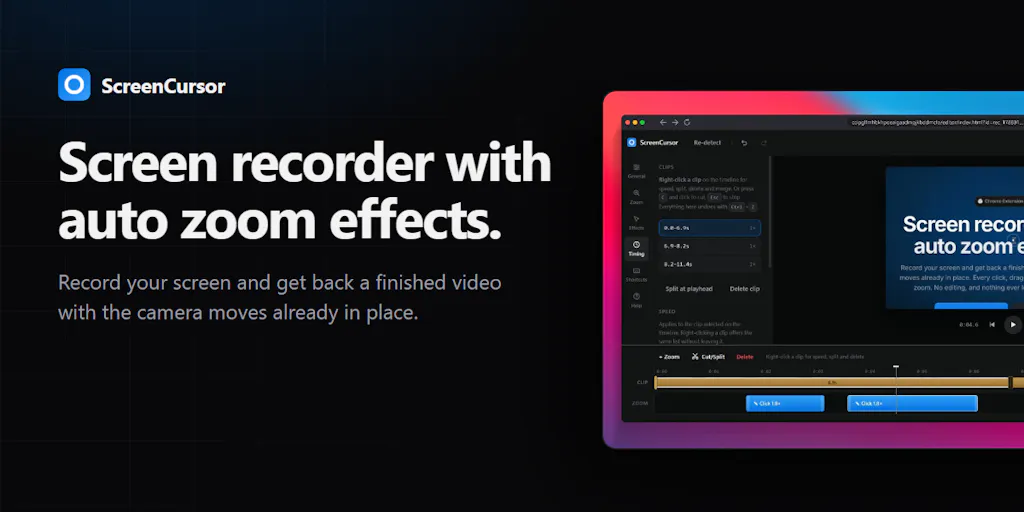
ScreenCursor is a Chrome extension from a maker who goes by Phoenix on Product Hunt. The pitch, in his own words, is that he kept seeing great product demos made with Screen Studio, discovered it was Mac-only, and built the Windows and Linux answer. You hit record; the extension watches where your cursor travels and where you click; when you stop, the zooms are already placed. You get a finished video, not a project to edit.
Three design choices are worth naming because they’re the actual product:
- It runs anywhere Chrome runs — Windows, Mac, Linux — with no installer and no admin rights.
- Nothing is uploaded. The recording never leaves your computer. No account, no server, no watermark.
- Pricing is $49 once for a lifetime license, positioned explicitly against “$108 a year.” During the launch window there’s a 50% code (PRODUCTHUNT) dropping it to $24.50 for seven days.
Every zoom stays editable. You can move it, resize it, delete it, or turn the automatic pass off entirely if it guessed wrong. The maker also confirmed in the thread that the editor supports adjustable zoom, backgrounds and frames, clip splitting and cutting, and speed/depth/motion customization.
For a cross-border operator, the interesting part isn’t the zoom automation. It’s the combination of “no install, no admin rights” and “no upload.” Those two constraints are exactly the constraints most agency-side and VA-side workflows run into, and almost nobody builds for them.
Why Amazon sellers should care more than Shopify ones
Shopify merchants record on their own laptops, usually on Macs, usually with a designer nearby. Amazon sellers don’t. The typical Amazon FBA brand I work with has a VA in the Philippines or Pakistan, a designer in Eastern Europe, and a founder on a Windows machine in the US or UK. Getting a consistent demo for A+ modules or a Sponsored Brands video means someone has to be on the right OS with the right license.
A Chrome extension that runs on any of those machines, requires no admin rights (which matters enormously on locked-down corporate or agency laptops), and produces a finished file without a cloud round-trip is genuinely a different category of tool than Screen Studio. It’s not “the same thing but cheaper.” It’s “the same thing, but deployable to a team that doesn’t share your hardware.”
The privacy angle is not marketing fluff
Sumon Khan made the sharpest comment in the thread: he’d used Loom for years but stopped because he didn’t want client recordings sitting on someone else’s servers. If you’ve ever recorded a walkthrough of your Amazon Seller Central dashboard, your Shopify admin, your Klaviyo flows, or a supplier’s Alibaba message thread, you’ve almost certainly leaked more operational detail than you intended — SKU-level margins, ad spend, supplier names, email list sizes.
Local-only recording is a real compliance and competitive-intelligence argument, not a vibe. For sellers under NDA with a brand owner, or agencies handling multiple client accounts, this is the feature that justifies the switch on its own.
How it stacks up against the incumbents
Let me be specific about the comparison set, because “Screen Studio alternative” undersells the field.
Against Screen Studio. Screen Studio is the reference implementation for auto-zoom screen recording, and it’s excellent. It’s also Mac-only and priced as a subscription. If your whole team is on Macs and you’re producing high-volume content, Screen Studio is still the better-polish option. If anyone on your team is on Windows or Linux, you now have a real choice.
Against Loom. Loom wins on sharing, async comments, and team libraries. It loses on privacy, on price at scale, and on the “finished video” promise — Loom gives you a recording, not a polished demo. Different jobs.
Against Camtasia and ScreenFlow. These are full NLEs. You’ll spend more time editing than recording. If you’re producing one demo a week, that’s fine. If you’re producing ten, it’s a tax.
Against OBS. Free, powerful, cross-platform, and completely wrong for this job unless you enjoy keyframing zooms by hand.
Against Tella and ScreenPal. Both cloud-first, both subscription, both browser-based recording — which is the closest architectural comparison. Neither is local-only in the way ScreenCursor claims to be.
The honest positioning is this: ScreenCursor is the cheapest, most portable, most private option in the category. It is almost certainly not the most polished. That trade is the whole point.
What cross-border operators should actually borrow from this launch
Even if you never install ScreenCursor, there are three lessons in this Product Hunt thread that apply directly to how you build your own stack.
Lesson one: OS portability is a real moat in distributed teams
The maker’s entire wedge is “Screen Studio is Mac-only.” That’s it. That’s the insight. If you run a cross-border operation, every tool in your stack should be audited against the same question: does this work for my VA, my designer, and my founder, or does it work for one of them? Shopify got this right early with browser-first admin. Helium 10 and Jungle Scout got it right by being web apps. The tools that quietly fail in cross-border ops are the ones that assume a single OS.
Lesson two: local-only is becoming a buying criterion
I expect “does this upload my data” to become as standard a filter in 2026 as “does this integrate with Klaviyo” is today. If you’re evaluating Triple Whale, Northbeam, or any attribution tool, you already ask where the pixel data lives. Apply the same scrutiny to your video, screenshot, and screen-share tools. Supplier names, ad spend, and margin data leak through screen recordings constantly.
Lesson three: lifetime pricing is a hedge against subscription fatigue
The comment thread is dominated by people reacting to the pricing model, not the features. Elias Leo said the lifetime payment was the thing he liked most. That’s a signal. Cross-border sellers are running 15–30 SaaS subscriptions at any given time across Shopify apps, Amazon tooling, ad platforms, and logistics dashboards. Every $20/month tool you can convert to a one-time $49 purchase is a permanent margin improvement. When you’re evaluating your next tool, ask the vendor if a lifetime tier exists. Increasingly, the answer is yes.
Where my judgment says this falls short
I want to be clear about the limits, because the launch thread surfaces them honestly.
Outside-browser recording is not solved. Charlie Titherley asked directly whether it captures other windows and the whole desktop. The maker’s answer: it records your screen outside the browser, but “the zoom effects won’t work perfectly right now.” A custom focus point in the editor is promised for a future update, with no ETA given. If your demos involve switching between Chrome and a desktop app — say, Amazon Seller Central in a browser and a supplier spreadsheet in Excel — you will hit this wall on day one.
Chrome-extension architecture has a ceiling. The same constraint that makes it portable also makes it shallow. It can’t hook into OS-level window management the way a native app can. That’s a permanent trade, not a bug.
No trial or money-back period was confirmed. Justin Johns asked about a trial or refund window and, as of the scrape, there’s no answer in the thread. At $24.50 that’s a minor risk. At $49 it’s still minor, but for a team buying ten seats it’s the kind of thing that stalls a PO.
Single-maker risk. This is a solo launch. If the maker moves on, the extension doesn’t get updated, and Chrome’s extension manifest requirements shift every couple of years, you could be left with a dead tool. That’s a real consideration for anyone putting it into a production workflow.
The editor is thinner than Camtasia. The maker confirms zoom adjustment, backgrounds, frames, splitting, cutting, speed, depth, and motion. Nancy Brown asked for more real-time editing features and the response was essentially “it already has these, and more is coming.” Fair. But if you’re used to a full NLE, you’ll feel the missing pieces.
Where the math breaks
Run the numbers for a five-person content team. Screen Studio at roughly $108/year per seat is $540/year, recurring. ScreenCursor at $49 one-time per seat is $245 total, forever. Over three years that’s $1,620 versus $245 — a $1,375 delta on a single tool. Multiply that across the ten or fifteen subscription tools in your stack that have a lifetime alternative, and you’re looking at five figures of annual margin recovery. The math only breaks if the tool doesn’t do the job. Which is why the outside-browser limitation matters so much: if it forces you to also keep a Screen Studio license for the founder’s Mac, you’ve added cost rather than removed it.
What I’d watch / test next
Here’s what I’d do this week, in order.
First, install the extension on your Windows or Linux machine — the machine you’d never normally record on — and run one real demo through it. Not a test video. An actual A+ content clip or a TikTok Shop affiliate walkthrough. See whether the auto-zooms land or whether you spend the same forty minutes fixing them that you’d have spent placing them manually.
Second, if you have a VA or agency partner on Windows, send them the link and ask them to record the same task. The whole value proposition is portability across your distributed team. Test that claim directly before you believe it.
Third, audit your current video tool spend. Add up what you’re paying across Loom, Screen Studio, Camtasia, and anything else in the recording layer. If it’s over $500/year, the lifetime math is worth a serious look.
Fourth, watch the thread for the custom focus point update. That’s the feature that determines whether this replaces your current tool or sits alongside it. If it ships, the case gets much stronger. If it doesn’t, you’re buying a browser-only recorder with a very good privacy story.
Fifth — and this is the one I’d actually push hardest on — ask your other SaaS vendors about lifetime tiers. The ScreenCursor launch is a reminder that the pricing model itself is negotiable in this market. Most sellers never ask. The ones who do tend to save real money.