The visual QA bottleneck is now the real cost of AI-built storefronts
Every cross-border operator I know has quietly become a builder again. Not because we wanted to, but because the math changed: a Shopify theme tweak that used to eat a freelancer’s afternoon now takes ten minutes with a coding agent, and a landing page variant for a Temu price-test or a TikTok Shop creative test can be spun up before the morning standup. The bottleneck moved. It is no longer “can we build it” — it is “can we describe precisely enough what we want built.” That gap between what you see in the browser and what you can articulate in a prompt is where PulseDev, a new tool from the team at Haptiker, is aiming. For sellers running multi-market storefronts where a misaligned button on a German PDP costs conversion in a market you can’t easily QA yourself, this is a more commercially interesting launch than it looks.
The actual problem: pointing beats describing
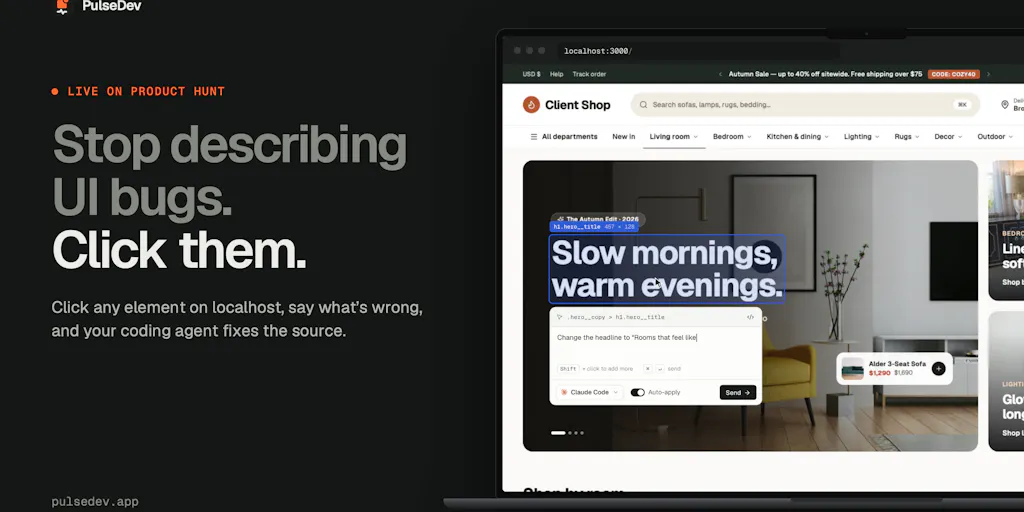
The maker’s framing is the cleanest articulation I’ve seen of a pain every operator with an AI-assisted build stack now feels: “I was already looking at the bug. I just wanted to click it.” That’s the whole thesis. When you’re building a site with a coding agent, you can see what needs changing — a button that doesn’t line up, a heading that wraps awkwardly, spacing that feels off. But getting the change made means translating sight into text: explain where the element is, open DevTools, copy a selector or screenshot, find the component, switch to the terminal, paste, hope you gave enough context, then go back to the browser to check. For a small visual change, the describing can cost more than the change.
That’s not a developer-only complaint. Cross-border storefronts are exactly the kind of surface where this friction compounds: you’re running localized versions of the same theme across markets, and the “make this button match the one beside it” class of work is endless and low-value per instance but high-value in aggregate. PulseDev’s answer is to invert the workflow — click the element on your local site, describe the change in plain language, and let the tool attach the selected element’s context, including its selector and styles, to your instruction. The Vite plugin adds source mapping where supported, helping the agent locate the relevant code. You still decide what the change should be; PulseDev handles the handoff from page to agent.
Why this matters more for marketplace-adjacent sellers than pure DTC
Here’s the operator-specific angle the Product Hunt thread doesn’t spell out. If you sell on Amazon and run a Shopify or headless storefront as your brand home, your storefront’s job is different from a pure DTC brand’s. It’s a trust surface — the place buyers go to verify you’re real after seeing you on TikTok Shop or Temu. That means polish matters disproportionately, and polish is exactly the “spacing, matching styles, changing copy” work PulseDev targets. A pure-play DTC operator with a dedicated front-end contractor feels this less; a marketplace seller wearing the builder hat on weekends feels it every single time they touch the theme.
How it differs from the incumbents you’re probably already using
The honest comparison set isn’t other AI coding agents — it’s the context-passing layer around them. Today most operators solve this with a mix of screenshots, Chrome DevTools selector copying, and increasingly browser-based AI tools. PulseDev’s differentiator is that it works with the agent you already have installed — the launch lists Claude Code, Codex, Gemini CLI, and OpenCode — and that your agents’ usual usage limits and provider charges still apply. That last point is the one I’d underline: this is a context layer, not a model reseller. You’re not paying twice for inference.
The workflow itself is deliberately narrow: open your local site, click an element (shift-click to select more than one), describe the change, send it to your agent, follow the agent’s activity beside the page, then review the proposed diff in your browser. Approve or reject in review mode, or enable auto-apply when you trust it. The diff-review step is what commenters kept coming back to — one noted “nothing is written until you approve,” and another said the in-browser diff review is “the part that would make me actually use this” because they don’t want an agent editing files from a screenshot description. That instinct is correct and I’d push it further: for anyone touching a live storefront theme, diff review shouldn’t be a feature, it should be non-negotiable.
Where the Vite dependency actually bites
The sharpest question in the thread came from someone asking what the agent receives when there’s no Vite source mapping — just the selector and computed styles, or does it still try to resolve the component? The maker didn’t answer that one directly in the visible thread, and it matters. Source mapping is what turns “this button” into “this component in this file.” Without it, you’re back to selector-plus-styles, which is better than a screenshot but not the same as true component resolution. The maker did confirm the tool works with any framework — “anything that runs in the browser,” including WordPress themes and page builders like Elementor — which broadens the addressable surface considerably for operators running older stacks. But “works with” and “works as well as” are different claims, and the source-mapping gap is where I’d expect the “make this match that” workflow to degrade.
What cross-border sellers can borrow from this
Even if you never install PulseDev, the launch is a useful mirror for how you should be structuring your AI-assisted build and QA workflow across markets.
Treat visual context as a first-class input, not an afterthought. The reason describing a button change is expensive is that we’ve trained ourselves to communicate with agents through text when the actual information is visual. Every operator running localized storefronts should be building a habit of capturing the element, not the screenshot — selectors, computed styles, component paths. PulseDev productizes that habit; you can also just adopt it manually.
Shift-click multi-select is the underrated feature. One commenter flagged that being able to point at two elements for “make this match that” eliminates a lot of explaining. That’s exactly the operation cross-market QA generates constantly: “make the DE button match the FR one.” If you’re briefing a contractor or an agent on localization fixes, give them pairs, not prose.
Keep a human approval gate on anything touching production. The thread consensus — “I’d never let an agent touch files without seeing diffs first” — is the right default for storefronts where a broken checkout or a mangled PDP is a revenue event, not an inconvenience. Auto-apply is fine for a staging theme; it is not fine for the theme your paid traffic lands on.
Watch the platform coverage before you standardize. The free tier is one project on macOS, and Windows is listed as “coming soon” with no date — the maker was explicit about not wanting to overpromise. If your build machine is Windows, this is a wait-and-see, not a this-week adoption.
Where my judgment says it falls short
Three things temper my enthusiasm, and operators should weigh them before adding another subscription to the stack.
First, the platform gap is real. macOS 13 or later only, one free project, Windows undated. For a solo operator on a MacBook this is fine; for a team with mixed machines it’s a coordination problem. The maker’s transparency about the missing Windows date is commendable but doesn’t change the practical constraint.
Second, pricing is a promotional structure, not a stable one. Pro is $12/month if you subscribe before November 3, 2026, and that rate is locked; new subscriptions are $18/month from November 3. That’s a clean early-adopter incentive, but it means your unit economics depend on when you sign up, and the “keep that rate” promise is only as good as the company’s longevity. For a tool that sits in your build pipeline, vendor durability matters more than a $6 delta.
Third, and most important for the cross-border use case: this is a local development tool. It works on your local site, with your installed agent, in your browser. That’s the right scope for a v1, but it doesn’t touch the harder problem — QA across deployed localized storefronts in markets you can’t manually inspect. A button that looks wrong on your local build is one thing; a checkout flow that breaks only on the German mobile PDP after a theme update is another, and PulseDev doesn’t claim to solve it. Don’t buy it expecting multi-market QA; buy it expecting faster local iteration, which is a narrower but still real win.
The trust question the thread didn’t fully resolve
The most operationally important unanswered question is the no-source-mapping behavior. If you’re on a framework without Vite source mapping — or a WordPress/Elementor stack — what exactly does the agent get, and how often does it guess wrong? The maker’s “works with anything in the browser” answer is about compatibility, not fidelity. Until that’s demonstrated, I’d treat the source-mapped path as the supported path and everything else as best-effort. That’s not a knock on the product; it’s how I’d scope a pilot.
What I’d watch / test next
This week, if you’re curious, do three concrete things. First, install PulseDev on a staging copy of your theme — never production — and run the exact test the maker suggests: pick one small visual fix you’ve been putting off, like matching a button height across two PDP templates, and see whether click-plus-describe beats your current screenshot-to-agent workflow on time-to-diff. Second, deliberately test the no-Vite path on whatever your storefront actually runs (WordPress, Elementor, a custom stack) and note where the agent’s proposed change misses — that tells you whether the source-mapping gap is theoretical or daily. Third, if you’re on Windows, email the team at [email protected] for a heads-up rather than blocking on it, and meanwhile adopt the behavior — element-level context, paired “match this to that” briefs, mandatory diff review — with the tools you already have. The tool is optional; the workflow discipline is not, and it’s the part that will still pay off if PulseDev never ships a Windows build.


