Why a Mac Screenshot Tool Should Matter to Anyone Selling Across Borders
Every cross-border operator I know has the same dirty secret: a desktop folder full of screenshots that were supposed to become spreadsheets, supplier messages, ad copy, or customer-service replies — and never did. The text is there, trapped in pixels, and the cost of manually retyping it is high enough that we just… don’t. We squint at a Chinese supplier’s QC photo, re-type an Amazon review into a translation tool, or copy a TikTok ad script from a video frame by frame. The friction is invisible but real, and it compounds across every marketplace, every timezone, and every language you touch. That’s why PixelRead AI OCR, a free Mac utility that turns any screen region into actionable text — with on-device translation, summarization, and AI processing — is more relevant to your operations than its humble “screenshot tool” framing suggests. It’s not about capturing text. It’s about eliminating the retyping tax that every cross-border seller pays daily, and doing it without shipping sensitive operational data to a third-party server. Let me explain why this matters, where it fits in your tooling stack, and where I think it still falls short.
The Problem It Actually Solves: The Retyping Tax
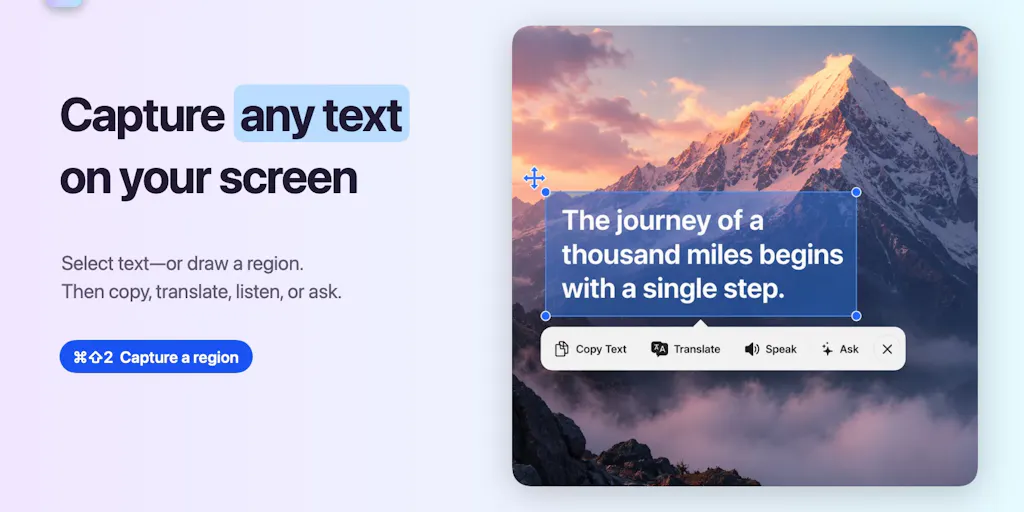
The pitch from Dimi Tarasowski, the maker, is straightforward: existing OCR utilities stop at copying, but PixelRead goes further — it can translate, speak, summarize, rewrite, extract details, and answer questions about the captured text, all without sending it to a server. Press ⌘⇧2, drag over any region, and you get actionable text. On the surface, that sounds like a convenience feature. In practice, it solves a problem that costs cross-border sellers hours every single week: the manual transfer of text from one context to another.
Think about your actual workflows. A supplier sends you a photo of a packing slip with a tracking number. A customer service rep in Manila pastes a screenshot of a return request into Slack. An Amazon listing image contains a claim you need to verify, and you have to type it out to search for it. A competitor’s TikTok ad has a call-to-action overlay you want to adapt — but you have to transcribe it by hand. Every one of those moments is a small tax: a few seconds of retyping, a few more seconds of error-checking, and a background hum of cognitive load that never goes away.
What PixelRead does is collapse that tax into a single keystroke. Capture the region, and the text is not only extracted — it’s ready to be copied, translated, or fed into an AI summary. The on-device processing is the key differentiator. As Gal Dayan notes in the comments, the privacy angle is what sold him: “half the reason I never bothered with the built-in screenshot-to-text tools is not wanting random screen content going to a server.” For cross-border sellers, that privacy isn’t a luxury — it’s a compliance requirement. When you’re capturing supplier pricing, customer PII, or internal margin calculations, sending that to a random OCR server is a liability. Apple’s built-in Live Text is decent, but it’s limited to copying. PixelRead adds the translation and AI layer on top, locally, which is a meaningful step up.
The real operational win, though, is the translation feature. It requires macOS 26 and supported hardware, and it works with automatic source detection. For a seller juggling Chinese suppliers, German customer emails, and Spanish ad platforms, the ability to capture a region and get an instant on-device translation is not a nice-to-have — it’s a workflow changer. You’re no longer context-switching between a screenshot, a translation app, and a note-taking tool. You capture, translate, and act, all in one flow.
How It Differs From What You’re Already Using
Let’s be honest: OCR is not new. Apple has Live Text built into macOS, and there are dozens of third-party utilities like TextSniper that have been doing screenshot-to-text for years. What separates PixelRead is the stack it puts on top of the capture. It’s not just OCR — it’s a local AI pipeline that can summarize, rewrite, extract key details, and answer questions about the captured text. That’s closer to what you’d get from a tool like Raycast with AI extensions, but Raycast’s AI features are cloud-based. PixelRead keeps everything on your Mac, which matters for the reasons I mentioned above.
The comparison to TextSniper is instructive. TextSniper is a solid, focused tool — it captures text, copies it, and that’s about it. It’s fast, but it doesn’t do anything with the text beyond extraction. PixelRead’s value proposition is that the extraction is just the entry point. Once you have the text, you can translate it, have it read aloud with language-aware system voices, or ask Apple Intelligence to summarize or rewrite it. That turns a utility into a mini workbench.
Where I’d draw the line is against full-featured AI assistants like ChatGPT or Claude. Those tools are far more powerful for deep analysis, but they require you to manually copy-paste the text, and they process it in the cloud. PixelRead is not a replacement for those — it’s a front-end that feeds them. The workflow I’d use: capture with PixelRead, get the text locally, then decide whether to send it to a cloud AI for deeper work. That’s a sensible division of labor.
Why Amazon Sellers Should Care More Than Shopify Ones
Here’s a judgment call: Amazon sellers have more to gain from this tool than Shopify merchants. Why? Because Amazon’s ecosystem is still shockingly text-in-image-heavy. Product images with text overlays, supplier photos with spec sheets, customer review screenshots, and Seller Central’s own clunky interface all generate a constant stream of pixelated text. Shopify sellers live in a more structured world — product data is in CSV files, descriptions are in a CMS, and most of their workflow is already text-native.
For Amazon FBA operators, the pain points are specific: extracting ASINs from screenshots, pulling out return reasons from customer messages, and transcribing competitor pricing from search result images. PixelRead’s extract-key-details feature is designed for exactly this. The comment from Gal Dayan about pulling text from error screenshots and stack traces applies equally to pulling ASINs from a cluttered screenshot. The question is whether the OCR handles messy, monospace, or low-contrast text as cleanly as regular text — and that’s a test I’d run before relying on it for operational workflows.
Where the Math Breaks
Let’s talk about the hardware requirement. PixelRead runs on macOS 15.2+, but translation and Apple Intelligence features require macOS 26 and supported hardware. That’s a significant limitation. If you’re running a 2019 Intel Mac or a Mac that’s a few years old, you’re locked out of the features that make this tool interesting. The on-device AI processing is also a double-edged sword: it’s private, but it’s slower and less capable than cloud-based models. For a quick translation of a supplier message, local processing is fine. For a nuanced rewrite of a product description, you’ll probably still want to paste the text into a cloud AI.
The pricing is another consideration. PixelRead is free, which is great for testing, but the sustainability of a free Mac utility is always a question. Will the maker add a paid tier? Will features get gated? The Product Hunt page doesn’t disclose a roadmap, so I’m cautious about building critical workflows around a free tool that could change its model.
What Cross-Border Sellers Can Borrow From It
Even if you never install PixelRead, the concept is worth stealing. The idea of a local-first, capture-to-action workflow is exactly what cross-border operations need. Here are three concrete borrowings:
1. Build a “capture-to-action” habit. The next time you see a screenshot with text you need, don’t retype it. Use any OCR tool — PixelRead, TextSniper, or even your phone’s built-in camera — to extract it. Then immediately act on it: translate it, paste it into a spreadsheet, or search for it. The goal is to make the extraction so fast that you never skip it.
2. Treat privacy as a workflow requirement, not a feature. The reason PixelRead’s on-device processing matters is that it removes the “should I send this to a server?” decision. For cross-border sellers, that decision is constant: supplier quotes, customer PII, internal margin data. Make it a rule that anything operational stays local. If a tool can’t do that, find one that can.
3. Use AI for extraction, not just generation. Most sellers think of AI as a content generator — writing listings, drafting emails, creating ad copy. PixelRead’s extract-key-details feature points to a different use case: AI as a data extraction layer. That’s a huge opportunity. Imagine capturing a screenshot of a competitor’s product page and having the AI pull out the title, price, and review count into a structured format. That’s not generation — it’s parsing, and it’s arguably more valuable.
The Local-First Advantage for International Teams
One angle that’s underappreciated: local-first tools are easier to roll out across distributed teams. If you have a VA in the Philippines, a brand manager in Germany, and a sourcing agent in China, you can’t assume everyone has the same cloud tools or network speed. A tool that works offline, on-device, with no account required, is something you can recommend to anyone, anywhere, without worrying about data residency or latency. That’s a real advantage for cross-border operations.
Where I’m Skeptical
I’m not going to pretend this is a perfect tool. Here’s where my judgment says it falls short.
The OCR quality on non-standard text is unproven. The comment from Gal Dayan raises the right question: how does it handle messy monospace/terminal output? In cross-border work, the text you’re capturing is rarely clean. It’s a blurred photo of a shipping label, a low-resolution screenshot of a Chinese e-commerce page, or a PDF with embedded fonts. If the OCR stumbles on those, the tool loses most of its value. I’d want to test it on a few real-world captures before trusting it.
The macOS 26 requirement is a dealbreaker for many. If you’re on a corporate-managed Mac that’s still on macOS 15 or 16, you can’t use the translation or AI features. That’s a significant chunk of the target audience. The free version is still useful for basic OCR, but the differentiator is locked behind an OS update that many businesses won’t roll out quickly.
The “answer questions” feature is likely too shallow. Apple Intelligence is improving, but it’s not a replacement for a dedicated AI assistant. Asking it to “answer focused questions” about a captured text block is fine for simple queries, but it won’t hold a candle to pasting that text into Claude or ChatGPT for a deep analysis. The tool is best as a capture layer, not an analysis layer.
No mention of batch processing. Cross-border sellers often need to extract text from multiple images at once — a folder of supplier photos, a batch of review screenshots. The Product Hunt page doesn’t mention any batch or automation capability. If you’re processing 50 screenshots, you’ll still be doing it one by one, which erodes the time savings.
What I’d Watch / Test Next
Here’s what I’d do this week, as a cross-border operator, to evaluate whether PixelRead earns a spot in your workflow:
Run a 10-capture test on real operational text. Take ten screenshots from your actual workflow — a supplier photo, a customer message, an Amazon listing image, a TikTok ad overlay — and run them through PixelRead. Compare the extraction accuracy to what you’d get from Apple’s Live Text or TextSniper. Pay special attention to low-contrast text, non-Latin scripts, and mixed-language content. If it fails on those, it’s a novelty, not a tool.
Test the translation on a real supplier message. Capture a Chinese or German message and see if the on-device translation is usable. Don’t compare it to a professional translator — compare it to the time it takes you to open Google Translate and manually paste the text. If it saves you more than 30 seconds per message, it’s worth keeping.
Check the privacy boundary. Before you use it for anything sensitive, verify that no network requests are made during capture and processing. Use a tool like Little Snitch or your firewall logs to confirm the “on-device” claim. If you see any unexpected connections, that’s a red flag.
Set up a capture-to-notes workflow. The most practical use case for a seller is probably not translation — it’s reducing the friction of capturing text into your notes or spreadsheet. Try this: capture a supplier’s price list from a screenshot, extract the text, and paste it directly into a Google Sheet. If that flow takes less than ten seconds, you’ve found your use case.
Watch for a paid tier. The tool is free now, but the maker’s long-term plans are not disclosed. If you find yourself relying on it, have a backup — TextSniper or a simple shortcut — ready in case the pricing or feature set changes.
The bottom line: PixelRead is not a game-changer for cross-border e-commerce. It’s a well-executed utility that solves a real, recurring friction point — the retyping tax — with a privacy-first approach that aligns with how operational data should be handled. The translation and AI features are genuinely useful, but they’re gated behind macOS 26, and the OCR quality on messy real-world text is unproven. My advice: test it on your actual workflow, not on a clean PDF. If it survives that test, it’s worth the download. If it doesn’t, you’ve lost ten minutes. Either way, the habit of capturing-to-action is worth building — regardless of which tool you use.


