Why a Mac Notch Utility Is a Masterclass in Cross-Border Product Strategy
Every cross-border seller I know is chasing the same two things: product-market fit and a moat that isn’t just a thinner margin. We spend thousands on Helium 10 and Jungle Scout, obsess over keyword rankings, and refresh our Amazon listings until our eyes bleed. But the real lesson in 2026 isn’t hiding in a product research tool. It’s hiding in your MacBook’s notch. The story of NotchDrop — a utility that turns dead screen space into a live workspace — is a case study in solving a problem so small that incumbents ignore it, iterating fast on user feedback, and building a cult following that a private-label gadget brand would kill for. For operators stuck selling commodity goods, the playbook here isn’t about the code. It’s about finding the “notch” in your own category: the overlooked, annoying, universally hated piece of the user experience that you can own.
The Problem: Dead Space Is a Silent Revenue Leak
We talk about “dead stock” and “dead links,” but how often do we talk about dead interface? The MacBook notch is a physical hardware compromise that Apple has refused to fix with software. It sits there, a black cutout in the menu bar, eating pixels and offering nothing in return. For a power user — which any serious e-commerce operator is, given the tabs, dashboards, and Slack channels we juggle — that notch is a daily reminder of wasted potential.
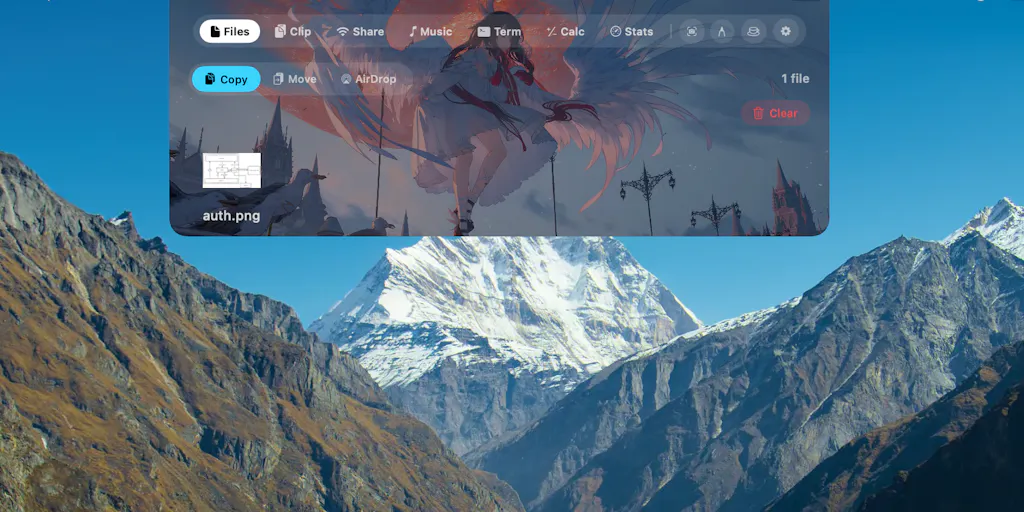
NotchDrop v2, launched on February 28th, 2026, doesn’t just cover the notch with a wallpaper. It turns that dead zone into a command center. The maker, Muhammad Saddam Nur, originally shipped a “Dynamic Island experience” back in January, but v2 is a full workspace. It includes a Studio, Live Wallpaper, Calendar, Calculator, System Stats, Keep Awake, Draw Signature, AirDrop, local file sharing, and a redesigned Notch Terminal. If you’re a seller running a Shopify store and an Amazon Seller Central account simultaneously, the appeal is immediate: you don’t need to alt-tab to check your CPU load or jot down a tracking number. The utility is in the accessibility.
This is the core problem NotchDrop solves: friction. Every time you reach for a calculator to check a margin, or open the Calendar to confirm a supplier call, you’re paying a cognitive switching cost. NotchDrop aggregates those micro-tasks into a single, always-visible location. For a cross-border operator, that’s not a gimmick — that’s a workflow optimization. It’s the same reason we use Klaviyo to automate email flows instead of manually sending campaigns. You’re removing the repetitive, low-value actions to focus on the high-leverage decisions.
How It Differs From the Incumbents: The “Utility vs. Suite” Divide
When you look at the existing landscape for Mac utilities, you see two camps. First, you have the heavyweights like Alfred or Raycast — they’re powerful, but they’re also sprawling. They require a learning curve, configuration, and a certain type of power-user mindset. They’re the equivalent of a full ERP system for your business. Second, you have the minimalist menu bar apps like iStat Menus or Bartender, which do one thing well but demand you look at a separate bar or toggle dropdowns.
NotchDrop sits in a third, underserved space: it’s a utility suite that lives in a location you’re already staring at. It doesn’t ask you to change your habits; it asks you to look at a spot you already look at. The differentiation is the “Dynamic Island” concept — borrowed from the iPhone — applied to the Mac. It’s a spatial hack. It makes the hardware limitation disappear by making it functional.
For cross-border sellers, this is a lesson in product positioning. You don’t always need to build a “better mousetrap” against the big guys. You need to build a different mousetrap in a location they’ve ignored. While Temu and SHEIN fight over the same fast-fashion dollar, the winning play is often a niche product that solves a specific pain point for a specific demographic — like a travel organizer that fits perfectly into a carry-on’s dead space, or a cable management kit that uses the gap behind your desk. NotchDrop is the software equivalent of that niche physical product.
Why Amazon Sellers Should Care More Than Shopify Ones
Here’s a contrarian take: a Mac utility like NotchDrop is more relevant to an Amazon FBA seller than a Shopify DTC brand owner. Why? Because your workflow is more fragmented. A Shopify operator lives in a single dashboard for orders, marketing, and analytics. An Amazon seller lives in a nightmare of spreadsheets, Seller Central tabs, Helium 10 chrome extensions, and repricing tools. The cognitive load is higher.
If NotchDrop’s Terminal feature lets you quickly run a Python script to check your inventory levels, or if the System Stats widget tells you your Mac is overheating while you’re running a bulk uploader, that’s immediate value. It’s a tool for the “operator” — the person who is doing the work, not just strategizing. The Calendar integration is also a quiet godsend for those of us juggling time zones with suppliers in Shenzhen and warehouses in California. It’s not a headline feature, but it’s the kind of “quality of life” improvement that makes a tool sticky.
What Cross-Border Sellers Can Borrow: The “Notch” Mindset
The biggest takeaway from NotchDrop isn’t the code; it’s the product philosophy. The maker explicitly stated that “a lot of this update came from feedback and feature requests.” That is the single most important sentence in the entire launch post. He didn’t spend six months in stealth mode building a bloated v1. He shipped a minimal viable product (the Dynamic Island experience in January), listened to the community, and then used that input to build a suite.
This is the “iterate on the fly” model that works so well in cross-border e-commerce. We see this with the best TikTok Shop sellers — they don’t launch a final product; they launch a test batch, run ads, read comments, and tweak the listing or the product itself based on viral feedback. NotchDrop is a digital version of that. He launched v1, got 110 reviews on the first launch, and then used that momentum to launch v2 with a feature set that directly addresses the “what if it could do this too?” comments.
Here’s how you apply this to your own operation this week:
- Audit Your “Dead Space”: Look at your product listings. What is the “notch” in your product photography? Is it a confusing size chart? A missing spec? A warranty question that goes unanswered? That’s your opportunity.
- Ship the “Dynamic Island” Version: Don’t wait for the perfect product. Ship the version that solves the core complaint. If you’re selling a kitchen gadget, don’t wait for the 10-in-1 version. Sell the one that works flawlessly for the primary use case, and ask for reviews.
- Use Feedback as a Product Roadmap: The NotchDrop v2 features — Calculator, Calendar, System Stats — are all things that were likely requested by users. When a customer leaves a review saying, “I wish this had a lid,” that’s not a complaint; that’s your next product iteration. Build it.
Where My Judgment Says It Falls Short
I have to be honest here. As a cross-border operator, I see the appeal, but I also see the limitations. The first is the platform risk. This is a Mac-only utility. It’s a niche within a niche. For a seller, this is like building a product exclusively for left-handed users who also own a specific brand of espresso machine. The Total Addressable Market (TAM) is small. The maker is a solo developer, which is great for agility, but it’s a risk if he gets hit by a bus or loses interest. If you build your daily workflow around NotchDrop and it stops being updated for macOS 27, you’re stuck.
The second issue is the feature bloat trajectory. The v2 update adds a lot. But there’s a danger in becoming a “jack of all trades, master of none.” When you try to be a Calendar, a Calculator, a Terminal, and a file-sharing tool, you risk being mediocre at all of them. The native Mac apps are excellent. Why would I use NotchDrop’s calculator over the Spotlight calculator? The value proposition is the location, but if the feature is a half-baked version of what I already have, the novelty wears off.
Where the Math Breaks
Let’s talk about the economics. The Product Hunt page doesn’t list a price, so I have to assume it’s either freemium or a low-cost one-time purchase. For a utility like this, the pricing power is weak. A seller might pay $10 for it, but they won’t pay $50. This is a classic “high-value, low-revenue” product. It’s a great portfolio piece for the developer, but it’s not a scalable business.
Compare this to the SaaS tools we use for e-commerce. Shopify charges a monthly subscription because it’s a mission-critical platform. Amazon Seller Central takes a percentage of your sales. NotchDrop is a “nice-to-have” that can be easily abandoned. For a cross-border seller looking to invest in tools, you have to ask: Does this tool directly generate revenue, or does it just save me 2 minutes a day? NotchDrop saves time, but it doesn’t put money in the bank. It’s a luxury, not a necessity.
The “Borrow the Feature, Not the Product” Strategy
The smartest move for a cross-border seller isn’t to download NotchDrop (though you should, it’s probably useful). The smartest move is to borrow the feature set for your own product development. Think about the “Draw Signature” feature. That’s a killer feature for anyone who has to approve digital proofs or sign customs documents. Can you build a “Draw Signature” feature into your supplier communication workflow? Probably not, but you can buy a cheap stylus and use a tool like DocuSign to streamline that process.
The “System Stats” feature is another one. For an e-commerce operator, this translates to business stats. Instead of checking your Mac’s CPU, you should be checking your business’s CPU. What are your ad spend metrics? What’s your inventory turnover rate? Tools like Google Analytics or Triple Whale do this, but the principle is the same: don’t wait for a problem to manifest. Keep your system health visible at all times.
The “Keep Awake” feature is also a metaphor. In cross-border e-commerce, you need to keep your operations “awake” 24⁄7. This means automated repricing, automated review requests, and automated reordering. You can’t be the bottleneck. NotchDrop’s “Keep Awake” is a literal button, but the concept should be applied to your entire backend. If you’re manually doing tasks that can be automated, you’re the bottleneck in your own business.
What I’d Watch / Test Next
This week, I’m going to do three things based on this launch:
Download and Stress-Test NotchDrop v2. I’ll put it on my work Mac for a full day. I’ll use the Terminal to check my server logs, the Calendar to schedule a supplier call, and the Calculator to run ad-hoc margin math. I want to see if the “aggregation” actually saves me time, or if it’s just a gimmick. I’ll also watch how it handles the notch on a 14-inch MacBook Pro with a notch-heavy menu bar. If it causes the menu bar to crowd, it’s a fail.
Audit My Own Products for “Notch” Features. I’m going to look at my best-selling SKU on Amazon and find the top 3 negative reviews. I’ll list the common complaints. Then, I’ll ask my manufacturer if we can solve at least one of them with a cheap design tweak. That’s my v2. I’m not going to wait for the “perfect” product; I’m going to ship the fix.
Implement a “Feature Request” Channel for My Customers. NotchDrop’s success came from listening to users. I’m going to add a simple Google Form link to my Amazon product insert cards and my Shopify thank-you page, asking one question: “What’s the one feature that would make this product perfect for you?” I’ll collect the data for 30 days, then prioritize the top request. That’s my product roadmap for Q3.
The NotchDrop story isn’t about a Mac app. It’s about the discipline of seeing opportunity in constraints. The notch is a constraint. Your shipping costs are a constraint. Your Amazon fee structure is a constraint. The winners aren’t the ones who complain about the constraints; they’re the ones who build a “Dynamic Island” inside of them. Go find your notch.


