Why a $99 USB-C Dongle Might Be the Most Important Tool in Your Ops Stack
Every cross-border seller I know has a graveyard of remote-access nightmares. The TeamViewer session that times out at 3 a.m. during a China warehouse shipment upload. The frozen Amazon Seller Central tab that forces a 200-mile drive to a co-working space. The Mac mini sitting in a Shenzhen co-location that kernel-panics and blindfolds every software-based remote tool. These aren’t edge cases—they’re the daily friction of running a multi-marketplace, multi-warehouse operation across time zones you can’t physically occupy. So when I saw the NanoKVM-Go on Product Hunt, I didn’t see a Kickstarter gadget for homelab tinkerers. I saw the missing infrastructure layer for any operator who needs hardware-level access to a machine they can’t touch—especially as AI agents start taking the wheel.
The Problem That Software Remote Access Can’t Fix
Every remote desktop tool—TeamViewer, Chrome Remote Desktop, RDP—works only inside the operating system. That’s fine 90% of the time. But the 10% when the machine is frozen, stuck in BIOS, waiting for a kernel panic reboot, or sitting behind a hotel-grade captive portal? You’re dead in the water. For cross-border operators, that 10% hits harder because your physical presence is often an ocean away. A dead machine in a third-party fulfillment center can cost thousands in delayed shipments, missed deal alerts, or lost ad campaign adjustments.
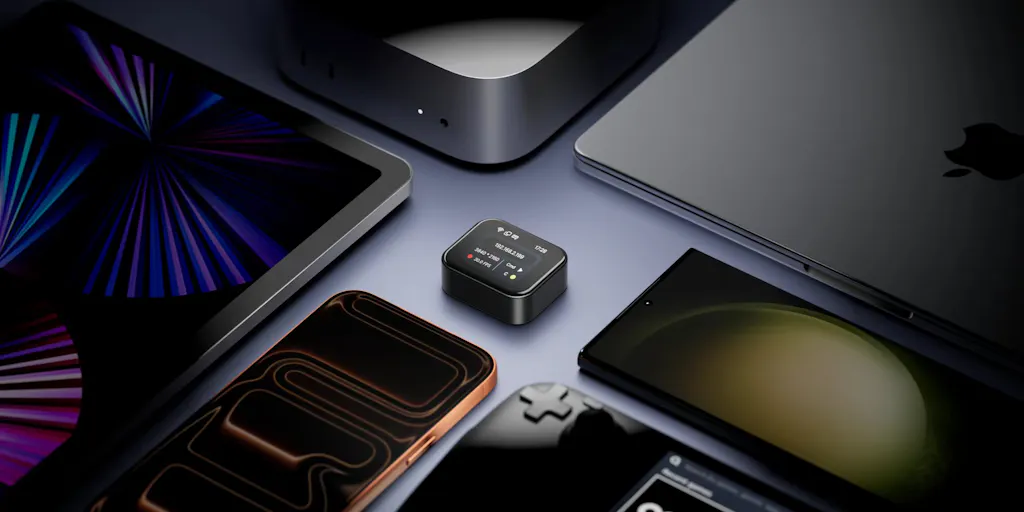
NanoKVM-Go solves this by sitting entirely outside the computer’s OS. It’s a tiny USB-C dongle that gives you pixel-level video capture, keyboard/mouse injection, and power control over a real device—all over a single USB-C cable. The maker, Zac Zuo (hunter of the product under the brand Flowtica Scribe), explicitly frames it as a hardware-boundary approach for AI agents: “Software agents can operate inside an OS, but a KVM sits outside the machine.” That’s the key insight.
Where incumbents like PiKVM or Lantronix Spider have existed for years, they’re bulky, expensive ($200–$400), and designed for data-center rack use. NanoKVM-Go compresses that capability into a “watch-sized” form factor, priced at a fraction (the Kickstarter tier isn’t disclosed in the source, but comparable products target ~$99). That changes the calculus for a small seller who needs to drop one in every remote workstation.
What AI Agents Change (and Why the KVM Angle Is Genius)
The In-OS Agent Blind Spot
Every agent framework—whether it’s Anthropic’s Computer Use, OpenAI’s Operator, or open-source CogAgent—operates through software APIs or accessibility trees. They can click buttons, read DOM, and fill forms. But the moment the target machine bluescreens, they’re as useless as a frozen TeamViewer window. Dipankar Sarkar’s comment on the Product Hunt page nails it: “An in-OS agent goes blind exactly when you need it most: a kernel panic, a BIOS screen, a full-screen modal that isn’t in the accessibility tree.” The NanoKVM-Go’s hardware-level approach means an AI agent can still see and interact with that frozen machine via pixel-grab and HID injection—no OS dependency.
For a cross-border seller, this is the difference between a fully automated restocking bot that works even when Seller Central crashes, and a bot that gets stuck on a captcha modal it can’t parse.
The MCP Protocol Bridge
Zac Zuo notes that the device “exposes its KVM functions through MCP,” referencing the Model Context Protocol that lets AI agents discover and invoke tools. That’s a powerful design decision. Instead of writing custom scripts to SSH into a KVM, an agent built on MCP can directly send mouse-clicks and read frames from the NanoKVM-Go’s output. This means you could, in theory, have a ChatGPT-powered agent that monitors your Amazon order dashboard, detects a surge in returns, and reboots the warehouse terminal if the system hangs—all through a single MCP tool call.
Go+ Version: Searchable Screen Memory
The Go+ version adds local OCR and screen memory. Your entire machine’s screen history becomes searchable context for both humans and agents. That’s a double-edged sword (privacy implications are real—see comments from Ulykbek and Patrick Krekelberg), but for operational debugging it’s a goldmine. Imagine replaying what your FBA repricing bot saw in the 10 minutes before it started undercutting your margin. Or auditing a remote worker’s session without requiring screen recording software that slows down the machine.
Why Amazon Sellers Should Care More Than Shopify Ones
Shopify sellers tend to work from the cloud—their “computer” is a browser window on any laptop. Amazon FBA sellers, on the other hand, often rely on dedicated machines for spreadsheet-heavy catalog management, multiple Seller Central tabs, and specialized tools like Helium 10 or Jungle Scout that run locally. Many operations in China and Southeast Asia use headless PCs in co-working offices or warehouses. A NanoKVM-Go attached to each of those machines means you can:
- Reboot a frozen Windows PC that’s running your repricing script at 3 a.m. Beijing time from your bed in California.
- Enter BIOS to change boot order when a remote vendor accidentally installed a malware-laden USB.
- Reset a captive portal login on a co-lo machine that lost internet because the router rebooted.
The security thread is real. Gal Dayan’s question about physical theft is spot-on: if the device is watch-sized and reachable over Tailscale, an attacker who steals the dongle could get full keyboard/mouse control of your remote machine. The maker hasn’t disclosed authentication details beyond “the legitimate owner.” Until we see a local pairing step or hardware-bound key, I’d only deploy these on machines inside a VPN with strict ACLs.
Where the Math Breaks
The tradeoff is that pixel-level control is slow. Dipankar Sarkar asks about “capture-to-input round trip: what latency and frame rate does an agent get over the USB-C link at 4K?” The source doesn’t specify numbers. For context, a typical PiKVM over HDMI captures at 30fps with sub-100ms latency over a good network. NanoKVM-Go uses USB-C (presumably USB 3.0 or better), which could outperform HDMI, but we don’t know yet. If the round-trip is >500ms, it’s fine for human intervention but too slow for agent-driven workflows that need sub-second reaction times—like capturing a flash sale add-to-cart trigger.
Also, the agent has to OCR every frame. That’s a massive compute cost. Running on-device OCR (the Go+ version) helps, but it adds latency and battery drain. For an always-on agent monitoring a screen, you’d probably want a hybrid: fast camera frames for motion detection, then a higher-resolution OCR pass when change is detected.
What Cross-Border Sellers Can Borrow From This (Even Before Buying)
You don’t need to back the Kickstarter tomorrow to benefit from this concept. The idea of a hardware-level “emergency access layer” is something every multi-location operator should architect into their infrastructure planning.
- Audit your remote-access failure modes. Where do your TeamViewer, AnyDesk, or Splashtop sessions break? Write down the last three times you needed physical access to a machine. If the answer is “BIOS update, OS reinstall, frozen screen,” you’re a candidate for a hardware KVM.
- Consider the “agent layer” now. Even if you aren’t running AI agents yet, the architecture of a KVM that can be controlled programmatically (via MCP or API) is the same one you’ll need when you inevitably automate more than just emails. Start thinking about how your remote machines expose control surfaces.
- Test with a cheap PiKVM. Before backing a Kickstarter, buy a PiKVM V4 ($200) and set it up on one remote machine. Learn the pain points (physical cabling, network security, latency). Then compare with NanoKVM-Go when it ships. The concept is sound; the execution is what will determine if it’s actually better for your stack.
Where I’m Cautious (And What I’d Watch For)
The hardware is clever, but the Product Hunt comments reveal several unresolved questions that directly affect adoption:
Security and access control. Gal Dayan’s concern about physical theft isn’t theoretical. In a co-working or warehouse environment, a watch-sized device could be pocketed. The maker replied about network-side auth, but I want to see: is there a hardware PIN that must be entered locally before the dongle accepts commands from the network? If not, anyone with physical access to the device can bypass your VPN.
Latency for agent loops. The “capture-to-input round trip” is the single most important metric for automation. If it’s >200ms at 1080p, agents will be too slow for real-time interactions. The source doesn’t disclose this. I’d wait for independent benchmarks.
Database privacy on Go+ version. Ulykbek asks where the OCR index lives. If it’s cloud-synced by default, you’re exfiltrating every screen of your Seller Central, inventory sheets, and customer data to a third-party. For a HIPAA- or GDPR-adjacent operation, that’s a hard no. The maker needs to clarify local-only storage with an option to exclude specific windows.
Kickstarter timeline. The project is on Kickstarter, not shipping yet. For a business-critical tool, you don’t want to depend on a crowdfunded gadget for your warehouse reboot system. Wait until they ship to backers and have real-world reviews.
What I’d Watch / Test Next
Buy a PiKVM for one critical machine. Do it this week. Understand what a hardware KVM enables and where it falls short. Report back to your ops team.
Follow the NanoKVM-Go Kickstarter page. Specifically the updates section for latency numbers, authentication details, and the exact price of the Go+ vs base model. If they hit <100ms round-trip over a wired network and include local-pairing security, it’s a strong buy.
Sketch an agent workflow. Imagine you have a NanoKVM-Go on your headless FBA repricing machine. Write the pseudo-MCP tool call that would reboot it, check its screen for a “Quote expired” modal, and re-login. Determine which steps are too slow for pixel-level control and which you’d still need a software agent for. That gap analysis will tell you if the hardware-layer approach is worth the cost.
Audit your existing remote-access stack. List every machine you manage that sits in a different building, city, or country. Next to each, note whether you’ve ever needed physical access after its OS booted. Those are the candidates for a hardware KVM—whether it’s NanoKVM-Go or something else.
The concept of a “hardware boundary for AI agents” is not a gimmick. It’s the missing piece for operators who want to trust a bot with their entire remote machine, not just the browser tab. Now is the time to validate the concept on your own network, before the Kickstarter ships and the next generation of tools makes this standard practice.