The Quiet Rebellion Against Subscription Fatigue Is a Playbook for Cross-Border Sellers
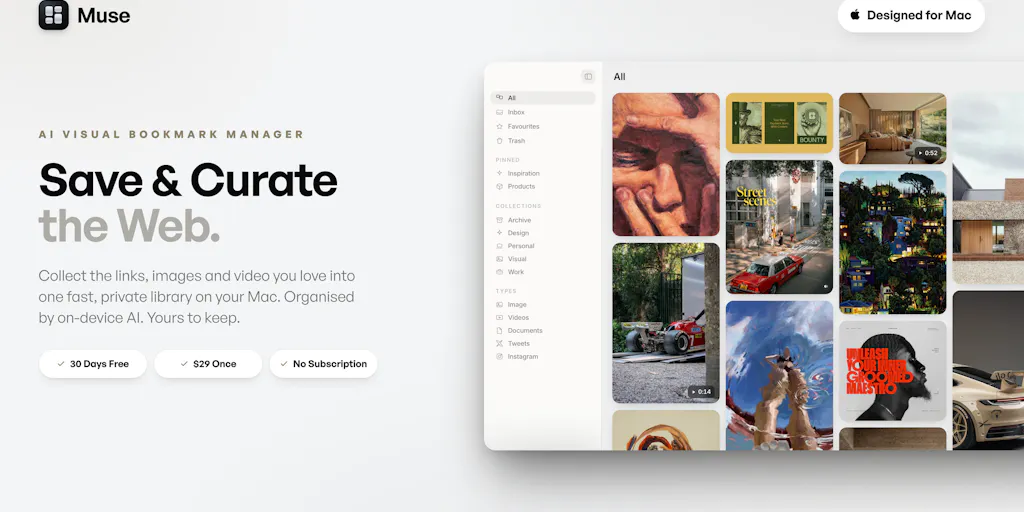
Every cross-border operator I know has the same dirty secret: we pay for tools we barely use. We stack a $79/month Helium 10 plan next to a $59/month SEMrush subscription, add a $29/month Klaviyo tier, and before we’ve launched a single profitable SKU, we’re bleeding $200+ a month on software that mostly just sits there. The SaaS model won because it promised us flexibility, but it delivered a slow-motion margin leak. So when I see a tool like Muse — a Mac-based library app that charges a one-time $29 and then gets out of your way — I don’t see a niche productivity toy. I see a challenge to the entire recurring-revenue assumption that has quietly become the tax on every DTC brand’s P&L. The question isn’t whether you’ll buy Muse for your personal bookmarking. The question is what its existence tells you about your own tooling stack, your own vendor relationships, and the pricing psychology you’re applying to your own customers on Amazon, Shopify, or TikTok Shop.
The Problem Muse Actually Solves Is Fragmentation, Not Storage
Let’s be honest about what most of us do when we’re researching products, competitors, or ad creatives. We save a link to Raindrop. We pin a visual to a private Pinterest board. We screenshot a competitor’s listing and lose it somewhere in a folder called “Screenshots 2024.” We bookmark a TikTok video that shows an interesting unboxing, and then we never find it again. The maker of Muse, THEODORE HQ, describes exactly this pain in their launch comments: they were using Raindrop for links, Pinterest for visuals, and had no real system for video, with X bookmarks sitting in a silo they couldn’t search across. That’s not a niche problem — that’s the daily reality of anyone doing competitor research, creative teardowns, or supplier vetting across multiple marketplaces.
Muse’s answer is to consolidate everything into one local library: images, screenshots, links, video, and notes, all searchable from the moment you save it. The key differentiator isn’t the storage — it’s the retrieval. The app uses on-device AI to read every image, auto-tag it, and make it searchable by vague descriptions like “dark moody UI” or even by color alone. That’s the kind of feature that sounds like a nice-to-have until you’ve spent forty minutes hunting for a specific competitor’s packaging shot you know you saved but can’t find. For cross-border sellers, this matters more than you’d think. When you’re managing listings across Amazon, Shopify, and TikTok Shop, your visual reference library is your institutional memory. The screenshot of a winning ad creative, the photo of a competitor’s insert card, the video of a viral unboxing — these are the raw materials of your next product iteration. If you can’t find them, you can’t act on them.
The local-first architecture is a deliberate choice, not a limitation. The maker confirmed in the comments that everything is stored on-device, built that way for privacy. But there’s a practical angle for sellers too: no cloud database means no sync lag, no account lockout, and no dependency on a vendor’s server uptime when you’re in a timezone that doesn’t match their maintenance window. The library sits in a real, visible folder on your Mac, which means you can back it up, export it, or open it in Finder whenever you like. That’s a level of data ownership that most SaaS tools will never give you.
How Muse Differs from the Incumbents — and What That Teaches You About Pricing
The natural comparison points here are Raindrop.io, Eagle, and Pinterest. Raindrop is excellent for links but treats images and video as afterthoughts. Eagle is beloved by designers for visual asset management but requires a learning curve and still leans subscription. Pinterest is free but is a public social network, not a private research library — and if you’re saving competitor pricing screenshots, you probably don’t want them publicly associated with your brand account. Muse’s differentiation is threefold: it treats every asset type with equal weight, it’s local-first with no account required, and it’s a one-time purchase.
The one-time $29 price point is the part that will make SaaS founders wince. The maker is explicit about their motivation: existing solutions are all subscriptions, and they wanted to avoid that. They’re offering a 30-day free trial with every feature unlocked, no card required, and then a single payment. There’s even a 25% discount code, ‘PH25’, for launch. This is a deliberate anti-SaaS stance, and it’s worth examining why it works for them.
Here’s the uncomfortable truth for the rest of us: the subscription model has trained us to churn. When a tool is $29/month, you keep it because canceling feels like administrative friction. When a tool is $29 one-time, you buy it because the price is trivial relative to the value, and you keep it because there’s no ongoing cost to reconsider. The psychology is inverted. For cross-border sellers, this is a lesson about your own pricing strategy. If you’re selling a physical product on Amazon, you’re not going to switch to one-time pricing — that’s not how goods work. But if you’re selling a digital product, a template, or a course on Shopify, the Muse model is worth studying. A one-time price with no subscription can be a powerful conversion tool for a specific segment of buyers who are subscription-fatigued, even if it means you need a higher price point to make the economics work.
What Cross-Border Sellers Can Borrow from Muse’s Approach
The Local-First Principle Applies to Your Data, Not Just Your Software
Muse’s local-first design isn’t just a privacy feature — it’s a resilience feature. For cross-border sellers, this maps directly to how you handle supplier data, listing content, and customer information. If your entire business runs on a cloud tool that goes down during a Chinese holiday week, or a platform that changes its API terms overnight, you’re exposed. The sellers who survive platform shifts are the ones who own their data. Muse’s visible folder structure is a reminder that your research library, your product specs, your ad copy history — these should live somewhere you control, not just in a vendor’s database. Export your Amazon listing data. Back up your Shopify theme files. Keep a local copy of your competitor research. The tools will change; your data shouldn’t have to.
AI Tagging That Actually Works Offline Is the Future of Research Workflows
The on-device AI that auto-tags images and makes them searchable by description is genuinely useful, but the more interesting implication is what it says about the direction of AI tooling. No cloud dependency, no API costs, no data leaving your machine. For sellers dealing with sensitive pricing information or proprietary product designs, the idea of AI that runs locally is more than a convenience — it’s a compliance advantage. The maker mentions that the AI art prompt tool uses your own Claude key if you choose to turn it on, which is another interesting model: the vendor provides the interface, but you bring your own API key and pay for your own usage. That’s a cost-transparent approach that more B2B SaaS tools should consider.
The Drop Ring Interaction Model Has Lessons for Your Product UX
The drop ring — a circular target that appears around your cursor when you drag an image while holding Control — is the kind of micro-interaction that separates a thoughtful tool from a generic one. It’s not a headline feature, but it’s the kind of polish that makes a tool feel worth paying for. For cross-border sellers who sell physical products, this is a reminder that the unboxing experience, the packaging design, the little insert card that says “thank you” — these micro-interactions are what turn a one-time buyer into a repeat customer. The Muse team even documented the drop ring settings in detail in their launch comments, showing they care about the user experience at a granular level. That’s a standard worth applying to your own customer journey.
Where the Math Breaks: My Honest Judgment on Muse’s Limitations
Let me be clear: I like what Muse is doing, but I’m not going to pretend it’s the right tool for every cross-border seller’s workflow. The first limitation is platform. Muse is Mac-only. If you’re running your operation on Windows — which is common for sellers who work with Chinese suppliers and use tools that are Windows-first — this app is irrelevant to you. The maker didn’t disclose any Windows or web roadmap, so for now, this is a Mac-only play.
The second limitation is the migration question. A commenter asked about moving to a new Mac, and the maker confirmed that everything is stored locally but didn’t provide a detailed migration path beyond the visible folder structure. For a seller who has accumulated thousands of saved assets over months of research, the thought of manually migrating that library is a real friction point. The import feature from Eagle, Raindrop, CSV, browser bookmarks, and Pinterest exports is a strong onboarding play, but the export side is less clear. If you’re going to commit your research library to a local-first tool, you need a clear exit path. The visible folder helps, but a documented migration guide would be better.
The third limitation is the video handling. Muse accepts video, but the launch page doesn’t detail how it handles large video files or whether it does any transcription or scene-level search. For sellers who save TikTok and YouTube content for creative inspiration, video search is a core need. The current feature set seems optimized for images and links, with video treated as a supported format rather than a first-class citizen. If video is your primary research medium, you might still need a separate tool.
Why Amazon Sellers Should Care More Than Shopify Ones
Here’s a contrarian take: Amazon sellers should pay more attention to Muse’s model than Shopify store owners. Why? Because Amazon sellers are the most subscription-fatigued cohort in e-commerce. You’re paying for Seller Central professional fees, repricing tools, review management software, inventory forecasting, and ad optimization — and that’s before you add the research stack. The Amazon seller ecosystem is a subscription pyramid, and every layer eats into your margin. Shopify sellers, by contrast, have a more modular stack where you can often get away with free themes and native features. So when a tool like Muse proves that a well-executed one-time purchase can compete with subscription incumbents, it’s a small validation that the Amazon seller’s tooling stack doesn’t have to be a death by a thousand monthly fees. You can’t replace Helium 10 with a one-time tool — the data refresh requirements make that impossible — but you can start questioning every subscription that doesn’t deliver continuous value.
Where the Math Breaks for a One-Time Purchase Model
The honest business analysis is that a one-time $29 price for a Mac app with on-device AI is a generous deal for users, but it’s a hard business model to sustain at scale. The maker is clearly building this as a passion project or a portfolio piece, not a venture-backed growth play. There’s no recurring revenue to fund ongoing development, customer support, or feature expansion. The Claude API key model for the AI art prompt tool is a clever way to offload variable costs, but it doesn’t solve the fundamental issue: software needs ongoing maintenance, and one-time purchases don’t fund that maintenance. For sellers, this means you should evaluate Muse (or any one-time tool) as a “buy it for today’s value” decision, not a “buy it for the long-term roadmap” decision. If the app solves your current research fragmentation problem, $29 is a fair price. If you’re hoping for years of updates and new features, you might be disappointed.
What I’d Watch / Test Next
If you’re a cross-border seller and this resonates, here’s what I’d do this week, not next month.
First, take a hard inventory of your current tooling stack. List every subscription you pay for, the monthly cost, and the last time you actually opened the tool. For any tool you haven’t used in the last 30 days, cancel it. The money you save will probably fund a Muse purchase (or any other one-time tool) several times over. This isn’t about Muse specifically — it’s about breaking the subscription reflex that has quietly become a default tax on your operation.
Second, if you’re on a Mac and you’re drowning in scattered research assets, download Muse and run the 30-day free trial. No card required, so the downside is just the time to import your existing bookmarks and start saving new assets. Test whether the AI tagging and search actually surface things you’d forgotten you saved. The maker’s claim is that you can search by vague descriptions or even color — put that to the test with your own messy research habits. If it works, $29 is a rounding error compared to the time you’ll save.
Third, regardless of whether you buy Muse, adopt its local-first principle for your critical business data. Export your Amazon listing content, back up your Shopify theme, and keep a local copy of your competitor research. The platforms will change their rules, their fees, and their algorithms — but your data should be portable. The sellers who survive platform shifts are the ones who own their information, not the ones who rent it.
Finally, watch the pricing psychology. Muse’s one-time purchase model is a reminder that a segment of your own customers is subscription-fatigued. If you sell digital products, templates, or courses, test a one-time price point alongside your subscription offering. The market is telling you that some buyers want ownership, not access. The question is whether you’re listening.


