Why Every Cross-Border Seller Should Pay Attention to an Open-Source Motion Graphics Editor
If you’ve ever tried to produce a product video that doesn’t look like a slideshow on caffeine—whether for an Amazon A+ module, a TikTok Spark ad, or a Shopify product page—you know the bottleneck isn’t creativity. It’s iteration. Most sellers outsource motion graphics to freelancers or agencies, paying $200–$1,000 per 15-second clip and waiting days for revisions. The alternative tools (Canva, Animoto, even Adobe After Effects) either lock you into rigid templates or require a motion designer’s hourly rate. So when I saw Motionly relaunch on Product Hunt with an “AI-native” approach that outputs an editable project file rather than a rendered video, I stopped scrolling. Because the single biggest cost in scaling creative production isn’t the first video—it’s the seventh revision when you decide to swap the call-to-action button color or adjust the timing on that fade-in. Motionly’s bet is that AI can generate the structure of an animation, and then you—or your team—can tweak individual keyframes, easing curves, and text layers without blowing up the whole timeline. For cross-border operators managing dozens of SKUs across multiple marketplaces, that’s not a nice-to-have; it’s a margin lever.
What Problem Does Motionly Actually Solve?
The Black-Box Trap of Most AI Video Tools
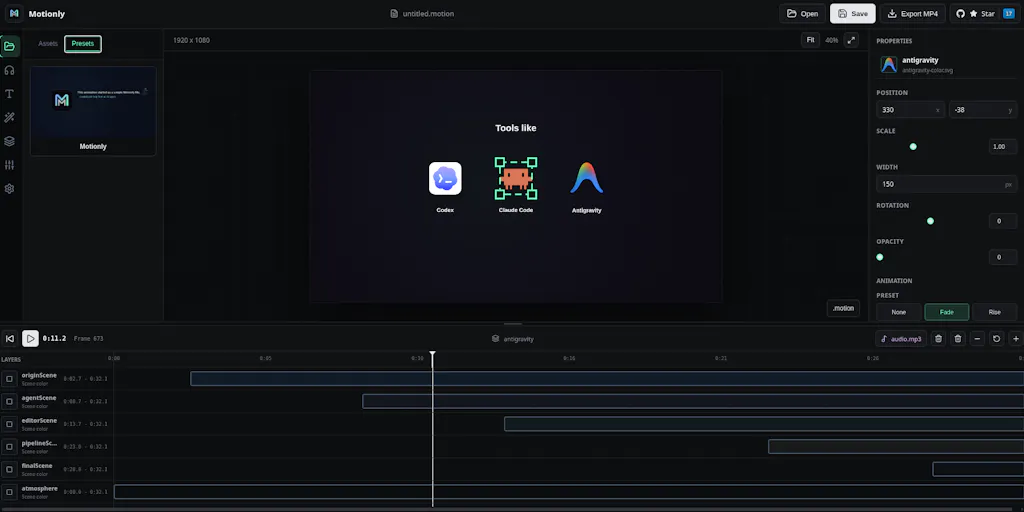
Almost every AI video tool I’ve tested—Runway, Pika, even the generative fill in Adobe After Effects—treats the output as a finished artifact. You describe a scene, the model spits out pixels, and if the timing is off or the branding color is wrong, you regenerate from scratch. That workflow kills productivity when you’re iterating on five versions of a product intro for an A/B test on TikTok Shop. Motionly takes a fundamentally different path: its AI generates a .motion project file—a structured, open format that describes every keyframe, easing curve, transition, and asset placement. The maker Prom Sereyreaksa explains this clearly in the Product Hunt comments: *“The core idea is that AI generates the entire motion project—a .motion file that describes the scene, timeline, asset placement, animations, easing, transitions, and effects. Think of it like how Photoshop has a PSD or Figma has a .fig file.”* Source). This means you can open the file, inspect every decision the AI made, and surgically change a single element—like swapping the easing curve on a layer—without touching anything else.
For a cross-border seller, this maps directly to the pain of creative localization. You’ve got a product video that works for the US Amazon store, but the EU market needs a different product label, a local-language text overlay, and shorter duration for Instagram Reels. With a black-box render, you’re essentially paying the AI to generate three separate videos. With an editable .motion file, you change the text, adjust the timeline, and export new versions in minutes. The savings compound across 20 SKUs and five marketplaces.
Why the Editable Project File Matters More Than Another AI Generator
The market is already flooded with tools that let you type “create a 3D product unveil” and get a video. But those tools don’t solve the iteration problem—they just shift the burden from manual animation to prompt engineering. Motionly’s real differentiator is what Brandon TK Beesman called out in the thread: “The .motion file as an intermediate format is the real differentiator most AI motion tools skip straight to rendered video, so any edit means regenerating from scratch.” Source. He also raised the hard question of conflict resolution when a human tweaks the visual editor while an AI agent modifies the same file—a problem the maker admits they haven’t deeply solved yet. But even the aspiration toward a versionable, diffable format puts Motionly ahead of every other AI motion tool I’ve seen. It’s the difference between a static PDF and a Figma file: one you consume, the other you collaborate on.
How It Differs From Existing Options (And Where the Comparisons Break Down)
LottieFiles vs. .motion: Runtime vs. Source
If you’ve worked on web animation, you’ve likely used LottieFiles to ship lightweight JSON-based animations to mobile and web apps. Lottie is a runtime format—it’s designed to play smoothly across platforms, not to be edited. When Nattu from LottieFiles asked whether Motionly can export to Lottie, the maker replied: “Export targets and runtime integrations are something we’re exploring as the ecosystem grows.” Source. That’s a gap today: if you need your animated product demo to run natively in an iOS app or a Shopify storefront, you’re currently tied to Motionly’s own renderer. But the strategic direction—using Lottie animations as reusable components inside .motion compositions—could eventually turn Motionly into a Lottie authoring tool with AI assistance. For sellers who run DTC storefronts on Shopify and want lightweight, performant animations on product pages, that feature would be a game-changer.
Canva and Animoto: Templates vs. True Motion Control
Canva and Animoto have made video creation accessible to non-designers, but their animation capabilities are essentially preset transitions and timed slides. You can’t control individual keyframes, easing curves, or layer z-ordering. They’re fine for social clips where you slap text on a background and call it a day. But for a hero video on an Amazon listing—where the difference between a 5% and 8% conversion rate often comes down to the smoothness of the product reveal—those tools fall short. Motionly, even in its early stage, offers granular control: the maker demonstrated that you can “change the keyframe, animation duration without affecting the styling or its positions. Update color, change the text rotation or scale without messing up the current animation.” Source. That level of precision is closer to Adobe After Effects—but without the learning curve of expressions, graph editors, and render queue management.
Adobe After Effects: The Pro Tool That’s Too Heavy for E-Commerce Teams
I’ve used After Effects for years on client projects, and it remains the gold standard for motion design. But it’s also the worst tool for rapid iteration across 50 product variations. Every time you change a layer, you risk breaking an expression, and rendering previews eats into your workflow. Motionly’s AI generation—which reportedly uses GPT-5.6 from OpenAI to plan complex animation structures—could act as a first draft for a motion designer, but the real win is for the in-house e-commerce team that has no dedicated designer. They can describe the animation in natural language (“slow zoom into the product, text fades in from left, logo pulses”), get a .motion file, then manually adjust the logo opacity without touching the rest. That’s the sweet spot: AI as a co-pilot, not a replacement.
What Cross-Border Sellers Can Borrow From Motionly Today
The Iterative Creative Workflow for Amazon A+ and Brand Stories
Amazon’s A+ Content and Brand Story modules allow video snippets, but they come with strict specifications: under 60 seconds, no static frames, smooth transitions. Currently, sellers either record 4K footage or use slideshow tools. Motionly could enable a different workflow: 1. Upload your product asset (logo, hero image, lifestyle photo). 2. Describe the animation: “Show the product rotating, then a callout box appears with key features.” 3. AI generates a .motion project. 4. Open the file, tweak the timing of the callout box, change the font to match your brand. 5. Export as MP4 for Amazon, as an animated GIF for email campaigns, and (once Lottie support arrives) as JSON for web.
The key is that the .motion file becomes your single source of truth. You can version it, store it in a Git repo or cloud folder, and reuse components across SKUs. For a seller running 200 ASINs, you could create one “product reveal” .motion template and simply swap the asset files and text for each SKU. That’s the kind of scale that matters.
Open Source as a Trust Signal for Privacy-Conscious Brands
Motionly is open source on GitHub. The maker explicitly said the decision was about “extensibility and trust … you own the project file and can edit or generate it however you like.” Source. For cross-border sellers who handle proprietary product designs or pre-launch teasers, this matters. You don’t want your product video generation going through a closed SaaS that could use your data for model training or lock you into a proprietary export format. Open source means you can run the tool locally, fork the code, or build custom integrations with your existing tech stack—whether that’s a Klaviyo email automation or a Helium 10 keyword research pipeline.
The AI + Human Collaboration Model for A/B Testing Creatives
One of the most expensive parts of Facebook Ads or TikTok Ads is creative fatigue. You need to rotate new angles, new texts, new motion styles every few weeks. If Motionly can generate a base animation from a description, and then a junior designer can spend 15 minutes tweaking three versions (different color accents, different call-to-action positions), you’ve effectively reduced the cost of a creative refresh from a freelancer’s day rate to your employee’s hourly wage. That math works when you’re running six ad sets per product.
Where My Judgment Says It Falls Short
The Missing Export Ecosystem
As of this writing, Motionly’s renderer is proprietary. You can output a rendered video, but you can’t export to Lottie, SVG animation, or a web-viewable JSON. For cross-border sellers who run Shopify storefronts with LottieFiles integrations, that’s a dealbreaker until the feature ships. The maker acknowledged this: “Export targets and runtime integrations are something we’re exploring.” That’s a roadmap item, not a deliverable.
Conflict Resolution: The Collaboration Nightmare
When Brandon TK Beesman asked how Motionly handles simultaneous AI and human edits to the same .motion file, the maker replied: “We haven’t explored this workflow deeply yet … One direction we might explore is a review-based workflow where AI changes are shown before being applied.” Source. For a team where one person is tweaking text in the visual editor while another is re-prompting the AI for a different animation style, this lack of merge/diff logic could lead to overwritten work. Until that’s solved, the collaborative promise is theoretical.
The AI Cost Question
Motionly uses GPT-5.6 under the hood. Each generation of a .motion file presumably consumes tokens, and if you’re generating dozens of animation drafts per day, the API costs could add up. The tool is open source, but the AI inference isn’t free unless you self-host a model. The maker hasn’t disclosed pricing or cost-per-generation estimates. For a bootstrapped seller, a tool that requires an OpenAI API key and incurs per-request charges might not be cheaper than hiring a freelancer for a batch of ten videos. You’ll need to test: is one good .motion file generated in a single prompt cheaper than a freelancer’s first draft? Possibly not, if you have to regenerate three times to get the timing right.
No Reviews Yet — Trust but Verify
At launch, Motionly has zero reviews on Product Hunt. That’s not unusual for a relaunch, but it means the real-world performance—render speed, stability, output quality—is unverified. I’d want to see a sample of .motion files generated from product descriptions before betting my ad spend on it.
Why Amazon Sellers Should Care More Than Shopify Ones
Amazon’s video content is still underserved by AI tools. Sellers can upload product videos to detail pages, brand stories, and sponsored brand video ads. But the tools for creating those videos are either expensive (hire a videographer) or clunky (screen recording with voiceover). Motionly’s ability to generate a .motion file from a description, then tweak it for Amazon’s specific aspect ratios and duration limits, could fill a real gap. Shopify sellers, by contrast, already have access to Shopify’s built-in video editor and a wealth of app integrations (like Laylo or Powr). They can get by with Canva or Animoto. Amazon sellers are more locked out of the AI motion graphics space because Amazon’s ecosystem doesn’t have a native creative suite. Motionly, with its open source nature, could be the first tool that lets a seller generate and iterate on product videos entirely off-Amazon, then upload the finished MP4. That’s a bigger opportunity than the Shopify angle.
Where the Math Breaks
Let’s assume you generate a .motion file using GPT-5.6 via API. A single call might cost $0.10–$0.50 depending on output length. If you need twenty versions to test different product angles, that’s $2–$10 in API costs per product. A freelance motion designer in the Philippines might charge $30 for a 15-second clip. So the cost advantage exists only if your AI success rate is high enough to avoid constant regeneration. And you still need a human to refine the file afterward. The real savings come not from replacing the designer, but from reducing iteration rounds from five to one. If your designer can start from a polished .motion file instead of a blank timeline, you save 30–60 minutes per clip. For a team producing 50 clips a month, that’s 25–50 hours saved. That’s where the math works.
The Lottie Integration Question
Until Motionly exports to Lottie or a web-compatible format, its utility for DTC storefronts is limited. If you want a lightweight, responsive animation that plays on a Shopify product page without heavy video files, you need Lottie. The maker’s response—“we’re exploring ways to work with existing animation ecosystems like LottieFiles, for example using Lottie animations as reusable components inside larger .motion compositions” Source—is promising but unshipped. For now, consider Motionly primarily as a video export tool. If that fits your Amazon or social media workflow, dive in. If you need web-native animations, wait for the Lottie bridge.
What I’d Watch / Test Next
Run a 15-second product demo through Motionly this week. Clone the GitHub repo, install it, and feed it a simple prompt: “Animate a white label sliding into frame, then a feature list fade-in.” Compare the generated .motion file to a manually built Adobe After Effects version. Note how long it takes to adjust the timing of the slide-in without breaking the fade.
Test iterative edits. Change the product image, update the text, and adjust the easing curve on one layer. Does the file remain clean, or does the AI’s structure get lost? This will tell you whether Motionly’s “editable project” promise holds under real-world churn.
Calculate your per-clip AI cost. If you’re on an OpenAI API plan, track the tokens used per generation. Compare that to your current freelancer rate. If the cost per successful generation is under $0.50, you have a viable production tool for high-volume creative testing.
Monitor the GitHub and Product Hunt for Lottie export announcements. The moment that lands, Motionly becomes a serious candidate for DTC storefront animations. Bookmark the Motionly Product Hunt page and check for updates weekly.
For Amazon sellers specifically: create one A+ video using Motionly and upload it to a test ASIN. Track the conversion rate difference compared to a static image. If the motion lift is even 2%, the tool pays for itself in a single sale cycle.
Motionly isn’t ready to replace your entire creative pipeline today. But its architecture—open, editable, AI-assisted—points to a future where cross-border sellers own their animation workflow instead of renting it from a freelancer or a black-box SaaS. That future is worth a weekend of testing.


