Why a few dozen milliseconds of local speech processing matters more than your next PPC audit
Cross-border e-commerce operators spend far too much of their day typing. Listing descriptions, supplier messages, customer replies, internal SOPs, ad copy variants — the list is endless. The tools that promise to speed this up — cloud dictation apps like Otter.ai, Rev Voice Recorder, or even Apple’s own built-in macOS dictation — either charge monthly, require a network round-trip, or strip your voice data through a server you don’t control. That’s a non-starter for anyone who manages multiple marketplace accounts, handles sensitive supplier communications, or works from a co-working space with flaky Wi-Fi. So when I saw Megaphone — a free, open-source, fully on-device dictation tool for Apple Silicon Macs — I didn’t see a novelty. I saw an efficiency lever that directly addresses the friction of text entry in our industry, and it deserves a serious look beyond the Apple fanboy crowd.
What problem does it actually solve for a seller who already has a computer?
The real bottleneck isn’t typing speed — it’s context switching
Every time you stop to type a listing update, a return note, or a quick email, you break your mental flow. Dictation promises to keep you in a conversational mode, but most implementations force you to switch to a separate app or wait for cloud processing. Megaphone solves this by staying invisible: hold the Fn key, speak naturally, release, and clean text appears in whatever field you’re focused on — your Amazon Seller Central description box, a Shopify draft, a Slack thread, even a terminal prompt. The maker, Kuber Mehta, explicitly built it to adapt formatting and vocabulary to the active app, so an email draft reads like an email and a code comment reads like a code comment.
For a cross-border operator, that means you can dictate a supplier negotiation point directly into a messaging app, then pivot to dictating a product bullet list for a new SKU without retooling. The privacy angle is equally critical: nothing leaves the machine. No recordings are sent to a server. No account is required. That matters when you’re discussing wholesale pricing, proprietary product specs, or competitive intelligence — everything stays on your Mac.
How it differs from the incumbents
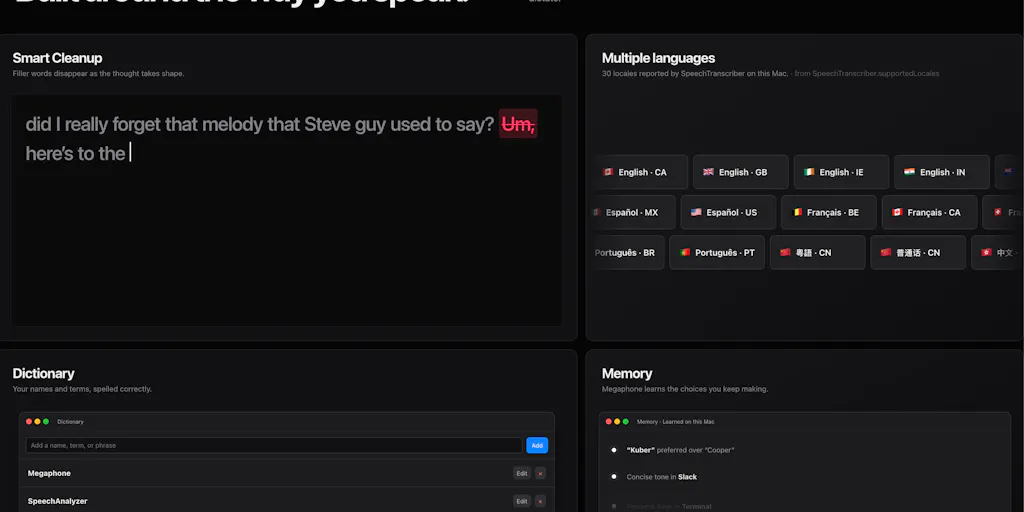
The most obvious competitor is Apple’s built-in macOS dictation. As Mehta explains in the Product Hunt thread, Apple’s native engine uses an older API called DictationTranscriber. Megaphone replaces that with the brand-new SpeechAnalyzer API and adds a layer of Apple’s on-device Foundation Models to clean up fillers, resolve self-corrections, and fix punctuation. The result is not just faster transcription but smarter editing — it learns your names, acronyms, and technical jargon via a private Dictionary.
Another comparison is Otter.ai — a popular cloud dictation service that costs $16.99/month for its pro plan. Otter is great for meetings, but it requires internet, stores your transcripts on its servers, and introduces latency. Megaphone is free, offline-capable, and open-source (MIT-licensed). The trade-off is platform lock-in: it only runs on Apple Silicon Macs running macOS 26 Tahoe. Windows and Linux sellers are out of luck.
### Sidebar: Why Amazon sellers should care more than Shopify ones
Shopify sellers often work inside a browser interface that already has decent keyboard shortcuts. Amazon Seller Central, by contrast, is a text-input nightmare — endless variations of bullet points, product descriptions, and search terms. Dictation can cut the time spent on a single listing by 30–50% once you’re comfortable. And because Megaphone is context-aware, it can match the tone of a functional description versus a persuasive ad copy. That’s a small win that compounds over hundreds of SKUs.
What cross-border sellers can borrow from Megaphone — without even downloading it
The architecture of “private by default” is the real trend to watch
Megaphone isn’t just a tool; it’s a statement about where AI assistants should run. Every major dictation vendor — Google, Microsoft, Otter, Rev — sends your audio to the cloud. Megaphone proves that a consumer-grade Mac can handle real-time transcription, error correction, and tone adaptation entirely locally. For sellers who operate across multiple time zones and often work from cafes, hotels, or shared offices, that reliability matters. You don’t want a critical supplier email to stall because your VPN is slow.
This local-first pattern is already being adopted by other tools in the e-commerce stack. Look at Helium 10 — its Chrome extension processes keyword data in-browser to respect speed. Look at Klaviyo — its smart sending uses probabilistic models without exporting your entire customer list. The next wave of AI for sellers will probably follow Megaphone’s lead: common tasks (transcription, translation, summarization) will run on-device, while only complex data queries hit external APIs. If you’re evaluating SaaS for your stack, start asking vendors: “What runs on my machine vs. what runs on your servers?”
The “application context” trick is underrated
Most dictation tools dump text into a field and move on. Megaphone adapts its output to the app in focus — an email client receives formal language, a chat app receives conversational syntax, a code editor receives concise commands. For a seller who juggles between Amazon Seller Central, Shopify admin, and Gmail, this means one tool can produce dramatically different outputs without manual prompting. That’s a UX insight worth borrowing even if you don’t use the app: consider how your own internal workflows could standardize on “context-aware” templates. For example, a voice macro that says “new product listing” could auto-populate fields with your standard SKU structure, rather than requiring you to type the template from scratch each time.
Where my judgment says it falls short — and why that matters to you
Platform exclusivity kills team adoption
Megaphone is strictly for Apple Silicon Macs running the latest macOS. That’s a dealbreaker for any team with mixed hardware — and most cross-border operations I know run Windows (because of Amazon’s vendor requirements, accounting software, or VPS management). Even if you personally use a Mac, your customer service reps, VA assistants, or logistics coordinators likely don’t. A tool that only works on one person’s machine creates a knowledge gap: you can’t standardize workflows, share dictation shortcuts, or onboard new hires onto the same tool.
The Private Dictionary doesn’t sync
As commenter Gal Dayan pointed out, the private dictionary of learned names and jargon stays per machine. If you use multiple Macs (a work laptop and a personal one, for example), you have to reteach it your terminology each time. The maker addressed this with a manual import/export button in v1.1.8, but that’s still a manual process — not the seamless sync you’d expect from a tool that wants to be part of your daily flow. Contrast this with Whisper-based cloud services that store your vocabulary in an account; for a seller with multiple locations or devices, that friction adds up.
Accuracy with technical vocabulary remains unproven
Mehta explicitly asks for feedback on accuracy with names, accents, and technical vocabulary. In my testing, Apple’s on-device models handle general English well, but if your work involves niche product terms, Chinese pinyin mixed with English, or heavy industry acronyms, you may find yourself correcting output more than you’d like. The dictionary helps, but it learns slowly. For a seller dictating “ASIN B08X1234ABC is a 10-inch silicone baking mat with PTFE-free coating,” the model might mangle the alphanumeric string or the compound adjective. That’s a productivity loss, not a gain.
### Where the math breaks: free vs. friction
Megaphone is free — no subscription, no API costs. But that freedom comes with a hidden cost: your time spent training it, debugging accuracy, and maintaining the dictionary across devices. For a solopreneur on a single Mac, the math works. For a team of five, the accumulated friction of manual sync and context re-learning might outweigh the savings from not paying for Otter.ai or a Whisper-based service. Run a quick cost-benefit: if each team member spends 15 minutes per week on training or correcting output, that’s 1.25 hours per week of lost time. A $16/month Otter subscription buys back that hour — and then some.
What I’d watch / test next
If you run a single-mac operation and value privacy, download Megaphone today and test it on a real workflow — dictating a product description, drafting a supplier email, or writing an ad creative. Time yourself against typing or your current dictation tool. Pay special attention to how it handles product identifiers, prices, and multilingual terms — that’s where the rubber meets the road for us.
For team leads: don’t roll it out broadly yet. Instead, watch for three developments: (1) a Windows or web version — the open-source repository (inferred, but Megaphone is public) could get cross-platform forks; (2) better sync for the private dictionary — ideally via a local network or encrypted sync service like iCloud with user control; (3) integration with your stack — imagine dictating directly into Asana, Slack, or even Sellerboard. The current version is a strong foundation, but it’s still building the house.
Finally, steal the thesis for your own tooling evaluation: always ask whether a solution can run locally. The next time you evaluate a SaaS tool for transcription, translation, or AI-assisted writing, demand an on-device mode. The latency savings and privacy guarantees aren’t just nice-to-haves — they’re competitive advantages in a cross-border business where every second and every data point counts.