Why a Cross-Border Seller Should Care About Agentic Workflows (Before Your Competitors Do)
Every cross-border operator I know is drowning in the same paradox: we have more tools than ever, yet the manual glue between them is eating our margin. You’re copying tracking numbers from ShipStation into a spreadsheet, pasting customer emails into ChatGPT to draft a reply, and refreshing Helium 10 like it’s a stock ticker. The next wave of AI isn’t about smarter chatbots — it’s about agents that actually do things. But the graveyard of failed AI pilots is full of agents that had too much freedom and too little structure. That’s why the launch of Controller AI caught my attention. It’s not another prompt wrapper. It’s an argument about how to build agents that don’t embarrass you in production — and that argument has direct, practical implications for anyone running an Amazon FBA business, a Shopify DTC brand, or a multi-marketplace operation. Let me break down what they’re doing, where it fits, and what you should steal from it this week.
The Problem: Agents Are Only as Good as Their Guardrails
Ferhat G, the maker behind Controller AI, spent years building workflows for SMBs and kept seeing the same three mistakes. I’ve seen them too, in every seller’s tech stack I’ve audited. First, agents are handed access to twenty tools and expected to pick the right one — which is like giving a new hire the keys to your entire warehouse and hoping they don’t ship the wrong SKU. Second, business logic gets baked into prompts, which means every tweak to your shipping rules or pricing floor requires rewriting a natural language paragraph and hoping the model interprets it correctly. Third, there’s no observability. You scroll through a chat log and try to reverse-engineer why the agent marked a return as refunded when your policy says restocking fees apply.
The core insight here is that these aren’t three separate problems. They’re all symptoms of conflating reasoning with execution. A frontier model is great at deciding what to do, but terrible at doing the same thing twice in exactly the same way. Your refund policy, your restock rules, your supplier reorder thresholds — these are deterministic. They should be code, not vibes. Controller AI’s bet is that you separate the two: let the agent reason and choose, but make the actual execution happen inside no-code workflows that run the same steps and return the same shape every single time. That’s a fundamentally different architecture from most of what I see in the AI agent space on Product Hunt, and it’s worth understanding even if you never touch this specific tool.
Why Amazon Sellers Should Care More Than Shopify Ones
Here’s a heretical take: if you’re a Shopify DTC operator, you can get away with sloppy automation for longer. Your catalog is smaller, your customer service volume is lower, and your platform’s app ecosystem hands you polished integrations. Amazon FBA is a different beast. You’re dealing with suppressed listings, stranded inventory, reimbursement claims that require PDF evidence, and a Seller Central interface that changes its layout every quarter. The cost of an agent that “mostly works” is catastrophic — one wrong click on a removal order or a pricing update can cost you thousands before you notice. For Amazon sellers, the determinism argument isn’t a nice-to-have. It’s the difference between an agent you trust with a $50,000 inventory decision and a toy you babysit.
How Controller AI Actually Works (And What It Gets Right)
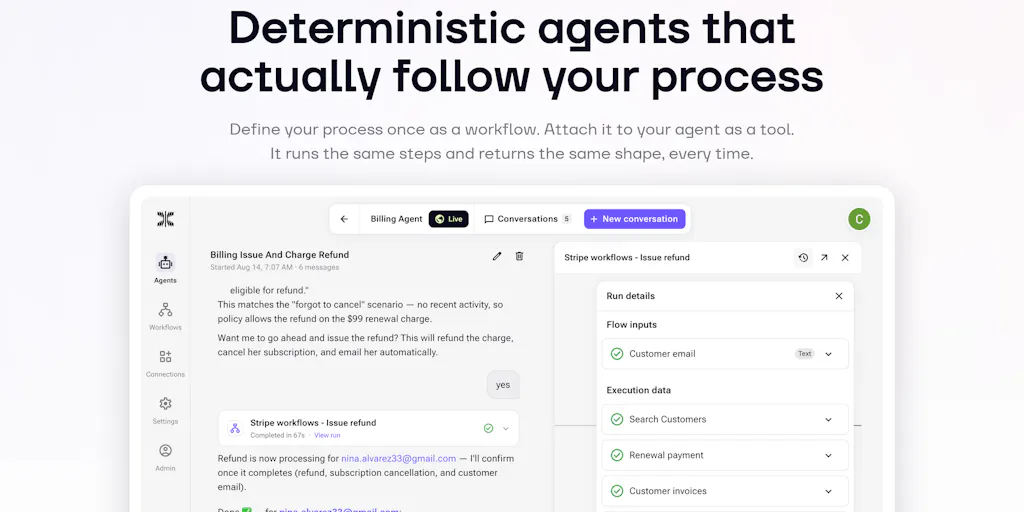
The pitch is refreshingly concrete. Instead of giving an agent a sprawling toolset, you build workflows — fully no-code, zero JavaScript expressions — and those workflows become the agent’s tools. The agent reasons, reads context, and picks a workflow. The workflow then executes with deterministic precision. Every agent action links to a visual execution trace, so you can click in and see each step’s input and output. If something fails, you find it in seconds, not after an hour of scrolling chat logs.
The cost model is where I perked up. The maker’s claim is that this architecture saves money in five distinct ways, and they’re all things I’ve seen blow up budgets in real seller operations. First, one workflow call replaces a whole loop of agent reasoning — your agent makes a single tool call instead of paying reasoning tokens to orchestrate every micro-step. Second, huge API responses never touch your frontier model; the workflow returns only the compact, typed result the agent needs. Third, you can use cheap models inside workflows for grunt work like summarizing, extracting, and formatting, reserving your expensive model for actual decisions. Fourth, small context windows compound — clean tool results keep the whole conversation cheap instead of bloating every subsequent turn. Fifth, no retry spirals. An improvised tool call fails and triggers a retry-and-reason loop that burns tokens and time; a workflow succeeds or fails cleanly, once.
That last point is the one that resonates most with anyone who’s run Zapier or Make automations at scale. The “retry spiral” is the silent killer of automation ROI. You set up a trigger, it fails silently, the agent tries again, the partial data corrupts the next step, and suddenly you’re spending an afternoon untangling a mess that was supposed to save you an hour a day. Controller AI’s approach — fail cleanly, show me the exact step that broke — is the right instinct.
Where This Fits in the Cross-Border Tooling Stack
Let me map this to your actual stack, because that’s where the rubber meets the road. If you’re a typical operator, you’re running Shopify or Amazon Seller Central as your core, with Helium 10 for research, Klaviyo for email, and some combination of ShipStation or ShipBob for fulfillment. The gaps between these tools are where your margin leaks. A return comes in via Amazon, the email notification goes to a shared inbox, someone manually copies the order number into a spreadsheet, and then — maybe — the restocking fee gets applied. That’s a five-step process with four manual handoffs. An agent with a well-built workflow could handle the entire loop: read the return request, check the policy, apply the fee or issue the refund, update the inventory count, and trigger the restock email. But only if the workflow is deterministic. The moment you let the agent improvise the fee calculation, you’re back to chaos.
This is where Controller AI’s positioning gets interesting. They’re not trying to replace your existing stack. They’re trying to be the layer that makes your existing tools obedient. The workflows you build can call any API, so they can talk to Klaviyo, Helium 10, or your custom inventory system. The agent becomes the brain, the workflows become the hands, and you become the supervisor who only steps in when something needs approval. The “requires approval” flag is a killer feature for cross-border operators — you can let the agent handle the 95% of routine cases and only ping you when a refund exceeds a threshold or a supplier reorder hits a minimum quantity.
Where the Math Breaks
I want to push back on one thing, though. The maker claims “predictable cost” — a run costs a known amount of credits, so you can price the task before running it. That’s true for the workflow execution itself. But the agent layer still uses frontier models, and those costs are not linear. If your agent has to reason about a complex edge case — a customer who ordered three items, returned two, one of which arrived damaged, and wants a replacement for the third — you’re still paying for that reasoning. The workflow makes the execution cheap and predictable, but the decision can still blow up your token budget. The fix is to be aggressive about routing: the cheaper the model that can make a decision, the better. Don’t send a $50/hour consultant to answer a question a $5/hour clerk can handle. Controller AI’s architecture supports this — they explicitly mention using cheap models for grunt work inside workflows — but the burden is on you to design the routing. The tool gives you the lever; you still have to pull it.
What Cross-Border Sellers Can Borrow (Without Buying Anything)
Here’s the part I really want you to take away. You don’t need to sign up for Controller AI to benefit from its architecture. The principles it’s built on are transferable to any automation you’re already running. Start by auditing your most frequent manual processes — the ones you do at least five times a week. Write down the exact steps, the inputs, the outputs, and the decision rules. That’s your workflow. Now ask yourself: which of those steps can be deterministic code, and which genuinely require judgment? The answer is almost always 80% deterministic, 20% judgment. Your refund policy isn’t a vibe; it’s a table. Your restock threshold isn’t a feeling; it’s a number. Your supplier lead time isn’t a guess; it’s a metric.
The second thing to borrow is the observability principle. If you’re running any automation today — even a simple Zapier zap — you should be able to answer the question “what exactly did this do, and why?” If you can’t, you’re flying blind. Every tool you use should give you an execution trace, not just a success/failure status. That’s the difference between debugging in minutes and debugging in hours.
Third, steal the “requires approval” pattern. Even if your current tooling doesn’t support it natively, you can build it manually. Set up your automations to draft actions but not execute them — generate the refund email, prepare the inventory adjustment, but hold it for your sign-off. Yes, it adds friction. But for high-stakes actions — anything over a certain dollar amount, anything that affects inventory counts, anything that touches supplier relationships — that friction is cheap insurance against a catastrophic error.
Where I Think Controller AI Falls Short
I want to be honest about the limitations, because the cross-border crowd doesn’t need hype, they need signal. First, the no-code workflow builder is powerful, but complex workflows — the kind you need for multi-currency reconciliation or cross-border tax calculations — can get unwieldy. The maker’s suggestion to use coding agents like Claude or Cursor to build the workflows is clever, but it assumes you have the technical chops to direct those agents effectively. For a non-technical seller, that’s a steep learning curve. The “copy this prompt to get started” approach is a nice onboarding touch, but it’s not a substitute for real documentation and templates.
Second, the platform is new. Launched on May 28th, 2025, with a single review at the time of writing. That’s not a knock — every tool starts somewhere — but it means the ecosystem of pre-built workflows, community templates, and battle-tested integrations isn’t there yet. You’ll be building from scratch, which is fine if you’re an early adopter, but risky if you need something that just works on day one.
Third, the enterprise question. The maker mentions they’ve been building for SMBs, and the pricing model (credits per run) is SMB-friendly. But cross-border operations at scale — think $10M+ annual revenue, multiple marketplaces, international warehouses — have governance and compliance requirements that a credit-based, no-code platform may not satisfy. If you need audit trails for tax authorities, role-based access control, or SOC 2 compliance, you’ll need to ask hard questions before committing. The Datadog comparison in the comments is telling — that’s an enterprise monitoring tool, and Controller AI is explicitly not that. It’s a builder’s tool for SMBs, and it should be judged on those terms.
What I’d Watch / Test Next
If you’re intrigued but not ready to rip out your stack, here’s what I’d do this week. First, pick one painful, repetitive process — ideally something that happens daily and currently requires copy-paste between two tools. Map it out on paper: inputs, steps, decision rules, outputs. That’s your pilot workflow. Second, sign up for Controller AI and build that one workflow. Don’t connect it to anything yet; just build it and test it with historical data. See if the execution trace gives you the visibility you’re missing. Third, if the pilot works, add the agent layer and the “requires approval” flag. Let it run for a week on read-only or approval-gated tasks. Measure two things: time saved and errors caught. If both move in the right direction, expand to a second workflow.
For the more technical operators, I’d also spend an afternoon with their start.md file — the fact that they’ve published a machine-readable spec for how coding agents should interact with their platform is a sign they’re thinking about the right things. That’s the kind of developer-first thinking that separates tools that scale from toys that stall. And keep an eye on the Moltcraft example in the comments — someone already used Controller AI to build an enterprise monitoring tool that competes with Datadog. That’s a proof point that the architecture generalizes beyond e-commerce.
The bottom line is this: the agents are coming, and they’re going to run your operations whether you like it or not. The question is whether you’ll be the one designing their guardrails or the one cleaning up their messes. Start with one workflow, one process, one approval gate. That’s how you learn to trust the machine — one deterministic step at a time.


