The Local AI Stack Is Coming for Your Ops Spreadsheets — and That Should Make You Nervous
Every cross-border operator I know runs on a fragile stack of spreadsheets, PDFs, and screenshots. Supplier quotes in Excel, freight invoices in PDF, ad creative screenshots, a folder of product photos that need resizing for six marketplaces. The SaaS answer has been to upload all of it to yet another cloud tool and trust the vendor. The new wave of local-first AI desktop apps argues you can get ChatGPT-style file handling without the upload — and for sellers sitting on supplier pricing, margin models, and unpublished launch plans, that tradeoff is worth taking seriously. Hob, a free open-source desktop app from Frigade maker Christian Mathiesen, is the most interesting entry in that category I’ve seen this quarter — not because it’s polished, but because it makes the right architectural bet.
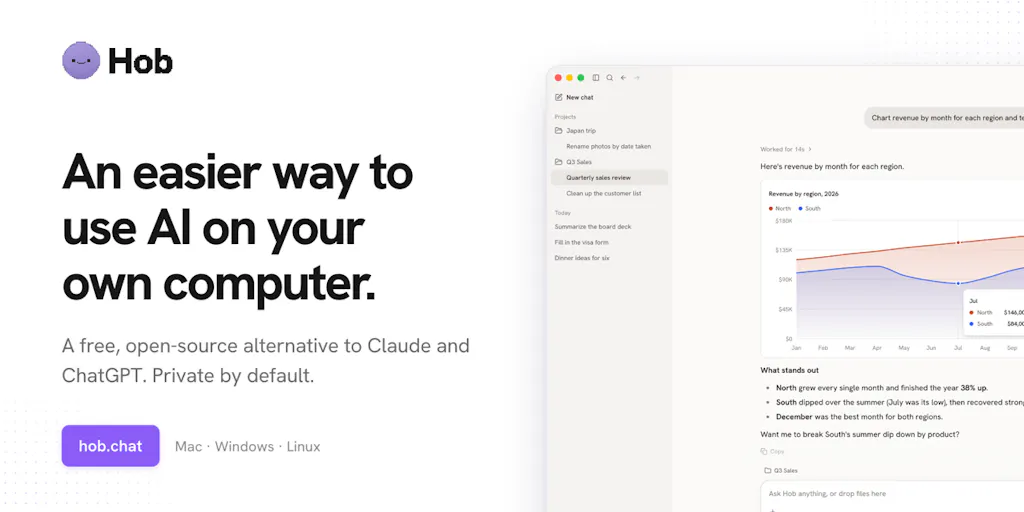
The pitch, as Mathiesen frames it in the launch thread, is deliberately unglamorous: a Mac/Windows/Linux app that “works on your files the way the Claude and ChatGPT apps do, except the AI runs on your own computer.” No account, no subscription, chats and files never leave the machine. It auto-picks an open model for your hardware, reads and edits files in folders you approve, turns spreadsheets into charts, fills PDFs, handles Word/Excel/PowerPoint, reads images and screenshots, searches the web (or doesn’t), and connects to other apps via MCP. That’s the whole pitch. For a seller, the interesting question isn’t whether it beats GPT-5 on a benchmark — it’s whether “good enough, fully local” clears the bar for the 80% of ops work that never needed a frontier model in the first place.
What problem this actually solves for a seller
Strip away the AI framing and look at the workflow. A typical Amazon FBA brand owner’s week includes: reconciling a supplier’s Excel quote against last quarter’s, pulling SKU-level margin math out of a spreadsheet into something a 3PL can read, filling in customs paperwork as PDFs, eyeballing a folder of product photos for the listing refresh, and drafting the copy that goes into Amazon Seller Central. None of that is creative work. All of it is file manipulation with a light reasoning layer on top. And all of it currently involves either a human doing it by hand or uploading commercially sensitive documents to a third-party cloud.
That last point is the real wedge. Supplier cost sheets, landed-cost models, MOQ negotiations, and pre-launch ad budgets are the most competitively sensitive documents a cross-border seller owns. Uploading them to a SaaS AI tool means accepting whatever that vendor’s data retention policy says. Mathiesen’s framing is blunt: local models are weaker than frontier models, but “for most tasks for most normal people, I’d argue you rarely need the newest frontier model.” I think he’s directionally right, and I think the seller use case is a better fit for that argument than the general-consumer use case he’s pitching to.
Why Amazon sellers should care more than Shopify ones
Shopify operators already live in a cloud-native stack — Shopify admin, Klaviyo for email, a dozen apps that all want OAuth access to your store. Their data is already in the cloud, and their tooling assumptions are cloud-first. The marginal privacy gain from a local AI app is real but abstract.
Amazon sellers are the opposite. The operational reality of an FBA business is a shared drive full of Excel files: the master SKU list, the reimbursement tracker, the freight forwarder’s rate card, the PPC budget model, the supplier scorecard. Amazon’s own tooling — Amazon Seller Central reports, Helium 10 exports, Keepa CSVs — dumps more spreadsheets into that folder every week. A local agent that can read a folder, spot the SKU that’s suddenly negative-margin after the new freight rate, and chart it without anyone uploading the file is a genuinely different value proposition for this cohort than for a DTC brand that’s already all-in on cloud.
How it differs from the incumbents
The comparison set here isn’t ChatGPT or Claude — it’s the local-AI category that’s been quietly maturing: Ollama as the model runtime, LM Studio as the desktop GUI, Jan as the open-source alternative, and a long tail of “chat with your PDF” tools. Mathiesen says he tried “every local AI app I could find” before building, and his critique is specific and, from my own testing, fair: most of them “would paste a text file into a small context window, which failed as soon as the file was larger than a few KB.” The ones that could do more “seemed to default to hosted models, which defeats the entire point of keeping things private, or push you towards a paid plan.”
That’s the gap Hob is aiming at. The differentiators, in order of how much I think they matter to an operator:
- Hardware-aware model selection. The app detects CPU/GPU/RAM and picks an appropriate Ollama model automatically. Commenter Omri Ben-Shoham of Dial called this “the real win here” — “most local AI apps default to cloud or force you through setup hell.” For a seller who is not a developer, setup hell is the actual adoption blocker.
- File editing with undo and approval. It reads and edits files in folders you choose, “asks before changing anything, and you can undo.” Commenter Oleksii Sekundant of SonOf flagged this correctly: “Undo matters when the agent is editing files you already use.” Mathiesen’s reply — “don’t want my mom to delete all her photos by accident” — is the right instinct, and it’s the difference between an agent you’d let touch a supplier quote and one you wouldn’t.
- Real file-format coverage. Spreadsheets to charts, PDF form-filling, Word/Excel/PowerPoint, image and screenshot reading. This is where most local tools fall down; a text-only context window is useless for a freight invoice.
- MCP integrations. The app connects to other apps through MCP, which is the emerging standard for agent-to-tool connections. That’s the forward-looking bet — it means Hob could eventually reach into your Shopify admin or your TikTok Shop seller center without a bespoke integration for each.
Where the math breaks
Here’s where I get skeptical, and where I think operators should too.
The hardware question is undersold
The launch thread’s most useful exchange is the one between Mathiesen and Nicholas Zakas, who reports having “trouble running local models with 32 GB because of an older GPU (and running on the CPU ends up being too slow)” — only getting “E2B running at anything close to usable” on CPU. Mathiesen’s answer is that “8gb RAM alone is enough to run a decent Gemma model,” and that “computers with 16+ GB of memory do really well.” Both can be true. But “runs” and “runs usefully on a folder of 40 supplier PDFs” are different claims, and the launch copy doesn’t distinguish them. If your ops machine is a five-year-old Windows laptop with integrated graphics, budget for the fact that this will be slow, and test before you build a workflow on it.
The file-scale question is unanswered
The sharpest question in the thread comes from JC of Haplo AI: when Hob works across a folder, “does it show you a diff or preview before it writes, and for a large file does it read just the relevant part or load the whole thing?” That’s the right question, and as of the scrape there’s no maker reply. It matters enormously for sellers. A 50,000-row SKU master is not a text file you paste into a context window. Whether the app does retrieval over the relevant rows or tries to load the whole thing determines whether it’s usable for real catalog work or just for small documents. Until that’s answered publicly, treat large-file handling as unproven.
“Free and open source” is not a support contract
Hob is free, open source, and built by one person “noodling” on it “for the last couple of weeks.” That’s charming and it’s also the risk. There’s no SLA, no support desk, no roadmap commitment. For a hobbyist, fine. For a seller who wants to route supplier invoices through it, you need a fallback — keep the manual process, don’t let the agent be the only path to a document you need. The upside of open source is that the code is auditable and the local-first architecture is verifiable; the downside is that nobody owes you a fix when a macOS update breaks it.
What cross-border sellers can borrow from this
Even if you never install Hob, the launch is a useful signal about where the tooling stack is heading, and there are three things worth stealing for your own ops.
First, the folder-permission model. The idea that an AI tool only sees folders you explicitly grant, asks before writing, and keeps an undo log is a better security posture than most SaaS tools offer. When you evaluate any AI tool for your business — including the ones already in your stack — ask the same three questions: what can it see, what can it change, and can I reverse it. Most cloud tools fail at least one.
Second, the local-model-first default. The argument that “you rarely need the newest frontier model” for routine work is one you can apply to your own tooling budget. A lot of sellers are paying per-seat for AI features they use for tasks — reformatting a supplier email, summarizing a freight quote — that a local model handles fine. The savings aren’t the point; the data-residency is.
Third, MCP as the integration layer to watch. If the agent-to-tool standard holds, the next 18 months of e-commerce tooling will be about which platforms expose MCP endpoints. When you’re evaluating a new SaaS — a PPC tool, a repricing tool, a returns manager — ask whether it has an MCP or API story, because that determines whether your local agent can eventually orchestrate it or whether you’re stuck with the vendor’s UI.
What I’d watch / test next
This week, if you’re curious: install Hob on the machine you actually do ops work on — not a spare laptop — and point it at a single, non-critical folder. A folder of last quarter’s already-processed supplier quotes is a good test set. Ask it to build a chart of unit cost by SKU, then ask it to edit one cell and confirm the undo works. Time how long a 5,000-row spreadsheet takes. That tells you more than any review.
Then watch three things. Whether the maker answers JC’s diff-and-large-file question publicly — that’s the tell on whether this is a toy or a tool. Whether the hardware-selection logic holds up on older machines, since Nicholas Zakas’s 32 GB / old-GPU report is the most common real-world configuration. And whether MCP integrations ship with any e-commerce-specific connectors, because that’s when a local agent stops being a privacy curiosity and starts being an ops layer. If you’re an Amazon seller with a shared drive full of margin math, the privacy argument alone is worth a weekend test. If you’re a Shopify operator already living in the cloud, bookmark it and check back in six months — the category is moving fast, and the setup-hell problem is the one most likely to get solved first.


