The Remote-Mac Question Nobody in E-commerce Is Asking — Yet
Cross-border operators have quietly become remote-infrastructure companies. Your ops lead is in Shenzhen, your ads buyer is in Lisbon, your Amazon account manager is in Toronto, and the Mac mini running your listing-automation scripts is in a closet in Austin. The tooling stack gets all the attention — Shopify admin, Amazon Seller Central, Helium 10, Klaviyo — but the layer underneath it, how a human actually reaches a machine sitting in another country, is where teams burn hours and leak account security. So when a launch shows up that attacks that layer with a genuinely different privacy model, I pay attention even if the product isn’t built for us. Headroom, from maker Haru at MusicFlow, is one of those. It’s a remote-control client for your Mac, and the design decisions in it are worth stealing for your own internal tooling — and worth arguing with.
What Headroom Actually Solves (and What It Doesn’t)
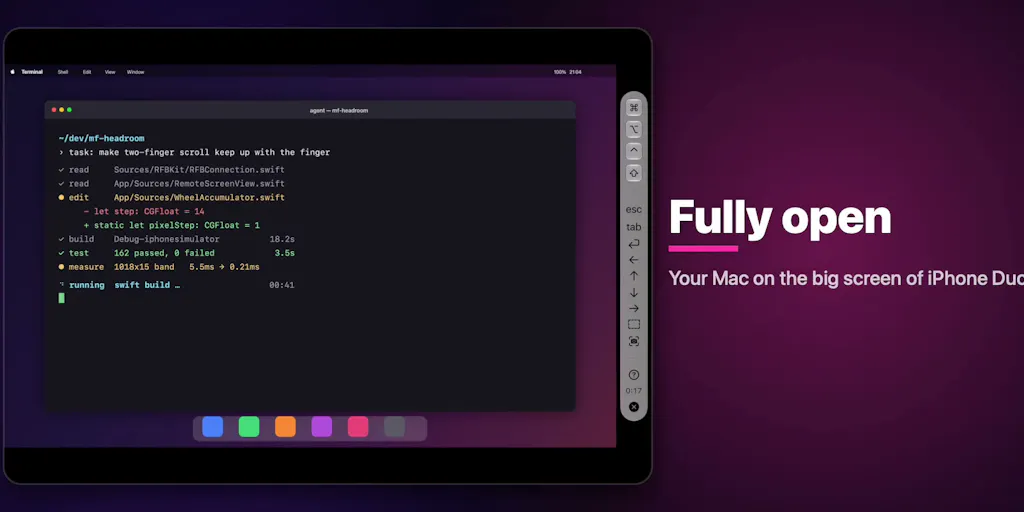
Strip away the launch-day framing and Headroom is a thin, opinionated client on top of the Screen Sharing that ships inside macOS. The maker’s pitch is that there’s nothing to install on the target Mac, no account to create, and no third-party relay in the middle — the screen and your input travel only between your own devices. That’s the whole architectural bet, stated plainly in the launch post. With Tailscale layered on, it also works when you’re away from the home or office network.
The problem it solves is real but narrow: you have a Mac somewhere, you’re somewhere else, and you want to see it and poke at it from a phone or tablet without signing your screen over to a cloud broker. That is not the same problem as “run my Amazon business from my phone.” Headroom doesn’t touch Seller Central, doesn’t batch-edit listings, doesn’t reconcile settlements. It’s the pipe, not the workflow. For a cross-border seller, the honest framing is: this is infrastructure you might use to reach the machine that runs your workflows, not a workflow tool itself.
The folding-phone angle is a distraction for operators
A meaningful chunk of the launch is about the iPhone Duo — half-open laptop pose with the Mac on the upper screen and a control bar above the fold, the keyboard auto-raising when you fold, the lower screen becoming a panel of large hardware-style keys, full-open filling the inner screen, book-hold moving the control bar to the side, closed running on the outer screen alone, and nothing ever drawn across the fold. Headroom has supported this since version 1.3.0, and it also runs on iPad and Mac, in 17 languages, built on Metal for smooth rendering.
That’s genuinely thoughtful interaction design, and I’ll come back to why the pose-awareness idea matters. But if you’re a DTC operator reading this on a normal phone, none of it changes your week. Don’t buy the folding-phone story; buy the architecture story.
How It Stacks Up Against the Incumbents You’re Probably Already Using
Here’s where I get skeptical, because the remote-access category is crowded and most of it is free-ish and already trusted by IT.
The obvious comparison is TeamViewer and AnyDesk — the two names most ops teams reach for first. Both require an agent on the target machine, both route through vendor infrastructure by default, and both have spent years building enterprise controls because their customers demanded them. Headroom’s “nothing to install, no account, no relay” pitch is a direct shot at exactly those friction points. If your objection to TeamViewer has always been “I don’t want a persistent agent and a vendor account on a machine that touches my seller credentials,” Headroom’s model is cleaner on paper.
Then there’s the free baseline: Apple’s own Screen Sharing, which is what commenter Jaewon Seo says they already use — “nothing fancy,” in their words, just the built-in tool when away from the desk. That’s the real competitor, not TeamViewer. Headroom’s value over bare Screen Sharing is the client experience: the phone-first layout, the pose handling, the polish. Whether that’s worth paying for depends entirely on how often you’re reaching for a Mac from a small screen.
And there’s the category Headroom deliberately isn’t: cloud-device tools like Amazon WorkSpaces or browser-based remote desktops, where the machine lives in a data center and access is brokered by a cloud provider. Different trust model, different compliance posture, different cost structure. If your concern is account security on marketplace logins, a cloud desktop with per-user provisioning may actually be the safer answer than remoting into a physical Mac in a closet.
My read: Headroom competes hardest on simplicity and privacy, and least on manageability. That’s a real trade-off, not a flaw — but it defines who should care.
Why Amazon sellers should care more than Shopify ones
A Shopify-first DTC brand mostly lives in a browser. Your team logs into admin, your apps are SaaS, your fulfillment is handled by a 3PL’s portal. There’s little reason to remote into a specific physical machine.
Amazon FBA is different. Seller Central is browser-based, but the operational reality around it often isn’t: repricing scripts, feed generators, inventory sync jobs, spreadsheet automations, and the odd legacy tool that only runs on a desktop OS. Plenty of mid-size sellers still keep a dedicated machine — sometimes literally a Mac mini — running scheduled jobs that touch listing data. If that’s your setup, a low-friction, no-agent way to check on that machine from a phone has obvious appeal. It’s also an obvious risk surface: that machine probably holds session cookies and API keys, which is precisely why the “nothing of mine in between” claim matters more to an Amazon operator than to a Shopify one.
What Cross-Border Teams Should Borrow From This
Even if you never install Headroom, three design ideas in it are worth copying into your own internal tooling and vendor evaluations.
First, the “no relay” trust argument. Cross-border sellers juggle accounts across marketplaces with wildly different security expectations, and every third-party service in the middle of a session is a question your account manager eventually has to answer. When you evaluate any remote-access or automation vendor, ask the architecture question first: does traffic pass through the vendor, or peer-to-peer between my devices? Headroom’s answer — devices only, with Tailscale for off-network reach — is the shape of answer you want to hear, whatever the product.
Second, pose-awareness as a UX principle. The folding-phone work is really about context: the interface rearranges itself based on how the device is being held, and the maker is explicit that nothing is drawn across the fold. Translate that to ops dashboards. Your warehouse lead on a phone in a fulfillment center, your ads buyer on a laptop, your account manager on a tablet — they need the same data in different arrangements, not one responsive layout that technically fits everywhere. The teams that win on operational speed are the ones whose internal tools respect the device, not just resize for it.
Third, the “step in when it needs me” framing. The maker describes Headroom as starting from a way to keep an eye on an AI agent working on a Mac from the sofa, and to step in when it needs a human. That’s the correct mental model for the automation you’re already running — repricers, feed bots, ad-rule engines. You don’t want to watch them constantly; you want a reliable way to see state and intervene fast. Any tooling that shortens the distance between “something looks wrong” and “I’m looking at the actual screen” earns its keep.
Where the math breaks
The privacy pitch has a sharp edge the launch post doesn’t dwell on. “No account, nothing in between” also means no central audit trail, no per-user access revocation, no session logging — the exact controls that make TeamViewer and AnyDesk tolerable to IT and compliance teams at scale. If you have five people who might need to reach that Mac, “no account” stops being a feature and starts being a governance problem. You’ll end up bolting on your own access discipline, which is work the incumbent vendors already did for you.
There’s also a device-support caveat worth flagging honestly: the maker says they’ve been building the folding-phone experience on a simulator because they haven’t been able to get a Duo in hand, and asked a commenter whether the real device behaves differently on keyboard state after relaunch. That’s admirably transparent, and it’s also a signal — the most-hyped part of the launch is the least field-tested part. Treat the folding-phone story as a demo, not a proof.
Where My Judgment Says It Falls Short
Three things I’d want before recommending this to an operator.
No mention of Windows or Linux. The pitch is macOS Screen Sharing all the way down. Cross-border ops teams are frequently Windows-heavy, especially in China-based operations, and a Mac-only client narrows the addressable audience sharply. Not disclosed whether other platforms are planned.
The AI-agent monitoring use case is asserted, not demonstrated. The launch frames Headroom as a way to watch an AI agent work and jump in when needed, which is a compelling hook for 2026-era operators running automation. But the post gives no detail on what “keeping an eye on” actually looks like — no alerts, no status summaries, no logs. It’s a remote screen, and you interpret it yourself. That’s fine, but don’t buy it expecting agent observability.
Pricing isn’t in the source. I can’t tell you what Headroom costs, because the launch material doesn’t say — not disclosed. That matters, because the free alternative (built-in Screen Sharing) is genuinely adequate for occasional use, and the paid alternatives come with support and management features. The value case has to be carried entirely by client polish, and polish is hard to justify on a spreadsheet.
None of this is disqualifying. It’s just the difference between “interesting launch” and “procurement decision.”
What I’d Watch / Test Next
This week, do three things. First, audit how your team actually reaches the machines that run your automations — count the people, the devices, and the credentials involved, and write down whether traffic passes through a vendor. That inventory is more valuable than any single tool decision. Second, if you have a Mac in the loop, spin up Tailscale and test plain macOS Screen Sharing from a phone before you evaluate any paid client — establish the free baseline so you know what you’re paying to improve. Third, if you do trial Headroom, test it on the boring stuff: reconnect after sleep, input latency on a weak connection, and what happens when two people try to reach the same Mac. The folding-phone demo is fun; the reconnect behavior is what determines whether it survives contact with a real ops team.
And watch the maker’s replies. A solo developer answering device-behavior questions in public, in detail, is the best signal you’ll get on whether the product will keep improving after launch day.


