Why a Slide Tool Might Be the Most Underrated SaaS in Your Cross-Border Stack
If you run a cross-border e‑commerce operation—whether you’re an Amazon FBA seller juggling supplier decks, a DTC brand raising a seed round, or a Shopify merchant pitching to retail buyers—you spend more time assembling presentations than you’d care to admit. Investor decks, brand guideline slide sets, quarterly business reviews for your wholesale partners, and even internal training on new Amazon policy changes all demand clean, on‑brand slides. The problem is that every “AI slide tool” I’ve tested either hallucinates your logo into Comic Sans or regenerates the entire deck when you ask to tweak one chart. That’s why I paid close attention when Folio launched on Product Hunt with a pitch that directly addresses the friction every e‑commerce operator faces: the tool should surgically edit the slide you’re on, not blow up the whole file. And it should do it fast enough that you’re not staring at a spinning wheel while your ad deadline passes. The cross-border relevance isn’t obvious at first glance, but once you dig into Folio’s architecture—especially its “6x fewer tokens” approach and in‑place editing—it becomes clear that this is the kind of AI you want staging your brand story, not just generating slide deck fluff.
What Problem Folio Actually Solves for E‑Commerce Operators
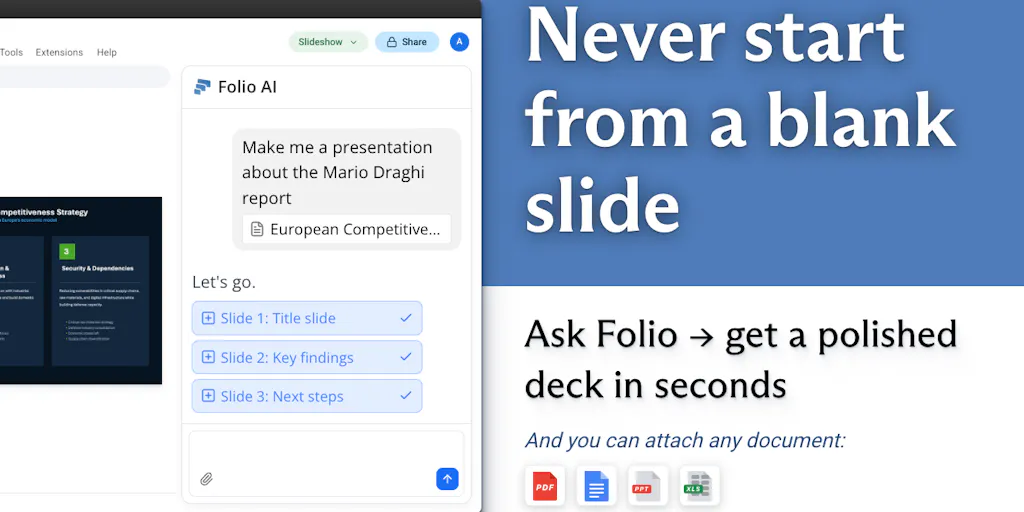
The core pain point is iterative slide work that breaks layout. Every cross‑border seller has been there: you have a beautifully formatted deck with your brand colors, product mockups, and margin tables. You ask an AI tool to “make the revenue chart larger and move it left,” and the tool regenerates the entire slide, losing the font, the spacing, and half your data. Folio’s maker, Aymeric Roucher, explicitly calls this out: the current “AI for Slides” tools “make you wait for minutes and lost focus, and produce broken output.” Their solution is a real‑time AI copilot that works directly inside Google Slides and PowerPoint, performing what they call “surgical edits” instead of a full‑deck regeneration.
For an e‑commerce operator, this changes a workflow that used to require either a dedicated designer or hours of manual fiddling. I often need to update a supplier pitch deck with the latest inventory data or adjust a wholesale catalog slide to highlight a new bestseller. With Folio, I can attach an Excel file with current stock numbers, ask the tool to “update the top‑selling SKU bar chart with this data,” and the rest of the slide stays intact. The tool also supports native charts and all kinds of shapes, plus LaTeX for any technical specs you might include in a product BOM slide.
Folio’s benchmark page claims it ranks top by a wide margin against leading slide copilots. They attribute that to a proprietary slide representation that burns “6x fewer tokens” than competitors. That matters because fewer tokens means faster inference and lower cost per slide, which for a small e‑commerce team on a budget translates directly to more iterations before hitting your API spend ceiling.
Why Amazon Sellers Should Care More Than Shopify Ones
Amazon FBA sellers live and die by their ability to communicate with overseas suppliers, domestic wholesalers, and internal teams spread across time zones. A supplier presentation that shows your brand’s quality control process, packaging specifications, and demand forecasts can mean the difference between a 30‑day lead time and a 45‑day one. Shopify DTC brands, by contrast, tend to funnel more creative energy into landing pages and email flows rather than slide decks. That’s not to say Shopify merchants don’t need investor decks or brand guidelines—they do—but the frequency and complexity of slide‑based stakeholder updates is higher for Amazon sellers who juggle multiple SKUs, private‑label negotiations, and category‑specific brand narratives. Folio’s ability to preserve a brand’s existing template while making targeted edits is particularly valuable for Amazon sellers who have a specific brand book from their parent company or a licensing agreement that imposes strict visual constraints.
How Folio Differs from Incumbents (and Where It Falls Short)
The incumbent tools—Gamma, Tome, and Beautiful.ai—all rely on a “generate everything from a prompt” model. You feed them a goal, they produce a deck, and then you’re stuck either accepting the layout or starting over. Folio’s differentiating feature is in‑place editing: you can ask it to modify one element on a slide without touching the rest. The community comments on the Product Hunt page confirm this is the dealbreaker for power users. One commenter, Mustafa Arian, said, “the iterate part is the thing that always breaks with AI slide tools. they generate something glossy on round 1 and then the second prompt regresses the whole layout.” Aymeric answered that Folio “works in‑place, doing a surgical edit to the slide that you asked for, but does not change anything else.”
Another differentiator is speed. Folio claims to be “over 6x faster than competitors.” In practice, that means a 20‑second wait for a complex edit rather than a 2‑minute wait that kills your flow. For an e‑commerce operator who is often jumping between spreadsheets, ad platforms, and inventory dashboards, that speed is the difference between using the tool daily and abandoning it after two tries.
Where the math breaks: Folio does not yet support live‑linked charts from Google Sheets or Excel. If you ask for a chart update based on a file, it reads the data at that moment but doesn’t maintain a live connection. In a cross‑border operation where daily margins fluctuate with exchange rates and shipping costs, a static chart can be stale by lunch. The maker acknowledged this in the comments, asking Vikram whether he’d use it in Google Sheets or Excel, implying it’s on the roadmap but not live. For now, if you need a deck that reflects real‑time data, you’ll still be manually exporting screenshots.
Also, the tool’s handling of version conflicts is not fully addressed. When a user manually edits a slide in PowerPoint and then asks Folio for an AI edit on the same slide, does the AI overwrite the manual edits? The maker’s response was not fully clear. In a collaborative environment where a brand manager might tweak a headline while a procurement analyst asks Folio to update the product image, this could cause friction until the reconciliation logic is better documented.
Where the Math Breaks
The “6x fewer tokens” claim is impressive, but it is also a proprietary representation that the maker explicitly declines to explain when asked by commenter David. That means you are betting on a black‑box engine. For a small e‑commerce team that relies on a tool being maintainable and debuggable, that lack of transparency is a risk. If the representation changes in a future update, your existing decks might break. Compare that to open‑source alternatives like Marp or even a well‑structured Canva Pro integration—you have more control over the output, even if the generation is slower.
Three Things Cross‑Border Sellers Can Borrow from Folio’s Approach
Even if you don’t adopt Folio tomorrow, the principles behind it are worth stealing.
1. Surgical edits over full regenerations.
Any AI tool you use for creative assets—whether it’s product images, ad copy, or packaging design—should strive to modify only what you specify. Tools like Canva’s Magic Edit already do this for images. Folio proves that the same principle can work for structured documents. When evaluating a SaaS for your stack, ask: can I edit one element without regenerating everything? If not, the tool will waste more time than it saves.
2. Use a brand reference system.
Folio allows you to set a slide as a “Reference” that can be reused across presentations by name (e.g., “@3-column”). For a multi‑brand seller, this is a simple way to enforce consistency without creating a separate template for every marketplace or category. You could define a reference slide for “Amazon A+ comparison table” and another for “Shopify collection grid,” then call them up in any deck.
3. Attach raw data files directly.
Instead of formatting a table inside the slide tool, you can drop an Excel or PDF into Folio and let it parse the data. That’s a pattern every seller should adopt: keep your data in its source of truth (inventory management system, Amazon seller reports, etc.) and let the AI handle formatting. The same approach works for Helium 10 or Jungle Scout data exports—just dump the file and ask for a visual summary.
My Honest Judgment: Where Folio Still Misses for E‑Commerce
Folio is clearly built with consulting and finance power users in mind—the example decks are “Air France 2025 financial statements” and “2025 State of AI by McKinsey.” The cross‑border e‑commerce use case is adjacent, not primary. That shows in a few areas:
- No native e‑commerce chart templates. I’d love a one‑click “P&L by marketplace” slide or a “unit economics breakdown” preset. You can build those manually, but it takes work.
- Limited collaboration features. The comments suggest you can work on other slides while the agent edits one slide, but there is no mention of real‑time multi‑user editing or change tracking. If you have a team of six across three continents, you’ll still be emailing PPTX files back and forth.
- The pricing model. Folio offers a “Plus” subscription (the promo code HUNT4FOLIO gives one free month), but the exact pricing is not disclosed in the source. For a medium‑sized seller with a tight tooling budget, the cost per seat needs to compete with something like a Figma slide deck template that costs $20 once. I’d want to see a transparent pricing page before committing.
Still, the core engine is solid. If you are a single operator or a small team that needs to produce high‑quality pitch decks, supplier presentations, or brand books a few times a month, Folio’s speed and surgical editing will save you hours. I wouldn’t replace your entire design workflow, but I would add it as a specialist tool for the slide tasks that currently take three rounds of painful manual adjustments.
What I’d Watch / Test Next
This week, I’m going to test Folio with a real e‑commerce deck—my own brand’s wholesale catalog. I’ll start with the Google Slides integration, upload a PDF of my latest inventory report, and ask it to “create a slide comparing Q1 sales by channel with a stacked bar chart using the attached data.” I’ll use the promo code HUNT4FOLIO for the free month. Then I’ll try a surgical edit: “make the Amazon channel bar 20% larger and add a callout for the best‑selling SKU.” If it preserves the rest of the slide, I’ll consider using it for all my investor updates.
For operators who want to replicate the workflow without adopting Folio, I’d also experiment with Claude’s new slide generation capabilities (mentioned in the comments as “we still get looksmaxxed on slides a little but we IQmog hard now”) and compare the results. The key metric is time from first draft to approval: if Folio cuts that from 45 minutes to 15, I’ll pay for it. If not, I’ll stick with a manual approach and wait for the next generation of document‑level AI agents.