Why a Better Email Designer Matters More Than You Think for Cross-Border Operations
If you sell across borders—whether through Shopify storefronts, Amazon marketplace listings, or TikTok Shop—your email channel is the one place you own the relationship end-to-end. No algorithm tweaks, no commission clawbacks, no marketplace fee hikes. Yet most cross-border operators treat email design as an afterthought, relying on stock templates from Klaviyo or Mailchimp that scream “template” in every inbox. The real cost isn’t just low open rates—it’s the slow erosion of brand trust with customers who speak different languages and shop on different devices. That’s why the launch of Flodesk Studio caught my eye. Not because it’s a piece of shiny AI, but because it addresses a pain point that keeps my conversion funnels leaky: the gap between “good enough” design and a brand experience that feels intentional across markets. Let me unpack what this tool actually offers, where it fits into an e-commerce tool stack, and where I think it still falls short for operators like us.
The Design Bottleneck That Still Haunts E-commerce Email
Every brand I advise has the same tension. You need to send more emails—abandoned cart flows, post-purchase surveys, seasonal promotions—but your design resources are either a part-time freelancer or yourself in Canva at 11 PM. The result? A/B tests that never happen because redesigning a template takes two days. Or worse, you copy-paste a winning flow from your US store to your EU store without adjusting the color palette, and the emails feel disconnected from the local landing page.
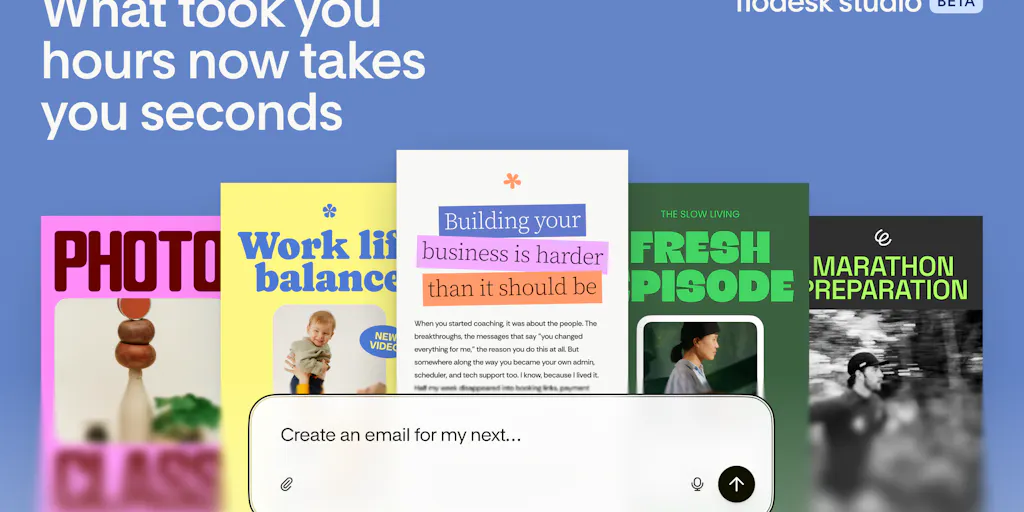
Flodesk has long positioned itself as the “beautiful email” alternative to Mailchimp, targeting creators and small businesses who care about aesthetics. But their existing drag-and-drop editor, while prettier than most, still requires starting from a blank canvas or heavy customization. Flodesk Studio changes that. According to the launch post, it’s “a place to make beautiful emails, built by the world’s top designers, accelerated by AI, finished by you.” You describe what you want—say, “a minimalist product launch with three hero images and a countdown timer”—and the AI generates multiple on-brand layouts that you can refine via chat or manually tweak.
This directly attacks the design bottleneck. Instead of spending hours aligning text boxes and picking font weights, you start with a structure that’s already close to final. For a cross-border operator managing four stores, that speed compounds. But the real promise isn’t just speed—it’s brand consistency. The tool includes a brand kit that “quietly does the right thing,” as designer Anja Seemuller put it in the comments. Set your colors, fonts, and logo once, and every AI-generated design uses them. That’s huge for operators who run multiple regional sub-brands or need to keep a parent brand voice while localizing for Japan, Germany, and Brazil.
How Flodesk Studio Actually Works (and Why It’s Different from Klaviyo/Mailchimp)
Most email service providers (ESPs) treat design as a layer on top of a marketing automation engine. Klaviyo has decent templates, but they’re optimized for data fields and segmentation, not for visual delight. Mailchimp has a clunky builder that feels frozen in 2016. Flodesk Studio flips the priority: it starts with design and lets you export the result to “any ESP.” That’s a radical bet—decouple the creative tool from the sending infrastructure.
The workflow: you describe your goal, the AI generates three to five layout options. You pick one, then either chat with the AI to adjust (“make the button bigger,” “swap the testimonial block for a product grid”) or dive into a visual editor. The brand kit auto-applies itself. Finished? Export as clean HTML/CSS (allegedly) and import into your existing ESP. You can also send directly from Flodesk, but the export option is what matters for sellers who already have complex automation flows built in Klaviyo or Amazon’s own email tools.
How does this differ from Canva for email? Canva can produce beautiful images, but you still have to paste them into an email builder as static images, which kill load speed and destroy personalization. Flodesk Studio outputs actual email HTML, which means dynamic content—like customer names, product recommendations, or currency symbols—can still be injected by your ESP after import. That’s the key architectural difference.
Why Amazon Sellers Should Care More Than Shopify Ones
Shopify store owners live and die by email flows. Amazon sellers, especially FBA brand owners, often neglect email because they think Amazon owns the customer. But with Amazon’s Brand Registry and the “Manage Your Customer Engagement” tool, you can email your branded followers and buyers direct. The catch? Amazon’s email editor is terrible—basically plain text with a few image slots. You cannot use Klaviyo for Amazon-sourced emails (Amazon doesn’t share email addresses). So if you want to build an Amazon audience outside the marketplace, you typically drive them to a landing page or use a third-party tool like FeedbackWhiz for review requests.
Flodesk Studio could become the design layer for Amazon sellers who want to create professional-looking follow-up emails (review requests, warranty registration, cross-sell offers) that they send via Amazon’s own system or via a service like Jungle Scout’s Email Automation. The export-to-any-ESP feature means you can design once and then paste the HTML into Amazon’s limited editor—if the HTML holds up. That’s a big “if,” as we’ll see below.
What Cross-Border Sellers Can Actually Borrow From This Launch
The product itself is built for creators and solopreneurs, not for enterprise multi-market operations. But the underlying principles are directly transferable:
Brand-first, data-second workflow. Most e-commerce email tools force you to start with a segment or a trigger. Flodesk Studio forces you to start with how the email looks. That’s a healthy mental shift. When you export to Klaviyo, you then attach the segment logic. Try it: design a new abandoned cart email in Flodesk Studio, export it, and import it into a Klaviyo flow. You’ll likely keep using it because it looks noticeably better than Klaviyo’s default templates.
The brand kit as a single source of truth. For a DTC brand selling in three countries, you can create one brand kit for your global identity, then tweak per region by duplicating the kit. Flodesk Studio’s color logic adapts automatically, which reduces the time spent on localization minutiae.
AI as a starting point, not a crutch. The comments from users like Scott Wyden Kivowitz emphasize that the AI “eliminates the mechanical burden of coding and layout building” without replacing the human eye. That’s exactly what sellers need: more speed on execution, more time for strategy and copywriting.
Export flexibility reduces lock-in. If you’re unhappy with Flodesk’s sending performance (deliverability, support), you can take your designs and run. That’s rare in the email tooling space. Most ESPs make it hard to export designs beyond plain text. Flodesk explicitly encourages exporting, which aligns with the modern composable stack mentality.
Where the Math Breaks: Export Fidelity and Localization Gaps
I’m not here to write a press-release paraphrase. I see a few hard problems that Flodesk Studio does not solve yet, and they matter deeply for cross-border operators.
The Export Rendering Problem
The first issue was raised by Gal Dayan in the Product Hunt comments: “When I export out to send from a different ESP, does the design hold up as real HTML/CSS, or does the fancier stuff quietly flatten into images or degrade once it’s outside Flodesk’s own renderer?” This is the classic tension between design tools and email clients. Email HTML is a wasteland of outdated renderers—Outlook uses Word, Gmail strips CSS, Apple Mail is forgiving but not universal. Flodesk Studio’s fun shapes and textures might look gorgeous in the editor but break when opened in Outlook 2016 on Windows. The maker responded that they put thought into the color logic and defaults, but they did not directly address the export fidelity question in detail. Until I see a side-by-side rendering test across six clients, I would not risk exporting a mission-critical Black Friday email from Flodesk Studio to Klaviyo without manual QA.
Dark Mode Preview: Missing but Requested
User Özcan Hasanoğlu asked for a built-in dark mode preview toggle. The maker acknowledged it’s in the backlog. For e-commerce, dark mode adoption ranges from 30% to 60% depending on platform and region. If your email looks fine in light mode but becomes illegible in dark mode (white text on white background, for example), you’re losing engagement from a huge slice of your audience. Cross-border sellers targeting mobile-first markets like Southeast Asia or Latin America should care even more, as dark mode usage is higher in those regions. Without a built-in preview, you’ll need to manually send test emails and view them on multiple devices. That’s doable, but it adds friction to the very speed the tool promises.
Localization Features: Missing Entirely
Flodesk Studio does not mention any multi-language or multi-currency support. The AI generates English layouts based on your description. If you sell in Spanish, German, or Japanese, you’ll have to translate the copy yourself—the AI does not handle localization. The brand kit can hold a single set of fonts and colors, but you cannot set regional overrides (e.g., different font for Japanese glyphs, different color meaning in Chinese culture). For a seller running a single language store, this is fine. For anyone with a multilingual customer base, the tool remains a design sketchpad, not a localization engine.
Pricing and Maturity
The page says “Flodesk Studio is free to try while we are in beta.” No mention of post-beta pricing. Flodesk’s standard plan is already more expensive than Mailchimp’s free tier and comparable to Klaviyo’s smaller plans. If Studio becomes a paid add-on or requires a premium Flodesk subscription, the cost-benefit for a seven-figure seller might still be worth it—but the lack of transparency is a yellow flag. I’d test heavily during the beta before committing workflows.
What I’d Watch / Test Next
Export QA. This week, design one email in Flodesk Studio—a simple “new arrivals” newsletter—and export it to Klaviyo. Then send it to your own account at three different email clients (Gmail, Outlook, Apple Mail, and a free account like Yahoo or ProtonMail). Check if the fun blocks (shapes, textures) degrade into images or break. Post the results in your team Slack. If it holds up, scale the test to a more complex layout. If not, note which features to avoid.
Dark mode manual test. Create a test email with white text on a dark background in Flodesk Studio. Export and open on a phone with dark mode enabled. If the email is unreadable, flag it as a limitation and stick to high-contrast designs until dark mode preview is added.
Brand kit scaling. Set up one brand kit for your primary store. Then duplicate it for a secondary market (e.g., EU with different VAT terms). Test whether the AI adapts to the new color palette without requiring manual overrides. Time the process—if setup takes under 10 minutes, it’s viable for multi-brand operations.
Monitor for localization features. Subscribe to Flodesk’s product updates or follow the Product Hunt board for feature announcements. If they add multi-language AI generation or regional brand overrides, this tool becomes a serious competitor to Stripo or BEE. Until then, treat it as a high-quality design accelerator, not a full-spread solution.
Cross-border e-commerce is already messy enough—don’t let email design be another leak. Flodesk Studio gives you a faster way to create beautiful layouts, but it’s still early. Test it, break it, and decide if the trade-offs fit your stack. Your inbox (and your customers’ inboxes) will thank you.