The screen recording stack is quietly becoming a cross-border ops problem
Cross-border sellers run on demos. A sourcing agent in Shenzhen needs to show a factory QC walkthrough. A VA in Manila needs to hand off a listing edit to a brand manager in Austin. A TikTok Shop affiliate manager needs to walk a creator through a returns flow. Every one of those moments is a screen recording, and most of them are recorded on a laptop that has customer PII, supplier pricing, or ad account credentials visible on screen. So when a tool shows up that keeps the recording local by default, that’s not a niche productivity curiosity — it’s a data-handling decision with real compliance implications for anyone running a multi-marketplace operation. Flicka, which launched as a Chrome extension on September 13th, 2026, is the latest entrant into that conversation, and it’s worth unpacking because the design choices it makes map almost directly onto problems cross-border operators hit weekly.
What Flicka actually is, and the problem it’s solving
The product is a screen recorder that lives entirely in a browser tab — or rather, in a browser extension. According to the maker’s launch post, the first version was a web app, and the team learned quickly that “a web page can’t draw on other pages.” That’s the whole thesis: the moment you start recording, what you actually want to do is point at something, circle it, blur an email address, or drop an arrow on a checkout button. A tab-based recorder can’t reach into the page you’re capturing. An extension can.
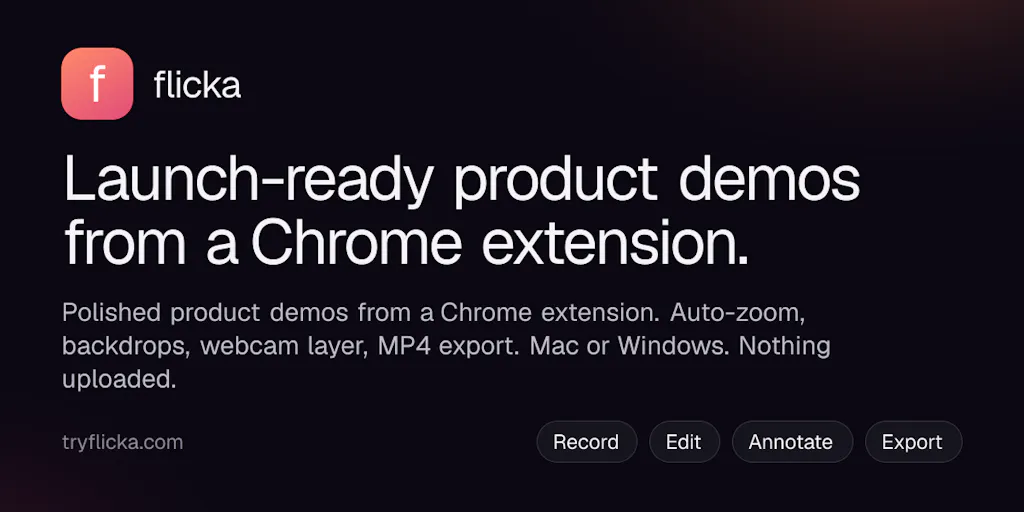
So Flicka 1.0 ships as a Chrome extension, with the recorder, library, and editor all living inside it. The feature set, per the maker’s post: a one-sentence recording setup (“Record this tab with my mic and auto-zoom” — click a word to change it), on-page annotation while recording (draw, highlight, arrows, text, blur), capture of tab / screen / window / drawn area / camera only, word-by-word captions generated on-device, and camera layouts that animate on the timeline (bubble, side-by-side, camera-only). Takes are written to disk every second, so a Chrome crash doesn’t lose the recording — including the auto-zoom cursor data.
The two claims that matter most for an operator: nothing you record is uploaded, and no account is needed to record, edit, or export. It’s free to use; Pro removes the watermark and adds MP4, 4K, captions, and “the rest.” It runs in Chrome, Edge, Brave, and Arc on Mac and Windows.
Why “local-only” is a bigger deal than it sounds
A reviewer on the launch page — Roger Wang — made the point bluntly: keeping everything on device is nice “especially when you’re recording something with customer info on screen.” The maker’s reply is the tell: “If customer data is on screen, the recording shouldn’t take a round trip through someone’s server just to get cropped.”
For a cross-border seller, that’s not a philosophical preference. It’s the difference between a support SOP that’s actually compliant and one that isn’t. If your returns team records a screen showing an Amazon Buyer-Seller Messaging thread — names, order IDs, addresses — and that clip lands on a third-party cloud by default, you’ve just created a data transfer event you probably didn’t document. Multiply that by a Philippines-based VA team doing 40 handoff recordings a week and you have a shadow data pipeline nobody signed off on.
How it stacks up against the incumbents
The obvious comparison is Loom, and the launch reviewer Gal Dayan made it directly: “Loom is the obvious comparison but it wants an account and uploads to the cloud by default. For a quick one-off demo I don’t want tied to a workspace, Flicka’s zero-setup local approach won out.”
That framing is fair but incomplete. Let me lay out where Flicka sits against the tools cross-border teams actually use:
- Loom — the default for async video in most DTC and agency orgs. Cloud-first, workspace-tied, strong sharing and analytics. Terrible fit if the recording contains anything you’d rather not store on someone else’s infra.
- Screen Studio — the Mac-only darling for polished product demos. Beautiful auto-zoom, but it’s a paid desktop app, Mac-only, and not built for quick annotated walkthroughs of live dashboards.
- OBS Studio — free, local, infinitely configurable, and completely unusable for a VA who needs to record a 90-second returns walkthrough before lunch.
- CleanShot X — great on Mac for screenshots and short clips, less so for narrated demos with captions.
- Tella and ScreenPal — browser-based editors with strong template and caption stories, but again cloud-centric by default.
- Zoom / Google Meet local recording — the accidental incumbent. Most cross-border teams already record internal walkthroughs this way, and it’s the worst of all worlds: clunky, no annotation, no auto-zoom, and the file usually ends up in a shared drive with no retention policy.
Flicka’s differentiation isn’t a feature Loom can’t build. It’s a default Loom won’t reverse. Cloud upload is Loom’s business model. Local-first is Flicka’s. For a narrow but important class of recordings — anything with PII, supplier pricing, ad account dashboards, or marketplace Seller Central screens — that default is the product.
Why Amazon sellers should care more than Shopify ones
Here’s the judgment call. If you’re a Shopify DTC operator, your team’s screen recordings are mostly marketing and product demos. Nothing sensitive. Loom is fine, and the collaboration features — comments, viewer analytics, workspace folders — are worth the cloud tradeoff.
If you’re an Amazon FBA brand owner or an agency managing multiple Seller Central accounts, the calculus flips. Your screen recordings routinely show:
- Buyer names, addresses, and order IDs in Seller Central messaging
- Supplier costs and margins in your Helium 10 or Jungle Scout dashboards
- Ad spend and ACOS in Amazon Advertising console
- Payout and banking details in the payments tab
Every one of those is a recording you do not want sitting on a SaaS vendor’s servers by default, especially if you’re operating across GDPR-relevant EU marketplaces or handling CCPA-covered California buyer data. A local-only recorder isn’t a nice-to-have in that context. It’s the only sane default.
Where the math breaks
Two things temper my enthusiasm.
First, “local-only” only holds until you share. The moment a VA exports an MP4 and drops it into Slack, Notion, or Google Drive, you’re back to cloud storage — just with less governance than Loom would have given you. Flicka solves the recording leg of the pipeline, not the distribution leg. If your team’s habit is “record, export, paste into Slack,” you’ve moved the compliance problem, not eliminated it.
Second, the pricing model is honest but thin on detail. The maker says it’s free with a Pro tier that removes the watermark and adds MP4, 4K, captions, and “the rest” — but the actual Pro price is not disclosed on the launch page. For a team of 20 VAs, that’s a real gap. You can’t build a tooling budget line on “the rest.”
What cross-border sellers can borrow from Flicka’s design
Even if you never install it, there are three patterns here worth stealing for your own ops.
1. Local-first as a default, not a setting
The lesson isn’t “use Flicka.” It’s “make the private path the default path.” If your team uses Loom, you can approximate this by disabling auto-upload, forcing local recording, and gating any cloud share behind a checklist. It’s friction, but friction is the point. The default should be the safe option, and opting into risk should require a conscious click.
2. Sentence-as-configuration
The “Record this tab with my mic and auto-zoom” pattern — where clicking any word in the sentence changes that parameter — is a genuinely good UI idea for operators building internal tools. Most of your VA-facing dashboards have 12 checkboxes when they need one editable sentence. If you’re building anything internal — a returns portal, a listing QA tool, a supplier scorecard — steal this. It collapses configuration into a single readable line and makes the state of the tool self-documenting.
3. Crash-resilient capture
The maker’s answer to Xun Jiang is the detail I’d flag to any ops lead: the recording is written to disk every second, so if the tab or browser dies mid-take, you reopen Flicka and the take is there — auto-zooms included, because cursor data is saved alongside the video. If you’ve ever lost a 20-minute factory walkthrough because Chrome decided to update, you know why this matters. Any tool your team uses for time-sensitive capture — supplier audits, unboxing footage, live marketplace walkthroughs — should have this property. If it doesn’t, you’re one crash away from a re-shoot.
Where I think it falls short
A few honest gripes, some echoed by the launch reviewers:
- No raw-clip trim before the editor opens. Gal Dayan flagged this: you can export MP4/WebM/GIF, but there’s no quick in/out trim on the raw clip before you’re dropped into the full timeline. For a 90-second VA handoff, that’s a step you shouldn’t have to take.
- Chrome-family only. Works in Chrome, Edge, Brave, and Arc on Mac and Windows. No Safari, no Firefox, no Linux, no mobile. For a cross-border team where someone is inevitably on a MacBook and someone else is on a Windows box in Shenzhen, that’s fine. For a team standardized on Safari or a Linux-based ops stack, it’s a non-starter.
- The distribution problem is unsolved. As above — local capture, cloud share. The pipeline still leaks at the export step.
- Pro pricing is not disclosed. You can’t evaluate TCO without it.
- Captions are on-device, which is great for privacy, but the accuracy ceiling is unclear. No claim about language coverage. For cross-border teams recording in Tagalog, Mandarin, or Spanish-accented English, that’s the first thing I’d test.
What I’d watch / test next
Three concrete things to do this week if this resonates:
- Audit your current recording pipeline. Pull the last 20 screen recordings your team shared internally. For each, ask: does this contain PII, supplier pricing, ad account data, or marketplace credentials? If more than two do, you have a data-handling problem that no tool swap fully fixes — but a local-first recorder buys you time to write the policy.
- Install Flicka in a sandbox Chrome profile and record one real Seller Central walkthrough. Not a demo. A real one, with real (test) buyer data on screen. Then export it and see where it lands. The point is to feel the friction of the export step, because that’s where your compliance story actually lives.
- Pressure-test the caption accuracy in your team’s working languages. If you have VAs recording in Tagalog or Mandarin, run a 60-second clip through and count the errors. On-device captions are a privacy win, but only if they’re usable — otherwise you’re back to typing subtitles manually.
The bigger pattern to watch: local-first is becoming a market position, not just a feature. Loom won the async video category by making sharing effortless. The next wave may win by making not sharing the default. For cross-border operators sitting on a mix of marketplace PII, supplier data, and multi-jurisdiction compliance obligations, that’s a shift worth tracking — and probably worth adopting before your legal team asks why you didn’t.