The Signature You’re Sending Is Quietly Costing You Wholesale Replies
Cross-border sellers obsess over the wrong pixels. We A/B test hero images on a Shopify product page for three weeks, then fire off a sourcing email to a Shenzhen factory or a wholesale pitch to a US boutique with a signature that looks like it was assembled in 2009 — mismatched fonts, a squashed logo, a phone number that wraps to a second line on mobile. For anyone whose business runs on outbound — supplier negotiation, influencer seeding, B2B wholesale, Amazon brand-registry outreach, affiliate recruitment — the email signature is the last thing a stranger sees before they decide whether you’re a real operation or a dropshipper with a Gmail account. That’s why esigna, a canvas-style signature designer launched by Luis Rodriguez, caught my attention. It’s a small tool solving a small problem, but the design philosophy behind it — paste your existing data, get a real editor instead of a form — is worth stealing for your own stack.
The Problem It Actually Solves (And Who Already Owns This Space)
Every signature tool I’ve used falls into one of two buckets. The first is the free generator: you land on a page, fill in eleven fields, pick template number four, copy the HTML, and never return. HubSpot’s signature generator and WiseStamp live here — fine for a solopreneur, useless the moment you want to change the type scale. The second bucket is the enterprise layer bolted onto Google Workspace or Microsoft 365, where IT pushes a locked template to 400 seats and nobody can touch the kerning. Exclaimer and CodeTwo dominate that tier.
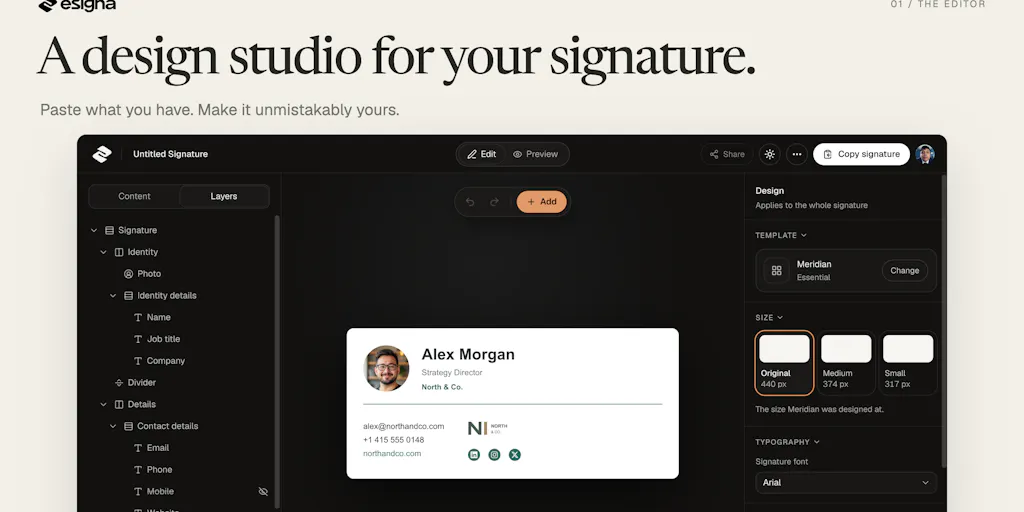
esigna sits deliberately between them. Rodriguez’s framing is blunt: “Most signature tools hand you a form to fill in. I wanted a canvas.” That’s the whole thesis. The paste-from-existing-email trick is the smartest part of the onboarding — copy the signature block from an email you’ve already sent, paste it in, and your name, title, numbers, and links populate the right fields across all 26 templates. You flip through designs without retyping. For an operator managing five sending identities across three storefronts, that’s a genuine time save.
The editor itself is where it diverges from the free-generator crowd. You edit text directly on the canvas, move and resize blocks, adjust typography and spacing, add a booking button or a banner, and — this is the unusual bit — change a template’s underlying structure. Details persist if you switch designs, and undo works as you go. Before export you get previews in light mode, dark mode, mobile, and Outlook. Rodriguez is honest that these are “close, not exact, because every inbox has its quirks.” Export gives you HTML plus setup steps, with PNG and plain text as fallbacks.
Why Amazon Sellers Should Care More Than Shopify Ones
Here’s my contrarian read. If you’re a pure DTC operator running a Shopify store, your customer relationship lives in Klaviyo flows and TikTok Shop DMs — your signature barely matters. But if you sell on Amazon, your business is a constant stream of one-to-one email: Brand Registry support tickets, Amazon Seller Central case escalations, supplier POs, freight forwarder coordination, Helium 10 or Jungle Scout vendor conversations, and the endless back-and-forth with your 3PL. Every one of those threads ends with your signature. A clean, consistent block signals “organized brand” to a freight broker deciding whether to prioritize your container. A broken one signals the opposite. Same logic applies to Etsy sellers pitching wholesale accounts and eBay power sellers negotiating with Temu or SHEIN suppliers. The higher your outbound email volume per dollar of revenue, the more this tool earns its keep.
What Cross-Border Operators Should Borrow From It
Three transferable ideas, regardless of whether you ever open esigna.
The paste-to-populate pattern. Any internal tool you build — a supplier onboarding form, a listing template generator, a returns portal — should let users paste an existing artifact and auto-extract structure. We waste absurd amounts of operator time on retyping data that already exists somewhere in an email or a PDF. If your ops team is maintaining a Google Sheet of supplier contacts, the winning move is a paste parser, not a prettier form.
Preview honesty. Rodriguez admits his previews are approximations. That’s the correct posture. Too many SaaS tools promise pixel-perfect rendering across every client and then quietly fail in Outlook 2019. Telling users “this is close, verify before you ship” builds more trust than a false guarantee.
The no-subscription pricing. Every template and export is free. You can design and copy without an account. A free account saves two signatures and includes six pastes. Beyond that it’s $19 once for 25 signatures and unlimited pastes — no recurring charge. For a category where most competitors push you toward $8–15/month per seat, a one-time fee is a positioning statement. It also matches the usage reality that commenter Ryan Keller flagged: “That makes sense for a tool where someone may only need to create a signature once.” Rodriguez’s reply — that you keep the option to change it later — is the honest counter.
Where the Math Breaks
Let’s stress-test the pricing against a real operator. If you run a 12-person cross-border team, each with a personal sending identity plus two shared inboxes (support@, sourcing@), you’re looking at 36 signatures. That’s two $19 purchases — $38 total, versus roughly $1,700/year if you’d gone with a per-seat subscription at $4/month across 36 seats. The math is lopsided in esigna’s favor for exactly the segment that gets punished hardest by seat-based pricing: lean teams with many identities. The catch is that esigna is a personal-productivity tool, not an admin console. There’s no central provisioning, no way for a brand manager to push a locked template to the whole team, no audit trail. If you need that, you’re still paying Exclaimer or living inside Google Workspace’s native signature settings. The $19 wins on cost and creative control; it loses on governance.
Where My Judgment Says It Falls Short
I like the product. I’m not going to pretend it’s complete.
Spam-filter anxiety is real and only half-addressed. Eliezer Cernin raised the fear every cold-outreach operator carries: “I’m afraid an html signature might trigger spam filters and my email will just go plonk.” Rodriguez’s answer is technically correct — nearly every email is already HTML, and filters dislike image-only signatures, tracking pixels, and sketchy links, none of which esigna injects. His practical advice, skip the photo and logo if you want to play it safe, is sound. But for cross-border sellers sending cold wholesale pitches from a new domain, deliverability is a domain-warming and authentication problem (SPF, DKIM, DMARC), not a signature problem. esigna can’t fix that, and it shouldn’t pretend to. Just don’t expect a pretty signature to rescue a cold domain.
Preview fidelity is the eternal disclaimer. Rodriguez says the editor “shows an approximation of what it will look like in gmail, outlook, mobile and even dark mode.” Approximation is doing a lot of work in that sentence. Outlook desktop, in particular, renders HTML with a Word engine that has broken better designers than this. Test before you blast.
The template count is a feature and a limit. 26 templates sounds generous until you’ve seen the signature-template landscape — Canva alone hosts thousands. The differentiator isn’t quantity, it’s the structural editability. If you want a signature that looks like nobody else’s, you’ll still be doing manual work.
No team layer, no CRM integration. There’s no obvious hook into HubSpot, Salesforce, or Gmail’s native signature API. For a solo operator, irrelevant. For a brand running outbound at scale, it means manual per-seat setup.
The Comparison Nobody Asked For
If you’re choosing between esigna, WiseStamp, and HubSpot’s free generator: pick HubSpot if you want zero friction and don’t care about design. Pick WiseStamp if you want a browser extension that manages signatures across Gmail and Outlook with a team dashboard — and you’re fine with a subscription. Pick esigna if you care about typography and layout control, you have multiple sending identities, and you’d rather pay once than rent forever. That’s a narrow but real slice of the cross-border operator population.
What I’d Watch / Test Next
This week, do three things. First, paste your current signature into esigna’s free tier and see how it renders in dark mode and on mobile — I’d bet money yours breaks on at least one. Second, if you’re running outbound supplier or wholesale email, audit your last twenty sent messages and count how many went out with a signature that matches your brand’s actual design system. The gap will embarrass you. Third, if you’re on a team, price out what per-seat signature management actually costs you annually versus a one-time tool, and decide whether governance or creative control matters more to your operation. The signature is the cheapest brand touchpoint you own and the one you’ve thought about least. Fix it before your next container ships.