Why a Mac File Manager Matters to Someone Who Sells on Amazon
Let me start with a confession: I spend more time staring at files than I do at dashboards. Inventory reports from Seller Central, supplier POs from 1688, logistics manifests from freight forwarders, ad spend exports from Helium 10, and the endless renamed versions of product photography from that freelancer in Manila. Cross-border e-commerce is, at its core, an exercise in managing chaos — and that chaos lives in folders. So when I see a solo developer take a swing at the one tool we all touch a hundred times a day, I pay attention. Not because I need a prettier Finder, but because the operational bottleneck for most DTC operators isn’t strategy or even ad creative — it’s the friction between the file and the action. This launch is a case study in how we think about tooling, and there are lessons here for anyone running a multi-channel operation.
The Problem: Finder Is the Unpaid Intern You Can’t Fire
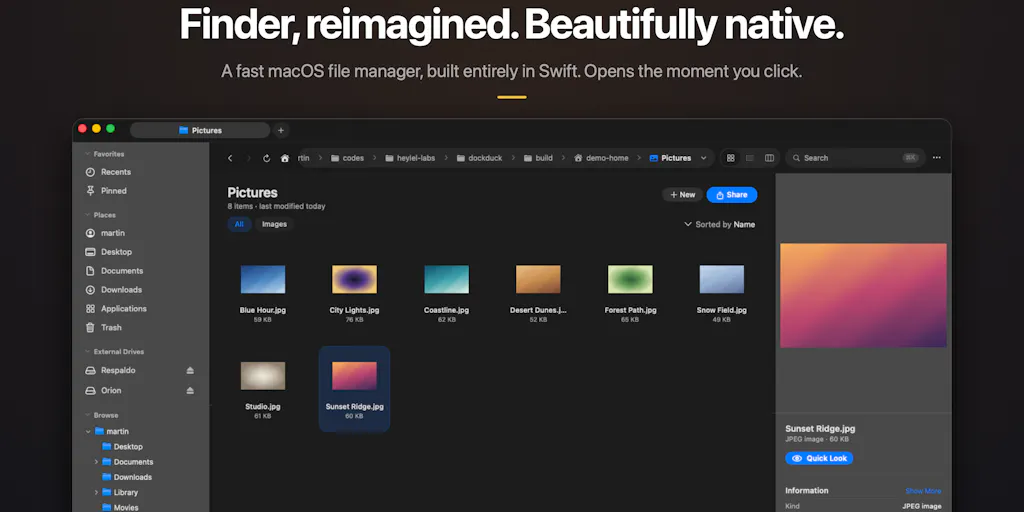
Every cross-border seller knows the feeling. You’re reconciling payouts from Amazon, and you need to cross-reference last month’s FBA inbound shipment report with the carrier’s delivery confirmation. That means opening three different folders, resizing two windows, and dragging files between them like it’s 2005. Finder has been the default file manager on macOS for decades, and it has barely evolved. The DockDuck Product Hunt launch frames this frustration perfectly: Finder “barely changes,” and the alternatives are either “powerful-but-dated power tools” or Electron apps that “ate my RAM and battery just to list files.”
That middle ground — a file manager that feels native, opens instantly, and has the power features you actually use — has been empty. For e-commerce operators, the stakes are higher than for the average user. We’re not just organizing vacation photos; we’re managing the digital backbone of a business that spans time zones, currencies, and fulfillment networks. Every second spent fighting the file system is a second not spent on margin optimization.
The existing alternatives fall into two camps. On one side, you have the long-standing power tools like Forklift and Commander One — they’ve been around for years, they’re capable, but they carry the visual and interaction baggage of an earlier era. On the other side, you have the Electron-based upstarts that try to modernize the experience but pay for it in performance. For a seller who’s already running a browser with 40 tabs, Slack, and a virtual machine for that one supplier’s portal, an Electron file manager is the thing that pushes your Mac over the edge.
DockDuck’s positioning is clear: 100% Swift and AppKit, zero Electron. It opens instantly and stays out of your way. That’s not just a technical preference — it’s a statement about what a daily-use tool should be. When you’re in the middle of a listing optimization sprint, the last thing you need is a spinner wheel because the file manager decided to re-index your entire Dropbox folder.
What DockDuck Actually Does Differently
The core features Martin, the solo developer, highlights are dual-pane browsing, server connections, batch rename, tags, and a pinned dashboard. On the surface, none of these are revolutionary — dual-pane has been a staple of file managers since Norton Commander. But the execution matters. The launch post emphasizes that this is “an early launch” and that Martin is “building it in public.” That’s a signal to operators: this is a tool that’s going to iterate based on user feedback, not a finished product that’s been sitting on a shelf.
The dual-pane view is where the cross-border magic happens. If you’ve ever had to move files between a folder on your Mac and an SFTP server hosted by your 3PL, you know the pain of the Finder approach: mount the server, open a second window, manually drag and drop, pray the connection doesn’t drop halfway through. DockDuck’s approach — connecting to servers directly and having that be a first-class citizen alongside local files — collapses a multi-step workflow into a single view. For anyone managing supplier files, this is a legitimate time-saver.
Batch rename is another sleeper feature for e-commerce operations. When you’re organizing a new product launch and you’ve got 47 images named IMG_4821.JPG from a photoshoot, batch rename is the difference between a clean asset library and a nightmare. The pinned dashboard for “the stuff I open every day” is also smart — it’s a small acknowledgment that we all have a core set of files we touch constantly, and digging through folder hierarchies to find them is wasted effort.
But the most interesting detail, from a trust perspective, is the credential handling. In response to a commenter’s question about whether server credentials go into the macOS Keychain or custom storage, Martin confirms it’s “the real macOS Keychain, not my own storage,” with each saved server getting a standard generic-password Keychain item under app.dockduck.server. He explicitly states that the password is never written to app preferences, even if you paste a full sftp://user:pass@host URL — the password portion is split off and sent straight to the Keychain.
This is a bigger deal than it might seem. For cross-border sellers, we’re constantly handling credentials for supplier portals, freight forwarder dashboards, and marketplace backends. A file manager that rolls its own credential storage is a liability — if its database gets compromised, all your server logins are exposed. Leaning on the platform’s security primitives, as Martin puts it, is the right call. It’s a signal that the developer understands the stakes.
Why Amazon Sellers Should Care More Than Shopify Ones
Let me get specific about who benefits most from a tool like this. Shopify sellers live in a browser. Their entire operation is the admin panel, and their files — if they have any — are theme files, product images, and the occasional CSV export. Amazon FBA sellers, on the other hand, live in a file system. The sheer volume of reports, reconciliation documents, and logistics paperwork is staggering.
Think about the weekly rhythm of an Amazon seller. You’re pulling the Settlement Report, the FBA Inventory Report, the Returns Report, and the Advertising Report. You’re exporting those from Seller Central, saving them to a folder structure that makes sense, and then importing them into your accounting software, your repricing tool, or your analytics spreadsheet. That’s a file-management-heavy workflow.
Now add the supplier side. Your factory in Shenzhen sends you updated product spec sheets, packing lists, and commercial invoices. Your freight forwarder sends you booking confirmations and bill of lading drafts. Your prep center sends you receiving reports. All of these are files, and they all need to be filed, cross-referenced, and archived for tax purposes.
The dual-pane and server-connection features in DockDuck are directly relevant here. If you’re regularly pulling files from a supplier’s FTP server or a shared drive, being able to do that within the same interface you use for local files — without mounting volumes or opening separate apps — is a genuine workflow improvement. It’s not a massive paradigm shift, but it’s the kind of compounding efficiency gain that adds up over a year of daily use.
Where the Math Breaks
Here’s where I have to be honest about the numbers. DockDuck is a pay-once or yearly app, with a free 14-day Pro trial and a 10% discount for Product Hunt users until September 30. The pricing model is fine — “no subscription” is a selling point for a segment of users who are subscription-fatigued. But for a cross-border operator running a business, the cost of the tool is almost irrelevant compared to the cost of the time it saves or wastes.
The real math question is about switching costs. We’re not talking about moving from one email client to another; we’re talking about changing the tool you use to navigate your entire digital life. That’s a high-friction switch, and it only makes sense if the tool is dramatically better. DockDuck’s early-launch status means it’s not there yet — it’s promising, but it’s not a finished product. For a seller who’s in the middle of Q4 prep, the last thing you need is a file manager that’s still finding its feet.
There’s also the platform lock-in question. This is a Mac-only tool. If you’re a solo operator running a Windows PC because that’s what your accounting software requires, this is irrelevant. If you’re on a Mac but your virtual assistant in the Philippines uses Windows, you’re not going to get the same tool on their end. The collaborative file-management problem — where you and your VA are working on the same set of files — is not solved by a Mac-only app.
What Cross-Border Sellers Can Borrow From This Launch
Even if you never download DockDuck, there are three lessons from this launch that apply directly to how you run your e-commerce operation.
First, the “zero Electron” framing is a reminder that performance is a feature, not a footnote. When Martin says the goal is something that “feels like Apple made it — fast, native, genuinely beautiful,” he’s making a bet that users care about the feel of the tool, not just its feature list. For sellers, this translates to your own tooling stack. If your repricing tool takes 30 seconds to load a new price list, or your inventory management system lags when you scroll through a thousand SKUs, you’re bleeding efficiency. The tools you use daily should feel effortless. If they don’t, they’re costing you more than their subscription price.
Second, the credential-handling decision is a masterclass in building trust through security architecture. Martin didn’t just say “your passwords are safe” — he explained the exact mechanism, down to the Keychain item name and the accessibility setting. For sellers who are evaluating new tools, this is the level of transparency you should demand. When you’re considering a new repricer, an AI-driven review responder, or a new logistics dashboard, ask about how they handle your data. If they can’t explain it at the same level of detail, that’s a red flag.
Third, the “building in public” approach is worth studying. Martin is launching early, asking for feedback, and treating the Product Hunt community as a product advisory board. For sellers, this is a reminder that your own product launches — whether it’s a new physical product or a new service — benefit from the same philosophy. Launch early, get feedback from a small group of trusted users, and iterate. Don’t wait for perfection.
Why I’m Not Ditching My Current Setup Yet
I want to be clear: I’m not going to recommend that anyone reading this drops their current file-management workflow and migrates everything to DockDuck this week. The tool is early, and “early” in file-management terms means bugs, missing features, and workflow gaps that you’ll only discover after you’ve committed to it. The risk of switching your daily driver to a tool that’s still finding its footing is real.
What I would do instead is download the 14-day free trial and use it for a specific, low-stakes workflow. Use it to manage your product image assets for a new listing. Use it to connect to one of your supplier’s FTP servers and see how the experience compares to your current setup. Use it for batch renaming that folder of 200 photos you’ve been putting off. If it works for that one workflow, you’ll know. If it doesn’t, you’ve lost nothing but a few minutes.
The bigger point is that the file-management problem is real, and it’s not going away. Finder isn’t going to get a major overhaul. The Electron apps aren’t going to get fast. The only path forward is native alternatives like this one, and they need users who are willing to give feedback and shape the roadmap. If you’re the kind of operator who’s always tinkering with your tooling stack, this is worth a look.
What I’d Watch / Test Next
Here’s my concrete plan for the next week, and I’d suggest you do the same:
First, grab the free 14-day Pro trial and set up a real workflow — not a test. Pick one recurring task you do daily, like downloading the previous day’s orders from Seller Central and moving them into a dated folder structure. If DockDuck can make that faster than Finder, you have your answer.
Second, test the server connection feature with your most-used remote location. If you regularly pull files from a supplier’s FTP or a shared Google Drive mounted on your Mac, see how the SFTP/SMB experience feels in the dual-pane view. Pay attention to how credentials are handled — the Keychain integration is the right approach, but you should verify it works in your environment.
Third, watch the Product Hunt discussion for the next month. The comments section is where you’ll see what features are being requested and what bugs are being reported. If Martin responds to feedback quickly and ships fixes, that’s a good sign for the tool’s trajectory. If the comments go quiet, that’s a warning sign.
Finally, don’t over-commit. This is an early launch, and the tool will change. Use it for a specific workflow, give feedback, and be patient. The file-management problem isn’t going to be solved overnight, but it’s encouraging to see someone building a native, fast, thoughtful alternative. For cross-border sellers who live in their file systems, that’s a step in the right direction.