Why a Starlink Debugging Tool Matters More to Your Amazon P&L Than You Think
Every cross-border seller I know has the same dirty secret: we run multi-million dollar operations on infrastructure we don’t actually understand. We obsess over ad spend, conversion rates, and inventory turnover, but when the warehouse Wi-Fi drops during a TikTok Shop live or the VPN lags during a critical Helium 10 pull, we just refresh and pray. We treat connectivity like electricity — invisible, assumed, and only noticed when it breaks. That’s why Dishylink, an open-source desktop client for Starlink diagnostics, caught my eye. It’s not a CRM or an ad tool. It’s a reminder that the most expensive inefficiencies in cross-border e-commerce are often the ones hiding in plain sight — in the hardware, the network, and the blind spots we’ve stopped questioning. And the way David Herbert built it, launched it, and positioned it offers a masterclass in how any of us should be thinking about our own tooling gaps.
The Problem: When the Official App Becomes the Bottleneck
Here’s the thing about the modern SaaS stack — it’s great until it isn’t. For a Starlink owner, the official mobile app is the only sanctioned window into your dish’s health, throughput, and obstructions. That’s fine if you live on your phone. But for anyone running a business from a laptop — and that’s most of us managing Amazon Seller Central, Shopify backends, or marketplace repricing tools — it’s a constant friction point. You have to physically get up, find your phone, and squint at a screen that wasn’t designed for deep diagnostics.
David’s pain point, as he describes it in the launch post, is almost laughably relatable: he’d been a Starlink customer for three years, and every time he wanted to check his connection, he had to hunt for his phone under a cushion. The old web portal that worked in any browser was quietly killed off in 2024, and desktop users were left with nothing. So he built Dishylink in two weeks. That’s not a flex — that’s a statement about how low the bar is for incumbent tooling. When a single developer can out-build a multi-billion dollar company’s desktop experience in fourteen days, it tells you the problem wasn’t technical difficulty. It was neglect.
For cross-border sellers, this is a mirror. How many of us are still logging into Seller Central through a clunky interface, or exporting CSV files from one tool and re-uploading them to another, because the “official” solution never bothered to improve? We accept the friction because we assume it’s the cost of doing business. Dishylink’s existence is proof that it doesn’t have to be.
What Dishylink Actually Does Differently
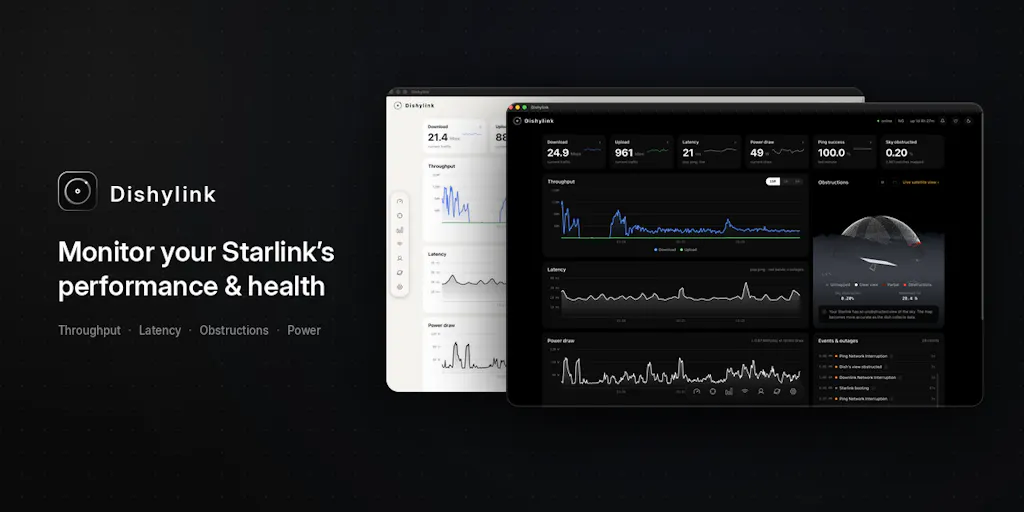
Let’s get into the specifics, because the feature list is where the strategic lessons hide. Dishylink reads your dish and router directly over your own network. No cloud relay, no intermediary. It gives you live throughput, latency, obstruction data, and hardware health. But the killer features are the ones the official app either doesn’t offer or buries:
- A dish alignment view that provides exact correction in degrees when you’re off target. That’s not just a convenience; for anyone running a remote operation, a misaligned dish means dropped calls, failed uploads, and lost sales.
- A 3D view of satellites overhead, including which one you’re actually connected to. This is the kind of granular telemetry that network engineers dream about, and it’s now available to a solo operator in a rural workshop.
- An obstruction time lapse showing what’s blocking your sky. If a tree grew a foot and your signal degraded, you’ll see it visually, not just in a generic “poor signal” warning.
- Per-device data usage for everything on your network. For a seller running multiple VMs, remote workers, or a warehouse with shared Wi-Fi, this is visibility into who’s actually consuming your bandwidth — and potentially throttling your critical operations.
- Power draw live plus historical totals by day, week, or month — which, as the maker notes, even the official app won’t give you. This is the kind of data that tells you if your hardware is degrading or if you’re paying for more electricity than you should.
- Alerts and an event log for outages, overheating, and weather, that clear themselves when things recover. Self-healing alerts are a UX pattern more tools should adopt.
- A latency breakdown that tells you whether the lag is Starlink or your own router. This alone is worth the download. How many hours have we all wasted blaming the ISP when the issue was a dying router in the office?
- Controls for snow melt, sleep schedule, update window, and reboots on supported firmware. Remote control over your hardware, without needing to be physically present.
And on privacy: no account, no backend, no analytics. It talks to your hardware over your own network and keeps everything on your machine. The source is public, it’s free, it’s MIT licensed, and there’s no paid tier coming. That’s a radical stance in a world where every tool is trying to harvest your data and upsell you to a “Pro” plan.
Why Amazon Sellers Should Care More Than Shopify Ones
Here’s my contrarian take: this tool matters more to Amazon FBA operators than to Shopify DTC brands. Why? Because Amazon sellers are uniquely hostage to their connectivity. Your entire operation depends on tools like Helium 10, Jungle Scout, or SellerSprite — all of which require stable, low-latency connections to scrape data, track rankings, and manage listings. If your dish misaligns during a storm and you don’t notice for three days, you’ve missed ranking shifts, lost Buy Box opportunities, and fallen behind on repricing. A Shopify store can survive a few hours of downtime; an Amazon account that misses a price war is bleeding money in real-time.
Moreover, the per-device data usage feature is a godsend for anyone running a multi-operator warehouse. You can finally see if someone’s kid is streaming 4K video on the same network you’re using to run your inventory management system. That’s the kind of operational insight that prevents “mysterious” slowdowns during peak sales hours.
Where the Math Breaks
Now, let me be the skeptic for a moment. Dishylink is brilliant, but it’s not a business — it’s a utility. The maker explicitly says there’s no paid tier coming, and the MIT license means anyone can fork it. That’s great for users, but it means the project’s longevity depends entirely on David’s goodwill and free time. If he gets busy, gets hired by Starlink, or just loses interest, the tool could stagnate. Open-source projects die all the time.
There’s also the question of scope. This is a niche tool for a niche hardware product. Starlink has millions of users, but the subset who are technical enough to want a 3D satellite view and a degree-based alignment correction is small. It’s not going to become a category-defining SaaS. It’s a reminder that the best tools aren’t always the biggest ones — they’re the ones that solve a specific, painful problem for a specific, underserved user.
But here’s what the math does support: the launch strategy. David shared it on Reddit, it hit the top post of the day with 100k+ views and around 3,000 downloads in 24 hours. That’s not a marketing campaign; that’s a product-market fit signal. He didn’t spend a dime on ads. He didn’t hire a PR firm. He built something useful, made it free, and let the community do the distribution. For cross-border sellers launching new products, this is a case study in organic traction — if your product genuinely solves a pain point, you don’t need to shout; you need to hand it to the right people and let them talk.
What Cross-Border Sellers Can Borrow From Dishylink
This isn’t just about Starlink. Dishylink is a template for how to think about your own tooling stack and product development. Here are the lessons I’m taking away:
1. The “Good Enough” Trap Is Real. Starlink had a functional web portal and killed it. They assumed mobile was sufficient. They were wrong. For sellers, this is a warning: don’t assume the incumbent solution is the best solution. If you’re frustrated with a tool, someone else is too — and that’s an opportunity, either for you to build something better or to switch to a tool that takes you seriously.
2. Local-First Is a Feature. Dishylink’s privacy stance — no account, no backend, no analytics — is a differentiator in a market where every tool wants your data. For cross-border sellers, this is increasingly relevant. We’re handling sensitive data: sales figures, customer PII, proprietary pricing strategies. The less of that data that leaves our control, the better. When you’re evaluating a new SaaS tool, ask: where does my data live? What happens if this company gets acquired or shut down? Local-first tools like Dishylink sidestep those risks entirely.
3. Self-Service Diagnostics Save Money. The latency breakdown that tells you whether the lag is Starlink or your own router is a perfect example of a tool that prevents costly, time-wasting support tickets. For sellers, this translates to: invest in tools that give you visibility into your own operations. If you can see that your repricing tool is slow because your VPN is routing through a congested server, you can fix it in minutes instead of spending hours on support chats.
4. Open Source Is a Trust Signal. Dishylink is MIT licensed and the source is public. That’s a massive trust advantage in a market where tools are opaque black boxes. For sellers, this is a reminder that transparency matters — both in the tools you use and the products you sell. If you’re selling a physical product, can you show your customers where it’s made, what’s in it, and how it works? If you’re using a tool, can you verify what it does with your data? Trust is a competitive advantage, and open source is one way to earn it.
The “Build It in Two Weeks” Mindset
David built Dishylink in two weeks. That’s the part that should make you uncomfortable — in a good way. How many times have we all said “I wish there was a tool that did X” and then just… lived with the problem? The barrier to building your own internal tools has never been lower. With AI-assisted coding, no-code platforms, and the sheer amount of open-source infrastructure available, a motivated operator can build a custom solution to a specific pain point in a matter of days.
I’m not saying you should all become developers. But I am saying this: if you’re running a serious operation, you should have a “tooling backlog” — a list of the annoyances and inefficiencies you’ve just accepted. Every one of those is a candidate for automation, customization, or replacement. Dishylink is proof that one person with a clear problem and a week of focused effort can out-build a corporate roadmap.
Where My Judgment Says It Falls Short
I’ve praised this tool a lot, so let me balance the ledger. Dishylink has real limitations, and ignoring them would be dishonest.
First, the platform risk. This is a third-party tool reading data from Starlink hardware. If Starlink changes their firmware, their API, or their authentication protocol, Dishylink could break overnight. The maker says it works with every dish he’s tested, including Gen 5, but that’s a snapshot, not a guarantee. For a seller relying on this for critical diagnostics, that’s a risk to manage — keep the official app as a backup, and don’t build your entire monitoring stack on a single open-source project.
Second, the “free forever” promise is a double-edged sword. No paid tier means no revenue, which means no dedicated maintenance. The maker’s heart is in the right place, but sustainability matters. If this tool gains traction and becomes essential to thousands of users, “free forever” becomes a liability — there’s no incentive to keep improving it, and no budget for support. I’d rather pay $5/month for a tool I can rely on than use a free tool that might be abandoned next month.
Third, the niche is tiny. Starlink users are a fraction of internet users, and desktop-focused, technically-minded Starlink users are a fraction of that. This will never be a billion-dollar company. That’s fine — it’s not trying to be — but it does mean the lessons it offers are more philosophical than directly applicable. The real value isn’t in the tool itself; it’s in the mindset it represents.
Fourth, the launch was a one-hit wonder. The Reddit post went viral, but that’s not a repeatable strategy. For sellers, this is a cautionary tale: a single viral moment doesn’t build a brand. If you’re launching a product, you need a sustained content engine, not just one lucky post. Dishylink’s launch was brilliant, but it’s also a one-off. Don’t mistake a spike for a trend.
What I’d Watch / Test Next
If you’re a cross-border operator, here’s what I’d do this week, based on the Dishylink playbook:
Audit your own tooling stack for “Starlink moments.” Make a list of every tool you use that frustrates you, that requires a workaround, or that you’ve just accepted as “the way it is.” For each one, ask: is there a better option? Could I build a simple internal solution? Could I switch to something more open or more local-first? You’re probably sitting on a dozen small inefficiencies that are costing you hours every week.
If you use Starlink for any part of your operation — a warehouse, a remote office, a temporary pop-up — download Dishylink today. It’s free, it’s open source, and the per-device data usage and latency breakdown features alone are worth the install. You’ll finally see what’s actually happening on your network, and you might be surprised at what you find.
Study the launch, not the tool. The Reddit-first, maker-led, open-source launch strategy is a masterclass for anyone bringing a product to market. The 100k+ views and 3,000 downloads in a day didn’t come from ads; they came from genuine usefulness and community trust. When you launch your next product, ask yourself: is this so useful that the right community will spread it for me? If not, keep iterating.
Reconsider your privacy stance. If you’re using tools that harvest your data and sell it to third parties, start migrating to alternatives that respect your boundaries. The cross-border e-commerce space is getting more competitive, and your data is one of your few proprietary advantages. Protect it like you protect your inventory.
Build something this week. It doesn’t have to be a full product. It could be a spreadsheet that automates a manual process, a script that monitors your repricing tool, or a dashboard that pulls your sales data into one place. The point is to break the habit of accepting friction. David built a tool in two weeks that out-classed a corporate giant’s offering. You can build something that out-classes your own current workflow.
The takeaway isn’t that you need a Starlink diagnostic tool. It’s that the tools you’re ignoring are the ones costing you the most. Start looking at the gaps.


