The real bottleneck in AI-assisted fulfillment isn’t the model — it’s the “Run” button
Every cross-border operator I know has the same quiet problem right now: the AI coding assistant that was supposed to compress their dev cycle spends most of its life parked at a confirmation prompt. You kick off an agent to refactor your Shopify-to-3PL webhook handler, walk away to take a supplier call, and come back forty minutes later to find the thing has been idling since minute two, waiting for someone to click “Run.” For sellers running lean teams across time zones, that dead time is the actual cost center — not the token bill. Cursor Remote Lite, a free, MIT-licensed, self-hosted project built by Yuzhuo Chen, is a small, unglamorous fix for exactly that failure mode. Here’s why I think it matters more than its modest launch suggests.
What Cursor Remote Lite actually solves
The maker’s framing is refreshingly specific: he kept leaving Cursor’s Agent running, walking away, and returning hours later to find it had stopped minutes in, waiting for a click or an answer. His constraint was the interesting part — his project lives on a GPU server he reaches through Cursor’s SSH window, so “just move the task to a cloud agent” wasn’t available to him, and his laptop doesn’t travel with him.
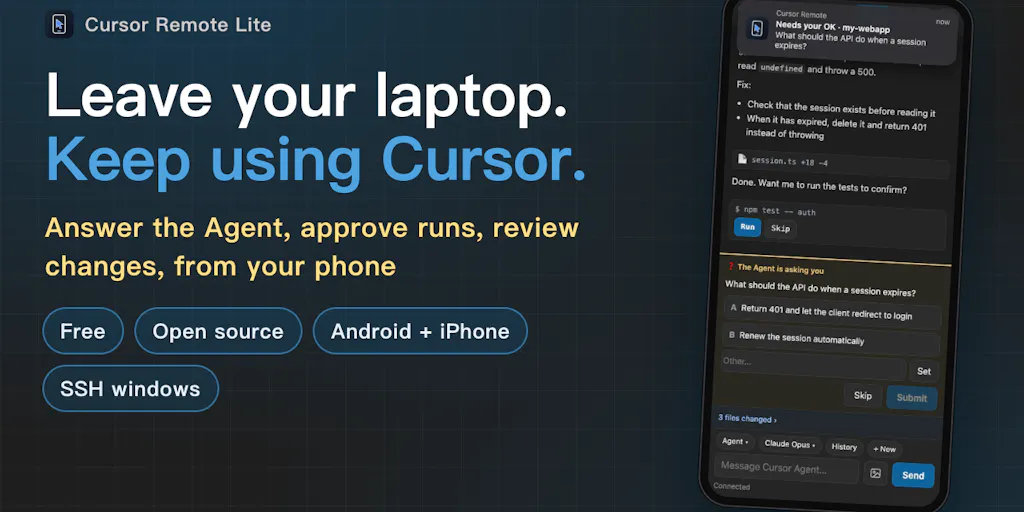
That’s the whole thesis. The product runs a small relay on your own computer that drives the real Cursor instance over the Chrome DevTools Protocol, then hands your phone a UI designed for phones. From the phone you can answer the Agent’s questions, approve commands, queue the next task while it’s busy, and keep or undo changed files — and it works across local, SSH, and Agents windows. Your code never leaves your machine; the phone reaches it through a Cloudflare tunnel.
Read that feature list again as an operator, not a developer. “Approve commands from your phone” is a workflow primitive. It means the human-in-the-loop requirement — the thing that makes agentic coding safe enough to trust with production code — stops being a tether to your desk.
Why this is a self-hosted answer to a hosted problem
The obvious comparison is cloud coding agents like Devin or the cloud task runners that GitHub and others have been bolting onto their platforms. Those solve the same “I’m not at my desk” problem, but they solve it by moving your code to their infrastructure. For a DTC brand whose repo contains pricing logic, supplier cost tables, and API keys for your Stripe and Klaviyo integrations, that’s a governance decision, not a convenience one. Cursor Remote Lite inverts it: the code stays put, and only the approval surface goes mobile.
That inversion is the entire product. If you’re already paying for Cursor and your work lives on a remote box, this is a strictly additive layer. If you’re not on Cursor, this does nothing for you — and the maker doesn’t pretend otherwise.
Where it fits against the tools you already run
Let me be blunt about the category. Most “AI for e-commerce” tooling in 2025 is SaaS that wants your data in its cloud: Helium 10’s AI features, whatever Shopify is shipping inside its admin, the dozens of listing-optimization copilots that scrape your Amazon Seller Central catalog. The value proposition is always convenience in exchange for access. Cursor Remote Lite is the opposite trade: friction in exchange for control. You self-host, you keep the code, you accept that the computer has to stay awake.
For operators, the question isn’t “is this better than Devin” — it’s “which of my workflows can tolerate a human approval gate, and which can’t.” Anything touching money movement, inventory sync, or marketplace API calls should have a human gate. That’s not a limitation of the tool; it’s the correct design. The tool’s job is to make that gate not require you to be at a desk.
Why Amazon sellers should care more than Shopify ones
Here’s a judgment call. Pure Shopify DTC operators mostly live in no-code land — theme editors, app stores, Klaviyo flows. They rarely have a repo that an agent could meaningfully drive. The sellers who feel this pain are the ones with custom middleware: Amazon SP-API polling scripts, multi-marketplace repricing logic, TikTok Shop order ingestion, Temu and SHEIN feed generators, Etsy listing syncs. That’s real code, often maintained by one person, often running on a VPS. If that’s you, an agent that can be approved from your phone during a factory visit is worth more than any dashboard.
What cross-border sellers can borrow from this launch
Strip away the specifics and there are three transferable lessons here, and they have nothing to do with Cursor.
One: the highest-leverage AI wins are boring approval-loop fixes, not new capabilities. The maker didn’t build a better model. He noticed that a workflow kept stalling at a human checkpoint and removed the geography constraint. Look at your own stack for the same pattern. Where does an automation stop and wait for a human — a refund over a threshold, a price change beyond a band, a listing edit flagged by Amazon’s compliance checks? The fix is rarely a smarter model. It’s making the approval reachable.
Two: self-hosted is a legitimate answer to data-residency anxiety. Cross-border sellers juggle GDPR, marketplace data-sharing rules, and supplier NDAs. “Your code stays on your computer” is a sentence that closes deals with cautious operators. If you’re evaluating any AI vendor this quarter, ask where the data lands. If the answer is vague, that’s your answer.
Three: the constraint list is the honest part. The maker states plainly that the computer must stay awake and the startup scripts are macOS-only for now. That’s the kind of disclosure most launches bury. As a buyer, reward it — vendors who tell you the limits up front are the ones you can build on.
Where the math breaks
I’ll be the skeptic. The “computer must stay awake” limitation is not trivial for a cross-border operator. If your dev box is a cloud VM, fine — it’s already always-on. But if this is meant to run on the laptop you actually carry, the whole premise collapses: the laptop is the thing you took with you. The value only exists when the always-on machine is separate from the machine in your pocket. That’s a narrower audience than the launch copy implies.
The macOS-only startup scripts compound it. A meaningful share of cross-border dev work runs on Linux VPS instances because that’s what’s cheap and what your hosting provider gives you. Until that’s addressed, this is a macOS-and-a-remote-box tool wearing general-purpose clothing.
Where my judgment says it falls short
Three honest reservations.
First, there’s no mention of authentication hardening on the phone side beyond the Cloudflare tunnel. A tunnel protects the transport; it doesn’t tell me what happens if my phone is unlocked and someone picks it up. For a tool that can approve arbitrary command execution on my codebase, that’s the question I’d want answered before I put it near production. The source doesn’t say, so I’m flagging it as not disclosed rather than assuming either way.
Second, the Chrome DevTools Protocol dependency is a fragility I’d watch. You’re driving Cursor’s UI through a browser-debugging interface. When Cursor ships a UI change, this can break. That’s the tax of building on top of someone else’s product rather than an API — and it’s a tax the maker will be paying on every Cursor release. Free and MIT-licensed means you can fork and fix it yourself, which softens this considerably, but it doesn’t eliminate the maintenance burden.
Third, “queue the next task while it’s busy” is the feature I’d most want to see mature. Serial queuing is useful; parallel task orchestration is where the real time savings live. Right now this reads as a single-agent remote control, not a fleet manager. That’s fine for v1. It’s just not the end state.
The bigger pattern worth naming
This launch is a data point in a trend I’ve been tracking all year: the tooling layer is fragmenting away from monolithic SaaS toward small, self-hosted, single-purpose utilities that plug into tools you already pay for. The winners in that layer won’t be the ones with the prettiest dashboards. They’ll be the ones that remove a specific, annoying, recurring friction — and then get out of the way. Cursor Remote Lite removes exactly one friction. That’s a feature, not a bug.
What I’d watch / test next
If you run custom middleware for your marketplace operations, here’s a concrete week-one plan. First, check whether your dev environment matches the constraints: is there an always-on machine distinct from the laptop you carry, and is it macOS? If both are yes, install it from the Product Hunt listing and run it against a non-production repo for a week — specifically, one where you’d normally be the bottleneck on approvals. Second, instrument it: log how many times per day you approve something from your phone versus your desk. That number is your actual ROI, and it’ll tell you within days whether the always-awake requirement is worth the electricity. Third, if you’re on Linux or Windows, don’t wait — file the platform request on the maker’s profile now, because portability is the single feature that decides whether this stays a macOS curiosity or becomes infrastructure. And if you’re not a Cursor user at all, the lesson still applies: go find the approval prompt in your own stack that’s costing you the most dead time, and ask whether the fix is a smarter model or just a reachable button.