Why a Scheduling Tool Just Became Cross-Border Infrastructure
Every serious cross-border operator I know runs on a stack of tools that were never built for them. Amazon sellers live in Seller Central, Shopify brands in their admin, and everyone in between in a graveyard of half-connected SaaS. But there is one category of software that quietly sits at the center of every partnership, every supplier negotiation, every agency call, and every warehouse onboarding: the scheduling link. When a tool like Calendly — a company that launched its first Product Hunt page back in 2014 and is now on its eleventh launch — decides to wrap AI around the entire meeting lifecycle, it stops being a calendar convenience and becomes a piece of operational leverage. For cross-border sellers, the meeting is not a distraction from the business; it is the business. The difference between a smooth supplier call and a chaotic one is often the difference between a shipment that lands on time and one that doesn’t. So when the scheduling layer starts absorbing the note-taking, the transcription, the follow-up, and the action-item generation, it is worth paying attention — because it changes how much of your week you get back.
The Real Problem: Meetings Are a Supply Chain, Not an Event
Cross-border sellers don’t think of meetings as a supply chain. They think of a call with a factory in Shenzhen as a single point of contact, a demo with a logistics provider as a one-off, a check-in with a VA in Manila as a recurring chore. But the truth is that every one of those meetings has a lifecycle that extends far beyond the thirty minutes you spend on the call. Before the meeting, there is the scheduling dance — the back-and-forth emails, the timezone math, the “does Thursday at 9 PM your time work?” spiral. During the meeting, there is the note-taking scramble — someone is typing furiously while also trying to listen, and half the details get lost. After the meeting, there is the follow-up — the summary email, the action items, the “as discussed, here is the revised PO” message that takes another twenty minutes to draft.
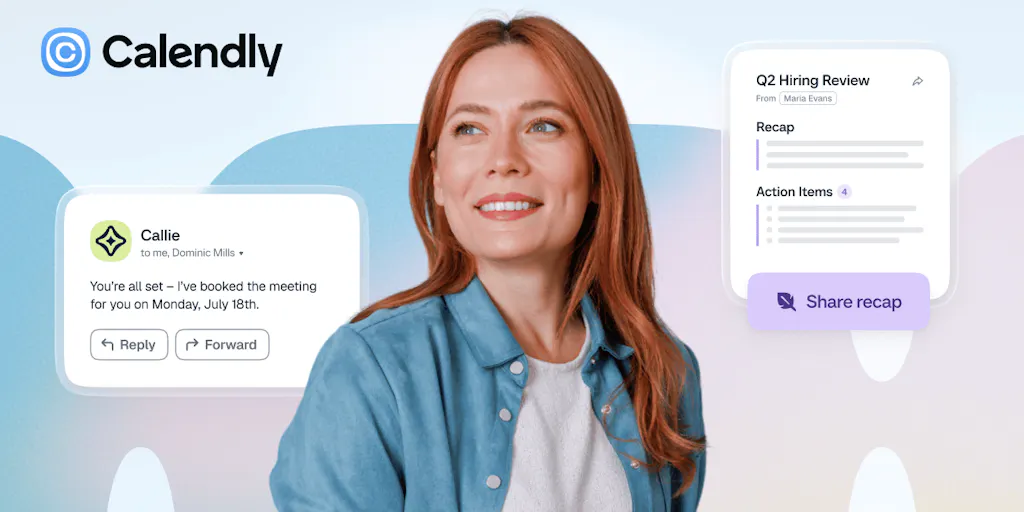
The new Calendly launch is essentially an attempt to compress that entire lifecycle into one connected platform. The product now has three distinct phases, each with its own AI component. Before the meeting, there is Callie, an AI assistant that handles scheduling coordination directly from your inbox — you add [email protected] to an email thread, and Callie finds a time that works for everyone. During the meeting, the Calendly Notetaker automatically records and transcribes meeting notes, working with Zoom, Google Meet, and Microsoft Teams. After the meeting, the same Notetaker generates automatic recaps with summaries, key points, and action items — plus pre-drafted follow-up emails ready to send. You can also ask Callie questions about past meetings to surface context instantly.
For a cross-border operator, this is not a nice-to-have. It is a direct answer to the most common complaint I hear from sellers who are scaling: “I don’t have time to run the business because I’m too busy coordinating the people who help me run it.” The scheduling link was already saving you from the back-and-forth. The AI assistant, the notetaker, and the automatic follow-up are saving you from the aftermath.
How This Differs From What You’re Already Using
If you’re a DTC operator or an Amazon brand owner, you are probably not using Calendly for its scheduling alone — you’re using it because it’s the default. The Product Hunt reviews on this launch page confirm that. One reviewer, Giodio Mitaart, notes that Calendly is “easier to set up, less distracting, and just works in the background” compared to alternatives like Cal.com. Another reviewer, Ola Rybacka, praises it for simplifying demo booking so that her sales team is “busy with actual demos rather than making arrangements.” The consistent theme is that Calendly’s strength has always been its simplicity — it gets out of the way.
But the criticism section of the reviews is where the old Calendly fell short. Multiple reviewers flagged that it “could do more after the meeting is booked,” with one specifically calling out the need for “smarter follow-ups or automatic notes.” Another reviewer, Kevin Touati, found the Zoom integration tedious. The overall 4.6 rating based on 28 reviews is solid, but the pattern is clear: the scheduling part was solved years ago, and the meeting lifecycle part was left to a patchwork of other tools.
That patchwork is what this launch directly attacks. If you’re currently using Calendly for scheduling, Fathom or a similar tool for transcription, and then manually drafting follow-up emails in Gmail, you are running a three-tool workflow for a single meeting. The new Calendly collapses that into one. Anna Ludwinowski asks in the comments whether the notetaker is part of the subscription or extra — a fair question, and the answer matters for cost-conscious sellers. But the direction is clear: the incumbents in the meeting-notes space — Otter.ai, Fathom, Fireflies.ai — should be watching this closely, because Calendly is not coming for the scheduling market anymore. It’s coming for the entire meeting workflow market.
Why Amazon Sellers Should Care More Than Shopify Ones
Shopify brands tend to have a more distributed team structure — designers, agencies, freelancers, all coordinating across time zones. Amazon sellers, especially those doing private label, have a different problem: they are coordinating with overseas suppliers, freight forwarders, and prep centers. The stakes are higher because the cost of a miscommunication is not a delayed creative asset — it’s a container sitting at port for an extra week, or a production run that comes back with the wrong packaging.
For Amazon sellers, the pre-meeting scheduling is already critical — you’re coordinating with factories in China, which means you’re dealing with a 12-to-15-hour time difference. The AI assistant that can handle scheduling coordination right from an email thread is not a convenience; it’s a way to avoid the 24-hour round-trip of “does this time work for you?” The notetaker is even more valuable, because supplier calls are dense with specifications, tolerances, and pricing details that you cannot afford to lose. And the automatic follow-up with action items is the difference between a supplier who knows exactly what to do next and a supplier who waits for you to send a summary email that you never get around to writing.
What Cross-Border Sellers Can Borrow From This Launch
You don’t have to adopt Calendly’s new features wholesale to benefit from the thinking behind them. The launch is a blueprint for how to systematize the meeting lifecycle, and there are three specific things you can steal for your own operation.
First, the pre-meeting qualification layer. Calendly’s earlier launch, Calendly Routing Forms, was about screening and qualifying people before they book. For a cross-border seller, this is directly applicable to supplier outreach. If you’re vetting new factories, you can use a routing form to collect basic qualification data — minimum order quantity, certifications, audit history — before you ever get on a call. This saves you from spending an hour on a call with a factory that can’t meet your volume requirements. The same logic applies to vetting agencies, freight forwarders, or new VA hires.
Second, the post-meeting follow-up as a system. The new Calendly generates pre-drafted follow-up emails with summaries, key points, and action items. You can replicate this without the tool by creating a standard follow-up template for each type of meeting you have — supplier call, logistics review, agency check-in — and committing to sending it within two hours of the call ending. The discipline of the follow-up is what separates professional operators from amateurs, and the tool just makes it easier to maintain that discipline.
Third, the “ask the AI about past meetings” feature. The ability to surface context instantly from past meetings is powerful for anyone managing multiple supplier relationships. Instead of digging through old notes or trying to remember what was agreed upon in the last call, you can ask a question and get an answer. For a seller managing twelve SKUs across three factories, this is the difference between walking into a negotiation with full context and walking in blind.
Where the Math Breaks
The honest assessment is that the new Calendly features are not free, and the pricing is not fully disclosed in the launch page. The comment from Anna Ludwinowski asking whether the notetaker is “part of the subscription or is it extra” is the right question to ask. If the AI features are bundled into the existing paid tiers, then the value proposition is strong — you’re replacing a Fathom or Otter subscription with a feature that’s already included. If they’re a separate add-on, the math changes, and you need to compare the total cost against your current stack.
There’s also the practical limitation of the notetaker itself. It works with Zoom, Google Meet, and Microsoft Teams — which covers most use cases — but if you’re doing supplier calls on WeChat or WhatsApp, which is common for China-based factories, the notetaker won’t help you. The transcription is only as good as the audio quality, and cross-border calls often have latency issues, background noise, and heavy accents that can degrade AI transcription accuracy. The tool is a step forward, but it’s not a complete solution for the specific realities of cross-border communication.
My Judgment: This Is a Moats-Building Move, Not a Feature Drop
The most interesting thing about this launch is not the individual features — it’s the strategic positioning. Calendly has spent a decade building the scheduling moat. Everyone knows it, everyone uses it, and it’s become the default booking link for millions of businesses. But scheduling alone is a commodity. The moat is shallow because the switching cost is low — you can move to Cal.com or Calendly’s own free tier without much pain. The new AI features are an attempt to deepen that moat by making Calendly the repository of your meeting history, your notes, your action items, and your follow-ups. Once your entire meeting lifecycle lives in Calendly, switching becomes much harder — you’re not just moving your calendar, you’re moving your institutional memory.
This is a smart move, but it’s also a risky one. The reviews on the launch page already flag that the interface is “outdated” and that customization is limited. The AI features are being layered on top of a product that some users find clunky. And the competition is not standing still — Cal.com is open-source and highly customizable, and the dedicated meeting-notes tools like Fathom and Otter are already polished. Calendly is betting that convenience and integration will beat best-in-class individual features, and for the cross-border seller who values time over customization, that bet is likely to pay off.
There’s also the trust factor. The launch page shows that Calendly has been through ten prior launches, with the first one landing in 2014, as Ben Kahan points out in the comments. Twelve years in, they’re still adding rather than coasting. That longevity matters for cross-border sellers who are making a long-term bet on a tool. You don’t want to build your meeting workflow around a startup that might pivot or shut down. Calendly’s track record is a form of de-risking that the younger competitors can’t match.
What I’d Watch / Test Next
If you’re a cross-border operator, here’s what I’d do this week — not next quarter, this week.
First, test the Callie AI assistant on a low-stakes internal meeting. Add [email protected] to an email thread with a colleague or a VA and see how well it handles the scheduling coordination. Don’t use it on a supplier call yet — you want to see how it behaves when the stakes are low and the time zones are mild. If it performs well, graduate it to a freight forwarder or a prep center call.
Second, run the Notetaker on one real external call — a supplier check-in or an agency review — and compare the transcription quality against what you’d get from your current tool. Pay attention to how it handles accents and technical vocabulary like SKU numbers, unit economics, and Incoterms. If the transcription is clean, the action-item generation is the feature to evaluate next. A good summary with clear action items is worth more than a perfect transcript.
Third, check the pricing disclosure. The launch page doesn’t specify whether the AI features are included in the existing subscription tiers or are a separate add-on. Before you commit to the workflow, log into your Calendly account and check what’s included in your plan. If the AI features are bundled, the value is immediate. If they’re extra, run the math against your current Fathom or Otter subscription and decide which one you actually need.
Finally, watch the competitive response. If Calendly’s AI features gain traction, expect Cal.com to respond with its own AI layer, and expect Fathom and Otter to add scheduling features to defend their turf. The meeting lifecycle is becoming a battleground, and cross-border sellers are the beneficiaries — because every tool that saves you thirty minutes of meeting admin is thirty minutes you can spend on product research, ad testing, or supplier negotiation. That’s the trade that actually moves the needle.