Why a Blender Plugin Matters More Than Another AI Landing Page Generator
Every week, another AI tool promises to vaporize your web design costs or automate your ad creative into a seven-figure funnel. Most of them are wrappers around the same three models, delivering templates that look identical to your competitor’s. Cross-border sellers don’t have a landing page problem; we have a product differentiation problem. We’re all selling similar gadgets from the same Shenzhen factories, and the margin lives in the details of presentation, packaging, and the ability to iterate on a visual concept before the container ship leaves port. That is why a tool like Blender Agent Bridge catches my eye, even though it has nothing to do with Shopify themes or Amazon A+ Content. It represents a fundamental shift in how we should think about AI in our workflow: not as a replacement for the skilled operator, but as a tireless assistant that works inside the professional tool we already trust. For too long, we’ve accepted AI that spits out a finished-looking image with no editable layers. This tool dares to suggest that the AI should hand you back a scene file, a rig, and a process you can still control. For anyone who has ever fought with a freelance 3D artist over a product render that was “close but not right,” that is a compelling promise.
The Real Problem: AI Gives You a JPG, Not a Workflow
The core frustration the maker, CallMeJones, identifies is one that resonates deeply with anyone managing a product catalog. Most AI creative tools operate on a “black box” principle. You type a prompt, you get an image, and that is the end of the transaction. If the lighting on your hero shot is slightly off, or the angle of the product doesn’t match your brand guidelines, you are stuck. You either regenerate the whole thing and hope for a better roll of the dice, or you take the image into Photoshop and spend an hour trying to fake a perspective change.
This is fundamentally broken for e-commerce. Our product lifecycles are short. We need to test variations of packaging, lifestyle shots, and colorways constantly. The cost of a “generated” image isn’t the token cost; it’s the time lost when the output isn’t editable. The Framer AI Agents approach on display here is interesting for marketing pages, but it still largely operates in that final-output paradigm. It gives you a site, not necessarily a design system you can hand to a developer.
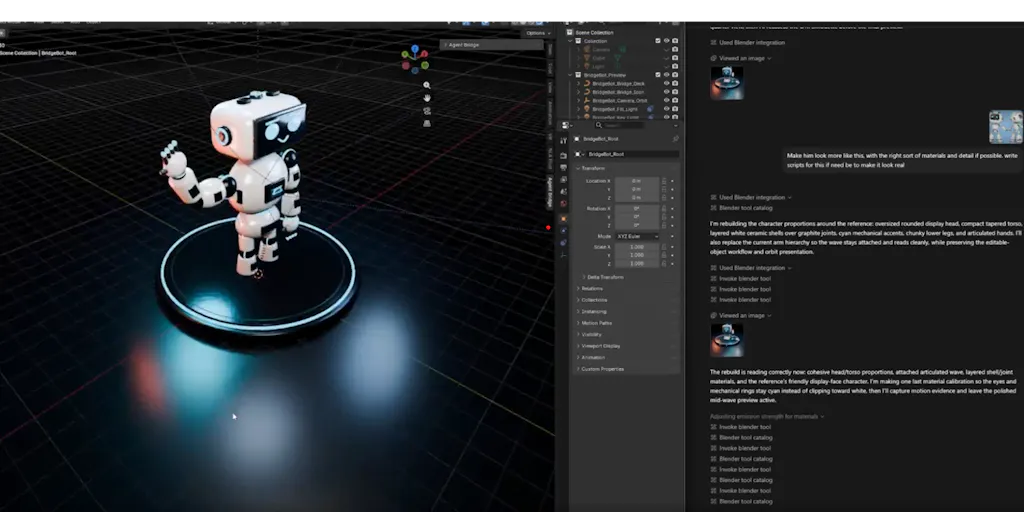
Blender Agent Bridge attempts to solve a different, more structural problem. It wants to make the AI a participant in the Blender process, not a generator of dead-end files. It lets the AI inspect the scene, gather viewport evidence, and use structured tools to make changes. This is the difference between hiring a consultant who gives you a report and hiring an employee who sits in your office, uses your computer, and asks for approval before sending the email. The value proposition is not “AI makes art”; it is “AI makes the artist faster without breaking the art.”
Why Amazon Sellers Should Care More Than Shopify Ones
Shopify sellers often live and die by the speed of their landing page tests. They need a new hero image for a Facebook ad campaign by tomorrow morning. Blender Agent Bridge seems like overkill for that.
But Amazon sellers, particularly those in home goods, electronics, or furniture, live in a different reality. Your listing images are your sales floor. You have exactly seven slots to tell a story that convinces a customer to buy from you instead of the 10 other sellers offering a nearly identical product. The difference often comes down to a render that shows the product in a context that feels aspirational yet realistic.
If you are sourcing a product that requires even minor customization—say, a desk with a specific cable management tray—you need to see how that modification looks before you pay for tooling. With a traditional 3D artist, that change is a multi-day, expensive revision cycle. With an AI that can operate inside Blender, you could theoretically ask the assistant to “move the USB port to the left side and re-render” and get a file back that is still fully editable. This isn’t about removing the artist; it’s about reducing the friction of iteration. For a private label brand, that speed to a final, manufacturable visual concept is a genuine competitive advantage.
How It Differs from the Incumbents and the “AI Wrapper” Crowd
The market is currently flooded with AI 3D model generators. Tools like Meshy or Luma Genie are impressive for creating a base mesh from a text prompt or a video. But they generally output a static asset. You can’t easily rig that asset for animation, and you often can’t edit the topology without significant cleanup work in a professional suite.
Blender Agent Bridge is not competing with those tools. It is competing with the process around them. It is closer in spirit to something like Klaviyo’s flow builder—it’s about automation and control—but for a 3D environment. The key differentiator is the “Agent Bridge” concept. By leveraging MCP (Model Context Protocol) workflows, it allows the AI to use structured tools. This is a massive distinction. Instead of the AI just “looking” at pixels, it can query the scene graph. It knows there is a cube named “Product_Box” and a light source called “Key_Light.” It can adjust the intensity of that light by a specific value, not just by “making it brighter.”
This is the same architectural shift we saw with Helium 10 for Amazon keyword research versus using a generic ChatGPT prompt. Helium 10 works because it is connected to the data source (Amazon’s search API) and uses structured queries. A generic AI prompt is a guess. Blender Agent Bridge tries to apply that same logic to the 3D workspace. It is a “tool for the trade,” not a toy for the curious.
The “Trust” Barrier in Automation
The maker explicitly mentions “script trust” and “paid generation approvals.” This is the unsung hero of the entire pitch. In the e-commerce world, we are rightfully paranoid about automation that touches our money or our brand assets. I’ve seen sellers refuse to use automated repricing tools because they don’t trust the algorithm not to nuke their margins at 3 AM.
This plugin addresses that fear head-on by putting control gates in the workflow. The AI can suggest a change, but Blender (or the user) retains the final say on executing scripts that cost money or modify critical files. This is the correct way to build AI tools for professionals. It acknowledges that the AI is a junior assistant, not the CEO. This trust layer is something that generic AI image generators completely ignore, and it’s why they fail in serious production pipelines.
What Cross-Border Sellers Can Borrow from This Tool
Even if you never touch Blender, the philosophy behind this tool is a blueprint for how to evaluate AI software for your own operations. Here is what I see in this launch that is directly transferable to selling on Amazon Seller Central or managing a TikTok Shop.
1. The “Editable Output” Principle When you evaluate an AI tool for your business, ask: “Does this output something I can edit, or does it give me a final file?” This applies to AI for listing copy, for ad creatives, and for video scripts. If you use an AI to write a product title, you should be able to edit the “scene graph” of that title—the keywords, the order, the attributes—without regenerating the whole thing. Tools that force you into a rigid output format will eventually become a bottleneck.
2. The “Inspect the Scene” Principle The best AI tools don’t just guess; they audit. This plugin allows the AI to inspect the Blender scene before making changes. In e-commerce, this translates to AI tools that analyze your PPC campaigns before suggesting changes, or tools that scrape your competitor’s reviews before writing your own. If an AI tool doesn’t ask to “inspect” your data first, it’s just hallucinating. The value is in the context.
3. The “Approval Workflow” Principle The concept of “paid generation approvals” is something every seller should implement. If you use AI to generate product images on a pay-per-render service, set up a workflow where the AI presents a mockup and a cost estimate before committing to the high-res render. This prevents “runaway token spend” on experiments that go nowhere. It is a simple cost-control mechanism that most SaaS tools don’t offer by default.
Where the Math Breaks: My Honest Judgment on the Shortfalls
I am bullish on the concept, but I have to be realistic about the adoption curve. The first hurdle is the audience. This is a tool for Blender users. Blender is free, but it has a notoriously steep learning curve. The intersection of “cross-border e-commerce seller” and “proficient Blender user” is a very small Venn diagram.
If you are a brand owner who outsources your 3D work, this tool doesn’t solve your problem directly. It solves your artist’s problem. You would need to convince your freelance artist to adopt this workflow and pass the cost savings on to you. That is a tough sell, as most freelancers are protective of their proprietary workflows.
Furthermore, the value proposition is heavily dependent on the underlying AI model’s ability to understand 3D space—which is historically poor. While the plugin provides structure, the “brain” still needs to interpret the viewport. If the AI misreads the depth of a scene, you’ll get a nonsense edit that requires more manual cleanup than if you had just done it yourself.
Finally, the safety features, while necessary, add friction. The “script trust” and “approval” prompts will slow down the workflow. For a solo operator who is fast in Blender, it might be faster to just do the task manually than to type out a prompt, wait for the AI to analyze, wait for the approval dialog, and then check the result. The tool’s efficiency gain is only realized on complex, multi-step tasks—the “longer workflows” the maker mentions. For simple tasks, it is overhead.
The “Missing Middle” for E-commerce
What I really want to see is a bridge between this Blender tool and the e-commerce render farms. A plugin that connects to a service like Renderforest or a product mockup generator like Placeit would be a game-changer. Right now, this is a tool for the creation phase. But the e-commerce pain point is often in the variation phase—creating 10 different lifestyle scenes for one product to A/B test on Etsy or eBay.
If this agent could not only edit the model but also automatically generate the required high-res renders for a new Amazon listing in the correct aspect ratio, with the right background, and the right shadows, that would be the killer app. As it stands, this is a great tool for the “hero image” creation, but it leaves the drudgery of “mass production” of secondary images to the user.
What I’d Watch / Test Next
I’m not going to rush to install Blender and start playing with this today. But I am watching the trajectory. Here is what I would suggest you do this week, regardless of your 3D skill level.
1. Audit Your AI Tool Stack for “Editability” Go through the AI tools you use for your store. For every tool, ask: “Can I edit the output without starting over?” If the answer is no, look for an alternative. This is the core lesson from Blender Agent Bridge. Your tools should be flexible, not just fast.
2. Test the MCP Concept on a Smaller Scale If you are technically inclined, look into how MCP workflows are being used in other areas. The concept of a “connected” AI that can access your store’s data (inventory, orders, ad spend) is the future. Tools like Zapier are starting to integrate these capabilities. See if you can set up a simple automation where an AI assistant can read your inventory levels and suggest a reorder, but requires your approval to execute the purchase order. This mimics the “trust” mechanism in the plugin.
3. Have a Conversation with Your 3D Freelancer If you spend more than $500 a month on product renders, send this Product Hunt link to your artist. Ask them if they are exploring AI-assisted workflows. The goal is not to replace them, but to see if they can reduce their revision time—and their billable hours—by using a tool like this. If they can turn around a revision in 2 hours instead of 2 days, that is a direct benefit to your launch timeline.
4. Watch the “Agent” Category, Not Just the “Image” Category The next wave of AI tools will not be about generating content; it will be about managing the generation process. This plugin is an early example of that. Keep an eye on tools that promise “workflow automation” over “content creation.” Those are the ones that will save you from drowning in a sea of uneditable JPGs.
The bottom line is that Blender Agent Bridge is a niche tool with a universal lesson. It reminds us that the value of AI is not in the output, but in the control we retain over the process. For cross-border sellers fighting for differentiation in a crowded market, that control is the only sustainable edge we have left.


