Why a Meeting Assistant That Hides From the Room Still Matters to Your P&L
Every cross-border operator I know lives inside a paradox: the more meetings you take with overseas suppliers, freight forwarders, and marketplace account managers, the less time you have to actually run the business. And the tools meant to fix that — the AI meeting bots that join your Zoom calls like an unwanted guest — create their own problems. They get blocked by enterprise IT, flagged by wary overseas partners, and frankly, they make you look like you’re not paying attention. The product I’m looking at this week, Assistly, attacks that problem from a different angle: no bot on the call at all. It listens on your machine, surfaces context in real time, and keeps the transcript in your own account. For anyone negotiating with a Shenzhen factory at 9 PM or walking through a disputed chargeback with a marketplace rep, the appeal is obvious. But the deeper story here isn’t about meeting transcription — it’s about who owns the AI context around your business conversations, and whether your tools are allowed to be invisible.
The Real Problem: AI Assistants Are Socially Awkward
Let me be blunt about the state of meeting AI in 2025. The incumbent players — Otter.ai, Fireflies.ai, and the native transcription built into Zoom and Google Meet — all solved the “capture the words” problem years ago. What they didn’t solve is the social and logistical friction of having a visible participant that isn’t human. If you’ve ever sat in a call with a European distributor and watched them visibly stiffen when the Otter bot joined, you know exactly what I’m talking about. They don’t say anything, but you can feel the shift. The conversation gets more careful, less candid, and suddenly you’re not getting the real numbers on sell-through rates.
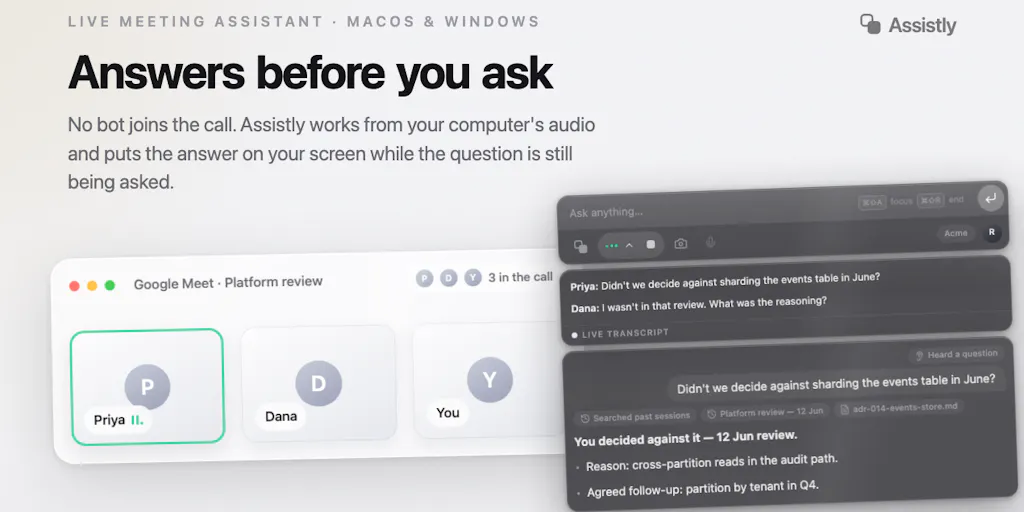
Assistly’s bet is that the future of meeting intelligence isn’t a participant — it’s a silent observer that lives on your side of the glass. The product captures system audio locally, meaning there’s no bot joining your Zoom, Google Meet, or Teams call, no extra name in the roster, no waiting room approval. For cross-border sellers, this is genuinely useful in a way that goes beyond convenience. When you’re on a call with a supplier in Dongguan and their English is shaky, having a real-time overlay that surfaces relevant context — contract terms, previous email threads, unit economics — without breaking the flow of conversation is worth real money. It’s not about hiding anything; it’s about not adding friction to an already fragile communication channel.
The second part of their pitch is where it gets interesting for operators who’ve built a tooling stack. Assistly supports MCP (Model Context Protocol) in both directions. That means it can pull context from other MCP-enabled tools while you’re in the meeting, and after the call, your existing AI tools can query the meeting knowledge base and fold it into your daily workflows. This is the part that should make Notion power users and Make automation builders sit up. The meeting transcript isn’t a dead artifact anymore — it becomes a queryable layer that your other systems can use.
Why Amazon Sellers Should Care More Than Shopify Ones
Here’s a distinction that matters. If you run a Shopify store, your operational conversations are mostly internal — with your VA, your designer, your agency. If you run an Amazon Seller Central operation, your conversations are disproportionately external and adversarial. You’re talking to supplier reps, logistics brokers, and Amazon account health investigators. In those conversations, the stakes are higher and the power dynamics are weirder. Having a tool that captures what was actually said — without the other party feeling surveilled by a visible bot — is a compliance and leverage play, not just a convenience. The Product Hunt comments on the launch page raise exactly this consent question, and the makers’ response is honest: they don’t store audio, only transcripts, and they surface consent responsibilities in onboarding. For Amazon sellers, I’d argue the calculus is different. You’re not recording to catch anyone; you’re recording to protect yourself in disputes that might surface six months later. The no-bot design makes that possible without poisoning the relationship.
How It Differs From What You’re Already Using
Let me put this in a comparison frame, because the cross-border operator’s tool stack is already crowded. The obvious comparison is Fireflies.ai, which is the default for many agencies I know. Fireflies gives you a bot, a public URL for the transcript, and decent search. What it doesn’t give you is discretion. The bot is visible, it can be blocked, and the transcript lives on their servers. Assistly’s local capture means the transcript lives in your account, not on a third-party recorder’s infrastructure. That’s a meaningful difference for anyone dealing with confidential supplier pricing or proprietary product development discussions.
The second comparison is the native transcription in Zoom or Teams. Those are fine for internal meetings, but they’re clunky for cross-border work because they’re siloed inside the platform. You can’t easily query them with your other AI tools, and you definitely can’t get real-time context pulled from your CRM or spreadsheet while the call is happening. Assistly’s MCP integration is the differentiator here — it’s not just a recorder, it’s a context engine. The launch page describes it as detecting questions and important moments as they happen and surfacing relevant context on your screen. That’s a fundamentally different workflow from “record the call, maybe search it later.”
The third comparison is the one nobody talks about: the manual method. Most cross-border sellers I know still take notes by hand during calls — or worse, they don’t take notes at all and rely on memory. That’s a disaster when you’re juggling three time zones and a 12-hour difference. The real cost isn’t the tool subscription; it’s the missed action item, the forgotten price quote, the supplier commitment that never got followed up on. Assistly’s overlay approach — private, not appearing in screen shares or recordings — means you can have a live cheat sheet during the call without the other party seeing it. For sales negotiations with Walmart Marketplace or eBay category managers, that’s a quiet edge.
Where the Math Breaks
Now let me be the skeptic in the room. The “no bot” angle is clever, but it creates a consent gray zone that the makers themselves acknowledge. If you’re in a two-party consent state — California, for instance — and you’re recording a call with a supplier in another country, the legal picture gets murky fast. The comment from Gal Dayan on the launch page nails this: “no bot might make people assume nothing is being captured when something actually is.” That’s a real risk for cross-border operators, because your overseas partners may have different expectations about privacy. The makers’ response — that consent responsibility sits with the host — is legally correct but practically dangerous. You can’t just tell a factory manager in Vietnam that “the responsibility is on me” when their local laws or company policies say otherwise.
The second crack in the math is platform risk. Assistly captures system audio locally, which means it’s essentially a screen-scraping or audio-routing tool. That’s a fragile foundation. Zoom and Teams can change their audio APIs, operating system updates can break the capture layer, and enterprise IT policies can flag the software as a security risk. The Product Hunt comments celebrate that “this can’t be blocked” — but anything that runs on your machine can be blocked by your own IT department, or by the operating system’s privacy permissions. It’s not a question of if this breaks; it’s a question of when.
The third issue is the cold-start problem. Assistly’s real-time assistance is only as good as the context it can pull in. If you haven’t connected your HubSpot or your Notion or your Google Drive through MCP, the “relevant context” it surfaces is going to be thin. The launch page is upfront about the MCP integration, but the average cross-border seller isn’t running an MCP server. That’s a technical hurdle that will filter out most of the audience this product could actually help. The tool is built for the AI-native operator, not the typical Amazon FBA brand owner who’s still exporting CSVs from Helium 10.
What Cross-Border Sellers Can Borrow From This Playbook
Even if you never install Assistly, there are three lessons here worth stealing for your own operation. First, the no-bot design philosophy applies beyond meetings. Think about how many of your tools announce themselves unnecessarily. Your email signature, your Klaviyo pop-ups, your Zendesk chat widget — they all add friction. The winning play is often the invisible one. When you’re negotiating with a Temu or SHEIN sourcing partner, the less you look like a “tool-heavy Western operator,” the better your leverage. Discretion is a business asset.
Second, the MCP-both-ways concept is the direction everything is heading. Your tools should talk to each other, and your meeting knowledge should flow into your operational workflows, not sit in a silo. If you’re not already experimenting with Make or Zapier to connect your communication data to your operations stack, you’re falling behind. The specific product doesn’t matter; the pattern does.
Third, the local-first approach to data is a competitive advantage worth copying. The fact that Assistly doesn’t store audio, only transcripts, and keeps that in your account is a trust feature. For cross-border sellers dealing with sensitive supplier pricing, proprietary product specs, and marketplace dispute details, data residency and control matter. If you’re evaluating any SaaS tool right now, ask where your data lives and who can access it. The answer will tell you a lot about whether the vendor is building for your long-term interests or their own.
The Workflow I’d Actually Build
Let me get concrete about how I’d use this if I were still running a multi-channel operation. The killer use case isn’t the internal team sync — it’s the weekly call with your overseas warehouse manager or your freight forwarder. Those calls are where inventory decisions go wrong. You’re discussing lead times, port congestion, and container pricing, and the details are easy to lose. With Assistly’s real-time overlay, you could have your current inventory levels from ShipBob or your Amazon FBA dashboard pulled up on your screen, invisible to the other party, while you negotiate. After the call, the transcript becomes a queryable record that your AI tools can reference when you’re making your next RestockPro or Forecastly order.
The second workflow is dispute resolution. If you’ve ever had a Amazon Seller Central case drag on for weeks, you know the pain of reconstructing what was said in a call with a seller support agent. A local transcript that you own, that you can search, and that you can feed into a complaint letter — that’s worth the subscription price alone. The key is to treat the transcript as evidence, not just notes. And because it’s on your machine, you control the chain of custody.
Where I’d Push Back: The Judgment Call
Here’s where my skepticism kicks in beyond the consent issue. The product is positioned as a meeting assistant, but the real value proposition is ambient intelligence — having a tool that listens to everything and surfaces what matters. That’s a much harder problem than transcription. The launch page promises it “detects questions and important moments,” but that’s a high bar. Detecting a question in a noisy call with a heavy accent, background noise, and cross-talk is technically difficult. If the real-time detection is flaky, the core value proposition collapses. I’d want to test this with a recorded call with a supplier in India or the Philippines before I trusted it in a live negotiation.
The second pushback is about the overlay feature — the private workspace that doesn’t appear in screen shares. That’s a clever trick, but it’s also a double-edged sword. If you’re sharing your screen with a supplier to review a spec sheet, and your private overlay is showing your internal cost structure, that’s a catastrophic leak waiting to happen. The feature is designed to be invisible, but invisible features are also the ones you forget are there. One bad screen share and your margin data is on the other side of the world. I’d want a hard kill-switch and a clear visual indicator that the overlay is active before I’d trust it in a client-facing call.
The third issue is pricing and platform availability. The launch mentions macOS and Windows, which is fine, but there’s no mention of mobile or browser extensions. For cross-border operators who are often on the move — checking in from a phone between airport gates — a desktop-only tool is limiting. And pricing is not disclosed on the launch page beyond “get started for free.” That’s typical for a launch, but it means the long-term cost is unknown. If this becomes a per-seat subscription at enterprise rates, the ROI math changes for a small operator.
What I’d Watch / Test Next
If you’re a cross-border operator and this piqued your interest, here’s what I’d do this week, not next month. First, sign up for the free tier at tryassistly.com and run it on a low-stakes internal call — not a supplier negotiation. Test the transcription quality with accented English and background noise. See if the real-time detection actually catches the moments that matter, or if it’s just a glorified recorder. Second, check whether the MCP integration plays nice with the tools you already use. If you’re on Notion and Slack, set up a test workflow where a meeting transcript feeds into a project tracker. If the integration is clunky, that’s a red flag. Third, and most important, have the consent conversation internally. Decide now what your policy is for recording calls with overseas partners. Don’t wait until you’re in a dispute and you realize you’ve been recording a two-party consent state without disclosure. The tool is only as safe as the policy you wrap around it.
The broader trend here is worth watching regardless of whether Assistly succeeds. The direction of travel in AI tooling is toward ambient, invisible, locally-owned intelligence. The meeting bot era is ending because it was socially awkward and architecturally centralized. What comes next is tools that listen without announcing themselves, that keep data on your side, and that connect to the rest of your stack through open protocols. That’s a future I’m bullish on — just make sure you’re the one setting the consent rules, not the tool vendor.