Why a CAD Copilot Suddenly Matters to Your Cross-Border P&L
If you’re running a private-label brand on Amazon, a DTC hardware startup on Shopify, or a furniture line that ships out of Shenzhen, the part of your business that bleeds money most quietly is the design-to-production loop. Every round-trip revision – “make the handle 3 mm longer,” “can we reduce the wall thickness to cut material cost?” – costs you 48 hours of email ping-pong, a factory change-order fee, and, if you’re unlucky, a container of unsellable inventory. The reason most sellers never iterate fast enough is that the bottleneck sits between CAD and decision. You need a mechanical engineer to open SolidWorks, parse a feature tree, and push a change. That engineer costs $80–$120 an hour and has a queue.
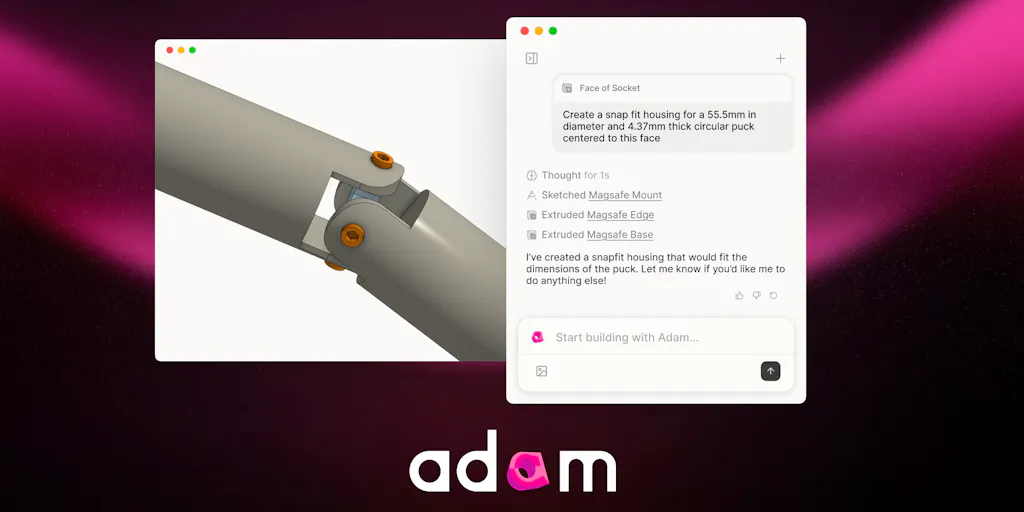
Enter Adam. Adam is an AI harness that integrates directly into Onshape and Autodesk Fusion, reads your part geometry, understands the existing feature tree, and edits it agentically – meaning it doesn’t just generate a new shape from a prompt; it refactors your parametric model the way a senior engineer would, but at machine speed. The Product Hunt launch thread (see the maker’s opening comment) frames it as a copilot for mechanical engineering, and the commenters are debating spatial reasoning and feature-tree cleanup. But what I see is a tool that could fundamentally reshape the cost structure of product iteration for cross-border sellers who do any in-house design.
Let me be clear: most sellers don’t open CAD software every day. They use suppliers’ existing molds or source from catalogues. But the ones who own their IP – the DTC furniture brands, the gadget companies, the outdoor-gear startups – are chronically slow to market because every revision requires a CAD operator. Adam promises to slash that turnaround. This essay is about whether that promise holds, what it means for your supply chain, and what you should actually test this week.
The Real Problem Adam Solves (It’s Not “Text-to-CAD”)
The headline on most AI-CAD launches is “generate a part from a text prompt.” That’s cool for inspiration, but useless for cross-border sellers. You already have a CAD file – from your supplier, from an intern, from a Fiverr freelancer who didn’t name any of the features. That file is a mess: orphaned sketches, unconstrained dimensions, features folded into a single “extrude” that should be three. Every time you want to tweak the mounting hole location or thicken a rib, you either rebuild from scratch or pay someone to untangle the tree.
Adam, as the makers Sam Stenner describes, “shines when working with an existing set of features.” It has full visibility over the entire geometry and can decide whether to edit in place or rebuild from scratch based on your goal. This is fundamentally different from a text-to-CAD generator like MecAgent or Hestus (both mentioned in the comments as adjacent tools). Those tools start from zero. Adam starts from your mess.
For an Amazon FBA brand owner, this means you can take the STEP file your supplier sent you last year, drop it into Onshape, and ask Adam to “rename all features, merge duplicate extrudes, and convert the wall thickness to a global variable.” That one operation, done manually, costs 2–3 hours of a contract engineer’s time at $50–$75 per hour. Adam does it in minutes. The comment thread confirms that feature-tree optimization is one of Adam’s biggest strengths – renaming, compressing, creating parametric variables while preserving geometric context.
Why Amazon Sellers Should Care More Than Shopify Ones
Shopify DTC brands that sell apparel, supplements, or print-on-demand have no CAD problem. Their supply chain is abstracted by print providers or contract manufacturers who own the tooling. But Amazon sellers in categories like home improvement, kitchen gadgets, outdoor gear, toys, and furniture are increasingly moving toward vertical integration – controlling the mold, the packaging, and the design. Helium 10 may help you find the keyword, but Adam helps you find the 10% weight reduction that saves $0.30 per unit on ocean freight.
When you’re shipping 10,000 units FOB Shenzhen, a 10% reduction in material cost directly drops to your bottom line. The bottleneck has never been knowing you need a thinner wall – it’s making that change without causing a cascade of downstream feature failures. Adam claims to “check for downstream feature breaks before applying an edit” (as Vijay Garg asks in the comments), and the maker responds affirmatively. If that holds, it removes the fear that has kept sellers from iterating on imported files.
How Adam Differs from Existing Tools (and Why Incumbents Should Worry)
The CAD-AI space is crowded with startups. You’ve got Cadio, which leans into text-to-CAD. You’ve got macro generators like MecAgent. You’ve got drawing automators like Hestus. None of them operate inside the feature tree the way Adam does. Adam is not a plugin that helps you draw faster – it’s an agent that reads your existing model, understands the intent, and makes changes that are parametric-aware.
Consider the difference between a script and a colleague. A script can add a fillet to every edge. A colleague (or a good copilot) knows that adding a fillet to a mating surface will break the assembly. Adam, according to the maker’s response to Cole Simmons, “respects existing parametric variables and can create more if it needs to. Adam understands dependencies between features, so won’t merge them if that will break the model.”
That’s the kind of reasoning that makes it valuable for cross-border sellers who are often working with files from multiple sources – a supplier in Dongguan, a designer in Upwork, an internal engineer in Chicago. The files don’t have consistent conventions. Adam can clean them up without human hand-holding.
But here’s the catch: Adam currently lives inside Onshape and Fusion 360. If your supplier uses SolidWorks, CATIA, or Creo – common in heavy manufacturing – you’re out of luck unless you export to a neutral format. The maker notes that Adam “plays nicely with imported files” and can iterate on existing documents, which suggests STEP or IGES imports work, but the feature tree is flattened on import. You lose parametric history. So Adam can still optimize geometry, but it can’t edit the original supplier’s tree. That’s a significant limitation for sellers who want to feed changes back to their supplier’s parametric model.
Where the Math Breaks
Let’s talk pricing, because the launch page doesn’t disclose any. I’m not writing a blank check for an AI that might hallucinate a hole in the wrong face. The comment thread is full of optimistic claims: “state of the art in agentic CAD,” “often much better than human benchmarks.” But until I see a side-by-side of Adam modifying a 500-feature injection mold model without breaking draft angles, I’m skeptical.
The core risk: Adam is only as good as the model inside it. The makers mention Fable 5 – a new model that is “state-of-the-art” and is being rolled back into production after a launch hiccup. That means the current version might be on an older, less capable model. For a cross-border seller, consistency is everything. You can’t have Adam work on Monday and get a different result on Tuesday because the model changed.
Also, Adam requires you to move your CAD workflow to Onshape or Fusion 360. Onshape is cloud-native and excellent for collaboration, but many manufacturing engineers still prefer desktop SolidWorks for its mature CAM integration. Switching CAD platforms is a nightmare for an established product line. The switching cost might outweigh the benefit unless you’re starting a new SKU from scratch.
What Cross-Border Sellers Can Borrow from Adam – Even Without Using CAD
Let’s step back. Even if you never open Onshape, the design philosophy behind Adam points to a broader principle: automate the revision loop, not the creative step. Most AI productivity tools for sellers focus on content – write your listing, generate a product photo, summarize reviews. Those are creative, one-shot tasks. Adam focuses on editing existing work while preserving intent. That’s a model for how you should think about your entire operations stack.
Consider your listing optimization workflow. You don’t want an AI that writes a brand-new bullet list from scratch every week. You want an AI that takes your current listing, understands the keyword gaps, and edits only the problematic sentences while preserving your brand voice. That’s what Adam does for geometry. If you’re evaluating AI tools for your business (e.g., Klaviyo for email, SellerSprite for keyword research), ask: does this tool edit or generate? The editors are harder to build but more valuable in the long run because they respect your existing investment.
My Judgment: Where Adam Falls Short Today
Three concrete shortcomings for cross-border operators:
No SolidWorks or CATIA support. Most Chinese mold-making factories work in SolidWorks. If you want Adam to clean up the file your factory sends you, you’ll need to re-host it in Onshape. That creates an extra step and potential translation errors. Onshape’s import of native SolidWorks files is good but not perfect – especially for assemblies with mates.
Pricing uncertainty. The launch thread is silent on cost. If Adam charges $200–$500/month, it’s a no-brainer for any seller with a product line. If it charges per-edit or per-feature, the math changes. Until I see a transparent pricing page, I’m treating this as a trial tool, not a core infrastructure piece.
The “agentic” black box. Adam decides when to rebuild vs. edit. That’s great when it works, but when it rebuilds incorrectly, do you have undo visibility? The maker says “if it makes a mistake, it can see where it went wrong and either undo a change or correct it.” That’s a claim that needs real-world stress testing. For a production mold, a wrong rebuild costs thousands.
What I’d Watch / Test Next
If you’re a cross-border seller who manufactures custom products, here’s your three-step action plan for this week:
Export one of your worst supplier files – the one with the messy feature tree you’ve been avoiding – as a STEP file. Import it into Onshape’s free tier. Then run Adam on it. Ask it to “rename all features based on their function, merge duplicate extrudes, and create parametric variables for the main dimensions.” Time how long it takes. Compare that to the quote you’d get from a freelance CAD engineer.
Check for post-edit validation. After Adam’s change, ask it to “check for downstream breaks in the feature tree” and verify manually in a section view. If Adam passes that test on a messy file, you’ve found a tool that could cut your design lead time by 40–60%.
Evaluate your platform risk. If your primary CAD tool is SolidWorks, ask Adam’s team about future support. The Product Hunt comments suggest they’re focused on Onshape and Fusion. If they add SolidWorks adapter in the next 6 months, that’s the trigger to commit.
Adam isn’t going to replace your factory engineer tomorrow. But if it can clean up one imported file per week without breaking the model, it pays for itself in that single saved hour. That’s a bet worth placing – with your worst file first.


